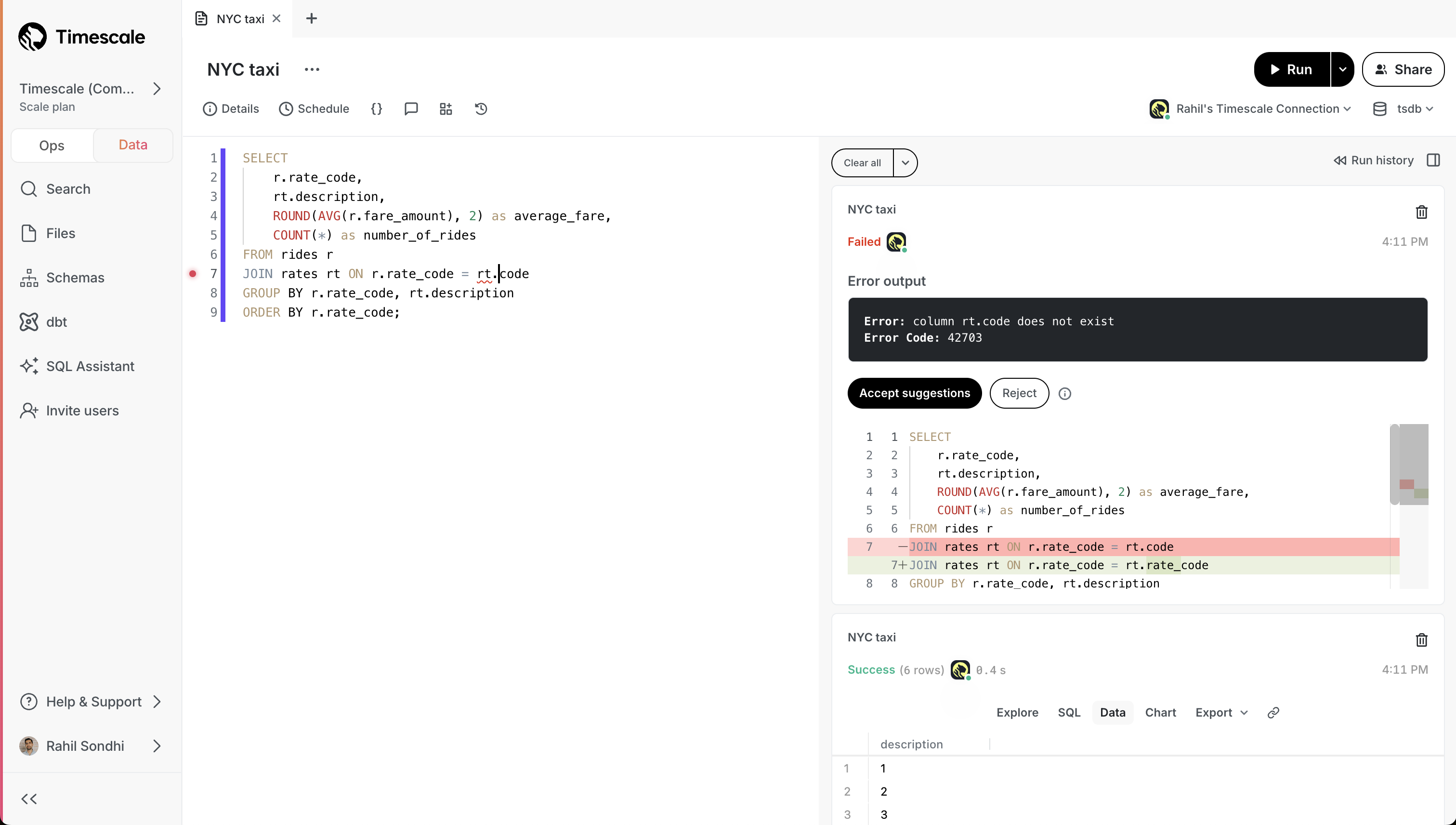
- **Error resolution**: when you run into an error, SQL Assistant proposes a recommended fix that you can choose to accept.
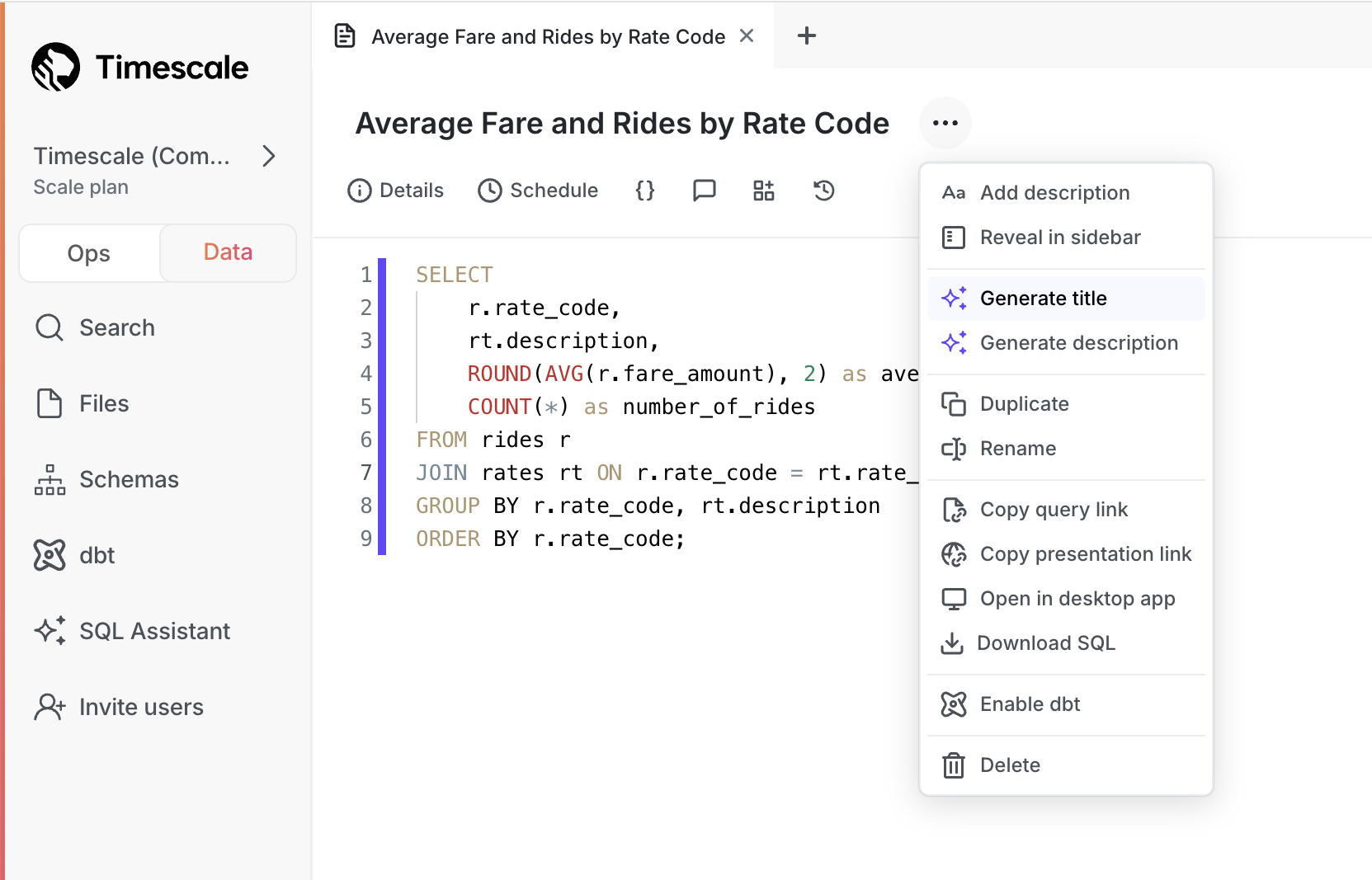
- **Generate titles and descriptions**: click a button and SQL Assistant generates a title and description for your query. No more untitled queries!
See our [blog post](https://www.tigerdata.com/blog/postgres-gui-sql-assistant/) or [docs](https://docs.tigerdata.com/getting-started/latest/run-queries-from-console/#sql-assistant) for full details!
### 🏄 TimescaleDB v2.17 - performance improvements for analytical queries and continuous aggregate refreshes
Starting this week, all new services created on Timescale Cloud use [TimescaleDB v2.17](https://github.com/timescale/timescaledb/releases/tag/2.17.0). Existing services are upgraded gradually during their maintenance windows.
TimescaleDB v2.17 significantly improves the performance of [continuous aggregate refreshes](https://docs.timescale.com/use-timescale/latest/continuous-aggregates/refresh-policies/), and contains performance improvements for [analytical queries and delete operations](https://docs.timescale.com/use-timescale/latest/compression/modify-compressed-data/) over compressed hypertables.
Best practice is to upgrade at the next available opportunity.
Highlighted features in TimescaleDB v2.17 are:
* Significant performance improvements for continuous aggregate policies:
* Continuous aggregate refresh now uses `merge` instead of deleting old materialized data and re-inserting.
* Continuous aggregate policies are now more lightweight, use less system resources, and complete faster. This update:
* Decreases dramatically the amount of data that must be written on the continuous aggregate in the presence of a small number of changes
* Reduces the i/o cost of refreshing a continuous aggregate
* Generates fewer Write-Ahead Logs (`WAL`)
* Increased performance for real-time analytical queries over compressed hypertables:
* We are excited to introduce additional Single Instruction, Multiple Data (SIMD) vectorization optimization to TimescaleDB. This release supports vectorized execution for queries that _group by_ using the `segment_by` column(s), and _aggregate_ using the `sum`, `count`, `avg`, `min`, and `max` basic aggregate functions.
* Stay tuned for more to come in follow-up releases! Support for grouping on additional columns, filtered aggregation, vectorized expressions, and `time_bucket` is coming soon.
* Improved performance of deletes on compressed hypertables when a large amount of data is affected.
This improvement speeds up operations that delete whole segments by skipping the decompression step. It is enabled for all deletes that filter by the `segment_by` column(s).
Timescale Cloud's [Enterprise plan](https://docs.timescale.com/about/latest/pricing-and-account-management/#features-included-in-each-pricing-plan) is now HIPAA (Health Insurance Portability and Accountability Act) compliant. This allows organizations to securely manage and analyze sensitive healthcare data, ensuring they meet regulatory requirements while building compliant applications.
### Expanded logging within Timescale Console
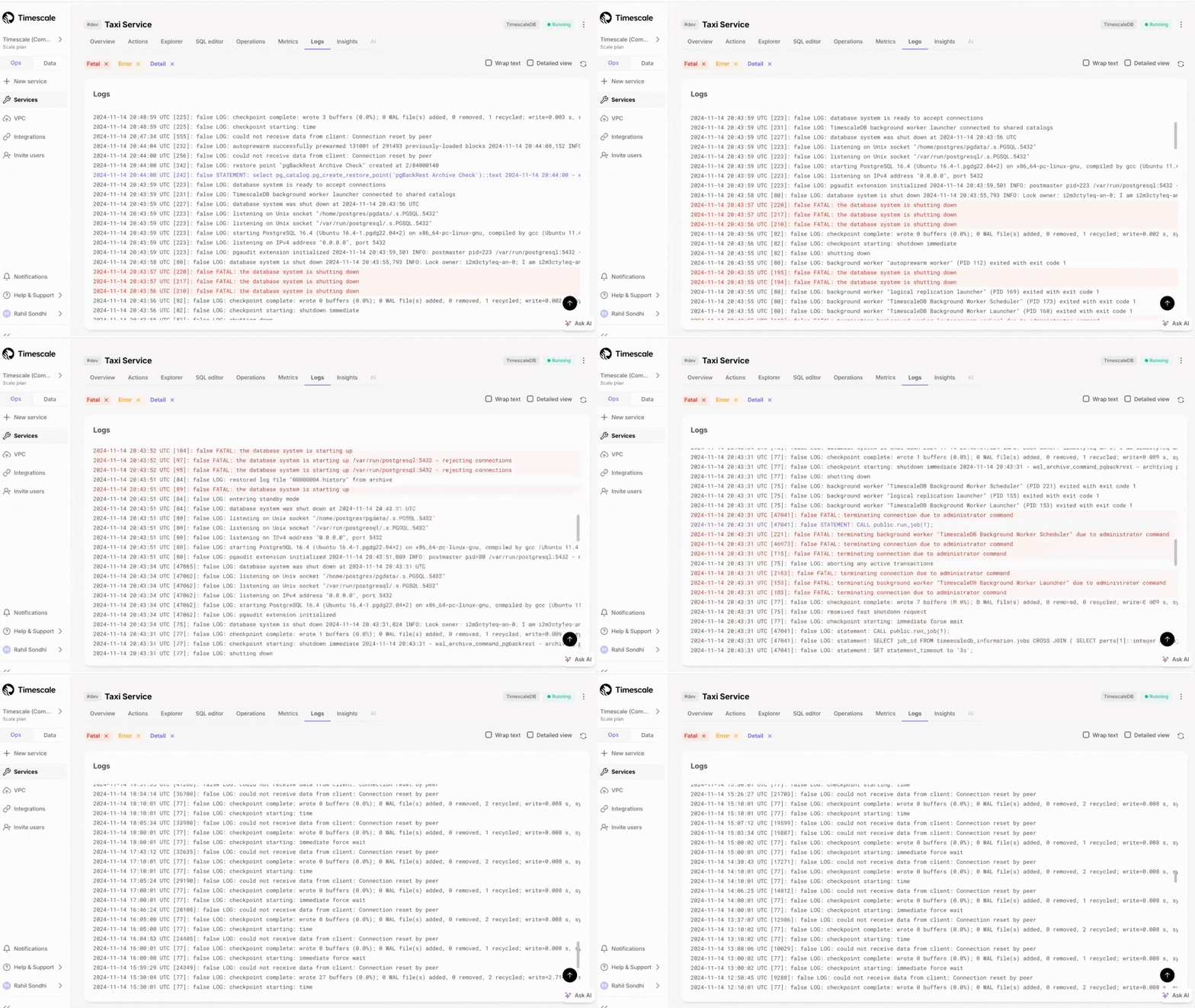
Customers can now access more than just the most recent 500 logs within the Timescale Console. We've updated the user experience, including scrollbar with infinite scrolling capabilities.
## ✨ Connect to Timescale from .NET Stack and check status of recent jobs
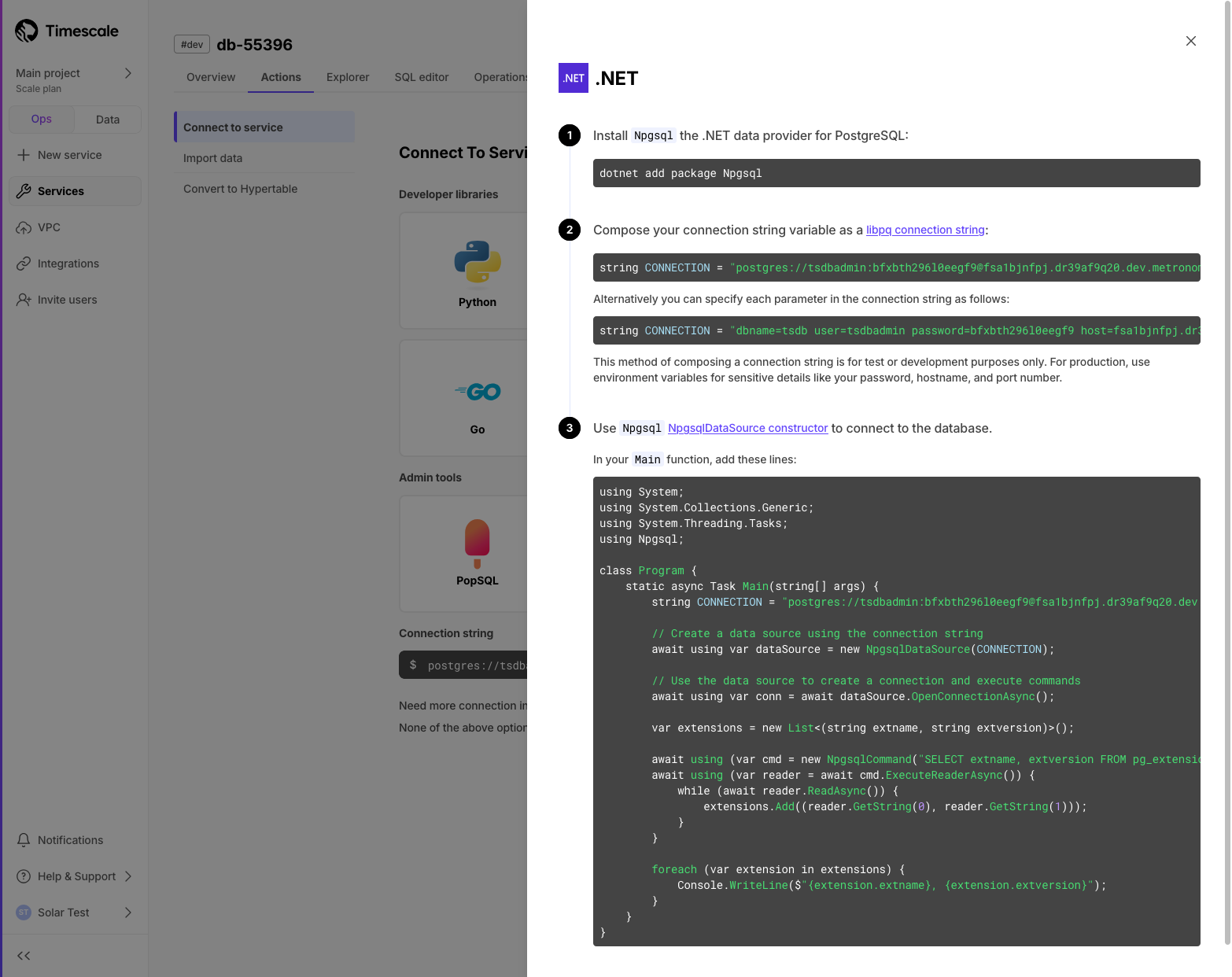
### Connect to Timescale with your .NET stack
We've added instructions for connecting to Timescale using your .NET workflow. In Console after service creation, or in the **Actions** tab, you can now select .NET from the developer library list. The guide demonstrates how to use Npgsql to integrate Timescale with your existing software stack.
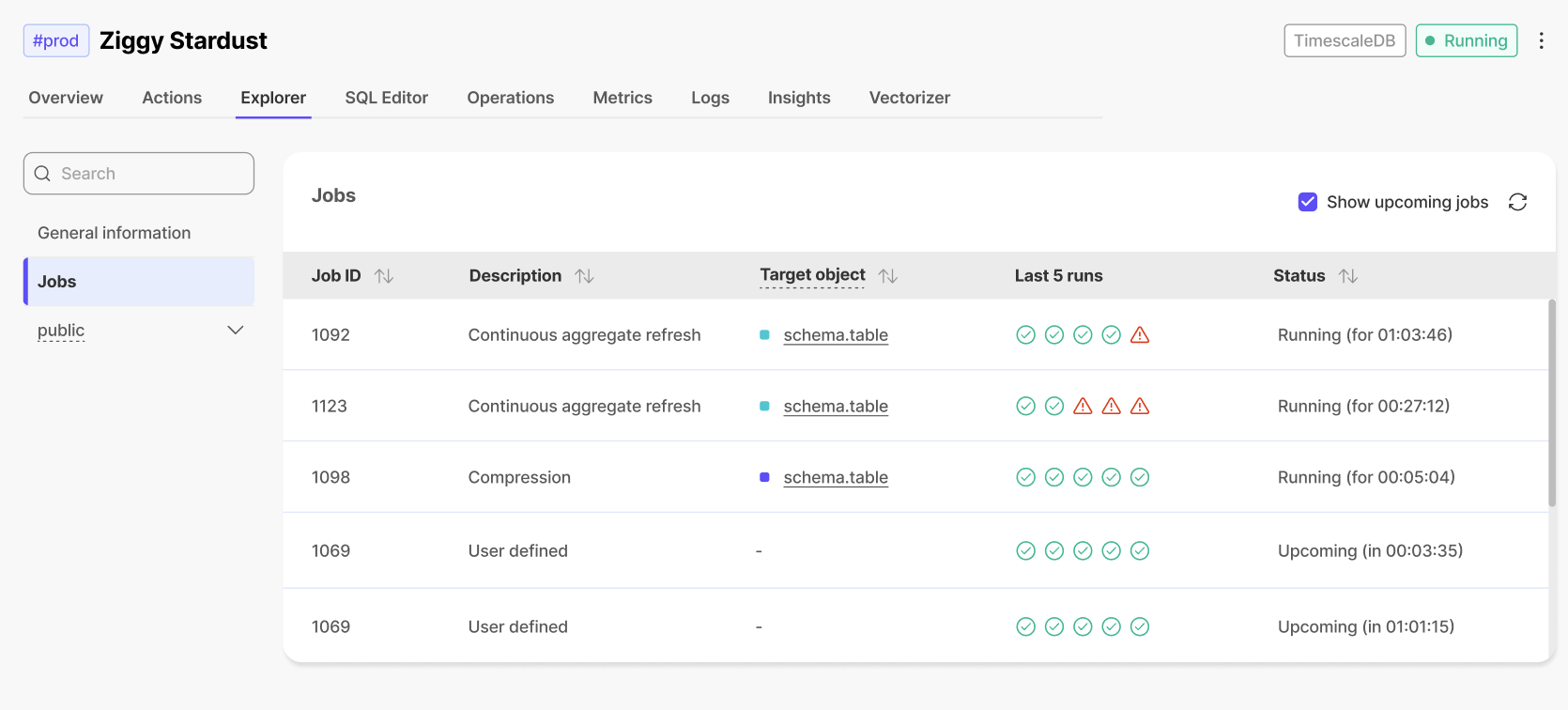
### ✅ Last 5 jobs status
In the **Jobs** section of the **Explorer**, users can now see the status (completed/failed) of the last 5 runs of each job.
## 🎃 New AI, data integration, and performance enhancements
### Pgai Vectorizer: vector embeddings as database indexes (early access)
This early access feature enables you to automatically create, update, and maintain embeddings as your data changes. Just like an index, Timescale handles all the complexity: syncing, versioning, and cleanup happen automatically.
This means no manual tracking, zero maintenance burden, and the freedom to rapidly experiment with different embedding models and chunking strategies without building new pipelines.
Navigate to the AI tab in your service overview and follow the instructions to add your OpenAI API key and set up your first vectorizer or read our [guide to automate embedding generation with pgai Vectorizer](https://github.com/timescale/pgai/blob/main/docs/vectorizer/overview.md) for more details.

### Postgres-to-Postgres foreign data wrappers:
Fetch and query data from multiple Postgres databases, including time-series data in hypertables, directly within Timescale Cloud using [foreign data wrappers (FDW)](https://docs.timescale.com/use-timescale/latest/schema-management/foreign-data-wrappers/). No more complicated ETL processes or external tools—just seamless integration right within your SQL editor. This feature is ideal for developers who manage multiple Postgres and time-series instances and need quick, easy access to data across databases.
### Faster queries over tiered data
This release adds support for runtime chunk exclusion for queries that need to access [tiered storage](https://docs.timescale.com/use-timescale/latest/data-tiering/). Chunk exclusion now works with queries that use stable expressions in the `WHERE` clause. The most common form of this type of query is:
For more info on queries with immutable/stable/volatile filters, check our blog post on [Implementing constraint exclusion for faster query performance](https://www.timescale.com/blog/implementing-constraint-exclusion-for-faster-query-performance/).
If you no longer want to use tiered storage for a particular hypertable, you can now disable tiering and drop the associated tiering metadata on the hypertable with a call to [disable_tiering function](https://docs.timescale.com/use-timescale/latest/data-tiering/enabling-data-tiering/#disable-tiering).
### Chunk interval recommendations
Timescale Console now shows recommendations for services with too many small chunks in their hypertables.
Recommendations for new intervals that improve service performance are displayed for each underperforming service and hypertable. Users can then change their chunk interval and boost performance within Timescale Console.

## 💡 Help with hypertables and faster notebooks
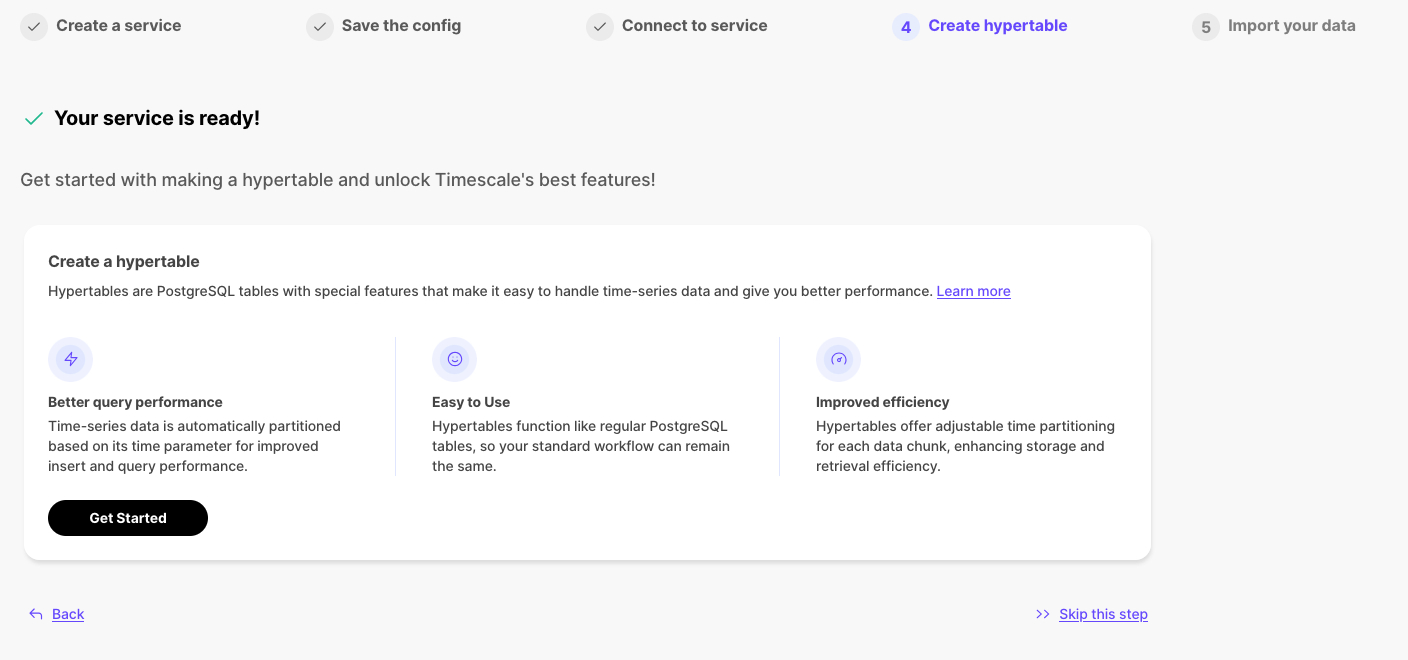
### 🧙Hypertable creation wizard
After creating a service, users can now create a hypertable directly in Timescale Console by first creating a table, then converting it into a hypertable. This is possible using the in-console SQL editor. All standard hypertable configuration options are supported, along with any customization of the underlying table schema.
### 🍭 PopSQL Notebooks
The newest version of Data Mode Notebooks is now waaaay faster. Why? We've incorporated the newly developed v3 of our query engine that currently powers Timescale Console's SQL Editor. Check out the difference in query response times.
## ✨ Production-Ready Low-Downtime Migrations, MySQL Import, Actions Tab, and Current Lock Contention Visibility in SQL Editor
### 🏗️ Live Migrations v1.0 Release
Last year, we began developing a solution for low-downtime migration from Postgres and TimescaleDB. Since then, this solution has evolved significantly, featuring enhanced functionality, improved reliability, and performance optimizations. We're now proud to announce that **live migration is production-ready** with the release of version 1.0.
Many of our customers have successfully migrated databases to Timescale using [live migration](https://docs.timescale.com/migrate/latest/live-migration/), with some databases as large as a few terabytes in size.
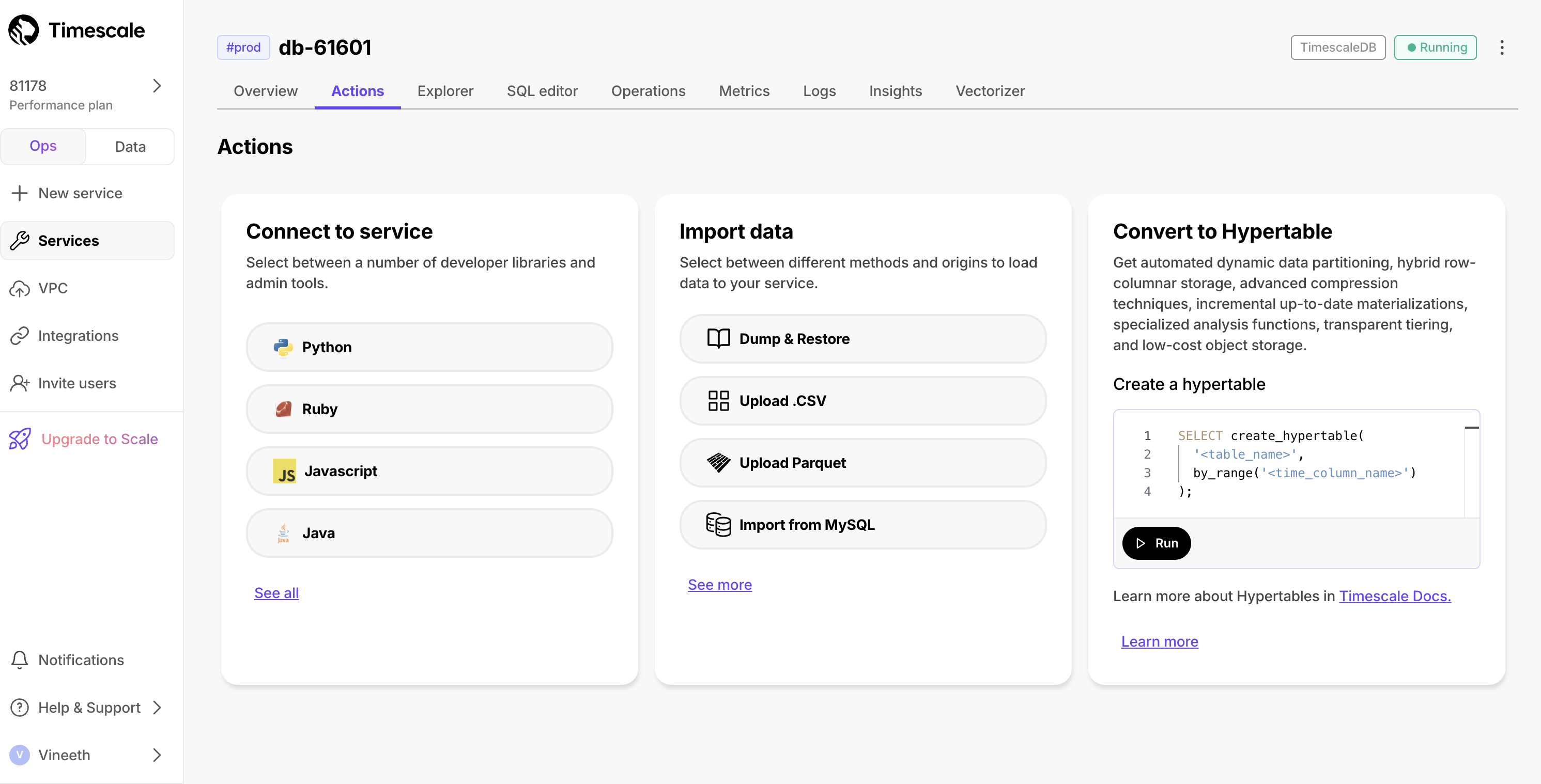
As part of the service creation flow, we offer the following:
- Connect to services from different sources
- Import and migrate data from various sources
- Create hypertables
Previously, these actions were only visible during the service creation process and couldn't be accessed later. Now, these actions are **persisted within the service**, allowing users to leverage them on-demand whenever they're ready to perform these tasks.
### 🧭 Import Data from MySQL
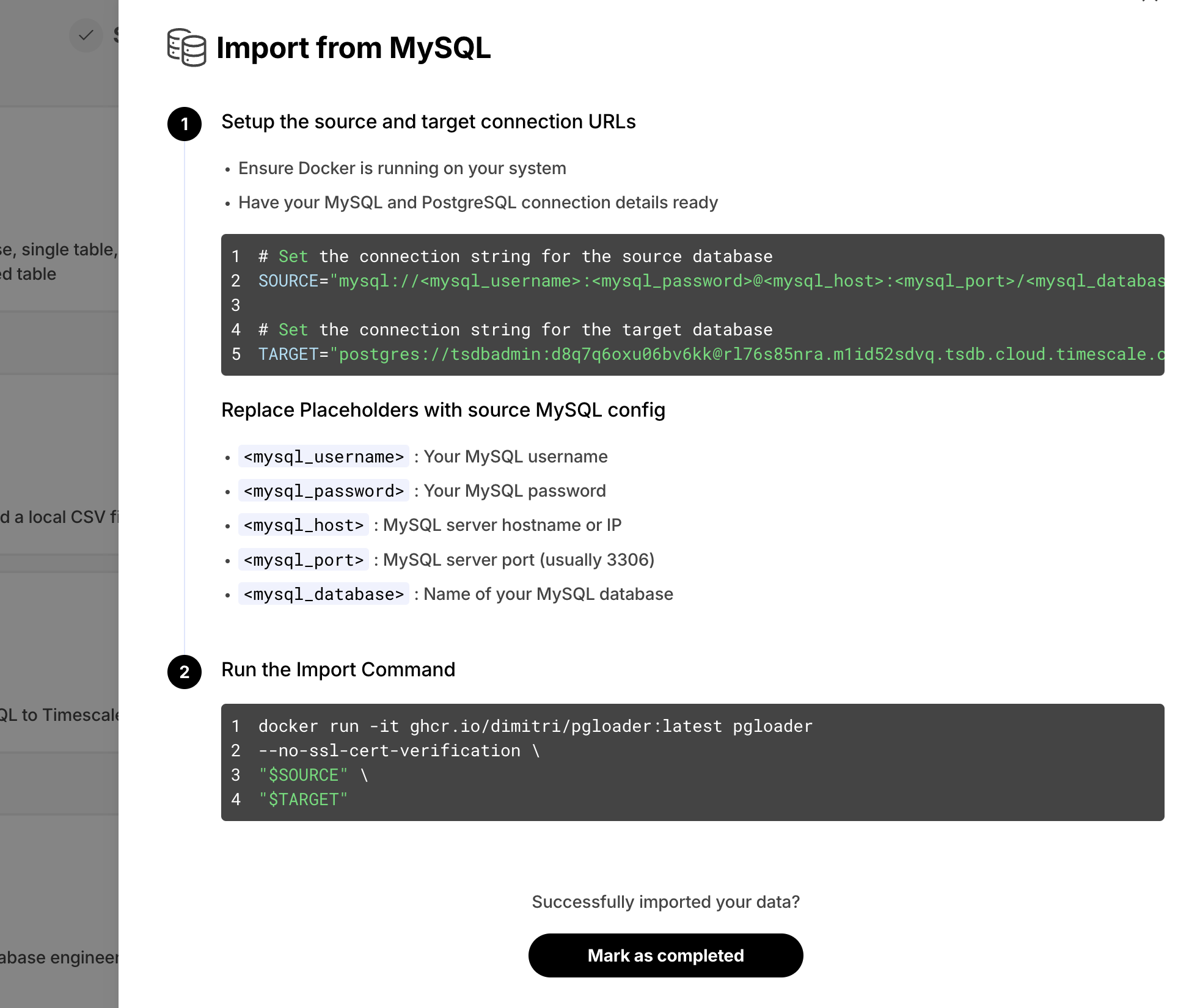
We've noticed users struggling to convert their MySQL schema and data into their Timescale Cloud services. This was due to the semantic differences between MySQL and Postgres. To simplify this process, we now offer **easy-to-follow instructions** to import data from MySQL to Timescale Cloud. This feature is available as part of the data import wizard, under the **Import from MySQL** option.
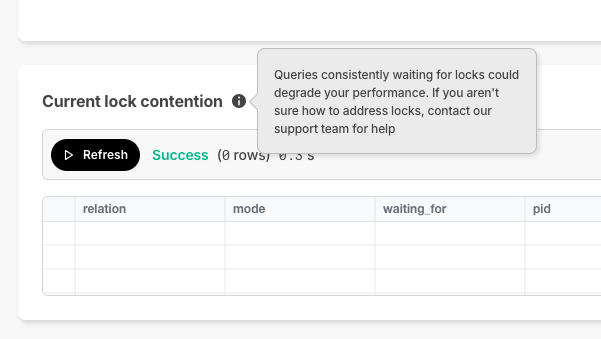
### 🔐 Current Lock Contention
In Timescale Console, we offer the SQL editor so you can directly querying your service. As a new improvement, **if a query is waiting on locks and can't complete execution**, Timescale Console now displays the current lock contention in the results section .
## CIDR & VPC Updates
Timescale now supports multiple CIDRs on the customer VPC. Customers who want to take advantage of multiple CIDRs will need to recreate their peering.
## 🤝 New modes in Timescale Console: Ops and Data mode, and Console based Parquet File Import
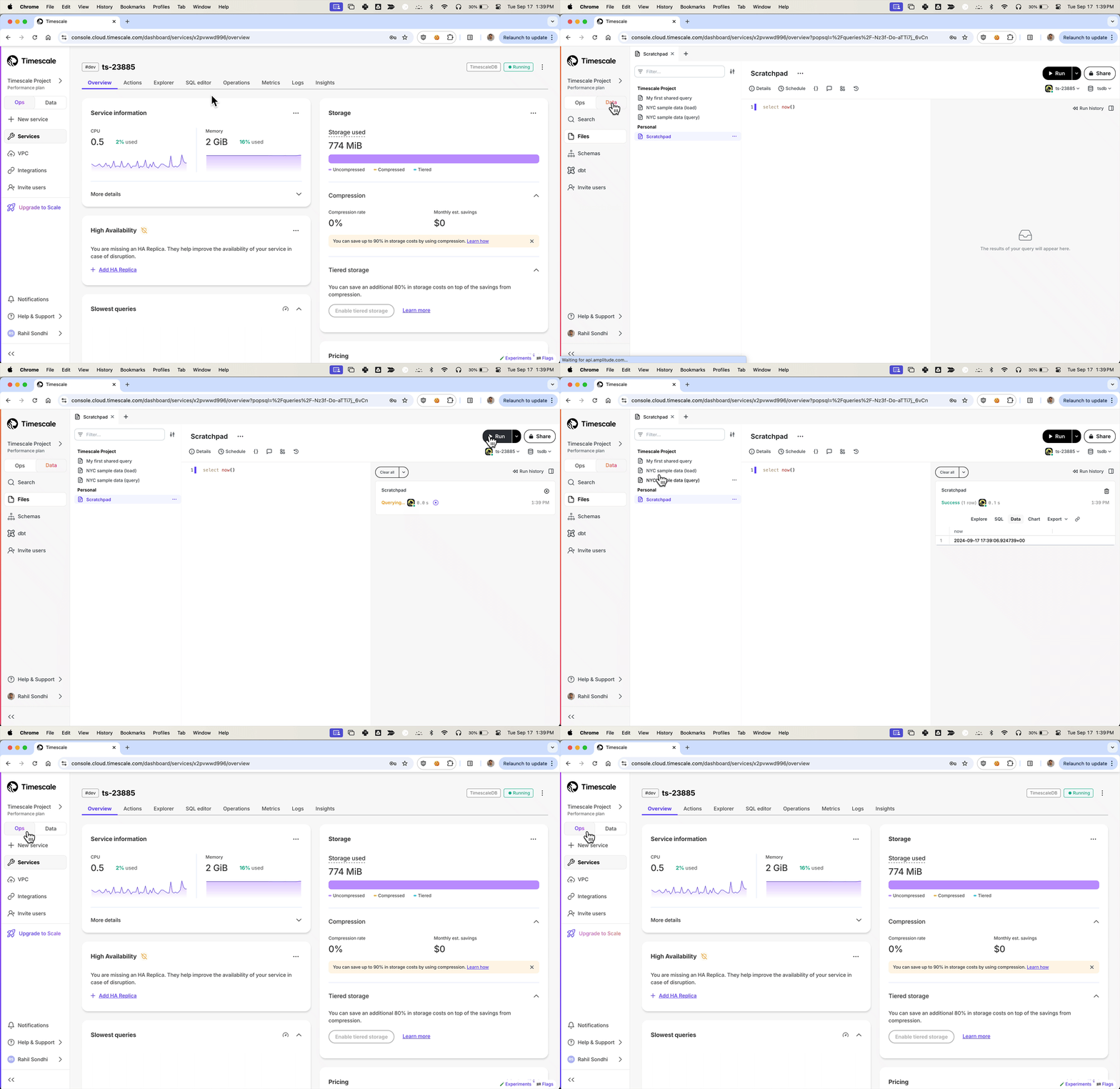
We've been listening to your feedback and noticed that Timescale Console users have diverse needs. Some of you are focused on operational tasks like adding replicas or changing parameters, while others are diving deep into data analysis to gather insights.
**To better serve you, we've introduced new modes to the Timescale Console UI—tailoring the experience based on what you're trying to accomplish.**
Ops mode is where you can manage your services, add replicas, configure compression, change parameters, and so on.
Data mode is the full PopSQL experience: write queries with autocomplete, visualize data with charts and dashboards, schedule queries and dashboards to create alerts or recurring reports, share queries and dashboards, and more.
Try it today and let us know what you think!
## Console based Parquet File Import
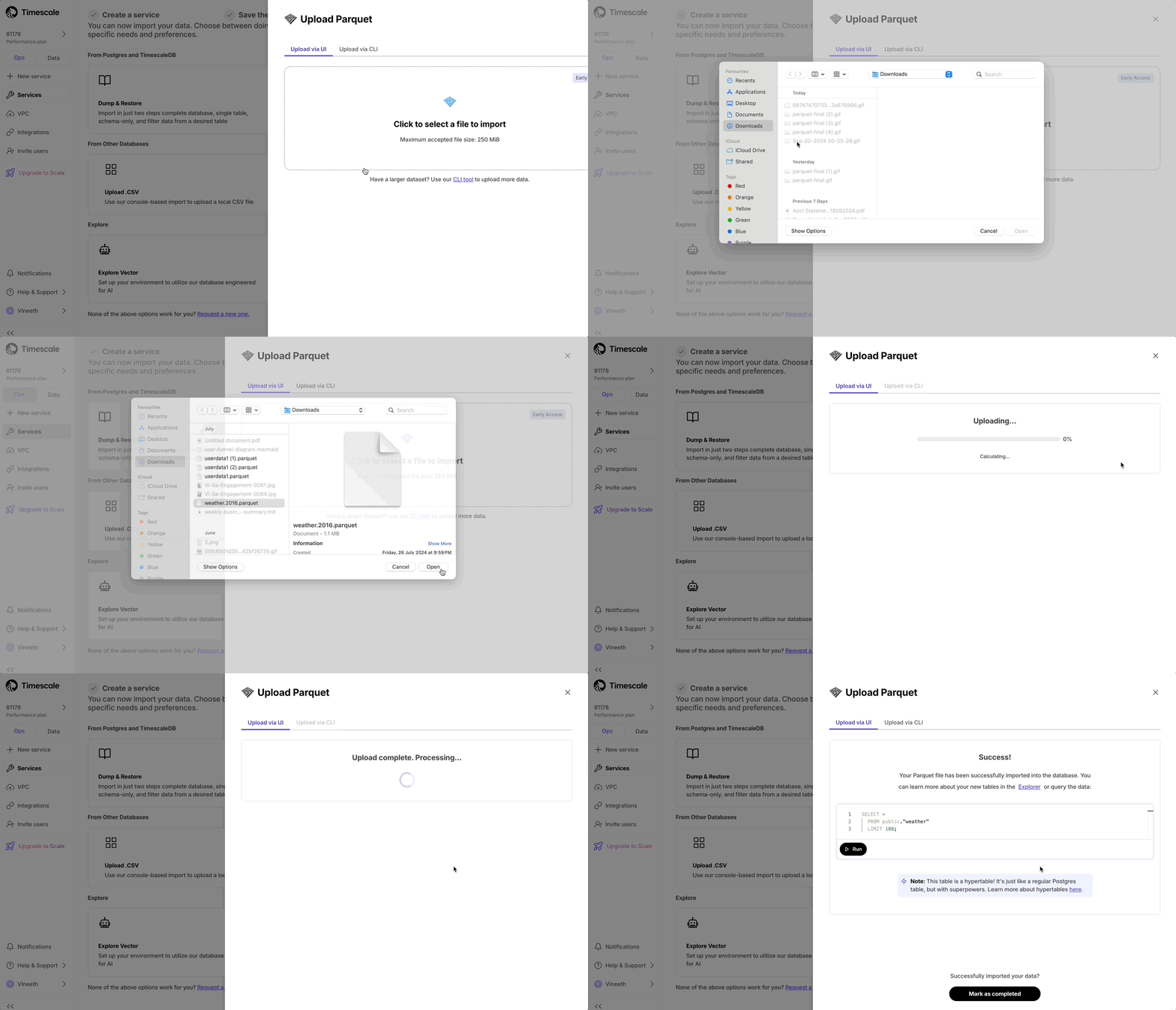
Now users can upload from Parquet to Timescale Cloud by uploading the file from their local file system. For files larger than 250 MB, or if you want to do it yourself, follow the three-step process to upload Parquet files to Timescale.
### SQL editor improvements
* In the Ops mode SQL editor, you can now highlight a statement to run a specific statement.
## High availability, usability, and migrations improvements
### Multiple HA replicas
Scale and Enterprise customers can now configure two new multiple high availability (HA) replica options directly through Timescale Console:
* Two HA replicas (both asynchronous) - our highest availability configuration.
* Two HA replicas (one asynchronous, one synchronous) - our highest data integrity configuration.
Previously, Timescale offered only a single synchronous replica for customers seeking high availability. The single HA option is still available.


For more details on multiple HA replicas, see [Manage high availability](https://docs.timescale.com/use-timescale/latest/ha-replicas/high-availability/).
### Other improvements
* In the Console SQL editor, we now indicate if your database session is healthy or has been disconnected. If it's been disconnected, the session will reconnect on your next query execution.

* Released live-migration v0.0.26 and then v0.0.27 which includes multiple performance improvements and bugfixes as well as better support for Postgres 12.
## One-click SQL statement execution from Timescale Console, and session support in the SQL editor
### One-click SQL statement execution from Timescale Console
Now you can simply click to run SQL statements in various places in the Console. This requires that the [SQL Editor][sql-editor] is enabled for the service.
* Enable Continuous Aggregates from the CAGGs wizard by clicking **Run** below the SQL statement.

* Enable database extensions by clicking **Run** below the SQL statement.

* Query data instantly with a single click in the Console after successfully uploading a CSV file.

### Session support in the SQL editor
Last week we announced the new in-console SQL editor. However, there was a limitation where a new database session was created for each query execution.
Today we removed that limitation and added support for keeping one database session for each user logged in, which means you can do things like start transactions:
Or work with temporary tables:
Or use the `set` command:
## 😎 Query your database directly from the Console and enhanced data import and migration options
### SQL Editor in Timescale Console
We've added a new tab to the service screen that allows users to query their database directly, without having to leave the console interface.
* For existing services on Timescale, this is an opt-in feature. For all newly created services, the SQL Editor will be enabled by default.
* Users can disable the SQL Editor at any time by toggling the option under the Operations tab.
* The editor supports all DML and DDL operations (any single-statement SQL query), but doesn't support multiple SQL statements in a single query.

### Enhanced Data Import Options for Quick Evaluation
After service creation, we now offer a dedicated section for data import, including options to import from Postgres as a source or from CSV files.
The enhanced Postgres import instructions now offer several options: single table import, schema-only import, partial data import (allowing selection of a specific time range), and complete database import. Users can execute any of these data imports with just one or two simple commands provided in the data import section.

### Improvements to Live migration
We've released v0.0.25 of Live migration that includes the following improvements:
* Support migrating tsdb on non public schema to public schema
* Pre-migration compatibility checks
* Docker compose build fixes
## 🛠️ Improved tooling in Timescale Cloud and new AI and Vector extension releases
### CSV import
We have added a CSV import tool to the Timescale Console. For all TimescaleDB services, after service creation you can:
* Choose a local file
* Select the name of the data collection to be uploaded (default is file name)
* Choose data types for each column
* Upload the file as a new hypertable within your service
Look for the `Import data from .csv` tile in the `Import your data` step of service creation.

### Replica lag
Customers now have more visibility into the state of replicas running on Timescale Cloud. We’ve released a new parameter called Replica Lag within the Service Overview for both Read and High Availability Replicas. Replica lag is measured in bytes against the current state of the primary database. For questions or concerns about the relative lag state of your replica, reach out to Customer Support.

### Adjust chunk interval
Customers can now adjust their chunk interval for their hypertables and continuous aggregates through the Timescale UI. In the Explorer, select the corresponding hypertable you would like to adjust the chunk interval for. Under *Chunk information*, you can change the chunk interval. Note that this only changes the chunk interval going forward, and does not retroactively change existing chunks.

### CloudWatch permissions via role assumption
We've released permission granting via role assumption to CloudWatch. Role assumption is both more secure and more convenient for customers who no longer need to rotate credentials and update their exporter config.
For more details take a look at [our documentation][integrations].
 ### Two-factor authentication (2FA) indicator
We’ve added a 2FA status column to the Members page, allowing customers to easily see whether each project member has 2FA enabled or disabled.

### Anthropic and Cohere integrations in pgai
The pgai extension v0.3.0 now supports embedding creation and LLM reasoning using models from Anthropic and Cohere. For details and examples, see [this post for pgai and Cohere](https://www.timescale.com/blog/build-search-and-rag-systems-on-postgresql-using-cohere-and-pgai/), and [this post for pgai and Anthropic](https://www.timescale.com/blog/use-anthropic-claude-sonnet-3-5-in-postgresql-with-pgai/).
### pgvectorscale extension: ARM builds and improved recall for low dimensional vectors
pgvectorscale extension [v0.3.0](https://github.com/timescale/pgvectorscale/releases/tag/0.3.0) adds support for ARM processors and improves recall when using StreamingDiskANN indexes with low dimensionality vectors. We recommend updating to this version if you are self-hosting.
## 🏄 Optimizations for compressed data and extended join support in continuous aggregates
TimescaleDB v2.16.0 contains significant performance improvements when working with compressed data, extended join
support in continuous aggregates, and the ability to define foreign keys from regular tables towards hypertables.
We recommend upgrading at the next available opportunity.
Any new service created on Timescale Cloud starting today uses TimescaleDB v2.16.0.
In TimescaleDB v2.16.0 we:
* Introduced multiple performance focused optimizations for data manipulation operations (DML) over compressed chunks.
Improved upsert performance by more than 100x in some cases and more than 500x in some update/delete scenarios.
* Added the ability to define chunk skipping indexes on non-partitioning columns of compressed hypertables.
TimescaleDB v2.16.0 extends chunk exclusion to use these skipping (sparse) indexes when queries filter on the relevant columns,
and prune chunks that do not include any relevant data for calculating the query response.
* Offered new options for use cases that require foreign keys defined.
You can now add foreign keys from regular tables towards hypertables. We have also removed
some really annoying locks in the reverse direction that blocked access to referenced tables
while compression was running.
* Extended Continuous Aggregates to support more types of analytical queries.
More types of joins are supported, additional equality operators on join clauses, and
support for joins between multiple regular tables.
**Highlighted features in this release**
* Improved query performance through chunk exclusion on compressed hypertables.
You can now define chunk skipping indexes on compressed chunks for any column with one of the following
integer data types: `smallint`, `int`, `bigint`, `serial`, `bigserial`, `date`, `timestamp`, `timestamptz`.
After calling `enable_chunk_skipping` on a column, TimescaleDB tracks the min and max values for
that column, using this information to exclude chunks for queries filtering on that
column, where no data would be found.
* Improved upsert performance on compressed hypertables.
By using index scans to verify constraints during inserts on compressed chunks, TimescaleDB speeds
up some ON CONFLICT clauses by more than 100x.
* Improved performance of updates, deletes, and inserts on compressed hypertables.
By filtering data while accessing the compressed data and before decompressing, TimescaleDB has
improved performance for updates and deletes on all types of compressed chunks, as well as inserts
into compressed chunks with unique constraints.
By signaling constraint violations without decompressing, or decompressing only when matching
records are found in the case of updates, deletes and upserts, TimescaleDB v2.16.0 speeds
up those operations more than 1000x in some update/delete scenarios, and 10x for upserts.
* You can add foreign keys from regular tables to hypertables, with support for all types of cascading options.
This is useful for hypertables that partition using sequential IDs, and need to reference these IDs from other tables.
* Lower locking requirements during compression for hypertables with foreign keys
Advanced foreign key handling removes the need for locking referenced tables when new chunks are compressed.
DML is no longer blocked on referenced tables while compression runs on a hypertable.
* Improved support for queries on Continuous Aggregates
`INNER/LEFT` and `LATERAL` joins are now supported. Plus, you can now join with multiple regular tables,
and have more than one equality operator on join clauses.
**Postgres 13 support removal announcement**
Following the deprecation announcement for Postgres 13 in TimescaleDB v2.13,
Postgres 13 is no longer supported in TimescaleDB v2.16.
The currently supported Postgres major versions are 14, 15, and 16.
## 📦 Performance, packaging and stability improvements for Timescale Cloud
### New plans
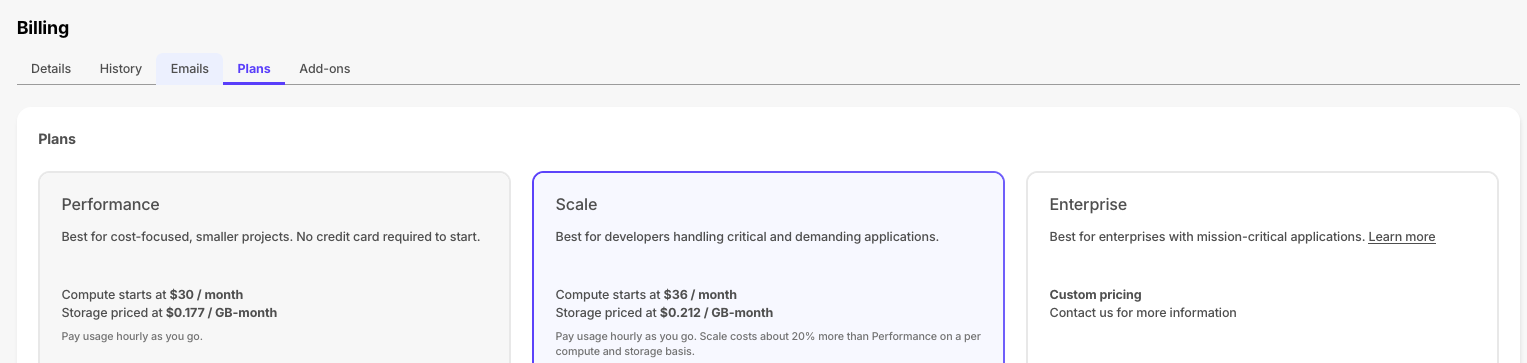
To support evolving customer needs, Timescale Cloud now offers three plans to provide more value, flexibility, and efficiency.
- **Performance:** for cost-focused, smaller projects. No credit card required to start.
- **Scale:** for developers handling critical and demanding apps.
- **Enterprise:** for enterprises with mission-critical apps.
Each plan continues to bill based on hourly usage, primarily for compute you run and storage you consume. You can upgrade or downgrade between Performance and Scale plans via the Console UI at any time. More information about the specifics and differences between these pricing plans can be found [here in the docs](https://docs.timescale.com/about/latest/pricing-and-account-management/).
### Improvements to the Timescale Console
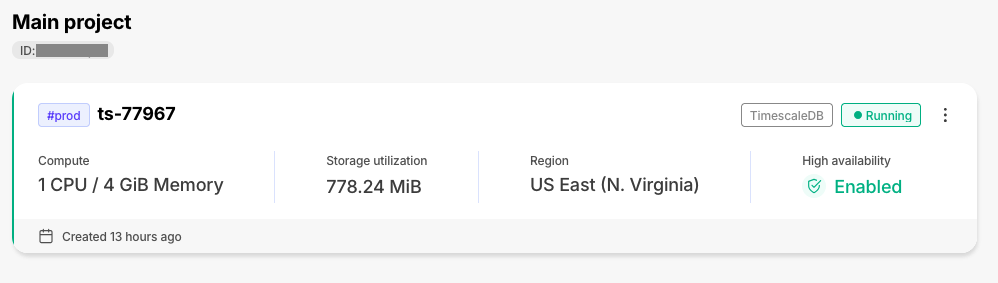
The individual tiles on the services page have been enhanced with new information, including high-availability status. This will let you better assess the state of your services at a glance.
### Live migration release v0.0.24
Improvements:
- Automatic retries are now available for the initial data copy of the migration
- Now uses pgcopydb for initial data copy for PG to TSDB migrations also (already did for TS to TS) which has a significant performance boost.
- Fixes issues with TimescaleDB v2.13.x migrations
- Support for chunk mapping for hypertables with custom schema and table prefixes
## ⚡ Performance and stability improvements for Timescale Cloud and TimescaleDB
The following improvements have been made to Timescale products:
- **Timescale Cloud**:
- The connection pooler has been updated and now avoids multiple reloads
- The tsdbadmin user can now grant the following roles to other users: `pg_checkpoint`,`pg_monitor`,`pg_signal_backend`,`pg_read_all_stats`,`pg_stat_scan_tables`
- Timescale Console is far more reliable.
- **TimescaleDB**
- The TimescaleDB v2.15.3 patch release improves handling of multiple unique indexes in a compressed INSERT,
removes the recheck of ORDER when querying compressed data, improves memory management in DML functions, improves
the tuple lock acquisition for tiered chunks on replicas, and fixes an issue with ORDER BY/GROUP BY in our
HashAggregate optimization on PG16. For more information, see the [release note](https://github.com/timescale/timescaledb/releases/tag/2.15.3).
- The TimescaleDB v2.15.2 patch release improves sort pushdown for partially compressed chunks, and compress_chunk with
a primary space partition. The metadata function is removed from the update script, and hash partitioning on a
primary column is disallowed. For more information, see the [release note](https://github.com/timescale/timescaledb/releases/tag/2.15.2).
## ⚡ Performance improvements for live migration to Timescale Cloud
The following improvements have been made to the Timescale [live-migration docker image](https://hub.docker.com/r/timescale/live-migration/tags):
- Table-based filtering is now available during live migration.
- Improvements to pbcopydb increase performance and remove unhelpful warning messages.
- The user notification log enables you to always select the most recent release for a migration run.
For improved stability and new features, update to the latest [timescale/live-migration](https://hub.docker.com/r/timescale/live-migration/tags) docker image. To learn more, see the [live migration docs](https://docs.timescale.com/migrate/latest/live-migration/).
## 🦙Ollama integration in pgai
Ollama is now integrated with [pgai](https://github.com/timescale/pgai).
Ollama is the easiest and most popular way to get up and running with open-source
language models. Think of Ollama as _Docker for LLMs_, enabling easy access and usage
of a variety of open-source models like Llama 3, Mistral, Phi 3, Gemma, and more.
With the pgai extension integrated in your database, embed Ollama AI into your app using
SQL. For example:
To learn more, see the [pgai Ollama documentation](https://github.com/timescale/pgai/blob/main/docs/vectorizer/quick-start.md).
## 🧙 Compression Wizard
The compression wizard is now available on Timescale Cloud. Select a hypertable and be guided through enabling compression through the UI!
To access the compression wizard, navigate to `Explorer`, and select the hypertable you would like to compress. In the top right corner, hover where it says `Compression off`, and open the wizard. You will then be guided through the process of configuring compression for your hypertable, and can compress it directly through the UI.

## 🏎️💨 High Performance AI Apps With pgvectorscale
The [vectorscale extension][pgvectorscale] is now available on [Timescale Cloud][signup].
pgvectorscale complements pgvector, the open-source vector data extension for Postgres, and introduces the
following key innovations for pgvector data:
- A new index type called StreamingDiskANN, inspired by the DiskANN algorithm, based on research from Microsoft.
- Statistical Binary Quantization: developed by Timescale researchers, This compression method improves on
standard Binary Quantization.
On benchmark dataset of 50 million Cohere embeddings (768 dimensions each), Postgres with pgvector and
pgvectorscale achieves 28x lower p95 latency and 16x higher query throughput compared to Pinecone's storage
optimized (s1) index for approximate nearest neighbor queries at 99% recall, all at 75% less cost when
self-hosted on AWS EC2.
To learn more, see the [pgvectorscale documentation][pgvectorscale].
## 🧐Integrate AI Into Your Database Using pgai
The [pgai extension][pgai] is now available on [Timescale Cloud][signup].
pgai brings embedding and generation AI models closer to the database. With pgai, you can now do the following directly
from within Postgres in a SQL query:
* Create embeddings for your data.
* Retrieve LLM chat completions from models like OpenAI GPT4o.
* Reason over your data and facilitate use cases like classification, summarization, and data enrichment on your existing relational data in Postgres.
To learn more, see the [pgai documentation][pgai].
## 🐅Continuous Aggregate and Hypertable Improvements for TimescaleDB
The 2.15.x releases contains performance improvements and bug fixes. Highlights in these releases are:
- Continuous Aggregate now supports `time_bucket` with origin and/or offset.
- Hypertable compression has the following improvements:
- Recommend optimized defaults for segment by and order by when configuring compression through analysis of table configuration and statistics.
- Added planner support to check more kinds of WHERE conditions before decompression.
This reduces the number of rows that have to be decompressed.
- You can now use minmax sparse indexes when you compress columns with btree indexes.
- Vectorize filters in the WHERE clause that contain text equality operators and LIKE expressions.
To learn more, see the [TimescaleDB release notes](https://github.com/timescale/timescaledb/releases).
## 🔍 Database Audit Logging with pgaudit
The [Postgres Audit extension(pgaudit)](https://github.com/pgaudit/pgaudit/) is now available on [Timescale Cloud][signup].
pgaudit provides detailed database session and object audit logging in the Timescale
Cloud logs.
If you have strict security and compliance requirements and need to log all operations
on the database level, pgaudit can help. You can also export these audit logs to
[Amazon CloudWatch](https://aws.amazon.com/cloudwatch/).
To learn more, see the [pgaudit documentation](https://github.com/pgaudit/pgaudit/).
## 🌡 International System of Unit Support with postgresql-unit
The [SI Units for Postgres extension(unit)](https://github.com/df7cb/postgresql-unit) provides support for the
[ISU](https://en.wikipedia.org/wiki/International_System_of_Units) in [Timescale Cloud][signup].
You can use Timescale Cloud to solve day-to-day questions. For example, to see what 50°C is in °F, run the following
query in your Timescale Cloud service:
To learn more, see the [postgresql-unit documentation](https://github.com/df7cb/postgresql-unit).
===== PAGE: https://docs.tigerdata.com/about/timescaledb-editions/ =====
**Examples:**
Example 1 (unknown):
```unknown
SELECT * FROM hypertable WHERE timestamp_col > now() - '100 days'::interval
```
Example 2 (unknown):
```unknown
begin;
insert into users (name, email) values ('john doe', 'john@example.com');
abort; -- nothing inserted
```
Example 3 (unknown):
```unknown
create temporary table temp_users (email text);
insert into temp_sales (email) values ('john@example.com');
-- table will automatically disappear after your session ends
```
Example 4 (unknown):
```unknown
set search_path to 'myschema', 'public';
```
---
## Create a compression policy
**URL:** llms-txt#create-a-compression-policy
**Contents:**
- Enable a compression policy
- Enabling compression
- View current compression policy
- Pause compression policy
- Remove compression policy
- Disable compression
Old API since [TimescaleDB v2.18.0](https://github.com/timescale/timescaledb/releases/tag/2.18.0) Replaced by Optimize your data for real-time analytics.
You can enable compression on individual hypertables, by declaring which column
you want to segment by.
## Enable a compression policy
This page uses an example table, called `example`, and segments it by the
`device_id` column. Every chunk that is more than seven days old is then marked
to be automatically compressed. The source data is organized like this:
|time|device_id|cpu|disk_io|energy_consumption|
|-|-|-|-|-|
|8/22/2019 0:00|1|88.2|20|0.8|
|8/22/2019 0:05|2|300.5|30|0.9|
### Enabling compression
1. At the `psql` prompt, alter the table:
1. Add a compression policy to compress chunks that are older than seven days:
For more information, see the API reference for
[`ALTER TABLE (compression)`][alter-table-compression] and
[`add_compression_policy`][add_compression_policy].
## View current compression policy
To view the compression policy that you've set:
For more information, see the API reference for [`timescaledb_information.jobs`][timescaledb_information-jobs].
## Pause compression policy
To disable a compression policy temporarily, find the corresponding job ID and then call `alter_job` to pause it:
## Remove compression policy
To remove a compression policy, use `remove_compression_policy`:
For more information, see the API reference for
[`remove_compression_policy`][remove_compression_policy].
## Disable compression
You can disable compression entirely on individual hypertables. This command
works only if you don't currently have any compressed chunks:
If your hypertable contains compressed chunks, you need to
[decompress each chunk][decompress-chunks] individually before you can turn off
compression.
===== PAGE: https://docs.tigerdata.com/use-timescale/compression/modify-compressed-data/ =====
**Examples:**
Example 1 (sql):
```sql
ALTER TABLE example SET (
timescaledb.compress,
timescaledb.compress_segmentby = 'device_id'
);
```
Example 2 (sql):
```sql
SELECT add_compression_policy('example', INTERVAL '7 days');
```
Example 3 (sql):
```sql
SELECT * FROM timescaledb_information.jobs
WHERE proc_name='policy_compression';
```
Example 4 (sql):
```sql
SELECT * FROM timescaledb_information.jobs where proc_name = 'policy_compression' AND relname = 'example'
```
---
## Compress your data using hypercore
**URL:** llms-txt#compress-your-data-using-hypercore
**Contents:**
- Optimize your data in the columnstore
- Take advantage of query speedups
Over time you end up with a lot of data. Since this data is mostly immutable, you can compress it
to save space and avoid incurring additional cost.
TimescaleDB is built for handling event-oriented data such as time-series and fast analytical queries, it comes with support
of [hypercore][hypercore] featuring the columnstore.
[Hypercore][hypercore] enables you to store the data in a vastly more efficient format allowing
up to 90x compression ratio compared to a normal Postgres table. However, this is highly dependent
on the data and configuration.
[Hypercore][hypercore] is implemented natively in Postgres and does not require special storage
formats. When you convert your data from the rowstore to the columnstore, TimescaleDB uses
Postgres features to transform the data into columnar format. The use of a columnar format allows a better
compression ratio since similar data is stored adjacently. For more details on the columnar format,
see [hypercore][hypercore].
A beneficial side effect of compressing data is that certain queries are significantly faster, since
less data has to be read into memory.
## Optimize your data in the columnstore
To compress the data in the `transactions` table, do the following:
1. Connect to your Tiger Cloud service
In [Tiger Cloud Console][services-portal] open an [SQL editor][in-console-editors]. The in-Console editors display the query speed.
You can also connect to your service using [psql][connect-using-psql].
1. Convert data to the columnstore:
You can do this either automatically or manually:
- [Automatically convert chunks][add_columnstore_policy] in the hypertable to the columnstore at a specific time interval:
- [Manually convert all chunks][convert_to_columnstore] in the hypertable to the columnstore:
## Take advantage of query speedups
Previously, data in the columnstore was segmented by the `block_id` column value.
This means fetching data by filtering or grouping on that column is
more efficient. Ordering is set to time descending. This means that when you run queries
which try to order data in the same way, you see performance benefits.
1. Connect to your Tiger Cloud service
In [Tiger Cloud Console][services-portal] open an [SQL editor][in-console-editors]. The in-Console editors display the query speed.
1. Run the following query:
Performance speedup is of two orders of magnitude, around 15 ms when compressed in the columnstore and
1 second when decompressed in the rowstore.
===== PAGE: https://docs.tigerdata.com/tutorials/blockchain-query/blockchain-dataset/ =====
**Examples:**
Example 1 (sql):
```sql
CALL add_columnstore_policy('transactions', after => INTERVAL '1d');
```
Example 2 (sql):
```sql
DO $$
DECLARE
chunk_name TEXT;
BEGIN
FOR chunk_name IN (SELECT c FROM show_chunks('transactions') c)
LOOP
RAISE NOTICE 'Converting chunk: %', chunk_name; -- Optional: To see progress
CALL convert_to_columnstore(chunk_name);
END LOOP;
RAISE NOTICE 'Conversion to columnar storage complete for all chunks.'; -- Optional: Completion message
END$$;
```
Example 3 (sql):
```sql
WITH recent_blocks AS (
SELECT block_id FROM transactions
WHERE is_coinbase IS TRUE
ORDER BY time DESC
LIMIT 5
)
SELECT
t.block_id, count(*) AS transaction_count,
SUM(weight) AS block_weight,
SUM(output_total_usd) AS block_value_usd
FROM transactions t
INNER JOIN recent_blocks b ON b.block_id = t.block_id
WHERE is_coinbase IS NOT TRUE
GROUP BY t.block_id;
```
---
## ALTER TABLE (Compression)
**URL:** llms-txt#alter-table-(compression)
**Contents:**
- Samples
- Required arguments
- Optional arguments
- Parameters
Old API since [TimescaleDB v2.18.0](https://github.com/timescale/timescaledb/releases/tag/2.18.0) Replaced by ALTER TABLE (Hypercore).
'ALTER TABLE' statement is used to turn on compression and set compression
options.
By itself, this `ALTER` statement alone does not compress a hypertable. To do so, either create a
compression policy using the [add_compression_policy][add_compression_policy] function or manually
compress a specific hypertable chunk using the [compress_chunk][compress_chunk] function.
Configure a hypertable that ingests device data to use compression. Here, if the hypertable
is often queried about a specific device or set of devices, the compression should be
segmented using the `device_id` for greater performance.
You can also specify compressed chunk interval without changing other
compression settings:
To disable the previously set option, set the interval to 0:
## Required arguments
|Name|Type|Description|
|-|-|-|
|`timescaledb.compress`|BOOLEAN|Enable or disable compression|
## Optional arguments
|Name|Type| Description |
|-|-|-----------------------------------------------------------------------------------------------------------------------------------------------------------------------------------------------------------------------------------------------------------------------------------------------------------------------------------------------------------------------------------------------------------------------------------------------------------------------------------------------------------------|
|`timescaledb.compress_orderby`|TEXT| Order used by compression, specified in the same way as the ORDER BY clause in a SELECT query. The default is the descending order of the hypertable's time column. |
|`timescaledb.compress_segmentby`|TEXT| Column list on which to key the compressed segments. An identifier representing the source of the data such as `device_id` or `tags_id` is usually a good candidate. The default is no `segment by` columns. |
|`timescaledb.compress_chunk_time_interval`|TEXT| EXPERIMENTAL: Set compressed chunk time interval used to roll chunks into. This parameter compresses every chunk, and then irreversibly merges it into a previous adjacent chunk if possible, to reduce the total number of chunks in the hypertable. Note that chunks will not be split up during decompression. It should be set to a multiple of the current chunk interval. This option can be changed independently of other compression settings and does not require the `timescaledb.compress` argument. |
|Name|Type|Description|
|-|-|-|
|`table_name`|TEXT|Hypertable that supports compression|
|`column_name`|TEXT|Column used to order by or segment by|
|`interval`|TEXT|Time interval used to roll compressed chunks into|
===== PAGE: https://docs.tigerdata.com/api/compression/hypertable_compression_stats/ =====
**Examples:**
Example 1 (unknown):
```unknown
## Samples
Configure a hypertable that ingests device data to use compression. Here, if the hypertable
is often queried about a specific device or set of devices, the compression should be
segmented using the `device_id` for greater performance.
```
Example 2 (unknown):
```unknown
You can also specify compressed chunk interval without changing other
compression settings:
```
Example 3 (unknown):
```unknown
To disable the previously set option, set the interval to 0:
```
---
## FAQ and troubleshooting
**URL:** llms-txt#faq-and-troubleshooting
**Contents:**
- Unsupported in live migration
- Where can I find logs for processes running during live migration?
- Source and target databases have different TimescaleDB versions
- Why does live migration log "no tuple identifier" warning?
- Set REPLICA IDENTITY on Postgres partitioned tables
- Can I use read/failover replicas as source database for live migration?
- Can I use live migration with a Postgres connection pooler like PgBouncer?
- Can I use Tiger Cloud instance as source for live migration?
- How can I exclude a schema/table from being replicated in live migration?
- Large migrations blocked
## Unsupported in live migration
Live migration tooling is currently experimental. You may run into the following shortcomings:
- Live migration does not yet support mutable columnstore compression (`INSERT`, `UPDATE`,
`DELETE` on data in the columnstore).
- By default, numeric fields containing `NaN`/`+Inf`/`-Inf` values are not
correctly replicated, and will be converted to `NULL`. A workaround is available, but is not enabled by default.
Should you run into any problems, please open a support request before losing
any time debugging issues.
You can open a support request directly from [Tiger Cloud Console][support-link],
or by email to [support@tigerdata.com](mailto:support@tigerdata.com).
## Where can I find logs for processes running during live migration?
Live migration involves several background processes to manage different stages of
the migration. The logs of these processes can be helpful for troubleshooting
unexpected behavior. You can find these logs in the `
### Two-factor authentication (2FA) indicator
We’ve added a 2FA status column to the Members page, allowing customers to easily see whether each project member has 2FA enabled or disabled.

### Anthropic and Cohere integrations in pgai
The pgai extension v0.3.0 now supports embedding creation and LLM reasoning using models from Anthropic and Cohere. For details and examples, see [this post for pgai and Cohere](https://www.timescale.com/blog/build-search-and-rag-systems-on-postgresql-using-cohere-and-pgai/), and [this post for pgai and Anthropic](https://www.timescale.com/blog/use-anthropic-claude-sonnet-3-5-in-postgresql-with-pgai/).
### pgvectorscale extension: ARM builds and improved recall for low dimensional vectors
pgvectorscale extension [v0.3.0](https://github.com/timescale/pgvectorscale/releases/tag/0.3.0) adds support for ARM processors and improves recall when using StreamingDiskANN indexes with low dimensionality vectors. We recommend updating to this version if you are self-hosting.
## 🏄 Optimizations for compressed data and extended join support in continuous aggregates
TimescaleDB v2.16.0 contains significant performance improvements when working with compressed data, extended join
support in continuous aggregates, and the ability to define foreign keys from regular tables towards hypertables.
We recommend upgrading at the next available opportunity.
Any new service created on Timescale Cloud starting today uses TimescaleDB v2.16.0.
In TimescaleDB v2.16.0 we:
* Introduced multiple performance focused optimizations for data manipulation operations (DML) over compressed chunks.
Improved upsert performance by more than 100x in some cases and more than 500x in some update/delete scenarios.
* Added the ability to define chunk skipping indexes on non-partitioning columns of compressed hypertables.
TimescaleDB v2.16.0 extends chunk exclusion to use these skipping (sparse) indexes when queries filter on the relevant columns,
and prune chunks that do not include any relevant data for calculating the query response.
* Offered new options for use cases that require foreign keys defined.
You can now add foreign keys from regular tables towards hypertables. We have also removed
some really annoying locks in the reverse direction that blocked access to referenced tables
while compression was running.
* Extended Continuous Aggregates to support more types of analytical queries.
More types of joins are supported, additional equality operators on join clauses, and
support for joins between multiple regular tables.
**Highlighted features in this release**
* Improved query performance through chunk exclusion on compressed hypertables.
You can now define chunk skipping indexes on compressed chunks for any column with one of the following
integer data types: `smallint`, `int`, `bigint`, `serial`, `bigserial`, `date`, `timestamp`, `timestamptz`.
After calling `enable_chunk_skipping` on a column, TimescaleDB tracks the min and max values for
that column, using this information to exclude chunks for queries filtering on that
column, where no data would be found.
* Improved upsert performance on compressed hypertables.
By using index scans to verify constraints during inserts on compressed chunks, TimescaleDB speeds
up some ON CONFLICT clauses by more than 100x.
* Improved performance of updates, deletes, and inserts on compressed hypertables.
By filtering data while accessing the compressed data and before decompressing, TimescaleDB has
improved performance for updates and deletes on all types of compressed chunks, as well as inserts
into compressed chunks with unique constraints.
By signaling constraint violations without decompressing, or decompressing only when matching
records are found in the case of updates, deletes and upserts, TimescaleDB v2.16.0 speeds
up those operations more than 1000x in some update/delete scenarios, and 10x for upserts.
* You can add foreign keys from regular tables to hypertables, with support for all types of cascading options.
This is useful for hypertables that partition using sequential IDs, and need to reference these IDs from other tables.
* Lower locking requirements during compression for hypertables with foreign keys
Advanced foreign key handling removes the need for locking referenced tables when new chunks are compressed.
DML is no longer blocked on referenced tables while compression runs on a hypertable.
* Improved support for queries on Continuous Aggregates
`INNER/LEFT` and `LATERAL` joins are now supported. Plus, you can now join with multiple regular tables,
and have more than one equality operator on join clauses.
**Postgres 13 support removal announcement**
Following the deprecation announcement for Postgres 13 in TimescaleDB v2.13,
Postgres 13 is no longer supported in TimescaleDB v2.16.
The currently supported Postgres major versions are 14, 15, and 16.
## 📦 Performance, packaging and stability improvements for Timescale Cloud
### New plans
To support evolving customer needs, Timescale Cloud now offers three plans to provide more value, flexibility, and efficiency.
- **Performance:** for cost-focused, smaller projects. No credit card required to start.
- **Scale:** for developers handling critical and demanding apps.
- **Enterprise:** for enterprises with mission-critical apps.
Each plan continues to bill based on hourly usage, primarily for compute you run and storage you consume. You can upgrade or downgrade between Performance and Scale plans via the Console UI at any time. More information about the specifics and differences between these pricing plans can be found [here in the docs](https://docs.timescale.com/about/latest/pricing-and-account-management/).

### Improvements to the Timescale Console
The individual tiles on the services page have been enhanced with new information, including high-availability status. This will let you better assess the state of your services at a glance.

### Live migration release v0.0.24
Improvements:
- Automatic retries are now available for the initial data copy of the migration
- Now uses pgcopydb for initial data copy for PG to TSDB migrations also (already did for TS to TS) which has a significant performance boost.
- Fixes issues with TimescaleDB v2.13.x migrations
- Support for chunk mapping for hypertables with custom schema and table prefixes
## ⚡ Performance and stability improvements for Timescale Cloud and TimescaleDB
The following improvements have been made to Timescale products:
- **Timescale Cloud**:
- The connection pooler has been updated and now avoids multiple reloads
- The tsdbadmin user can now grant the following roles to other users: `pg_checkpoint`,`pg_monitor`,`pg_signal_backend`,`pg_read_all_stats`,`pg_stat_scan_tables`
- Timescale Console is far more reliable.
- **TimescaleDB**
- The TimescaleDB v2.15.3 patch release improves handling of multiple unique indexes in a compressed INSERT,
removes the recheck of ORDER when querying compressed data, improves memory management in DML functions, improves
the tuple lock acquisition for tiered chunks on replicas, and fixes an issue with ORDER BY/GROUP BY in our
HashAggregate optimization on PG16. For more information, see the [release note](https://github.com/timescale/timescaledb/releases/tag/2.15.3).
- The TimescaleDB v2.15.2 patch release improves sort pushdown for partially compressed chunks, and compress_chunk with
a primary space partition. The metadata function is removed from the update script, and hash partitioning on a
primary column is disallowed. For more information, see the [release note](https://github.com/timescale/timescaledb/releases/tag/2.15.2).
## ⚡ Performance improvements for live migration to Timescale Cloud
The following improvements have been made to the Timescale [live-migration docker image](https://hub.docker.com/r/timescale/live-migration/tags):
- Table-based filtering is now available during live migration.
- Improvements to pbcopydb increase performance and remove unhelpful warning messages.
- The user notification log enables you to always select the most recent release for a migration run.
For improved stability and new features, update to the latest [timescale/live-migration](https://hub.docker.com/r/timescale/live-migration/tags) docker image. To learn more, see the [live migration docs](https://docs.timescale.com/migrate/latest/live-migration/).
## 🦙Ollama integration in pgai
Ollama is now integrated with [pgai](https://github.com/timescale/pgai).
Ollama is the easiest and most popular way to get up and running with open-source
language models. Think of Ollama as _Docker for LLMs_, enabling easy access and usage
of a variety of open-source models like Llama 3, Mistral, Phi 3, Gemma, and more.
With the pgai extension integrated in your database, embed Ollama AI into your app using
SQL. For example:
To learn more, see the [pgai Ollama documentation](https://github.com/timescale/pgai/blob/main/docs/vectorizer/quick-start.md).
## 🧙 Compression Wizard
The compression wizard is now available on Timescale Cloud. Select a hypertable and be guided through enabling compression through the UI!
To access the compression wizard, navigate to `Explorer`, and select the hypertable you would like to compress. In the top right corner, hover where it says `Compression off`, and open the wizard. You will then be guided through the process of configuring compression for your hypertable, and can compress it directly through the UI.

## 🏎️💨 High Performance AI Apps With pgvectorscale
The [vectorscale extension][pgvectorscale] is now available on [Timescale Cloud][signup].
pgvectorscale complements pgvector, the open-source vector data extension for Postgres, and introduces the
following key innovations for pgvector data:
- A new index type called StreamingDiskANN, inspired by the DiskANN algorithm, based on research from Microsoft.
- Statistical Binary Quantization: developed by Timescale researchers, This compression method improves on
standard Binary Quantization.
On benchmark dataset of 50 million Cohere embeddings (768 dimensions each), Postgres with pgvector and
pgvectorscale achieves 28x lower p95 latency and 16x higher query throughput compared to Pinecone's storage
optimized (s1) index for approximate nearest neighbor queries at 99% recall, all at 75% less cost when
self-hosted on AWS EC2.
To learn more, see the [pgvectorscale documentation][pgvectorscale].
## 🧐Integrate AI Into Your Database Using pgai
The [pgai extension][pgai] is now available on [Timescale Cloud][signup].
pgai brings embedding and generation AI models closer to the database. With pgai, you can now do the following directly
from within Postgres in a SQL query:
* Create embeddings for your data.
* Retrieve LLM chat completions from models like OpenAI GPT4o.
* Reason over your data and facilitate use cases like classification, summarization, and data enrichment on your existing relational data in Postgres.
To learn more, see the [pgai documentation][pgai].
## 🐅Continuous Aggregate and Hypertable Improvements for TimescaleDB
The 2.15.x releases contains performance improvements and bug fixes. Highlights in these releases are:
- Continuous Aggregate now supports `time_bucket` with origin and/or offset.
- Hypertable compression has the following improvements:
- Recommend optimized defaults for segment by and order by when configuring compression through analysis of table configuration and statistics.
- Added planner support to check more kinds of WHERE conditions before decompression.
This reduces the number of rows that have to be decompressed.
- You can now use minmax sparse indexes when you compress columns with btree indexes.
- Vectorize filters in the WHERE clause that contain text equality operators and LIKE expressions.
To learn more, see the [TimescaleDB release notes](https://github.com/timescale/timescaledb/releases).
## 🔍 Database Audit Logging with pgaudit
The [Postgres Audit extension(pgaudit)](https://github.com/pgaudit/pgaudit/) is now available on [Timescale Cloud][signup].
pgaudit provides detailed database session and object audit logging in the Timescale
Cloud logs.
If you have strict security and compliance requirements and need to log all operations
on the database level, pgaudit can help. You can also export these audit logs to
[Amazon CloudWatch](https://aws.amazon.com/cloudwatch/).
To learn more, see the [pgaudit documentation](https://github.com/pgaudit/pgaudit/).
## 🌡 International System of Unit Support with postgresql-unit
The [SI Units for Postgres extension(unit)](https://github.com/df7cb/postgresql-unit) provides support for the
[ISU](https://en.wikipedia.org/wiki/International_System_of_Units) in [Timescale Cloud][signup].
You can use Timescale Cloud to solve day-to-day questions. For example, to see what 50°C is in °F, run the following
query in your Timescale Cloud service:
To learn more, see the [postgresql-unit documentation](https://github.com/df7cb/postgresql-unit).
===== PAGE: https://docs.tigerdata.com/about/timescaledb-editions/ =====
**Examples:**
Example 1 (unknown):
```unknown
SELECT * FROM hypertable WHERE timestamp_col > now() - '100 days'::interval
```
Example 2 (unknown):
```unknown
begin;
insert into users (name, email) values ('john doe', 'john@example.com');
abort; -- nothing inserted
```
Example 3 (unknown):
```unknown
create temporary table temp_users (email text);
insert into temp_sales (email) values ('john@example.com');
-- table will automatically disappear after your session ends
```
Example 4 (unknown):
```unknown
set search_path to 'myschema', 'public';
```
---
## Create a compression policy
**URL:** llms-txt#create-a-compression-policy
**Contents:**
- Enable a compression policy
- Enabling compression
- View current compression policy
- Pause compression policy
- Remove compression policy
- Disable compression
Old API since [TimescaleDB v2.18.0](https://github.com/timescale/timescaledb/releases/tag/2.18.0) Replaced by Optimize your data for real-time analytics.
You can enable compression on individual hypertables, by declaring which column
you want to segment by.
## Enable a compression policy
This page uses an example table, called `example`, and segments it by the
`device_id` column. Every chunk that is more than seven days old is then marked
to be automatically compressed. The source data is organized like this:
|time|device_id|cpu|disk_io|energy_consumption|
|-|-|-|-|-|
|8/22/2019 0:00|1|88.2|20|0.8|
|8/22/2019 0:05|2|300.5|30|0.9|
### Enabling compression
1. At the `psql` prompt, alter the table:
1. Add a compression policy to compress chunks that are older than seven days:
For more information, see the API reference for
[`ALTER TABLE (compression)`][alter-table-compression] and
[`add_compression_policy`][add_compression_policy].
## View current compression policy
To view the compression policy that you've set:
For more information, see the API reference for [`timescaledb_information.jobs`][timescaledb_information-jobs].
## Pause compression policy
To disable a compression policy temporarily, find the corresponding job ID and then call `alter_job` to pause it:
## Remove compression policy
To remove a compression policy, use `remove_compression_policy`:
For more information, see the API reference for
[`remove_compression_policy`][remove_compression_policy].
## Disable compression
You can disable compression entirely on individual hypertables. This command
works only if you don't currently have any compressed chunks:
If your hypertable contains compressed chunks, you need to
[decompress each chunk][decompress-chunks] individually before you can turn off
compression.
===== PAGE: https://docs.tigerdata.com/use-timescale/compression/modify-compressed-data/ =====
**Examples:**
Example 1 (sql):
```sql
ALTER TABLE example SET (
timescaledb.compress,
timescaledb.compress_segmentby = 'device_id'
);
```
Example 2 (sql):
```sql
SELECT add_compression_policy('example', INTERVAL '7 days');
```
Example 3 (sql):
```sql
SELECT * FROM timescaledb_information.jobs
WHERE proc_name='policy_compression';
```
Example 4 (sql):
```sql
SELECT * FROM timescaledb_information.jobs where proc_name = 'policy_compression' AND relname = 'example'
```
---
## Compress your data using hypercore
**URL:** llms-txt#compress-your-data-using-hypercore
**Contents:**
- Optimize your data in the columnstore
- Take advantage of query speedups
Over time you end up with a lot of data. Since this data is mostly immutable, you can compress it
to save space and avoid incurring additional cost.
TimescaleDB is built for handling event-oriented data such as time-series and fast analytical queries, it comes with support
of [hypercore][hypercore] featuring the columnstore.
[Hypercore][hypercore] enables you to store the data in a vastly more efficient format allowing
up to 90x compression ratio compared to a normal Postgres table. However, this is highly dependent
on the data and configuration.
[Hypercore][hypercore] is implemented natively in Postgres and does not require special storage
formats. When you convert your data from the rowstore to the columnstore, TimescaleDB uses
Postgres features to transform the data into columnar format. The use of a columnar format allows a better
compression ratio since similar data is stored adjacently. For more details on the columnar format,
see [hypercore][hypercore].
A beneficial side effect of compressing data is that certain queries are significantly faster, since
less data has to be read into memory.
## Optimize your data in the columnstore
To compress the data in the `transactions` table, do the following:
1. Connect to your Tiger Cloud service
In [Tiger Cloud Console][services-portal] open an [SQL editor][in-console-editors]. The in-Console editors display the query speed.
You can also connect to your service using [psql][connect-using-psql].
1. Convert data to the columnstore:
You can do this either automatically or manually:
- [Automatically convert chunks][add_columnstore_policy] in the hypertable to the columnstore at a specific time interval:
- [Manually convert all chunks][convert_to_columnstore] in the hypertable to the columnstore:
## Take advantage of query speedups
Previously, data in the columnstore was segmented by the `block_id` column value.
This means fetching data by filtering or grouping on that column is
more efficient. Ordering is set to time descending. This means that when you run queries
which try to order data in the same way, you see performance benefits.
1. Connect to your Tiger Cloud service
In [Tiger Cloud Console][services-portal] open an [SQL editor][in-console-editors]. The in-Console editors display the query speed.
1. Run the following query:
Performance speedup is of two orders of magnitude, around 15 ms when compressed in the columnstore and
1 second when decompressed in the rowstore.
===== PAGE: https://docs.tigerdata.com/tutorials/blockchain-query/blockchain-dataset/ =====
**Examples:**
Example 1 (sql):
```sql
CALL add_columnstore_policy('transactions', after => INTERVAL '1d');
```
Example 2 (sql):
```sql
DO $$
DECLARE
chunk_name TEXT;
BEGIN
FOR chunk_name IN (SELECT c FROM show_chunks('transactions') c)
LOOP
RAISE NOTICE 'Converting chunk: %', chunk_name; -- Optional: To see progress
CALL convert_to_columnstore(chunk_name);
END LOOP;
RAISE NOTICE 'Conversion to columnar storage complete for all chunks.'; -- Optional: Completion message
END$$;
```
Example 3 (sql):
```sql
WITH recent_blocks AS (
SELECT block_id FROM transactions
WHERE is_coinbase IS TRUE
ORDER BY time DESC
LIMIT 5
)
SELECT
t.block_id, count(*) AS transaction_count,
SUM(weight) AS block_weight,
SUM(output_total_usd) AS block_value_usd
FROM transactions t
INNER JOIN recent_blocks b ON b.block_id = t.block_id
WHERE is_coinbase IS NOT TRUE
GROUP BY t.block_id;
```
---
## ALTER TABLE (Compression)
**URL:** llms-txt#alter-table-(compression)
**Contents:**
- Samples
- Required arguments
- Optional arguments
- Parameters
Old API since [TimescaleDB v2.18.0](https://github.com/timescale/timescaledb/releases/tag/2.18.0) Replaced by ALTER TABLE (Hypercore).
'ALTER TABLE' statement is used to turn on compression and set compression
options.
By itself, this `ALTER` statement alone does not compress a hypertable. To do so, either create a
compression policy using the [add_compression_policy][add_compression_policy] function or manually
compress a specific hypertable chunk using the [compress_chunk][compress_chunk] function.
Configure a hypertable that ingests device data to use compression. Here, if the hypertable
is often queried about a specific device or set of devices, the compression should be
segmented using the `device_id` for greater performance.
You can also specify compressed chunk interval without changing other
compression settings:
To disable the previously set option, set the interval to 0:
## Required arguments
|Name|Type|Description|
|-|-|-|
|`timescaledb.compress`|BOOLEAN|Enable or disable compression|
## Optional arguments
|Name|Type| Description |
|-|-|-----------------------------------------------------------------------------------------------------------------------------------------------------------------------------------------------------------------------------------------------------------------------------------------------------------------------------------------------------------------------------------------------------------------------------------------------------------------------------------------------------------------|
|`timescaledb.compress_orderby`|TEXT| Order used by compression, specified in the same way as the ORDER BY clause in a SELECT query. The default is the descending order of the hypertable's time column. |
|`timescaledb.compress_segmentby`|TEXT| Column list on which to key the compressed segments. An identifier representing the source of the data such as `device_id` or `tags_id` is usually a good candidate. The default is no `segment by` columns. |
|`timescaledb.compress_chunk_time_interval`|TEXT| EXPERIMENTAL: Set compressed chunk time interval used to roll chunks into. This parameter compresses every chunk, and then irreversibly merges it into a previous adjacent chunk if possible, to reduce the total number of chunks in the hypertable. Note that chunks will not be split up during decompression. It should be set to a multiple of the current chunk interval. This option can be changed independently of other compression settings and does not require the `timescaledb.compress` argument. |
|Name|Type|Description|
|-|-|-|
|`table_name`|TEXT|Hypertable that supports compression|
|`column_name`|TEXT|Column used to order by or segment by|
|`interval`|TEXT|Time interval used to roll compressed chunks into|
===== PAGE: https://docs.tigerdata.com/api/compression/hypertable_compression_stats/ =====
**Examples:**
Example 1 (unknown):
```unknown
## Samples
Configure a hypertable that ingests device data to use compression. Here, if the hypertable
is often queried about a specific device or set of devices, the compression should be
segmented using the `device_id` for greater performance.
```
Example 2 (unknown):
```unknown
You can also specify compressed chunk interval without changing other
compression settings:
```
Example 3 (unknown):
```unknown
To disable the previously set option, set the interval to 0:
```
---
## FAQ and troubleshooting
**URL:** llms-txt#faq-and-troubleshooting
**Contents:**
- Unsupported in live migration
- Where can I find logs for processes running during live migration?
- Source and target databases have different TimescaleDB versions
- Why does live migration log "no tuple identifier" warning?
- Set REPLICA IDENTITY on Postgres partitioned tables
- Can I use read/failover replicas as source database for live migration?
- Can I use live migration with a Postgres connection pooler like PgBouncer?
- Can I use Tiger Cloud instance as source for live migration?
- How can I exclude a schema/table from being replicated in live migration?
- Large migrations blocked
## Unsupported in live migration
Live migration tooling is currently experimental. You may run into the following shortcomings:
- Live migration does not yet support mutable columnstore compression (`INSERT`, `UPDATE`,
`DELETE` on data in the columnstore).
- By default, numeric fields containing `NaN`/`+Inf`/`-Inf` values are not
correctly replicated, and will be converted to `NULL`. A workaround is available, but is not enabled by default.
Should you run into any problems, please open a support request before losing
any time debugging issues.
You can open a support request directly from [Tiger Cloud Console][support-link],
or by email to [support@tigerdata.com](mailto:support@tigerdata.com).
## Where can I find logs for processes running during live migration?
Live migration involves several background processes to manage different stages of
the migration. The logs of these processes can be helpful for troubleshooting
unexpected behavior. You can find these logs in the `/logs` directory.
## Source and target databases have different TimescaleDB versions
When you migrate a [self-hosted][self hosted] or [Managed Service for TimescaleDB (MST)][mst]
database to Tiger Cloud, the source database and the destination
[Tiger Cloud service][timescale-service] must run the same version of TimescaleDB.
Before you start [live migration][live migration]:
1. Check the version of TimescaleDB running on the source database and the
target Tiger Cloud service:
1. If the version of TimescaleDB on the source database is lower than your Tiger Cloud service, either:
- **Downgrade**: reinstall an older version of TimescaleDB on your Tiger Cloud service that matches the source database:
1. Connect to your Tiger Cloud service and check the versions of TimescaleDB available:
2. If an available TimescaleDB release matches your source database:
1. Uninstall TimescaleDB from your Tiger Cloud service:
1. Reinstall the correct version of TimescaleDB:
You may need to reconnect to your Tiger Cloud service using `psql -X` when you're creating the TimescaleDB extension.
- **Upgrade**: for self-hosted databases, [upgrade TimescaleDB][self hosted upgrade] to match your Tiger Cloud service.
## Why does live migration log "no tuple identifier" warning?
Live migration logs a warning `WARNING: no tuple identifier for UPDATE in table`
when it cannot determine which specific rows should be updated after receiving an
`UPDATE` statement from the source database during replication. This occurs when tables
in the source database that receive `UPDATE` statements lack either a `PRIMARY KEY` or
a `REPLICA IDENTITY` setting. For live migration to successfully replicate `UPDATE` and
`DELETE` statements, tables must have either a `PRIMARY KEY` or `REPLICA IDENTITY` set
as a prerequisite.
## Set REPLICA IDENTITY on Postgres partitioned tables
If your Postgres tables use native partitioning, setting `REPLICA IDENTITY` on the
root (parent) table will not automatically apply it to the partitioned child tables.
You must manually set `REPLICA IDENTITY` on each partitioned child table.
## Can I use read/failover replicas as source database for live migration?
Live migration does not support replication from read or failover replicas. You must
provide a connection string that points directly to your source database for
live migration.
## Can I use live migration with a Postgres connection pooler like PgBouncer?
Live migration does not support connection poolers. You must provide a
connection string that points directly to your source and target databases
for live migration to work smoothly.
## Can I use Tiger Cloud instance as source for live migration?
No, Tiger Cloud cannot be used as a source database for live migration.
## How can I exclude a schema/table from being replicated in live migration?
At present, live migration does not allow for excluding schemas or tables from
replication, but this feature is expected to be added in future releases.
However, a workaround is available for skipping table data using the `--skip-table-data` flag.
For more information, please refer to the help text under the `migrate` subcommand.
## Large migrations blocked
Tiger Cloud automatically manages the underlying disk volume. Due to
platform limitations, it is only possible to resize the disk once every six
hours. Depending on the rate at which you're able to copy data, you may be
affected by this restriction. Affected instances are unable to accept new data
and error with: `FATAL: terminating connection due to administrator command`.
If you intend on migrating more than 400 GB of data to Tiger Cloud, open a
support request requesting the required storage to be pre-allocated in your
Tiger Cloud service.
You can open a support request directly from [Tiger Cloud Console][support-link],
or by email to [support@tigerdata.com](mailto:support@tigerdata.com).
When `pg_dump` starts, it takes an `ACCESS SHARE` lock on all tables which it
dumps. This ensures that tables aren't dropped before `pg_dump` is able to drop
them. A side effect of this is that any query which tries to take an
`ACCESS EXCLUSIVE` lock on a table is be blocked by the `ACCESS SHARE` lock.
A number of Tiger Cloud-internal processes require taking `ACCESS EXCLUSIVE`
locks to ensure consistency of the data. The following is a non-exhaustive list
of potentially affected operations:
- converting a chunk into the columnstore/rowstore and back
- continuous aggregate refresh (before 2.12)
- create hypertable with foreign keys, truncate hypertable
- enable hypercore on a hypertable
- drop chunks
The most likely impact of the above is that background jobs for retention
policies, columnstore compression policies, and continuous aggregate refresh policies are
blocked for the duration of the `pg_dump` command. This may have unintended
consequences for your database performance.
## Dumping with concurrency
When using the `pg_dump` directory format, it is possible to use concurrency to
use multiple connections to the source database to dump data. This speeds up
the dump process. Due to the fact that there are multiple connections, it is
possible for `pg_dump` to end up in a deadlock situation. When it detects a
deadlock it aborts the dump.
In principle, any query which takes an `ACCESS EXCLUSIVE` lock on a table
causes such a deadlock. As mentioned above, some common operations which take
an `ACCESS EXCLUSIVE` lock are:
- retention policies
- columnstore compression policies
- continuous aggregate refresh policies
If you would like to use concurrency nonetheless, turn off all background jobs
in the source database before running `pg_dump`, and turn them on once the dump
is complete. If the dump procedure takes longer than the continuous aggregate
refresh policy's window, you must manually refresh the continuous aggregate in
the correct time range. For more information, consult the
[refresh policies documentation].
To turn off the jobs:
## Restoring with concurrency
If the directory format is used for `pg_dump` and `pg_restore`, concurrency can be
employed to speed up the process. Unfortunately, loading the tables in the
`timescaledb_catalog` schema concurrently causes errors. Furthermore, the
`tsdbadmin` user does not have sufficient privileges to turn off triggers in
this schema. To get around this limitation, load this schema serially, and then
load the rest of the database concurrently.
## Ownership of background jobs
The `_timescaledb_config.bgw_jobs` table is used to manage background jobs.
This includes custom jobs, columnstore compression policies, retention
policies, and continuous aggregate refresh policies. On Tiger Cloud, this table
has a trigger which ensures that no database user can create or modify jobs
owned by another database user. This trigger can provide an obstacle for migrations.
If the `--no-owner` flag is used with `pg_dump` and `pg_restore`, all
objects in the target database are owned by the user that ran
`pg_restore`, likely `tsdbadmin`.
If all the background jobs in the source database were owned by a user of the
same name as the user running the restore (again likely `tsdbadmin`), then
loading the `_timescaledb_config.bgw_jobs` table should work.
If the background jobs in the source were owned by the `postgres` user, they
are be automatically changed to be owned by the `tsdbadmin` user. In this case,
one just needs to verify that the jobs do not make use of privileges that the
`tsdbadmin` user does not possess.
If background jobs are owned by one or more users other than the user
employed in restoring, then there could be issues. To work around this
issue, do not dump this table with `pg_dump`. Provide either
`--exclude-table-data='_timescaledb_config.bgw_job'` or
`--exclude-table='_timescaledb_config.bgw_job'` to `pg_dump` to skip
this table. Then, use `psql` and the `COPY` command to dump and
restore this table with modified values for the `owner` column.
Once the table has been loaded and the restore completed, you may then use SQL
to adjust the ownership of the jobs and/or the associated stored procedures and
functions as you wish.
## Extension availability
There are a vast number of Postgres extensions available in the wild.
Tiger Cloud supports many of the most popular extensions, but not all extensions.
Before migrating, check that the extensions you are using are supported on
Tiger Cloud. Consult the [list of supported extensions].
## TimescaleDB extension in the public schema
When self-hosting, the TimescaleDB extension may be installed in an arbitrary
schema. Tiger Cloud only supports installing the TimescaleDB extension in the
`public` schema. How to go about resolving this depends heavily on the
particular details of the source schema and the migration approach chosen.
Tiger Cloud does not support using custom tablespaces. Providing the
`--no-tablespaces` flag to `pg_dump` and `pg_restore` when
dumping/restoring the schema results in all objects being in the
default tablespace as desired.
## Only one database per instance
While Postgres clusters can contain many databases, Tiger Cloud services are
limited to a single database. When migrating a cluster with multiple databases
to Tiger Cloud, one can either migrate each source database to a separate
Tiger Cloud service or "merge" source databases to target schemas.
## Superuser privileges
The `tsdbadmin` database user is the most powerful available on Tiger Cloud, but it
is not a true superuser. Review your application for use of superuser privileged
operations and mitigate before migrating.
## Migrate partial continuous aggregates
In order to improve the performance and compatibility of continuous aggregates, TimescaleDB
v2.7 replaces _partial_ continuous aggregates with _finalized_ continuous aggregates.
To test your database for partial continuous aggregates, run the following query:
If you have partial continuous aggregates in your database, [migrate them][migrate]
from partial to finalized before you migrate your database.
If you accidentally migrate partial continuous aggregates across Postgres
versions, you see the following error when you query any continuous aggregates:
===== PAGE: https://docs.tigerdata.com/ai/mcp-server/ =====
**Examples:**
Example 1 (sql):
```sql
select extversion from pg_extension where extname = 'timescaledb';
```
Example 2 (sql):
```sql
SELECT version FROM pg_available_extension_versions WHERE name = 'timescaledb' ORDER BY 1 DESC;
```
Example 3 (sql):
```sql
DROP EXTENSION timescaledb;
```
Example 4 (sql):
```sql
CREATE EXTENSION timescaledb VERSION '';
```
---
## Energy consumption data tutorial - set up compression
**URL:** llms-txt#energy-consumption-data-tutorial---set-up-compression
**Contents:**
- Compression setup
- Add a compression policy
- Taking advantage of query speedups
You have now seen how to create a hypertable for your energy consumption
dataset and query it. When ingesting a dataset like this
is seldom necessary to update old data and over time the amount of
data in the tables grows. Over time you end up with a lot of data and
since this is mostly immutable you can compress it to save space and
avoid incurring additional cost.
It is possible to use disk-oriented compression like the support
offered by ZFS and Btrfs but since TimescaleDB is build for handling
event-oriented data (such as time-series) it comes with support for
compressing data in hypertables.
TimescaleDB compression allows you to store the data in a vastly more
efficient format allowing up to 20x compression ratio compared to a
normal Postgres table, but this is of course highly dependent on the
data and configuration.
TimescaleDB compression is implemented natively in Postgres and does
not require special storage formats. Instead it relies on features of
Postgres to transform the data into columnar format before
compression. The use of a columnar format allows better compression
ratio since similar data is stored adjacently. For more details on how
the compression format looks, you can look at the [compression
design][compression-design] section.
A beneficial side-effect of compressing data is that certain queries
are significantly faster since less data has to be read into
memory.
1. Connect to the Tiger Cloud service that contains the energy
dataset using, for example `psql`.
1. Enable compression on the table and pick suitable segment-by and
order-by column using the `ALTER TABLE` command:
Depending on the choice if segment-by and order-by column you can
get very different performance and compression ratio. To learn
more about how to pick the correct columns, see
[here][segment-by-columns].
1. You can manually compress all the chunks of the hypertable using
`compress_chunk` in this manner:
You can also [automate compression][automatic-compression] by
adding a [compression policy][add_compression_policy] which will
be covered below.
1. Now that you have compressed the table you can compare the size of
the dataset before and after compression:
This shows a significant improvement in data usage:
## Add a compression policy
To avoid running the compression step each time you have some data to
compress you can set up a compression policy. The compression policy
allows you to compress data that is older than a particular age, for
example, to compress all chunks that are older than 8 days:
Compression policies run on a regular schedule, by default once every
day, which means that you might have up to 9 days of uncompressed data
with the setting above.
You can find more information on compression policies in the
[add_compression_policy][add_compression_policy] section.
## Taking advantage of query speedups
Previously, compression was set up to be segmented by `type_id` column value.
This means fetching data by filtering or grouping on that column will be
more efficient. Ordering is also set to `created` descending so if you run queries
which try to order data with that ordering, you should see performance benefits.
For instance, if you run the query example from previous section:
You should see a decent performance difference when the dataset is compressed and
when is decompressed. Try it yourself by running the previous query, decompressing
the dataset and running it again while timing the execution time. You can enable
timing query times in psql by running:
To decompress the whole dataset, run:
On an example setup, speedup performance observed was an order of magnitude,
30 ms when compressed vs 360 ms when decompressed.
Try it yourself and see what you get!
===== PAGE: https://docs.tigerdata.com/tutorials/financial-ingest-real-time/financial-ingest-dataset/ =====
**Examples:**
Example 1 (sql):
```sql
ALTER TABLE metrics
SET (
timescaledb.compress,
timescaledb.compress_segmentby='type_id',
timescaledb.compress_orderby='created DESC'
);
```
Example 2 (sql):
```sql
SELECT compress_chunk(c) from show_chunks('metrics') c;
```
Example 3 (sql):
```sql
SELECT
pg_size_pretty(before_compression_total_bytes) as before,
pg_size_pretty(after_compression_total_bytes) as after
FROM hypertable_compression_stats('metrics');
```
Example 4 (sql):
```sql
before | after
--------+-------
180 MB | 16 MB
(1 row)
```
---
## Tuple decompression limit exceeded by operation
**URL:** llms-txt#tuple-decompression-limit-exceeded-by-operation
When inserting, updating, or deleting tuples from chunks in the columnstore, it might be necessary to convert tuples to the rowstore. This happens either when you are updating existing tuples or have constraints that need to be verified during insert time. If you happen to trigger a lot of rowstore conversion with a single command, you may end up running out of storage space. For this reason, a limit has been put in place on the number of tuples you can decompress into the rowstore for a single command.
The limit can be increased or turned off (set to 0) like so:
===== PAGE: https://docs.tigerdata.com/_troubleshooting/caggs-queries-fail/ =====
**Examples:**
Example 1 (sql):
```sql
-- set limit to a milion tuples
SET timescaledb.max_tuples_decompressed_per_dml_transaction TO 1000000;
-- disable limit by setting to 0
SET timescaledb.max_tuples_decompressed_per_dml_transaction TO 0;
```
---
## Schema modifications
**URL:** llms-txt#schema-modifications
**Contents:**
- Add a nullable column
- Add a column with a default value and a NOT NULL constraint
- Rename a column
- Drop a column
You can modify the schema of compressed hypertables in recent versions of
TimescaleDB.
|Schema modification|Before TimescaleDB 2.1|TimescaleDB 2.1 to 2.5|TimescaleDB 2.6 and above|
|-|-|-|-|
|Add a nullable column|❌|✅|✅|
|Add a column with a default value and a `NOT NULL` constraint|❌|❌|✅|
|Rename a column|❌|✅|✅|
|Drop a column|❌|❌|✅|
|Change the data type of a column|❌|❌|❌|
To perform operations that aren't supported on compressed hypertables, first
[decompress][decompression] the table.
## Add a nullable column
To add a nullable column:
Note that adding constraints to the new column is not supported before
TimescaleDB v2.6.
## Add a column with a default value and a NOT NULL constraint
To add a column with a default value and a not-null constraint:
You can drop a column from a compressed hypertable, if the column is not an
`orderby` or `segmentby` column. To drop a column:
===== PAGE: https://docs.tigerdata.com/use-timescale/compression/decompress-chunks/ =====
**Examples:**
Example 1 (sql):
```sql
ALTER TABLE ADD COLUMN ;
```
Example 2 (sql):
```sql
ALTER TABLE conditions ADD COLUMN device_id integer;
```
Example 3 (sql):
```sql
ALTER TABLE ADD COLUMN
NOT NULL DEFAULT ;
```
Example 4 (sql):
```sql
ALTER TABLE conditions ADD COLUMN device_id integer
NOT NULL DEFAULT 1;
```
---
## Compression
**URL:** llms-txt#compression
**Contents:**
- Restrictions
Old API since [TimescaleDB v2.18.0](https://github.com/timescale/timescaledb/releases/tag/2.18.0) Replaced by Hypercore.
Compression functionality is included in Hypercore.
Before you set up compression, you need to
[configure the hypertable for compression][configure-compression] and then
[set up a compression policy][add_compression_policy].
Before you set up compression for the first time, read
the compression
[blog post](https://www.tigerdata.com/blog/building-columnar-compression-in-a-row-oriented-database)
and
[documentation](https://docs.tigerdata.com/use-timescale/latest/compression/).
You can also [compress chunks manually][compress_chunk], instead of using an
automated compression policy to compress chunks as they age.
Compressed chunks have the following limitations:
* `ROW LEVEL SECURITY` is not supported on compressed chunks.
* Creation of unique constraints on compressed chunks is not supported. You
can add them by disabling compression on the hypertable and re-enabling
after constraint creation.
In general, compressing a hypertable imposes some limitations on the types
of data modifications that you can perform on data inside a compressed chunk.
This table shows changes to the compression feature, added in different versions
of TimescaleDB:
|TimescaleDB version|Supported data modifications on compressed chunks|
|-|-|
|1.5 - 2.0|Data and schema modifications are not supported.|
|2.1 - 2.2|Schema may be modified on compressed hypertables. Data modification not supported.|
|2.3|Schema modifications and basic insert of new data is allowed. Deleting, updating and some advanced insert statements are not supported.|
|2.11|Deleting, updating and advanced insert statements are supported.|
In TimescaleDB 2.1 and later, you can modify the schema of hypertables that
have compressed chunks. Specifically, you can add columns to and rename existing
columns of compressed hypertables.
In TimescaleDB v2.3 and later, you can insert data into compressed chunks
and to enable compression policies on distributed hypertables.
In TimescaleDB v2.11 and later, you can update and delete compressed data.
You can also use advanced insert statements like `ON CONFLICT` and `RETURNING`.
===== PAGE: https://docs.tigerdata.com/api/distributed-hypertables/ =====
---
### Two-factor authentication (2FA) indicator
We’ve added a 2FA status column to the Members page, allowing customers to easily see whether each project member has 2FA enabled or disabled.

### Anthropic and Cohere integrations in pgai
The pgai extension v0.3.0 now supports embedding creation and LLM reasoning using models from Anthropic and Cohere. For details and examples, see [this post for pgai and Cohere](https://www.timescale.com/blog/build-search-and-rag-systems-on-postgresql-using-cohere-and-pgai/), and [this post for pgai and Anthropic](https://www.timescale.com/blog/use-anthropic-claude-sonnet-3-5-in-postgresql-with-pgai/).
### pgvectorscale extension: ARM builds and improved recall for low dimensional vectors
pgvectorscale extension [v0.3.0](https://github.com/timescale/pgvectorscale/releases/tag/0.3.0) adds support for ARM processors and improves recall when using StreamingDiskANN indexes with low dimensionality vectors. We recommend updating to this version if you are self-hosting.
## 🏄 Optimizations for compressed data and extended join support in continuous aggregates
TimescaleDB v2.16.0 contains significant performance improvements when working with compressed data, extended join
support in continuous aggregates, and the ability to define foreign keys from regular tables towards hypertables.
We recommend upgrading at the next available opportunity.
Any new service created on Timescale Cloud starting today uses TimescaleDB v2.16.0.
In TimescaleDB v2.16.0 we:
* Introduced multiple performance focused optimizations for data manipulation operations (DML) over compressed chunks.
Improved upsert performance by more than 100x in some cases and more than 500x in some update/delete scenarios.
* Added the ability to define chunk skipping indexes on non-partitioning columns of compressed hypertables.
TimescaleDB v2.16.0 extends chunk exclusion to use these skipping (sparse) indexes when queries filter on the relevant columns,
and prune chunks that do not include any relevant data for calculating the query response.
* Offered new options for use cases that require foreign keys defined.
You can now add foreign keys from regular tables towards hypertables. We have also removed
some really annoying locks in the reverse direction that blocked access to referenced tables
while compression was running.
* Extended Continuous Aggregates to support more types of analytical queries.
More types of joins are supported, additional equality operators on join clauses, and
support for joins between multiple regular tables.
**Highlighted features in this release**
* Improved query performance through chunk exclusion on compressed hypertables.
You can now define chunk skipping indexes on compressed chunks for any column with one of the following
integer data types: `smallint`, `int`, `bigint`, `serial`, `bigserial`, `date`, `timestamp`, `timestamptz`.
After calling `enable_chunk_skipping` on a column, TimescaleDB tracks the min and max values for
that column, using this information to exclude chunks for queries filtering on that
column, where no data would be found.
* Improved upsert performance on compressed hypertables.
By using index scans to verify constraints during inserts on compressed chunks, TimescaleDB speeds
up some ON CONFLICT clauses by more than 100x.
* Improved performance of updates, deletes, and inserts on compressed hypertables.
By filtering data while accessing the compressed data and before decompressing, TimescaleDB has
improved performance for updates and deletes on all types of compressed chunks, as well as inserts
into compressed chunks with unique constraints.
By signaling constraint violations without decompressing, or decompressing only when matching
records are found in the case of updates, deletes and upserts, TimescaleDB v2.16.0 speeds
up those operations more than 1000x in some update/delete scenarios, and 10x for upserts.
* You can add foreign keys from regular tables to hypertables, with support for all types of cascading options.
This is useful for hypertables that partition using sequential IDs, and need to reference these IDs from other tables.
* Lower locking requirements during compression for hypertables with foreign keys
Advanced foreign key handling removes the need for locking referenced tables when new chunks are compressed.
DML is no longer blocked on referenced tables while compression runs on a hypertable.
* Improved support for queries on Continuous Aggregates
`INNER/LEFT` and `LATERAL` joins are now supported. Plus, you can now join with multiple regular tables,
and have more than one equality operator on join clauses.
**Postgres 13 support removal announcement**
Following the deprecation announcement for Postgres 13 in TimescaleDB v2.13,
Postgres 13 is no longer supported in TimescaleDB v2.16.
The currently supported Postgres major versions are 14, 15, and 16.
## 📦 Performance, packaging and stability improvements for Timescale Cloud
### New plans
To support evolving customer needs, Timescale Cloud now offers three plans to provide more value, flexibility, and efficiency.
- **Performance:** for cost-focused, smaller projects. No credit card required to start.
- **Scale:** for developers handling critical and demanding apps.
- **Enterprise:** for enterprises with mission-critical apps.
Each plan continues to bill based on hourly usage, primarily for compute you run and storage you consume. You can upgrade or downgrade between Performance and Scale plans via the Console UI at any time. More information about the specifics and differences between these pricing plans can be found [here in the docs](https://docs.timescale.com/about/latest/pricing-and-account-management/).

### Improvements to the Timescale Console
The individual tiles on the services page have been enhanced with new information, including high-availability status. This will let you better assess the state of your services at a glance.

### Live migration release v0.0.24
Improvements:
- Automatic retries are now available for the initial data copy of the migration
- Now uses pgcopydb for initial data copy for PG to TSDB migrations also (already did for TS to TS) which has a significant performance boost.
- Fixes issues with TimescaleDB v2.13.x migrations
- Support for chunk mapping for hypertables with custom schema and table prefixes
## ⚡ Performance and stability improvements for Timescale Cloud and TimescaleDB
The following improvements have been made to Timescale products:
- **Timescale Cloud**:
- The connection pooler has been updated and now avoids multiple reloads
- The tsdbadmin user can now grant the following roles to other users: `pg_checkpoint`,`pg_monitor`,`pg_signal_backend`,`pg_read_all_stats`,`pg_stat_scan_tables`
- Timescale Console is far more reliable.
- **TimescaleDB**
- The TimescaleDB v2.15.3 patch release improves handling of multiple unique indexes in a compressed INSERT,
removes the recheck of ORDER when querying compressed data, improves memory management in DML functions, improves
the tuple lock acquisition for tiered chunks on replicas, and fixes an issue with ORDER BY/GROUP BY in our
HashAggregate optimization on PG16. For more information, see the [release note](https://github.com/timescale/timescaledb/releases/tag/2.15.3).
- The TimescaleDB v2.15.2 patch release improves sort pushdown for partially compressed chunks, and compress_chunk with
a primary space partition. The metadata function is removed from the update script, and hash partitioning on a
primary column is disallowed. For more information, see the [release note](https://github.com/timescale/timescaledb/releases/tag/2.15.2).
## ⚡ Performance improvements for live migration to Timescale Cloud
The following improvements have been made to the Timescale [live-migration docker image](https://hub.docker.com/r/timescale/live-migration/tags):
- Table-based filtering is now available during live migration.
- Improvements to pbcopydb increase performance and remove unhelpful warning messages.
- The user notification log enables you to always select the most recent release for a migration run.
For improved stability and new features, update to the latest [timescale/live-migration](https://hub.docker.com/r/timescale/live-migration/tags) docker image. To learn more, see the [live migration docs](https://docs.timescale.com/migrate/latest/live-migration/).
## 🦙Ollama integration in pgai
Ollama is now integrated with [pgai](https://github.com/timescale/pgai).
Ollama is the easiest and most popular way to get up and running with open-source
language models. Think of Ollama as _Docker for LLMs_, enabling easy access and usage
of a variety of open-source models like Llama 3, Mistral, Phi 3, Gemma, and more.
With the pgai extension integrated in your database, embed Ollama AI into your app using
SQL. For example:
To learn more, see the [pgai Ollama documentation](https://github.com/timescale/pgai/blob/main/docs/vectorizer/quick-start.md).
## 🧙 Compression Wizard
The compression wizard is now available on Timescale Cloud. Select a hypertable and be guided through enabling compression through the UI!
To access the compression wizard, navigate to `Explorer`, and select the hypertable you would like to compress. In the top right corner, hover where it says `Compression off`, and open the wizard. You will then be guided through the process of configuring compression for your hypertable, and can compress it directly through the UI.

## 🏎️💨 High Performance AI Apps With pgvectorscale
The [vectorscale extension][pgvectorscale] is now available on [Timescale Cloud][signup].
pgvectorscale complements pgvector, the open-source vector data extension for Postgres, and introduces the
following key innovations for pgvector data:
- A new index type called StreamingDiskANN, inspired by the DiskANN algorithm, based on research from Microsoft.
- Statistical Binary Quantization: developed by Timescale researchers, This compression method improves on
standard Binary Quantization.
On benchmark dataset of 50 million Cohere embeddings (768 dimensions each), Postgres with pgvector and
pgvectorscale achieves 28x lower p95 latency and 16x higher query throughput compared to Pinecone's storage
optimized (s1) index for approximate nearest neighbor queries at 99% recall, all at 75% less cost when
self-hosted on AWS EC2.
To learn more, see the [pgvectorscale documentation][pgvectorscale].
## 🧐Integrate AI Into Your Database Using pgai
The [pgai extension][pgai] is now available on [Timescale Cloud][signup].
pgai brings embedding and generation AI models closer to the database. With pgai, you can now do the following directly
from within Postgres in a SQL query:
* Create embeddings for your data.
* Retrieve LLM chat completions from models like OpenAI GPT4o.
* Reason over your data and facilitate use cases like classification, summarization, and data enrichment on your existing relational data in Postgres.
To learn more, see the [pgai documentation][pgai].
## 🐅Continuous Aggregate and Hypertable Improvements for TimescaleDB
The 2.15.x releases contains performance improvements and bug fixes. Highlights in these releases are:
- Continuous Aggregate now supports `time_bucket` with origin and/or offset.
- Hypertable compression has the following improvements:
- Recommend optimized defaults for segment by and order by when configuring compression through analysis of table configuration and statistics.
- Added planner support to check more kinds of WHERE conditions before decompression.
This reduces the number of rows that have to be decompressed.
- You can now use minmax sparse indexes when you compress columns with btree indexes.
- Vectorize filters in the WHERE clause that contain text equality operators and LIKE expressions.
To learn more, see the [TimescaleDB release notes](https://github.com/timescale/timescaledb/releases).
## 🔍 Database Audit Logging with pgaudit
The [Postgres Audit extension(pgaudit)](https://github.com/pgaudit/pgaudit/) is now available on [Timescale Cloud][signup].
pgaudit provides detailed database session and object audit logging in the Timescale
Cloud logs.
If you have strict security and compliance requirements and need to log all operations
on the database level, pgaudit can help. You can also export these audit logs to
[Amazon CloudWatch](https://aws.amazon.com/cloudwatch/).
To learn more, see the [pgaudit documentation](https://github.com/pgaudit/pgaudit/).
## 🌡 International System of Unit Support with postgresql-unit
The [SI Units for Postgres extension(unit)](https://github.com/df7cb/postgresql-unit) provides support for the
[ISU](https://en.wikipedia.org/wiki/International_System_of_Units) in [Timescale Cloud][signup].
You can use Timescale Cloud to solve day-to-day questions. For example, to see what 50°C is in °F, run the following
query in your Timescale Cloud service:
To learn more, see the [postgresql-unit documentation](https://github.com/df7cb/postgresql-unit).
===== PAGE: https://docs.tigerdata.com/about/timescaledb-editions/ =====
**Examples:**
Example 1 (unknown):
```unknown
SELECT * FROM hypertable WHERE timestamp_col > now() - '100 days'::interval
```
Example 2 (unknown):
```unknown
begin;
insert into users (name, email) values ('john doe', 'john@example.com');
abort; -- nothing inserted
```
Example 3 (unknown):
```unknown
create temporary table temp_users (email text);
insert into temp_sales (email) values ('john@example.com');
-- table will automatically disappear after your session ends
```
Example 4 (unknown):
```unknown
set search_path to 'myschema', 'public';
```
---
## Create a compression policy
**URL:** llms-txt#create-a-compression-policy
**Contents:**
- Enable a compression policy
- Enabling compression
- View current compression policy
- Pause compression policy
- Remove compression policy
- Disable compression
Old API since [TimescaleDB v2.18.0](https://github.com/timescale/timescaledb/releases/tag/2.18.0) Replaced by Optimize your data for real-time analytics.
You can enable compression on individual hypertables, by declaring which column
you want to segment by.
## Enable a compression policy
This page uses an example table, called `example`, and segments it by the
`device_id` column. Every chunk that is more than seven days old is then marked
to be automatically compressed. The source data is organized like this:
|time|device_id|cpu|disk_io|energy_consumption|
|-|-|-|-|-|
|8/22/2019 0:00|1|88.2|20|0.8|
|8/22/2019 0:05|2|300.5|30|0.9|
### Enabling compression
1. At the `psql` prompt, alter the table:
1. Add a compression policy to compress chunks that are older than seven days:
For more information, see the API reference for
[`ALTER TABLE (compression)`][alter-table-compression] and
[`add_compression_policy`][add_compression_policy].
## View current compression policy
To view the compression policy that you've set:
For more information, see the API reference for [`timescaledb_information.jobs`][timescaledb_information-jobs].
## Pause compression policy
To disable a compression policy temporarily, find the corresponding job ID and then call `alter_job` to pause it:
## Remove compression policy
To remove a compression policy, use `remove_compression_policy`:
For more information, see the API reference for
[`remove_compression_policy`][remove_compression_policy].
## Disable compression
You can disable compression entirely on individual hypertables. This command
works only if you don't currently have any compressed chunks:
If your hypertable contains compressed chunks, you need to
[decompress each chunk][decompress-chunks] individually before you can turn off
compression.
===== PAGE: https://docs.tigerdata.com/use-timescale/compression/modify-compressed-data/ =====
**Examples:**
Example 1 (sql):
```sql
ALTER TABLE example SET (
timescaledb.compress,
timescaledb.compress_segmentby = 'device_id'
);
```
Example 2 (sql):
```sql
SELECT add_compression_policy('example', INTERVAL '7 days');
```
Example 3 (sql):
```sql
SELECT * FROM timescaledb_information.jobs
WHERE proc_name='policy_compression';
```
Example 4 (sql):
```sql
SELECT * FROM timescaledb_information.jobs where proc_name = 'policy_compression' AND relname = 'example'
```
---
## Compress your data using hypercore
**URL:** llms-txt#compress-your-data-using-hypercore
**Contents:**
- Optimize your data in the columnstore
- Take advantage of query speedups
Over time you end up with a lot of data. Since this data is mostly immutable, you can compress it
to save space and avoid incurring additional cost.
TimescaleDB is built for handling event-oriented data such as time-series and fast analytical queries, it comes with support
of [hypercore][hypercore] featuring the columnstore.
[Hypercore][hypercore] enables you to store the data in a vastly more efficient format allowing
up to 90x compression ratio compared to a normal Postgres table. However, this is highly dependent
on the data and configuration.
[Hypercore][hypercore] is implemented natively in Postgres and does not require special storage
formats. When you convert your data from the rowstore to the columnstore, TimescaleDB uses
Postgres features to transform the data into columnar format. The use of a columnar format allows a better
compression ratio since similar data is stored adjacently. For more details on the columnar format,
see [hypercore][hypercore].
A beneficial side effect of compressing data is that certain queries are significantly faster, since
less data has to be read into memory.
## Optimize your data in the columnstore
To compress the data in the `transactions` table, do the following:
1. Connect to your Tiger Cloud service
In [Tiger Cloud Console][services-portal] open an [SQL editor][in-console-editors]. The in-Console editors display the query speed.
You can also connect to your service using [psql][connect-using-psql].
1. Convert data to the columnstore:
You can do this either automatically or manually:
- [Automatically convert chunks][add_columnstore_policy] in the hypertable to the columnstore at a specific time interval:
- [Manually convert all chunks][convert_to_columnstore] in the hypertable to the columnstore:
## Take advantage of query speedups
Previously, data in the columnstore was segmented by the `block_id` column value.
This means fetching data by filtering or grouping on that column is
more efficient. Ordering is set to time descending. This means that when you run queries
which try to order data in the same way, you see performance benefits.
1. Connect to your Tiger Cloud service
In [Tiger Cloud Console][services-portal] open an [SQL editor][in-console-editors]. The in-Console editors display the query speed.
1. Run the following query:
Performance speedup is of two orders of magnitude, around 15 ms when compressed in the columnstore and
1 second when decompressed in the rowstore.
===== PAGE: https://docs.tigerdata.com/tutorials/blockchain-query/blockchain-dataset/ =====
**Examples:**
Example 1 (sql):
```sql
CALL add_columnstore_policy('transactions', after => INTERVAL '1d');
```
Example 2 (sql):
```sql
DO $$
DECLARE
chunk_name TEXT;
BEGIN
FOR chunk_name IN (SELECT c FROM show_chunks('transactions') c)
LOOP
RAISE NOTICE 'Converting chunk: %', chunk_name; -- Optional: To see progress
CALL convert_to_columnstore(chunk_name);
END LOOP;
RAISE NOTICE 'Conversion to columnar storage complete for all chunks.'; -- Optional: Completion message
END$$;
```
Example 3 (sql):
```sql
WITH recent_blocks AS (
SELECT block_id FROM transactions
WHERE is_coinbase IS TRUE
ORDER BY time DESC
LIMIT 5
)
SELECT
t.block_id, count(*) AS transaction_count,
SUM(weight) AS block_weight,
SUM(output_total_usd) AS block_value_usd
FROM transactions t
INNER JOIN recent_blocks b ON b.block_id = t.block_id
WHERE is_coinbase IS NOT TRUE
GROUP BY t.block_id;
```
---
## ALTER TABLE (Compression)
**URL:** llms-txt#alter-table-(compression)
**Contents:**
- Samples
- Required arguments
- Optional arguments
- Parameters
Old API since [TimescaleDB v2.18.0](https://github.com/timescale/timescaledb/releases/tag/2.18.0) Replaced by ALTER TABLE (Hypercore).
'ALTER TABLE' statement is used to turn on compression and set compression
options.
By itself, this `ALTER` statement alone does not compress a hypertable. To do so, either create a
compression policy using the [add_compression_policy][add_compression_policy] function or manually
compress a specific hypertable chunk using the [compress_chunk][compress_chunk] function.
Configure a hypertable that ingests device data to use compression. Here, if the hypertable
is often queried about a specific device or set of devices, the compression should be
segmented using the `device_id` for greater performance.
You can also specify compressed chunk interval without changing other
compression settings:
To disable the previously set option, set the interval to 0:
## Required arguments
|Name|Type|Description|
|-|-|-|
|`timescaledb.compress`|BOOLEAN|Enable or disable compression|
## Optional arguments
|Name|Type| Description |
|-|-|-----------------------------------------------------------------------------------------------------------------------------------------------------------------------------------------------------------------------------------------------------------------------------------------------------------------------------------------------------------------------------------------------------------------------------------------------------------------------------------------------------------------|
|`timescaledb.compress_orderby`|TEXT| Order used by compression, specified in the same way as the ORDER BY clause in a SELECT query. The default is the descending order of the hypertable's time column. |
|`timescaledb.compress_segmentby`|TEXT| Column list on which to key the compressed segments. An identifier representing the source of the data such as `device_id` or `tags_id` is usually a good candidate. The default is no `segment by` columns. |
|`timescaledb.compress_chunk_time_interval`|TEXT| EXPERIMENTAL: Set compressed chunk time interval used to roll chunks into. This parameter compresses every chunk, and then irreversibly merges it into a previous adjacent chunk if possible, to reduce the total number of chunks in the hypertable. Note that chunks will not be split up during decompression. It should be set to a multiple of the current chunk interval. This option can be changed independently of other compression settings and does not require the `timescaledb.compress` argument. |
|Name|Type|Description|
|-|-|-|
|`table_name`|TEXT|Hypertable that supports compression|
|`column_name`|TEXT|Column used to order by or segment by|
|`interval`|TEXT|Time interval used to roll compressed chunks into|
===== PAGE: https://docs.tigerdata.com/api/compression/hypertable_compression_stats/ =====
**Examples:**
Example 1 (unknown):
```unknown
## Samples
Configure a hypertable that ingests device data to use compression. Here, if the hypertable
is often queried about a specific device or set of devices, the compression should be
segmented using the `device_id` for greater performance.
```
Example 2 (unknown):
```unknown
You can also specify compressed chunk interval without changing other
compression settings:
```
Example 3 (unknown):
```unknown
To disable the previously set option, set the interval to 0:
```
---
## FAQ and troubleshooting
**URL:** llms-txt#faq-and-troubleshooting
**Contents:**
- Unsupported in live migration
- Where can I find logs for processes running during live migration?
- Source and target databases have different TimescaleDB versions
- Why does live migration log "no tuple identifier" warning?
- Set REPLICA IDENTITY on Postgres partitioned tables
- Can I use read/failover replicas as source database for live migration?
- Can I use live migration with a Postgres connection pooler like PgBouncer?
- Can I use Tiger Cloud instance as source for live migration?
- How can I exclude a schema/table from being replicated in live migration?
- Large migrations blocked
## Unsupported in live migration
Live migration tooling is currently experimental. You may run into the following shortcomings:
- Live migration does not yet support mutable columnstore compression (`INSERT`, `UPDATE`,
`DELETE` on data in the columnstore).
- By default, numeric fields containing `NaN`/`+Inf`/`-Inf` values are not
correctly replicated, and will be converted to `NULL`. A workaround is available, but is not enabled by default.
Should you run into any problems, please open a support request before losing
any time debugging issues.
You can open a support request directly from [Tiger Cloud Console][support-link],
or by email to [support@tigerdata.com](mailto:support@tigerdata.com).
## Where can I find logs for processes running during live migration?
Live migration involves several background processes to manage different stages of
the migration. The logs of these processes can be helpful for troubleshooting
unexpected behavior. You can find these logs in the `