
learn.md 74 KB
Polymarket - Learn
Pages: 34
How Do I Export My Key?
URL: llms-txt#how-do-i-export-my-key?
Source: https://docs.polymarket.com/polymarket-learn/FAQ/how-to-export-private-key
Exporting your private key on Magic.Link
Exporting your private key gives you direct control and security over your funds. This process is applicable if you’ve signed up via email.
DO NOT share your private key with other parties, platforms, or people. We will never ask for your private key.
Access the Export Link while signed into Polymarket: https://reveal.magic.link/polymarket
Sign-in on Magic.Link
Export Private Key. Once revealed, you should securely store the private key displayed, where others can’t access it.
Log out of Magic.Link
Recover Missing Deposit
URL: llms-txt#recover-missing-deposit
Contents:
- Recover on Ethereum
- Recover on Polygon
Source: https://docs.polymarket.com/polymarket-learn/FAQ/recover-missing-deposit
If you deposited the wrong cryptocurrency on Ethereum or Polygon, use these tools to recover those funds.
Recover on Ethereum
Use this tool if you deposited the wrong token on Ethereum.
Go to https://recovery.polymarket.com/ and sign in with your Polymarket account or connect the wallet you use on Polymarket.
Select the asset you incorrectly deposited.
You’ll then see the asset balance displayed, and will have the ability to recover those funds to your specified wallet.
Recover on Polygon
Use this tool if you deposited the wrong token on Polygon.
Go to https://matic-recovery.polymarket.com/ and sign in with your Polymarket account or connect the wallet you use on Polymarket.
Select the asset you incorrectly deposited.
You’ll then see the asset balance displayed, and will have the ability to recover those funds to your specified wallet.
How Are Markets Created?
URL: llms-txt#how-are-markets-created?
Contents:
- Can I create my own market?
- Submit your market proposal
Source: https://docs.polymarket.com/polymarket-learn/markets/how-are-markets-created
Markets are created by the markets team with input from users and the community.
Can I create my own market?
While users cannot directly create their own markets, they are encouraged to suggest ideas for new markets. In choosing which markets to list, Polymarket considers the following factors:
Is there enough demand for trading in the market to produce an accurate probability? Polymarket targets \$X in trading volume as a minimum.
Is there social good or news value in understanding the probability generated by the market?
Can the market be resolved clearly?
Is there a credible information source for market resolution?
For example, a country’s elections commission can be specified as the official resolution source for an election.
Can the market be resolved in a definitive time frame?
Submit your market proposal
To give your proposal the best chance of being listed, include as much information as possible, such as:
- What is the market title?
- What is the resolution source?
- Evidence of demand for trading that market
The best ways to propose a new market are:
- On Discord in the #market-suggestion channel
- On Twitter / X by tagging @polymarket
Is Polymarket The House?
URL: llms-txt#is-polymarket-the-house?
Contents:
- Polymarket is different in three ways:
- 1. Traders interact directly with each other, not with Polymarket.
- 2. Polymarket does not charge trading fees.
- 3. Transact at any time.
Source: https://docs.polymarket.com/polymarket-learn/FAQ/is-polymarket-the-house
No, Polymarket is not the house. All trades happen peer-to-peer (p2p).
Polymarket is different in three ways:
1. Traders interact directly with each other, not with Polymarket.
Polymarket is a marketplace comprised of traders on both sides of any given market. This means you're always trading with other users, not against a centralized entity or "house." Prices on Polymarket are determined by supply and demand. As traders buy and sell shares in outcomes, prices fluctuate to reflect the collective sentiment and knowledge of market participants.
2. Polymarket does not charge trading fees.
Unlike bookmakers or wagering operations, Polymarket does not charge deposit/withdrawal fees, or any type of trading fees. This means that Polymarket does not stand to benefit from the outcome of any market or usage of any trader.
3. Transact at any time.
Polymarket enables you to sell your position at any time before the market resolves, provided there is a willing buyer of your shares. This offers flexibility and allows you to manage your risk and lock in profits or cut losses as you see fit.
In essence, Polymarket empowers you to trade based on your own knowledge and research, without going up against a "house" with potentially unfair advantages.
Holding Rewards
URL: llms-txt#holding-rewards
Contents:
- What are we doing?
- Reward Rate and Conditions
- Total Position Value Computation
- Example
- Eligible Events:
Source: https://docs.polymarket.com/polymarket-learn/trading/holding-rewards
What are we doing?
To keep long-term pricing accurate, we're paying 4.00% annualized Holding Reward based on your total position value in certain polymarkets. We anticipate rolling out a new reward and oracle-resolution system later this year — at which point there will be a simple 1-click migration.
Reward Rate and Conditions
The current rate is set at 4.00% and applies to all eligible positions. This rate is variable and subject to change at Polymarket's discretion. We also reserve the right to introduce limits to the total amount of rewards paid out at any time. This iteration of rewards is funded through the Polymarket Treasury.
Your total position value is randomly sampled once each hour, and the reward is distributed daily. Your rewards are calculated based on the total position value of your eligible positions at the time of evaluation.
Total Position Value Computation
For each eligible polymarket, we calculate the eligible position in the following way:
Position Valuation:
- Based on your current "Yes" and "No" shares and the most recent mid-price for each outcome.
If you hold at time of sample:
- 30,000 “Yes” shares at a price of \$0.53
- 10,000 “No” shares at a price of \$0.45
Total Position Value =
→ (30000 × 0.53) + (10000 × 0.45)
→ $15,900 + $4,500 = $20,400
Hourly Holding Reward Calculation (based on 4.00% Annual Reward):
→ $20400 × (0.04 / 365 / 24) ≈ $.09315068493
- Presidential Election Winner 2028
- Republican Presidential Nominee 2028
- Democratic Presidential Nominee 2028
- Which party wins 2028 US Presidential Election?
- Balance of Power: 2026 Midterms
- Which party will win the Senate in 2026?
- Which party will win the House in 2026?
- Erdoğan out before 2027?
- Zelenskyy out as Ukraine president before 2027?
- Netanyahu out before 2027?
- Xi Jinping out before 2027?
- Putin out as President of Russia before 2027?
- Russia x Ukraine ceasefire before 2027?
Trading Fees
URL: llms-txt#trading-fees
Source: https://docs.polymarket.com/polymarket-learn/trading/fees
Polymarket does not charge any type of fee.
There are no fees to deposit or withdraw USDC, although intermediaries such as Coinbase, MoonPay, etc may charge transaction fees.
There are no fees to trade shares in any market.
Deposit by Transfering Crypto
URL: llms-txt#deposit-by-transfering-crypto
Contents:
- How do I use Transfer Crypto?
- What can I transfer?
- Need help with your deposit?
Source: https://docs.polymarket.com/polymarket-learn/deposits/supported-tokens
Learn what Tokens and Chains are supported for deposit.
How do I use Transfer Crypto?
The feature was designed to be one of the simplest ways to transfer your tokens into a dApp.
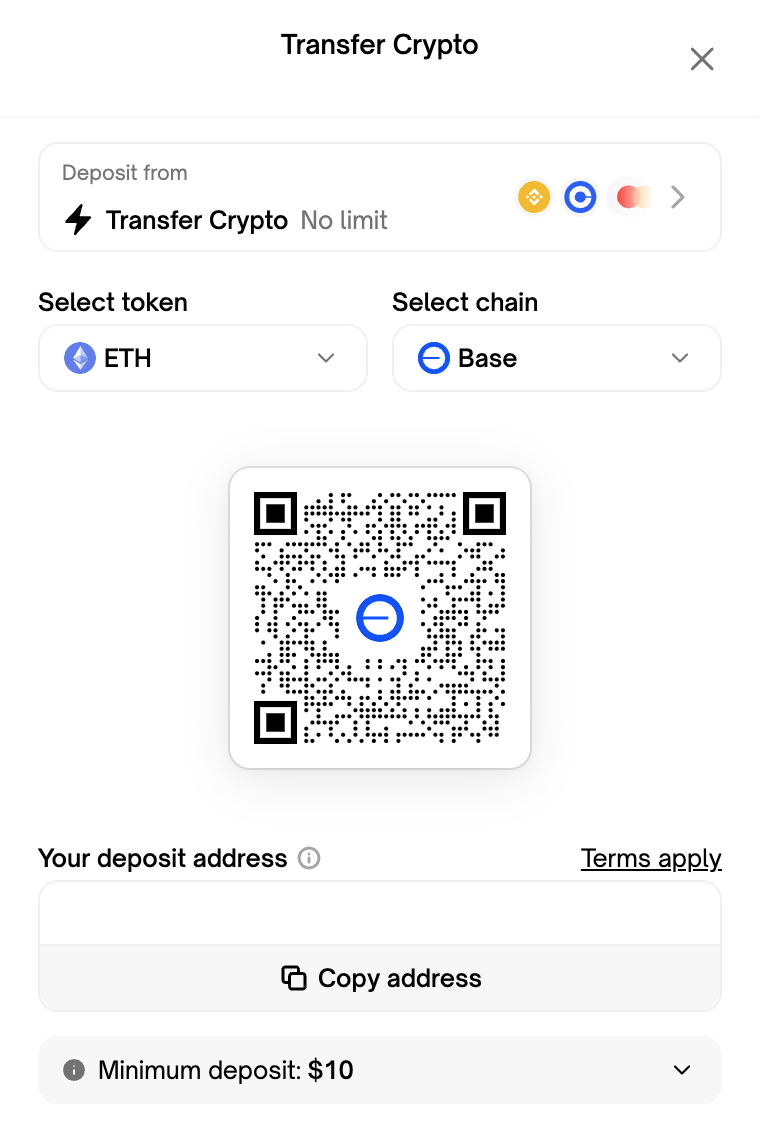
- Click on the Deposit button and select Transfer Crypto as a source option
- Select which supported token and chain your assets are on from the dropdown
- Depending on your combination, this may update the deposit address
- Only send supported token-chain combinations
- Sending non-supported tokens may cause an irrecoverable loss
- Scan the QR code or copy the deposit address and paste as the recipient in the withdrawal/transfer page of your exchange/wallet
- This is where you'll specify how much crypto you're transferring
- You must send more than the minimum deposit amount or the funds will not process
- Always ensure to double check the pasted address versus that is shown on the widget to protect against clickjacking attempts
- You can click on the collapsible section at the bottom of the widget for estimated price impact, slippage, delivery time, and our help guide
- Withdraw/transfer the tokens from your exchange/wallet and wait until they're reflected on the dApp
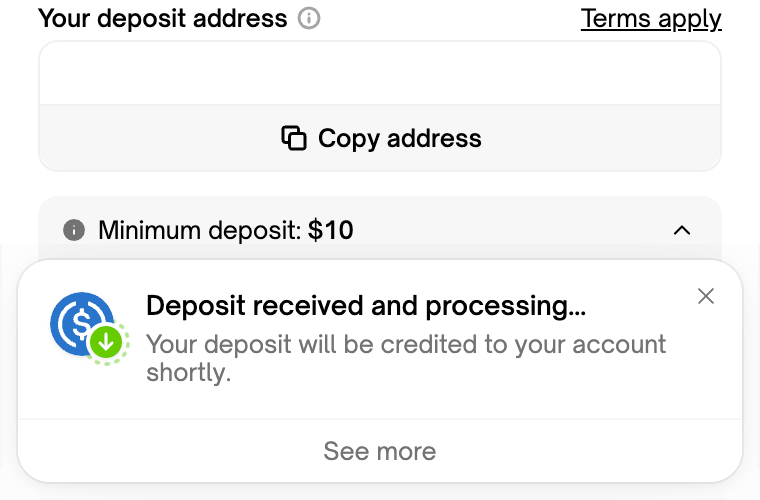
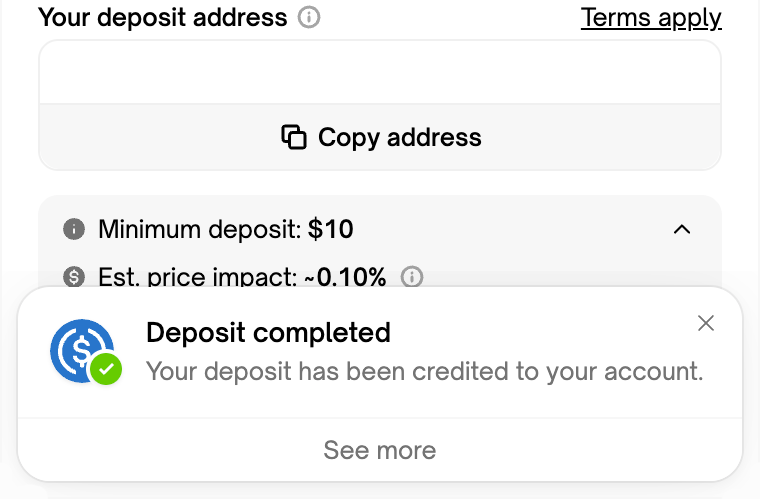
- You will receive notifications on the Fun widget as your withdraw/transfer processes and completes as shown below
What can I transfer?
Transfer Crypto is compatible with a range of supported tokens and chains:
| Ethereum | Polygon | Base | Arbitrum | Solana | |
|---|---|---|---|---|---|
| USDC | ✅ | ✅ | ✅ | ✅ | ✅ |
| USDC.e | ✅ | ||||
| USDT | ✅ | ✅ | ✅ | ✅ | |
| DAI | ✅ | ✅ | ✅ | ✅ | |
| ETH | ✅ | ✅ | ✅ | ||
| WETH | ✅ | ✅ | ✅ | ✅ | |
| MATIC | ✅ | ✅ | |||
| POL | ✅ | ✅ | |||
| SOL | ✅ | ||||
| CBBTC | ✅ | ✅ | |||
| ARB | ✅ |
Need help with your deposit?
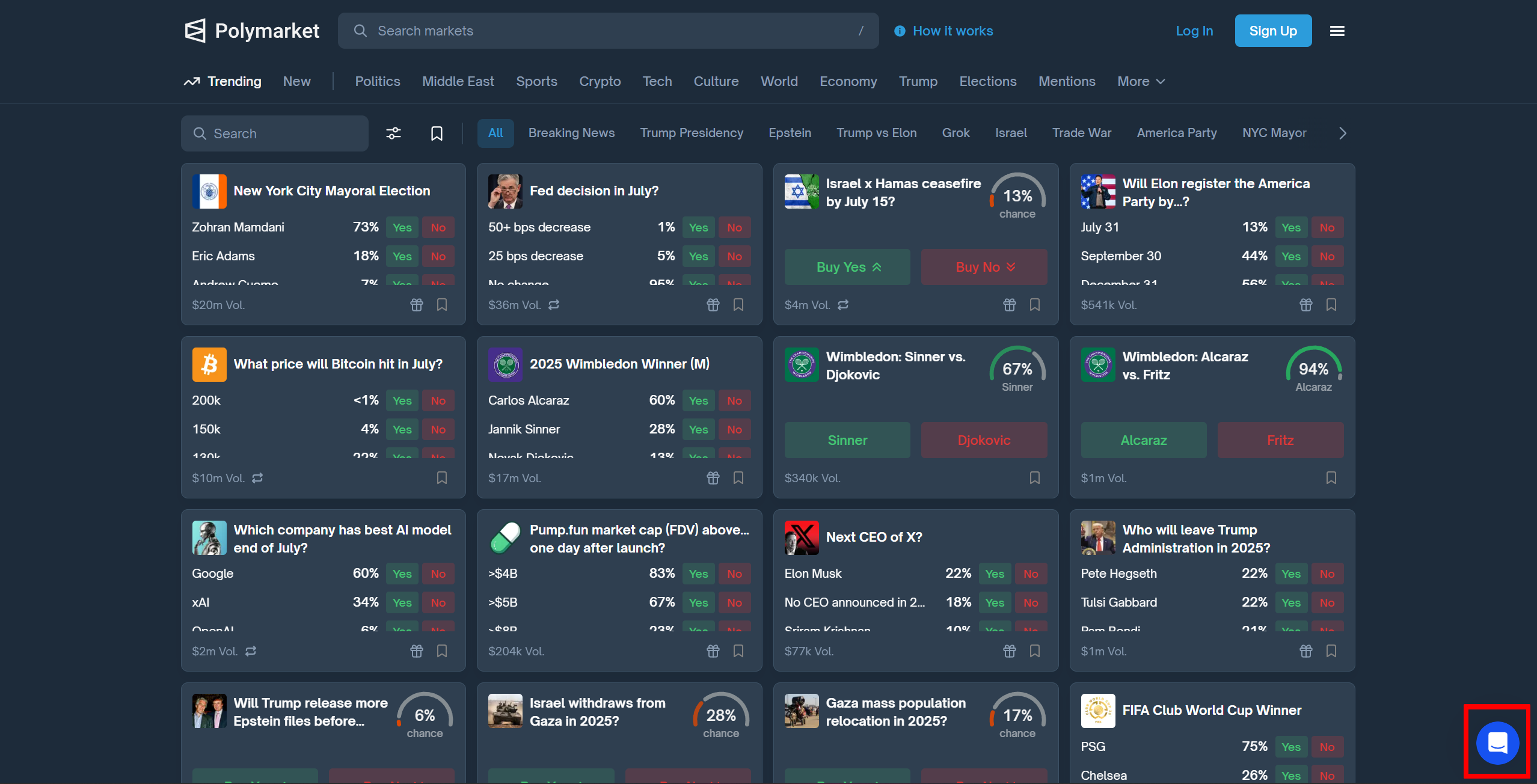
Please contact us using the live chat button on the bottom right on Polymarket.com** or email us on support@polymarket.com**
Does Polymarket Have Trading Limits?
URL: llms-txt#does-polymarket-have-trading-limits?
Source: https://docs.polymarket.com/polymarket-learn/trading/no-limits
By design, the Polymarket orderbook does not have trading size limits. It matches willing buyers and sellers of any amount.
However, there is no guarantee that it will be possible to transact a desired amount of shares without impacting the price significantly, or at all if there are no willing counterparties. Before trading in any market, especially in large size, it is valuable to look at the orderbook to understand depth of liquidity, ie how many buyers or sellers are in the market and their desired trade size and price.
Orders Overview
URL: llms-txt#orders-overview
Contents:
- Allowances
- Signature Types
- Validity Checks
Source: https://docs.polymarket.com/developers/CLOB/orders/orders
Detailed instructions for creating, placing, and managing orders using Polymarket's CLOB API.
All orders are expressed as limit orders (can be marketable). The underlying order primitive must be in the form expected and executable by the on-chain binary limit order protocol contract. Preparing such an order is quite involved (structuring, hashing, signing), thus Polymarket suggests using the open source typescript, python and golang libraries.
To place an order, allowances must be set by the funder address for the specified maker asset for the Exchange contract. When buying, this means the funder must have set a USDC allowance greater than or equal to the spending amount. When selling, the funder must have set an allowance for the conditional token that is greater than or equal to the selling amount. This allows the Exchange contract to execute settlement according to the signed order instructions created by a user and matched by the operator.
Polymarket’s CLOB supports 3 signature types. Orders must identify what signature type they use. The available typescript and python clients abstract the complexity of signing and preparing orders with the following signature types by allowing a funder address and signer type to be specified on initialization. The supported signature types are:
| Type | ID | Description | | ------------------ | -- | ------------------------------------------------------------------------------------------ | | EOA | 0 | EIP712 signature signed by an EOA | | POLY_PROXY | 1 | EIP712 signatures signed by a signer associated with funding Polymarket proxy wallet | | POLY_GNOSIS_SAFE | 2 | EIP712 signatures signed by a signer associated with funding Polymarket gnosis safe wallet |
Orders are continually monitored to make sure they remain valid. Specifically, this includes continually tracking underlying balances, allowances and on-chain order cancellations. Any maker that is caught intentionally abusing these checks (which are essentially real time) will be blacklisted.
Additionally, there are rails on order placement in a market. Specifically, you can only place orders that sum to less than or equal to your available balance for each market. For example if you have 500 USDC in your funding wallet, you can place one order to buy 1000 YES in marketA @ \$.50, then any additional buy orders to that market will be rejected since your entire balance is reserved for the first (and only) buy order. More explicitly the max size you can place for an order is:
$$ \text{maxOrderSize} = \text{underlyingAssetBalance} - \sum(\text{orderSize} - \text{orderFillAmount}) $$
How Are Markets Disputed?
URL: llms-txt#how-are-markets-disputed?
Contents:
- Outcomes
- Proposer wins
- Disputer wins
- Too Early
- Unknown/50-50
Source: https://docs.polymarket.com/polymarket-learn/markets/dispute
Anyone can dispute a proposed market resolution if they feel it was proposed in error.
Once a market is proposed for resolution it goes into a challenge period of 2 hours.
If no one challenges the proposal the resolution is deemed valid and the proposer receives their bond back plus the reward.
During the 2-hour challenge period, anyone may dispute the proposal on the UMA dapp by posting a challenge bond of the same amount as the proposer bond (usually \$750).
This begins the debate period of 24-48 hours (votes happen every other day and there will always be at least 24 hours for discussion). Anyone wishing to contribute evidence to the discussion can do so in the Uma Discord server in the #evidence-rationale and #voting-discussion channels.
After the debate period, Uma token holders vote (this process takes approximately 48 hours) and one of four outcomes happens:
Proposer receives their bond back plus half the disputer’s bond as a bounty. Disputer loses their bond.
Disputer receives their bond back plus half the proposer’s bond as a bounty. Proposer loses their bond.
This outcome is for proposals for which the underlying event has not yet happened. Eg the result of a sports match that is still ongoing. Disputer receives their bond back plus half the proposer’s bond as a bounty. Proposer loses their bond.
This (rarely used) outcome is for events where none of the other options are appropriate. In this case the market price resolves to 50 yes and 50 no. Disputer receives their bond back plus half the proposer’s bond as a bounty. Proposer loses their bond.
Is My Money Safe?
URL: llms-txt#is-my-money-safe?
Contents:
- Your keys = your funds
- Keep your private keys private.
- Our Commitment
Source: https://docs.polymarket.com/polymarket-learn/FAQ/is-my-money-safe
Yes. Polymarket is non-custodial, so you're in control of your funds.
Non-custodial, you’re in control
Polymarket recognizes the importance of a trustworthy environment for managing your funds. To ensure this, Polymarket uses non-custodial wallets, meaning we never take possession of your USDC. This approach gives you full control over your assets, providing protection against potential security threats like hacks, misuse, and unauthorized transactions.
Your keys = your funds
A private key acts like a highly secure password, essential for managing and moving your assets without restrictions. You can export your private key at any time, ensuring sole access to your funds. Learn how to export your private key here.
Keep your private keys private.
Do not share your private key with others. While Polymarket provides the infrastructure, the security of your assets depends on how securely you handle your private key and passwords. Losing your private key or passwords can result in losing access to your funds. It's crucial to store this information in a safe and secure environment.
Polymarket aims to give you peace of mind, knowing that your assets are safe and fully under your control at all times. We encourage you to take necessary precautions to secure your digital assets effectively. The ability to manage your private key means you are not reliant on Polymarket to secure your assets; you have the control to ensure your financial security.
Overview
URL: llms-txt#overview
Contents:
- Augmented Negative Risk
- Original Outcomes
- Placeholder Outcomes
- Explicit Other
Source: https://docs.polymarket.com/developers/neg-risk/overview
Certain events which meet the criteria of being "winner-take-all" may be deployed as "negative risk" events/markets. The Gamma API includes a boolean field on events, negRisk, which indicates whether the event is negative risk.
Negative risk allows for increased capital efficiency by relating all markets within events via a convert action. More explicitly, a NO share in any market can be converted into 1 YES share in all other markets. Converts can be exercised via the Negative Adapter. You can read more about negative risk here.
Augmented Negative Risk
There is a known issue with the negative risk architecture which is that the outcome universe must be complete before conversions are made or otherwise conversion will “cost” something. In most cases, the outcome universe can be made complete by deploying all the named outcomes and then an “other” option. But in some cases this is undesirable as new outcomes can come out of nowhere and you'd rather them be directly named versus grouped together in an “other”.
To fix this, some markets use a system of "augmented negative risk", where named outcomes, a collection of unnamed outcomes, and an other is deployed. When a new outcome needs to be added, an unnamed outcome can be clarified to be the new outcome via the bulletin board. This means the “other” in the case of augmented negative risk can effectively change definitions (outcomes can be taken out of it).
As such, trading should only happen on the named outcomes, and the other outcomes should be ignored until they are named or until resolution occurs. The Polymarket UI will not show unnamed outcomes.
If a market becomes resolvable and the correct outcome is not named (originally or via placeholder clarification), it should resolve to the “other” outcome. An event can be considered “augmented negative risk” when enableNegRisk is true AND negRiskAugmented is true.
The naming conventions are as follows:
Original Outcomes
- Outcome A
- Outcome B
- ...
Placeholder Outcomes
- Person A -> can be clarified to a named outcome
- Person B -> can be clarified to a named outcome
...
Other -> not meant to be traded as the definition of this changes as placeholder outcomes are clarified to named outcomes
How to Deposit
URL: llms-txt#how-to-deposit
Contents:
- Depositing funds on Polymarket
- About USDC and Polygon
- How to purchase and deposit USDC
- Deposit with crypto exchanges
- Deposit with Visa or Mastercard
- Depositing on Etheruem and Polygon
Source: https://docs.polymarket.com/polymarket-learn/get-started/how-to-deposit
How to add cash to your balance on Polymarket.
Depositing funds on Polymarket
This guide will walk you through the deposit process for Polymarket, covering popular methods and step-by-step instructions for buying and depositing USDC.
Need Help? For assistance, reach out to us on Discord.
About USDC and Polygon
Polymarket uses USDC (USD Coin), a federally regulated "stable coin" backed by the US dollar.
Polymarket utilizes USDC on the Polygon network for transactions. By using USDC on Polygon, Polymarket ensures fast and reliable transactions, enhancing the overall user experience.
How to purchase and deposit USDC
</p> <p>USDC is available on most major exchanges, including Coinbase.</p> <p>If your exchange supports sending or withdrawing to Polygon, we recommend this option for faster and fee-free transactions. Alternatively, you can deposit USDC via the Ethereum network.</p> <h3>Deposit with crypto exchanges</h3> <p>For detailed instructions, check out our guides for purchasing and depositing USDC using popular exchanges:</p> <ul> <li><a href="/ka-cn/vibe-coding-cn/src/<a href="/ka-cn/vibe-coding-cn/commit/2556dd07a953f463b2cc9ecb6592a7452efaeb2c"><code>2556dd07a9</code></a>/skills/polymarket/deposits/coinbase">Deposit from Coinbase</a> (recommended)</li> </ul> <p><Note> If you decide to use an exchange to purchase and send (deposit) USDC to your Polygon deposit address, please ensure you're sending on Polygon Network. If you're unsure, please reach out to support on <a href="https://discord.com/invite/polymarket">Discord</a>. </Note></p> <h3>Deposit with Visa or Mastercard</h3> <p>MoonPay enables you to buy USDC (on Polygon) using your Visa, Mastercard, and select bank cards. Please be aware that payment options and transaction limits may vary depending on your region. <a href="/ka-cn/vibe-coding-cn/src/<a href="/ka-cn/vibe-coding-cn/commit/2556dd07a953f463b2cc9ecb6592a7452efaeb2c"><code>2556dd07a9</code></a>/skills/polymarket/deposits/moonpay">How to use MoonPay</a>.</p> <h3>Depositing on Etheruem and Polygon</h3> <p>You can send USDC with your wallet on Ethereum or USDC.e on Polygon to your respective deposit addresses found on the Deposit page. <a href="/ka-cn/vibe-coding-cn/src/<a href="/ka-cn/vibe-coding-cn/commit/2556dd07a953f463b2cc9ecb6592a7452efaeb2c"><code>2556dd07a9</code></a>/skills/polymarket/deposits/usdc-on-eth">Learn more</a>.</p> <hr> <h2>Deposit with Coinbase</h2> <p><strong>URL:</strong> llms-txt#deposit-with-coinbase</p> <p><strong>Contents:</strong></p> <ul> <li>Buying USDC</li> <li>Transfering to Polymarket</li> </ul> <p>Source: <a href="https://docs.polymarket.com/polymarket-learn/deposits/coinbase">https://docs.polymarket.com/polymarket-learn/deposits/coinbase</a></p> <p>How to buy and deposit USDC to your Polymarket account using Coinbase.</p> <p><strong>How to buy and deposit USDC to your Polymarket account using Coinbase.</strong></p> <p>Depositing directly to Polymarket from Coinbase is simple and easy. If you need help creating a Coinbase account, see their <a href="https://help.coinbase.com/en/coinbase/getting-started">guide on Coinbase.com</a></p> <p><iframe width="560" height="315" src="https://www.youtube.com/embed/IlDLdqT8RjU?si=v8iHe20FNqob_Cgr" title="YouTube video player" frameborder="0" allow="accelerometer; autoplay; clipboard-write; encrypted-media; gyroscope; picture-in-picture" allowfullscreen /></p> <p><Steps> <Steps.Step></p> <pre><code>Login to &lt;ExternalLink href=&quot;https://coinbase.com&quot;&gt;Coinbase&lt;/ExternalLink&gt;, and click &quot;**Transfer**&quot; </code></pre> <p></Steps.Step></p> <p><Steps.Step></p> <pre><code>Select &quot;Deposit Cash&quot; &gt; &quot;Deposit USDC&quot; </code></pre> <p></Steps.Step></p> <p><Steps.Step></p> <pre><code>Enter the amount you wish to deposit, and connect a payment method under &quot;**Transfer from**&quot; </code></pre> <p></Steps.Step></p> <p><Steps.Step></p> <pre><code>Click **Preview**, review the Order Preview, then click **Deposit cash now**. </code></pre> <p></Steps.Step></p> <p><Steps.Step></p> <pre><code>You'll see a **“Your deposit is pending”** screen. You'll receive a confirmation email from Coinbase when your USDC purchase is successful. </code></pre> <p></Steps.Step> </Steps></p> <p>If something went wrong along the way, we recommend reaching to Coinbase support.</p> <h2>Transfering to Polymarket</h2> <p><VideoPlayer src="https://www.youtube.com/embed/O6HaKdE9d80?si=NwuCGTzcilUhVQwg" /></p> <p><Steps> <Steps.Step></p> <pre><code>Copy your Polymarket USDC (Polygon) wallet address, as shown in your &lt;ExternalLink href=&quot;https://polymarket.com/wallet&quot;&gt;Polymarket wallet&lt;/ExternalLink&gt;. </code></pre> <p><em>Ensure you have copied your address for the Polygon network, as depicted below</em></p> <p><Frame></p> <pre><code> &lt;ExternalLink href=&quot;https://polymarket.com/wallet&quot;&gt; &lt;img className=&quot;hidden h-32 dark:block&quot; src=&quot;https://polymarket-upload.s3.us-east-2.amazonaws.com/PolygonAddress-dark.png&quot; /&gt; &lt;/ExternalLink&gt; &lt;/Frame&gt; </code></pre> <p></Steps.Step></p> <p><Steps.Step></p> <pre><code>Login to &lt;ExternalLink href=&quot;https://coinbase.com&quot;&gt;Coinbase&lt;/ExternalLink&gt;, and select &quot;Transfer&quot; &gt; &quot;Send Crypto&quot; </code></pre> <p></Steps.Step></p> <p><Steps.Step></p> <pre><code>Select USDC as the sending asset (note: you may have to search for it), and enter the amount you wish to send (deposit) to Polymarket. </code></pre> <p></Steps.Step></p> <p><Steps.Step></p> <pre><code>Under **To**, enter your Polymarket deposit address you copied from your &lt;ExternalLink href=&quot;https://polymarket.com/wallet&quot;&gt;Polymarket wallet&lt;/ExternalLink&gt;. </code></pre> <p></Steps.Step></p> <p><Steps.Step></p> <pre><code>Under **Network**, select Polygon. </code></pre> <p></Steps.Step></p> <p><Steps.Step></p> <pre><code>Click **Send Now**. Your deposit will be available to trade on Polymarket in a few minutes! </code></pre> <p></Steps.Step></p> <p><Steps.Step></p> <pre><code>Back on the Polymarket &lt;ExternalLink href=&quot;https://polymarket.com/wallet&quot;&gt;deposit page&lt;/ExternalLink&gt;, click **&quot;Confirm pending deposit&quot;**. </code></pre> <p></Steps.Step> </Steps></p> <hr> <h2>How To Use Embeds</h2> <p><strong>URL:</strong> llms-txt#how-to-use-embeds</p> <p><strong>Contents:</strong></p> <ul> <li>Web</li> <li>Twitter / X</li> <li>Substack</li> </ul> <p>Source: <a href="https://docs.polymarket.com/polymarket-learn/FAQ/embeds">https://docs.polymarket.com/polymarket-learn/FAQ/embeds</a></p> <p>Adding market embeds to your Substack or website.</p> <p>Polymarket allows you to embed a live-updating widget displaying the latest odds for markets in many places around the web.</p> <p>Navigate to the individual market you want to embed and click the embed (&lt; &gt;) link.</p> <p>Select light or dark mode, and copy the auto-generated code Paste the code into your code editor or CMS and publish as normal</p> <p>Navigate to any Polymarket market Copy the URL from your browser Paste the URL into the compose window</p> <p><Note>The embeds feature currently supports single markets only (eg “USA to Win Most Gold Medals”, not “Most Gold Medals at Paris Olympics’) </Note></p> <p>To embed a market, navigate on Polymarket.com to the single market you want to embed and click “copy link.”</p> <p>Navigate to your Substack editor and paste the link directly into the body of your newsletter. The editor will recognize the market and convert it to a widget that automatically refreshes with the latest odds.</p> <hr> <h2>Using the Order Book</h2> <p><strong>URL:</strong> llms-txt#using-the-order-book</p> <p><strong>Contents:</strong></p> <ul> <li>Viewing the Order Book</li> <li>Managing open orders</li> <li>Canceling open orders</li> </ul> <p>Source: <a href="https://docs.polymarket.com/polymarket-learn/trading/using-the-orderbook">https://docs.polymarket.com/polymarket-learn/trading/using-the-orderbook</a></p> <p>Understanding the Order Book will help you become an advanced trader.</p> <p>In the Getting Started tutorial on <a href="/ka-cn/vibe-coding-cn/src/<a href="/ka-cn/vibe-coding-cn/commit/2556dd07a953f463b2cc9ecb6592a7452efaeb2c"><code>2556dd07a9</code></a>/skills/polymarket/get-started/making-your-first-trade">Making your First Trade</a>, we learned about market orders.</p> <p>In a market order, your trade executes instantly at the current market price.</p> <p>But what if you think the market price is too high and want to set a specific price that you would be willing to accept? These are called <a href="/ka-cn/vibe-coding-cn/src/<a href="/ka-cn/vibe-coding-cn/commit/2556dd07a953f463b2cc9ecb6592a7452efaeb2c"><code>2556dd07a9</code></a>/skills/polymarket/trading/limit-orders">Limit Orders</a>.</p> <h2>Viewing the Order Book</h2> <p>The order book is a list of every open order to buy or sell shares in a particular market.</p> <p><Frame> <img className="block w-full h-auto dark:hidden" style={{ maxWidth: '100%', height: 'auto' }} noZoom src="https://polymarket-upload.s3.us-east-2.amazonaws.com/Orderbook-light.png" /> </Frame></p> <p>In this market, <strong>“Presidential Election Winner 2024”</strong>, we are viewing the order book for Trump <span style={{ backgroundColor: '#E5F8E6', color: '#27AE60', padding: '2px 4px', borderRadius: '4px' }}>Yes</span> shares.</p> <p>The green side represents the <span style={{ backgroundColor: '#E5F8E6', color: '#27AE60', padding: '2px 4px', borderRadius: '4px' }}>Bids</span>: the highest price traders are willing to pay to buy Trump <span style={{ backgroundColor: '#E5F8E6', color: '#27AE60', padding: '2px 4px', borderRadius: '4px' }}>Yes</span> shares.</p> <p>The red side represents the <span style={{ backgroundColor: '#FEEEE5', color: '#F55A00', padding: '2px 4px', borderRadius: '4px' }}>Asks</span>: the lowest price traders are willing to accept to sell Trump <span style={{ backgroundColor: '#E5F8E6', color: '#27AE60', padding: '2px 4px', borderRadius: '4px' }}>Yes</span> shares.</p> <p><Tip> Notice that there is a 0.3c gap between the highest bid and the lowest ask price. This is referred to as the spread. </Tip></p> <h2>Managing open orders</h2> <p>When you have an open order, you'll find it displayed just below the Order Book on the market's page.</p> <p>If you have open orders across multiple markets, you can easily manage and monitor them all from the <a href="https://polymarket.com/portfolio?tab=Open+orders">Portfolio page</a>.</p> <h2>Canceling open orders</h2> <p>When you have an open order, you'll find it displayed just below the Order Book on the market's page.</p> <p>To cancel the order, you can simply click the red <strong>x</strong> button alongside the order.</p> <p><iframe width="560" height="315" src="https://www.youtube.com/embed/KuA2UdUfZls?si=RUpuzqB9lbBB2pl9" title="YouTube video player" frameborder="0" allow="accelerometer; autoplay; clipboard-write; encrypted-media; gyroscope; picture-in-picture" allowfullscreen /></p> <p>If you have open orders across multiple markets, you can easily manage and monitor them all from the <a href="https://polymarket.com/portfolio?tab=Open+orders">Portfolio page</a>.</p> <p>Nice! You can officially call yourself an advanced trader.</p> <p><Tip> If some of this still isn’t making sense, feel free to reach out to us on <a href="https://discord.com/invite/polymarket">Discord</a>. We’re happy to help get you up to speed. </Tip></p> <hr> <h2>Liquidity Rewards</h2> <p><strong>URL:</strong> llms-txt#liquidity-rewards</p> <p><strong>Contents:</strong></p> <ul> <li>Overview</li> <li>Seeing Rewards in the Order Book <ul> <li>Viewing Rewards</li> <li>Earning Rewards</li> </ul></li> <li>Learn more</li> </ul> <p>Source: <a href="https://docs.polymarket.com/polymarket-learn/trading/liquidity-rewards">https://docs.polymarket.com/polymarket-learn/trading/liquidity-rewards</a></p> <p>Learn how to earn rewards merely by placing trades on Polymarket</p> <p>With Polymarket's Liquidity Rewards Program, you can earn money by placing limit orders that help keep the market active and balanced.</p> <ul> <li><p>The closer your orders are to the market's average price, the more you earn.</p></li> <li><p>The reward amount depends on how helpful your orders are in terms of size and pricing compared to others.</p></li> <li><p>The more competitive your limit orders, the more you can make.</p></li> <li><p>You get paid daily based on how much your orders add to the market, and can use our <a href="https://polymarket.com/rewards">Rewards page</a> to check your current earnings for the day, which markets have rewards in place, as well as how much.</p></li> <li><p>The minimum reward payout is \$1; amounts below this will not be paid.</p></li> </ul> <p><Frame> <img src="https://mintcdn.com/polymarket-<a href="/ka-cn/vibe-coding-cn/commit/292d1b1b"><code>292d1b1b</code></a>/YUHnSq4JdekVofRY/polymarket-learn/media/liquidity-rewards-earnings.png?fit=max&auto=format&n=YUHnSq4JdekVofRY&q=85&s=<a href="/ka-cn/vibe-coding-cn/commit/ebcb693900b79d2c23356b0f087b5941"><code>ebcb693900</code></a>" data-og-width="2000" width="2000" data-og-height="767" height="767" data-path="polymarket-learn/media/liquidity-rewards-earnings.png" data-optimize="true" data-opv="3" srcset="https://mintcdn.com/polymarket-<a href="/ka-cn/vibe-coding-cn/commit/292d1b1b"><code>292d1b1b</code></a>/YUHnSq4JdekVofRY/polymarket-learn/media/liquidity-rewards-earnings.png?w=280&fit=max&auto=format&n=YUHnSq4JdekVofRY&q=85&s=<a href="/ka-cn/vibe-coding-cn/commit/9db6070985119ba1a50a442567f0aa60"><code>9db6070985</code></a> 280w, https://mintcdn.com/polymarket-<a href="/ka-cn/vibe-coding-cn/commit/292d1b1b"><code>292d1b1b</code></a>/YUHnSq4JdekVofRY/polymarket-learn/media/liquidity-rewards-earnings.png?w=560&fit=max&auto=format&n=YUHnSq4JdekVofRY&q=85&s=<a href="/ka-cn/vibe-coding-cn/commit/0751971d6bdbf37e5b6199c75667b7df"><code>0751971d6b</code></a> 560w, https://mintcdn.com/polymarket-<a href="/ka-cn/vibe-coding-cn/commit/292d1b1b"><code>292d1b1b</code></a>/YUHnSq4JdekVofRY/polymarket-learn/media/liquidity-rewards-earnings.png?w=840&fit=max&auto=format&n=YUHnSq4JdekVofRY&q=85&s=<a href="/ka-cn/vibe-coding-cn/commit/f202b8060f23a9dfe979a984f6ff7dc2"><code>f202b8060f</code></a> 840w, https://mintcdn.com/polymarket-<a href="/ka-cn/vibe-coding-cn/commit/292d1b1b"><code>292d1b1b</code></a>/YUHnSq4JdekVofRY/polymarket-learn/media/liquidity-rewards-earnings.png?w=1100&fit=max&auto=format&n=YUHnSq4JdekVofRY&q=85&s=<a href="/ka-cn/vibe-coding-cn/commit/85fca21bad31dda8a833de3c0ec3ffbf"><code>85fca21bad</code></a> 1100w, https://mintcdn.com/polymarket-<a href="/ka-cn/vibe-coding-cn/commit/292d1b1b"><code>292d1b1b</code></a>/YUHnSq4JdekVofRY/polymarket-learn/media/liquidity-rewards-earnings.png?w=1650&fit=max&auto=format&n=YUHnSq4JdekVofRY&q=85&s=<a href="/ka-cn/vibe-coding-cn/commit/a1ac5afea3e04a8223d135159792cfbc"><code>a1ac5afea3</code></a> 1650w, https://mintcdn.com/polymarket-<a href="/ka-cn/vibe-coding-cn/commit/292d1b1b"><code>292d1b1b</code></a>/YUHnSq4JdekVofRY/polymarket-learn/media/liquidity-rewards-earnings.png?w=2500&fit=max&auto=format&n=YUHnSq4JdekVofRY&q=85&s=<a href="/ka-cn/vibe-coding-cn/commit/85b91f7804be348fcea35ccc7981ae6e"><code>85b91f7804</code></a> 2500w" /> </Frame></p> <p>Simply put, the more you help the market by placing good orders, the more rewards you earn!</p> <h2>Seeing Rewards in the Order Book</h2> <p>The total rewards, max spread, and minimum shares required to earn rewards vary by market. You can view the rewards for a given market in its Order Book.</p> <ul> <li><p>On the Polymarket order book, you can hover over the Rewards text to see the amount of rewards available in total on each market.</p></li> <li><p>The blue highlighted lines correspond to the max spread — meaning the farthest distance your limit order can be from the midpoint of the market to earn rewards.</p></li> <li><p>In the example below, because the max spread is 3c, every order within 3c of the midpoint is eligible for rewards. If the midpoint is &lt; \$0.10, you need to have orders on both sides to qualify.</p></li> </ul> <p><Frame> <img src="https://mintcdn.com/polymarket-<a href="/ka-cn/vibe-coding-cn/commit/292d1b1b"><code>292d1b1b</code></a>/YUHnSq4JdekVofRY/polymarket-learn/media/liquidity-rewards-market.png?fit=max&auto=format&n=YUHnSq4JdekVofRY&q=85&s=<a href="/ka-cn/vibe-coding-cn/commit/12202bc1af31cdc1935ee816ca00f308"><code>12202bc1af</code></a>" data-og-width="2000" width="2000" data-og-height="1367" height="1367" data-path="polymarket-learn/media/liquidity-rewards-market.png" data-optimize="true" data-opv="3" srcset="https://mintcdn.com/polymarket-<a href="/ka-cn/vibe-coding-cn/commit/292d1b1b"><code>292d1b1b</code></a>/YUHnSq4JdekVofRY/polymarket-learn/media/liquidity-rewards-market.png?w=280&fit=max&auto=format&n=YUHnSq4JdekVofRY&q=85&s=<a href="/ka-cn/vibe-coding-cn/commit/b065f81168d3d5f9541857471a041427"><code>b065f81168</code></a> 280w, https://mintcdn.com/polymarket-<a href="/ka-cn/vibe-coding-cn/commit/292d1b1b"><code>292d1b1b</code></a>/YUHnSq4JdekVofRY/polymarket-learn/media/liquidity-rewards-market.png?w=560&fit=max&auto=format&n=YUHnSq4JdekVofRY&q=85&s=<a href="/ka-cn/vibe-coding-cn/commit/35755273beea782b1bb20c11288afb74"><code>35755273be</code></a> 560w, https://mintcdn.com/polymarket-<a href="/ka-cn/vibe-coding-cn/commit/292d1b1b"><code>292d1b1b</code></a>/YUHnSq4JdekVofRY/polymarket-learn/media/liquidity-rewards-market.png?w=840&fit=max&auto=format&n=YUHnSq4JdekVofRY&q=85&s=<a href="/ka-cn/vibe-coding-cn/commit/75f37d73214985f85bdb5c98351a4654"><code>75f37d7321</code></a> 840w, https://mintcdn.com/polymarket-<a href="/ka-cn/vibe-coding-cn/commit/292d1b1b"><code>292d1b1b</code></a>/YUHnSq4JdekVofRY/polymarket-learn/media/liquidity-rewards-market.png?w=1100&fit=max&auto=format&n=YUHnSq4JdekVofRY&q=85&s=<a href="/ka-cn/vibe-coding-cn/commit/7b14257457d28ae5209200328093439d"><code>7b14257457</code></a> 1100w, https://mintcdn.com/polymarket-<a href="/ka-cn/vibe-coding-cn/commit/292d1b1b"><code>292d1b1b</code></a>/YUHnSq4JdekVofRY/polymarket-learn/media/liquidity-rewards-market.png?w=1650&fit=max&auto=format&n=YUHnSq4JdekVofRY&q=85&s=<a href="/ka-cn/vibe-coding-cn/commit/58d5ff89f7f9efe900bdb9602de7b9b1"><code>58d5ff89f7</code></a> 1650w, https://mintcdn.com/polymarket-<a href="/ka-cn/vibe-coding-cn/commit/292d1b1b"><code>292d1b1b</code></a>/YUHnSq4JdekVofRY/polymarket-learn/media/liquidity-rewards-market.png?w=2500&fit=max&auto=format&n=YUHnSq4JdekVofRY&q=85&s=<a href="/ka-cn/vibe-coding-cn/commit/fa5269ee4ff8c40974c69024a89c2e90"><code>fa5269ee4f</code></a> 2500w" /> </Frame></p> <p>When your orders are earning rewards you’ll see a blue highlight around the clock icon, as shown below:</p> <p><Frame> <img src="https://mintcdn.com/polymarket-<a href="/ka-cn/vibe-coding-cn/commit/292d1b1b"><code>292d1b1b</code></a>/YUHnSq4JdekVofRY/polymarket-learn/media/earning-liquidity-rewards.png?fit=max&auto=format&n=YUHnSq4JdekVofRY&q=85&s=<a href="/ka-cn/vibe-coding-cn/commit/1a0c05e93f37c95c66b4ad67ff66c320"><code>1a0c05e93f</code></a>" data-og-width="2000" width="2000" data-og-height="1631" height="1631" data-path="polymarket-learn/media/earning-liquidity-rewards.png" data-optimize="true" data-opv="3" srcset="https://mintcdn.com/polymarket-<a href="/ka-cn/vibe-coding-cn/commit/292d1b1b"><code>292d1b1b</code></a>/YUHnSq4JdekVofRY/polymarket-learn/media/earning-liquidity-rewards.png?w=280&fit=max&auto=format&n=YUHnSq4JdekVofRY&q=85&s=<a href="/ka-cn/vibe-coding-cn/commit/f8423304aac914fefae7361fc2d2c17e"><code>f8423304aa</code></a> 280w, https://mintcdn.com/polymarket-<a href="/ka-cn/vibe-coding-cn/commit/292d1b1b"><code>292d1b1b</code></a>/YUHnSq4JdekVofRY/polymarket-learn/media/earning-liquidity-rewards.png?w=560&fit=max&auto=format&n=YUHnSq4JdekVofRY&q=85&s=<a href="/ka-cn/vibe-coding-cn/commit/69ee175aab44d11b54ca22e02769c7e7"><code>69ee175aab</code></a> 560w, https://mintcdn.com/polymarket-<a href="/ka-cn/vibe-coding-cn/commit/292d1b1b"><code>292d1b1b</code></a>/YUHnSq4JdekVofRY/polymarket-learn/media/earning-liquidity-rewards.png?w=840&fit=max&auto=format&n=YUHnSq4JdekVofRY&q=85&s=<a href="/ka-cn/vibe-coding-cn/commit/53a591eb0724fcc6d1bc60ff57d54a4c"><code>53a591eb07</code></a> 840w, https://mintcdn.com/polymarket-<a href="/ka-cn/vibe-coding-cn/commit/292d1b1b"><code>292d1b1b</code></a>/YUHnSq4JdekVofRY/polymarket-learn/media/earning-liquidity-rewards.png?w=1100&fit=max&auto=format&n=YUHnSq4JdekVofRY&q=85&s=<a href="/ka-cn/vibe-coding-cn/commit/c1360cc0a9aadafee148df76e446dc39"><code>c1360cc0a9</code></a> 1100w, https://mintcdn.com/polymarket-<a href="/ka-cn/vibe-coding-cn/commit/292d1b1b"><code>292d1b1b</code></a>/YUHnSq4JdekVofRY/polymarket-learn/media/earning-liquidity-rewards.png?w=1650&fit=max&auto=format&n=YUHnSq4JdekVofRY&q=85&s=<a href="/ka-cn/vibe-coding-cn/commit/8c078f355b61a3d8bd09a62ff246fbad"><code>8c078f355b</code></a> 1650w, https://mintcdn.com/polymarket-<a href="/ka-cn/vibe-coding-cn/commit/292d1b1b"><code>292d1b1b</code></a>/YUHnSq4JdekVofRY/polymarket-learn/media/earning-liquidity-rewards.png?w=2500&fit=max&auto=format&n=YUHnSq4JdekVofRY&q=85&s=<a href="/ka-cn/vibe-coding-cn/commit/4cdcf0dc79ea6e6e28dcce1cbf08657e"><code>4cdcf0dc79</code></a> 2500w" /> </Frame></p> <p>Rewards are paid out automatically every day at ~midnight UTC. Your history on your portfolio page will reflect rewards paid to your address.</p> <p>To read more about the specific calculations and formulas that determine rewards, visit our <a href="/ka-cn/vibe-coding-cn/src/<a href="/ka-cn/vibe-coding-cn/commit/2556dd07a953f463b2cc9ecb6592a7452efaeb2c"><code>2556dd07a9</code></a>/skills/polymarket/references/developers/rewards/overview">Rewards Documentation</a>.</p> <hr> <h2>Large Cross Chain Deposits</h2> <p><strong>URL:</strong> llms-txt#large-cross-chain-deposits</p> <p><strong>Contents:</strong></p> <ul> <li>Recommended Bridges</li> <li>Important Notes</li> </ul> <p>Source: <a href="https://docs.polymarket.com/polymarket-learn/deposits/large-cross-chain-deposits">https://docs.polymarket.com/polymarket-learn/deposits/large-cross-chain-deposits</a></p> <p><strong>For deposits over \$50,000 we recommended to use bridges and ensure minimal fee's (slippage).</strong></p> <h2>Recommended Bridges</h2> <ul> <li><a href="https://app.debridge.finance/?inputChain=1&amp;outputChain=137&amp;inputCurrency=0xa0b86991c6218b36c1d19d4a2e9eb0ce3606eb48&amp;outputCurrency=0x3c499c542cef5e3811e1192ce70d8cc03d5c3359&amp;dlnMode=simple">DeBridge</a></li> <li><a href="https://app.across.to/bridge?">Across</a></li> <li><a href="https://portalbridge.com/">Portal</a></li> </ul> <p>For large deposits (&gt;\$50,000) originating from a chain other than Polygon, we recommend using one of the aforementioned bridges. Ensure you bridge to your Polymarket USDC (Polygon) <a href="https://polymarket.com/wallet">deposit address</a> (screenshot below). Please be mindful of potential slippage during the transaction.</p> <p><Warning> Polymarket is not affiliated with, responsible for, or makes any guarantees regarding any third-party bridge. Users are advised to review the Terms of Use or other relevant documentation for third-party bridges. </Warning></p> <p>You can deposit USDC or USDC.e to your Polymarket Polygon wallet.</p> <p>If you deposit USDC (native), you will be prompted to &quot;activate funds,&quot; which will swap this to USDC.e via the lowest fee Uniswap pool, ensuring slippage of less than 10 basis points (bps).</p> <p>If you encounter any issues with the deposit process, please reach out to us on Discord for assistance.</p> <hr> <h2>Does Polymarket Have a Token?</h2> <p><strong>URL:</strong> llms-txt#does-polymarket-have-a-token?</p> <p>Source: <a href="https://docs.polymarket.com/polymarket-learn/FAQ/wen-token">https://docs.polymarket.com/polymarket-learn/FAQ/wen-token</a></p> <p><strong>Polymarket does not have a token.</strong></p> <p>All trading and liquidity rewards are in USDC, a USD-pegged stablecoin.</p> <p>Polymarket has not announced plans for any airdrop or token generation event. Be wary of scams claiming airdrops, giveaways, etc.</p> <p>If in doubt, refer to official Polymarket communication channels:</p> <ul> <li>Web: <a href="https://polymarket.com">https://polymarket.com</a></li> <li>Twitter / X: <a href="https://x.com/polymarket">https://x.com/polymarket</a></li> <li>Discord: <a href="https://discord.gg/polymarket">https://discord.gg/polymarket</a></li> </ul> <hr> <h2>Why Crypto?</h2> <p><strong>URL:</strong> llms-txt#why-crypto?</p> <p><strong>Contents:</strong></p> <ul> <li>Why USDC? <ul> <li>Stable Value</li> <li>Regulated Reserves</li> <li>Transparency</li> <li>Global Reach</li> </ul></li> </ul> <p>Source: <a href="https://docs.polymarket.com/polymarket-learn/FAQ/why-do-i-need-crypto">https://docs.polymarket.com/polymarket-learn/FAQ/why-do-i-need-crypto</a></p> <p>Why Polymarket uses crypto and blockchain technology to create the world’s largest Prediction market.</p> <p>Polymarket operates on Polygon, a proof-of-stake layer two blockchain built on <a href="https://ethereum.org">Ethereum</a>. All transactions are denominated in USDC, a US-dollar pegged stablecoin.</p> <p>This architecture offers several advantages over traditional prediction markets:</p> <p>Polymarket denominates trades in USDC, which is pegged 1:1 to the US Dollar. This shields you from the volatility associated with other cryptocurrencies and offers a stable medium for trading.</p> <h3>Regulated Reserves</h3> <p>USDC operates in adherence to regulatory standards and is backed by reserved assets.</p> <p>Blockchain technology facilitates transparency, as all transactions are recorded publicly.</p> <p>Research has shown that wide availability of prediction markets increases their accuracy. Using decentralized blockchain technology removes the need for a central authority in trading, which fosters fairness and open participation around the globe.</p> <hr> <h2>How Are Markets Clarified?</h2> <p><strong>URL:</strong> llms-txt#how-are-markets-clarified?</p> <p><strong>Contents:</strong></p> <ul> <li>Overview</li> <li>Clarifications</li> </ul> <p>Source: <a href="https://docs.polymarket.com/polymarket-learn/markets/how-are-markets-clarified">https://docs.polymarket.com/polymarket-learn/markets/how-are-markets-clarified</a></p> <p>How are markets on Polymarket clarified?</p> <ul> <li><p>Markets are resolved according to the rules set forth on the market page.</p></li> <li><p>The rules specify the resolution source, the market end date, and they outline how the market should resolve in various edge-cases.</p></li> <li><p>The market title describes the market, but the rules define how it should be resolved.</p></li> </ul> <p><Important>It is important to read the rules before trading in a market. </Important></p> <p><Frame> <img src="https://mintcdn.com/polymarket-<a href="/ka-cn/vibe-coding-cn/commit/292d1b1b"><code>292d1b1b</code></a>/YUHnSq4JdekVofRY/polymarket-learn/markets/market-rules.png?fit=max&auto=format&n=YUHnSq4JdekVofRY&q=85&s=<a href="/ka-cn/vibe-coding-cn/commit/22ee2dab424287bd8ffe4ee8017dff4e"><code>22ee2dab42</code></a>" data-og-width="1684" width="1684" data-og-height="1278" height="1278" data-path="polymarket-learn/markets/market-rules.png" data-optimize="true" data-opv="3" srcset="https://mintcdn.com/polymarket-<a href="/ka-cn/vibe-coding-cn/commit/292d1b1b"><code>292d1b1b</code></a>/YUHnSq4JdekVofRY/polymarket-learn/markets/market-rules.png?w=280&fit=max&auto=format&n=YUHnSq4JdekVofRY&q=85&s=<a href="/ka-cn/vibe-coding-cn/commit/a18e693ed0ef40b937a20c2f016b9285"><code>a18e693ed0</code></a> 280w, https://mintcdn.com/polymarket-<a href="/ka-cn/vibe-coding-cn/commit/292d1b1b"><code>292d1b1b</code></a>/YUHnSq4JdekVofRY/polymarket-learn/markets/market-rules.png?w=560&fit=max&auto=format&n=YUHnSq4JdekVofRY&q=85&s=<a href="/ka-cn/vibe-coding-cn/commit/55f60bb6f0fc6e73dbc79f4ddb89a48b"><code>55f60bb6f0</code></a> 560w, https://mintcdn.com/polymarket-<a href="/ka-cn/vibe-coding-cn/commit/292d1b1b"><code>292d1b1b</code></a>/YUHnSq4JdekVofRY/polymarket-learn/markets/market-rules.png?w=840&fit=max&auto=format&n=YUHnSq4JdekVofRY&q=85&s=<a href="/ka-cn/vibe-coding-cn/commit/fd54012529a854f0eaff03c2b8622923"><code>fd54012529</code></a> 840w, https://mintcdn.com/polymarket-<a href="/ka-cn/vibe-coding-cn/commit/292d1b1b"><code>292d1b1b</code></a>/YUHnSq4JdekVofRY/polymarket-learn/markets/market-rules.png?w=1100&fit=max&auto=format&n=YUHnSq4JdekVofRY&q=85&s=<a href="/ka-cn/vibe-coding-cn/commit/cee1310e052ddc361c2c5f05cb5af08d"><code>cee1310e05</code></a> 1100w, https://mintcdn.com/polymarket-<a href="/ka-cn/vibe-coding-cn/commit/292d1b1b"><code>292d1b1b</code></a>/YUHnSq4JdekVofRY/polymarket-learn/markets/market-rules.png?w=1650&fit=max&auto=format&n=YUHnSq4JdekVofRY&q=85&s=<a href="/ka-cn/vibe-coding-cn/commit/ddcac99c3515d39e8803420fe47c6263"><code>ddcac99c35</code></a> 1650w, https://mintcdn.com/polymarket-<a href="/ka-cn/vibe-coding-cn/commit/292d1b1b"><code>292d1b1b</code></a>/YUHnSq4JdekVofRY/polymarket-learn/markets/market-rules.png?w=2500&fit=max&auto=format&n=YUHnSq4JdekVofRY&q=85&s=<a href="/ka-cn/vibe-coding-cn/commit/d78bcb523db705fe43cf95a9db20b1e0"><code>d78bcb523d</code></a> 2500w" /> </Frame></p> <p>In rare cases, circumstances occur that were not foreseen at a market’s creation and it becomes necessary to clarify rules after trading has begun. In these cases Polymarket may issue an “Additional context” update to the rules.</p> <p><Tip>If you believe a clarification is necessary for a market, the best place to request a clarification is in the <a href="https://discord.com/invite/polymarket">Polymarket Discord</a> <strong>#market-review</strong> channel.</Tip></p> <p><Frame caption="An example clarification in the market on what Trump would say during Hannity Town Hall. "> <img src="https://mintcdn.com/polymarket-<a href="/ka-cn/vibe-coding-cn/commit/292d1b1b"><code>292d1b1b</code></a>/YUHnSq4JdekVofRY/polymarket-learn/markets/additional-context.png?fit=max&auto=format&n=YUHnSq4JdekVofRY&q=85&s=<a href="/ka-cn/vibe-coding-cn/commit/c541cfe17203de08a547da32d0995804"><code>c541cfe172</code></a>" data-og-width="940" width="940" data-og-height="482" height="482" data-path="polymarket-learn/markets/additional-context.png" data-optimize="true" data-opv="3" srcset="https://mintcdn.com/polymarket-<a href="/ka-cn/vibe-coding-cn/commit/292d1b1b"><code>292d1b1b</code></a>/YUHnSq4JdekVofRY/polymarket-learn/markets/additional-context.png?w=280&fit=max&auto=format&n=YUHnSq4JdekVofRY&q=85&s=<a href="/ka-cn/vibe-coding-cn/commit/189aff574aa25f6cc33a2aada719e7ee"><code>189aff574a</code></a> 280w, https://mintcdn.com/polymarket-<a href="/ka-cn/vibe-coding-cn/commit/292d1b1b"><code>292d1b1b</code></a>/YUHnSq4JdekVofRY/polymarket-learn/markets/additional-context.png?w=560&fit=max&auto=format&n=YUHnSq4JdekVofRY&q=85&s=<a href="/ka-cn/vibe-coding-cn/commit/cc34b7c65289a0481c23d4f082410684"><code>cc34b7c652</code></a> 560w, https://mintcdn.com/polymarket-<a href="/ka-cn/vibe-coding-cn/commit/292d1b1b"><code>292d1b1b</code></a>/YUHnSq4JdekVofRY/polymarket-learn/markets/additional-context.png?w=840&fit=max&auto=format&n=YUHnSq4JdekVofRY&q=85&s=<a href="/ka-cn/vibe-coding-cn/commit/251fd8aff678b616583d1997ce2bcfcf"><code>251fd8aff6</code></a> 840w, https://mintcdn.com/polymarket-<a href="/ka-cn/vibe-coding-cn/commit/292d1b1b"><code>292d1b1b</code></a>/YUHnSq4JdekVofRY/polymarket-learn/markets/additional-context.png?w=1100&fit=max&auto=format&n=YUHnSq4JdekVofRY&q=85&s=<a href="/ka-cn/vibe-coding-cn/commit/1b11238c8c08383cae76cee0b2747f73"><code>1b11238c8c</code></a> 1100w, https://mintcdn.com/polymarket-<a href="/ka-cn/vibe-coding-cn/commit/292d1b1b"><code>292d1b1b</code></a>/YUHnSq4JdekVofRY/polymarket-learn/markets/additional-context.png?w=1650&fit=max&auto=format&n=YUHnSq4JdekVofRY&q=85&s=<a href="/ka-cn/vibe-coding-cn/commit/358861be6c10816b76e5dd56e3c446d1"><code>358861be6c</code></a> 1650w, https://mintcdn.com/polymarket-<a href="/ka-cn/vibe-coding-cn/commit/292d1b1b"><code>292d1b1b</code></a>/YUHnSq4JdekVofRY/polymarket-learn/markets/additional-context.png?w=2500&fit=max&auto=format&n=YUHnSq4JdekVofRY&q=85&s=<a href="/ka-cn/vibe-coding-cn/commit/1b556681e45977ceefadecd562a61360"><code>1b556681e4</code></a> 2500w" /> </Frame></p> <hr> <h2>Making Your First Trade</h2> <p><strong>URL:</strong> llms-txt#making-your-first-trade</p> <p><strong>Contents:</strong></p> <ul> <li>Video guide</li> <li>Walkthrough</li> </ul> <p>Source: <a href="https://docs.polymarket.com/polymarket-learn/get-started/making-your-first-trade">https://docs.polymarket.com/polymarket-learn/get-started/making-your-first-trade</a></p> <p>Once you've <a href="/ka-cn/vibe-coding-cn/src/<a href="/ka-cn/vibe-coding-cn/commit/2556dd07a953f463b2cc9ecb6592a7452efaeb2c"><code>2556dd07a9</code></a>/skills/polymarket/get-started/how-to-signup">signed up</a> and <a href="/ka-cn/vibe-coding-cn/src/<a href="/ka-cn/vibe-coding-cn/commit/2556dd07a953f463b2cc9ecb6592a7452efaeb2c"><code>2556dd07a9</code></a>/skills/polymarket/get-started/how-to-deposit">deposited funds</a>, you're ready to start trading on Polymarket. Here's a step-by-step guide to get you started.</p> <p><iframe width="560" height="315" src="https://www.youtube.com/embed/1lFgkHLqo28?si=i7e61-roRsOVeRMW" title="YouTube video player" frameborder="0" allow="accelerometer; autoplay; clipboard-write; encrypted-media; gyroscope; picture-in-picture" allowfullscreen /></p> <p>Before trading, you'll have to visit the <a href="https://polymarket.com/markets">markets page</a> to see all available markets. Use the search, sort, and filter tools to narrow down your options and find a market that interests you. screen shot.</p> <p><Steps> <Steps.Step></p> <pre><code>### Choose a Market </code></pre> <p>Locate the 'buy' modal, on the right side of the screen. Click the outcome you want to buy (usually Yes or No), then enter the dollar amount you wish to invest. </Steps.Step></p> <p><Steps.Step></p> <pre><code>### Buy Shares </code></pre> <p>Click <strong>Buy</strong> and confirm the transaction in your wallet. Once your trade goes through, you'll receive a notification confirming its success.</p> <p><Tip>Congrats, you're officially a Polymarket trader!</Tip> </Steps.Step></p> <p><Steps.Step></p> <pre><code>### Share your trade </code></pre> <p>You'll also see a bet slip to share on social media. We love sending \$\$\$ to traders who post their trades on Twitter and tag us! </Steps.Step> </Steps></p> <p>Simple, right? If you think you've got the hang of it, it's time to learn about more advanced trading and order types. <a href="/ka-cn/vibe-coding-cn/src/<a href="/ka-cn/vibe-coding-cn/commit/2556dd07a953f463b2cc9ecb6592a7452efaeb2c"><code>2556dd07a9</code></a>/skills/polymarket/trading/limit-orders">Limit Orders</a>.</p> <hr> <h2>How to Withdraw</h2> <p><strong>URL:</strong> llms-txt#how-to-withdraw</p> <p>Source: <a href="https://docs.polymarket.com/polymarket-learn/deposits/how-to-withdraw">https://docs.polymarket.com/polymarket-learn/deposits/how-to-withdraw</a></p> <p>How to withdraw your cash balance from Polymarket.</p> <p>Withdrawing from Polymarket is simple, instant, and free.</p> <p><Steps> <Steps.Step></p> <pre><code>Go to the Polymarket funds page and click on the **Withdraw** button. </code></pre> <p></Steps.Step></p> <p><Steps.Step></p> <pre><code>Enter the USDC address you wish to withdraw to. Make sure the address supports USDC on the Polygon network. Then, enter the amount you want to withdraw. </code></pre> <p></Steps.Step></p> <p><Steps.Step></p> <pre><code>Click **Withdraw**. Your funds will be transferred instantly. </code></pre> <p></Steps.Step> </Steps></p> <p><iframe width="560" height="315" src="https://www.youtube.com/embed/fAXn0LCPTgA?si=JsYilGM3h0jSNBZa" title="YouTube video player" frameborder="0" allow="accelerometer; autoplay; clipboard-write; encrypted-media; gyroscope; picture-in-picture" allowfullscreen /></p> <p><Note> Note: When withdrawing USDC.e (bridged USDC) is swapped through the <a href="https://polygonscan.com/address/0xd36ec33c8bed5a9f7b6630855f1533455b98a418">Uniswap v3 pool</a> for USDC (native) (the UI enforces less than 10bp difference in output amount). At times, this pool may be exhausted and for extremely large deposits there might not be enough liquidity. If you are having withdraw issues, try breaking your withdraw into smaller amounts or waiting for the pool to be rebalanced. Additionally, you can select to withdraw USDC.e directly which does not require any Uniswap liquidity; just be aware that some exchanges no longer allow USDC.e to be deposited directly. </Note></p> <hr> <h2>How Are Prices Calculated?</h2> <p><strong>URL:</strong> llms-txt#how-are-prices-calculated?</p> <p><strong>Contents:</strong></p> <ul> <li>Initial Price</li> <li>Future Price <ul> <li>Prices = Probabilities</li> </ul></li> </ul> <p>Source: <a href="https://docs.polymarket.com/polymarket-learn/trading/how-are-prices-calculated">https://docs.polymarket.com/polymarket-learn/trading/how-are-prices-calculated</a></p> <p>The prices probabilities displayed on Polymarket are the midpoint of the bid-ask spread in the orderbook.</p> <ul> <li><p>When a market is created, there are initially zero shares and no pre-defined prices or odds.</p></li> <li><p>Market makers (a fancy term for traders placing limit orders) interested in buying YES or NO shares can place <a href="/ka-cn/vibe-coding-cn/src/<a href="/ka-cn/vibe-coding-cn/commit/2556dd07a953f463b2cc9ecb6592a7452efaeb2c"><code>2556dd07a9</code></a>/skills/polymarket/trading/limit-orders">Limit Orders</a> at the price they're willing to pay</p></li> <li><p>When offers for the YES and NO side equal \$1.00, the order is &quot;matched&quot; and that \$1.00 is converted into 1 YES and 1 NO share, each going to their respective buyers.</p></li> </ul> <p>For example, if you place a limit order at \$0.60 for YES, that order is matched when someone places a NO order at \$0.40. <em>This becomes the initial market price.</em></p> <p><Important>Polymarket is not a &quot;bookie&quot; and does not set prices / odds. Prices are set by what Polymarket users are currently willling to buy/sell shares at. All trades are peer-to-peer.</Important></p> <p>The prices displayed on Polymarket are the midpoint of the bid-ask spread in the orderbook — unless that spread is over \$0.10, in which case the last traded price is used.</p> <p>Like the stock market, prices on Polymarket are a function of realtime supply &amp; demand.</p> <p><VideoPlayer src="https://www.youtube.com/embed/v0CvPEYBzTI?si=9cirMPQ72orQzLyS" /></p> <h3>Prices = Probabilities</h3> <p>In the market below, the probability of 37% is the midpoint between the 34¢ bid and 40¢ ask. If the bid-ask spread is wider than 10¢, the probability is shown as the last traded price.</p> <p><Frame> <img className="block w-full h-auto dark:hidden" style={{ maxWidth: '100%', height: 'auto' }} noZoom src="https://polymarket-upload.s3.us-east-2.amazonaws.com/how_are_prices_calculated.png" /> </Frame></p> <p><Note>You may not be able to buy shares at the displayed probability / price because there is a bid-ask spread. In the above example, a trader wanting to buy shares would pay 40¢ for up to 4,200 shares, after which the price would rise to 43¢.</Note></p> <hr> <h2>Limit Orders</h2> <p><strong>URL:</strong> llms-txt#limit-orders</p> <p><strong>Contents:</strong></p> <ul> <li>Video guide</li> <li>What are Limit Orders?</li> <li>Managing limit orders</li> <li>Canceling limit orders</li> </ul> <p>Source: <a href="https://docs.polymarket.com/polymarket-learn/trading/limit-orders">https://docs.polymarket.com/polymarket-learn/trading/limit-orders</a></p> <p>What are limit orders and how to make them.</p> <p><iframe width="560" height="315" src="https://www.youtube.com/embed/_WfpoVGqzbw?si=yvuXC5i08Eik-PnR" title="YouTube video player" frameborder="0" allow="accelerometer; autoplay; clipboard-write; encrypted-media; gyroscope; picture-in-picture" allowfullscreen /></p> <h2>What are Limit Orders?</h2> <p>Limit orders are open orders (pending trades) that only execute when the market trades at your desired price.</p> <p>For example, if the highest you’re willing to pay for a share of Trump “Yes” in the 2024 Republican Nomination is 72c, but the current market price is 73c, you could create a limit order at 72c and wait until someone is willing to sell Yes shares at your desired price.</p> <p><Note> It’s not necessary for the entire order to execute at once. Limit orders can ‘partially fill’ as individual traders fill parts of your order. </Note></p> <p><Steps> <Steps.Step></p> <pre><code>In the buy modal, select **limit** in the order type dropdown. </code></pre> <p></Steps.Step></p> <p><Steps.Step></p> <pre><code>Enter the price you are willing to buy (or sell, if you’ve selected to sell) shares at. </code></pre> <p></Steps.Step></p> <p><Steps.Step></p> <pre><code>Enter the number of shares you want to buy or sell at that price. </code></pre> <p><em>Optional: Set an expiration date for your limit order. This means that if the order does not execute at your desired price within this timeframe, it will be canceled.</em> </Steps.Step></p> <p><Steps.Step></p> <pre><code>Click **Buy** and confirm the transaction in your wallet. </code></pre> <p><Note></p> <pre><code> Your limited orders that have yet to be filled are called &quot;Open Orders&quot;. &lt;/Note&gt; </code></pre> <p></Steps.Step></p> <p><Steps.Step></p> <pre><code>You'll see a **“Your deposit is pending”** screen. You'll receive a confirmation email from Coinbase when your USDC purchase is successful. </code></pre> <p></Steps.Step> </Steps></p> <h2>Managing limit orders</h2> <p>When you have an open order, you'll find it displayed just below the Order Book on the market's page.</p> <p>If you have open orders across multiple markets, you can easily manage and monitor them all from the <a href="https://polymarket.com/portfolio?tab=Open+orders">Portfolio page</a>.</p> <p><Tip> Specifically for sports markets, any outstanding limit orders are automatically cancelled once the game begins, clearing the entire order book at the official start time. Be aware, game start times can shift so it’s important to always monitor your orders closely in case they are not cleared due to game changes or other circumstances. </Tip></p> <p><Tip> Additionally, sports markets include a 3-second delay on the placement of marketable orders. </Tip></p> <h2>Canceling limit orders</h2> <p>When you have an open order, you'll find it displayed just below the Order Book on the market's page.</p> <p>To cancel the order, you can simply click the red <strong>x</strong> button alongside the order.</p> <p><iframe width="560" height="315" src="https://www.youtube.com/embed/KuA2UdUfZls?si=RUpuzqB9lbBB2pl9" title="YouTube video player" frameborder="0" allow="accelerometer; autoplay; clipboard-write; encrypted-media; gyroscope; picture-in-picture" allowfullscreen /></p> <p>If you have open orders across multiple markets, you can easily manage and monitor them all from the <a href="https://polymarket.com/portfolio?tab=Open+orders">Portfolio page</a>.</p> <p>Nice! You can officially call yourself an advanced trader.</p> <p><Tip> If some of this still isn’t making sense, feel free to reach out to us on <a href="https://discord.com/invite/polymarket">Discord</a>. We’re happy to help get you up to speed. </Tip></p> <hr> <h2>Polymarket vs. Polling</h2> <p><strong>URL:</strong> llms-txt#polymarket-vs.-polling</p> <p>Source: <a href="https://docs.polymarket.com/polymarket-learn/FAQ/polling">https://docs.polymarket.com/polymarket-learn/FAQ/polling</a></p> <p>How is Polymarket better than traditional / legacy polling?</p> <p>While legacy polls capture a snapshot of opinion at a specific moment, they are often outdated by the time they're published—sometimes lagging by several days. In contrast, Polymarket reflects real-time sentiment as events unfold, offering continuous updates and a more dynamic understanding of public opinion.</p> <p>Studies show that prediction markets like Polymarket tend to outperform traditional pollsters because participants are financially incentivized to be correct. This creates more thoughtful, data-driven predictions. Research by James Surowiecki, author of The Wisdom of Crowds, has highlighted how markets like these can be more accurate than polls due to the &quot;collective intelligence&quot; of diverse participants. Additionally, the Iowa Electronic Markets, an academic research project at the University of Iowa, has consistently demonstrated the superior accuracy of prediction markets like Polymarket over traditional polling in predicting political outcomes.</p> <p>Polymarket provides a constantly updating picture of public sentiment, offering a degree of accuracy and timeliness that traditional pollsters, who typically report data that is days old, simply cannot match.</p> <hr> <h2>Deposit USDC on Ethereum</h2> <p><strong>URL:</strong> llms-txt#deposit-usdc-on-ethereum</p> <p>Source: <a href="https://docs.polymarket.com/polymarket-learn/deposits/usdc-on-eth">https://docs.polymarket.com/polymarket-learn/deposits/usdc-on-eth</a></p> <p>How to deposit USDC on the Ethereum Network to your Polymarket account.</p> <p><iframe width="560" height="315" src="https://www.youtube.com/embed/igx1J2ugFIg?si=gOBDPFnXZTLoRLGM" title="YouTube video player" frameborder="0" allow="accelerometer; autoplay; clipboard-write; encrypted-media; gyroscope; picture-in-picture" allowfullscreen /></p> <p>Depositing USDC on the Ethereum network to Polymarket will automatically bridge your funds to the Polygon network.</p> <p><Steps> <Steps.Step></p> <pre><code>On the Polymarket deposit page, under “Other Methods,” click **USDC (ETH)**. </code></pre> <p></Steps.Step></p> <p><Steps.Step></p> <pre><code>Copy your unique USDC (ETH) deposit address. </code></pre> <p><Frame></p> <pre><code> &lt;img className=&quot;hidden h-32 dark:block&quot; src=&quot;https://polymarket-upload.s3.us-east-2.amazonaws.com/EthAddress-dark.png&quot; /&gt; &lt;/Frame&gt; </code></pre> <p></Steps.Step></p> <p><Steps.Step></p> <pre><code>Send your USDC to the address you just copied on the Ethereum network. This feature is typically called “send” or “withdraw” on most exchanges and wallets. </code></pre> <p><Note></p> <pre><code> Ensure you are sending USDC to your Polymarket Ethereum deposit address on Ethereum network to avoid any issues. &lt;/Note&gt; </code></pre> <p></Steps.Step></p> <p><Steps.Step></p> <pre><code>Once your deposit is detected, a countdown timer will begin. </code></pre> <p></Steps.Step></p> <p><Steps.Step></p> <pre><code>You will see &quot;Deposit Complete&quot; when your funds are ready to trade. </code></pre> <p><Tip></p> <pre><code> If your countdown timer resets more than once, or if you encounter any issues, please reach out to support on [Discord](https://discord.com/invite/polymarket) &lt;/Tip&gt; </code></pre> <p></Steps.Step> </Steps></p> <hr> <h2>Trades Overview</h2> <p><strong>URL:</strong> llms-txt#trades-overview</p> <p><strong>Contents:</strong></p> <ul> <li>Overview</li> <li>Statuses</li> </ul> <p>Source: <a href="https://docs.polymarket.com/developers/CLOB/trades/trades-overview">https://docs.polymarket.com/developers/CLOB/trades/trades-overview</a></p> <p>All historical trades can be fetched via the Polymarket CLOB REST API. A trade is initiated by a &quot;taker&quot; who creates a marketable limit order. This limit order can be matched against one or more resting limit orders on the associated book. A trade can be in various states as described below. Note: in some cases (due to gas limitations) the execution of a &quot;trade&quot; must be broken into multiple transactions which case separate trade entities will be returned. To associate trade entities, there is a bucket_index field and a match_time field. Trades that have been broken into multiple trade objects can be reconciled by combining trade objects with the same market_order_id, match_time and incrementing bucket_index's into a top level &quot;trade&quot; client side.</p> <table> <thead> <tr> <th>Status</th> <th>Terminal?</th> <th>Description</th> </tr> </thead> <tbody> <tr> <td>MATCHED</td> <td>no</td> <td>trade has been matched and sent to the executor service by the operator, the executor service submits the trade as a transaction to the Exchange contract</td> </tr> <tr> <td>MINED</td> <td>no</td> <td>trade is observed to be mined into the chain, no finality threshold established</td> </tr> <tr> <td>CONFIRMED</td> <td>yes</td> <td>trade has achieved strong probabilistic finality and was successful</td> </tr> <tr> <td>RETRYING</td> <td>no</td> <td>trade transaction has failed (revert or reorg) and is being retried/resubmitted by the operator</td> </tr> <tr> <td>FAILED</td> <td>yes</td> <td>trade has failed and is not being retried</td> </tr> </tbody> </table> <hr> <h2>How to Sign-Up</h2> <p><strong>URL:</strong> llms-txt#how-to-sign-up</p> <p><strong>Contents:</strong></p> <ul> <li>Email or Google Sign-Up</li> <li>Crypto Wallet Sign-Up</li> </ul> <p>Source: <a href="https://docs.polymarket.com/polymarket-learn/get-started/how-to-signup">https://docs.polymarket.com/polymarket-learn/get-started/how-to-signup</a></p> <p>How to create a Polymarket account.</p> <p><Tip> Need Help? We're available to guide you through the sign-up process on <a href="https://discord.gg/polymarket">Discord</a> </Tip></p> <h3>Email or Google Sign-Up</h3> <p>Signing up for Polymarket with your email address or Google account is quick, simple, and secure.</p> <p><Steps> <Steps.Step></p> <pre><code>Click **Sign Up** on the top right of the Polymarket homepage. </code></pre> <p></Steps.Step></p> <p><Steps.Step></p> <pre><code>Enter your email address and click **continue**. </code></pre> <p><em>You can also use your Google account to sign in and follow the same procedure.</em> </Steps.Step></p> <p><Steps.Step></p> <pre><code>**Copy the security code** provided by Magic. </code></pre> <p></Steps.Step></p> <p><Steps.Step></p> <pre><code>You’ll receive an email with the subject “Log in to Polymarket”. Open the email, and click the **Log in to Polymarket** button. </code></pre> <p>In the new window, enter or <strong>paste the security code</strong> from the previous step.</p> <p><Note>Note: This page will be hosted on auth.magic.link.</Note></p> <p>You'll see a Login Complete message. Return to your original Polymarket window. </Steps.Step></p> <p><Steps.Step></p> <pre><code>Back on Polymarket, you'll be signed in. Choose your display name, agree to the terms of service, opt into email updates, and get started trading. </code></pre> <p></Steps.Step> </Steps></p> <h3>Crypto Wallet Sign-Up</h3> <p>Polymarket supports most crypto wallets, including MetaMask, Coinbase Wallet, and others via WalletConnect.</p> <p><Steps> <Steps.Step></p> <pre><code>Click Sign Up on the Polymarket homepage. </code></pre> <p></Steps.Step></p> <p><Steps.Step></p> <pre><code>Choose your preferred wallet and follow the prompts to connect it to Polymarket. Ensure you are connected to the Polygon Network, your wallet may prompt you to switch networks. </code></pre> <p></Steps.Step></p> <p><Steps.Step></p> <pre><code>Sign the transaction prompt(s) on your wallet app or extension. </code></pre> <p></Steps.Step></p> <p><Steps.Step></p> <pre><code>You're signed in! Choose your display name, agree to the terms of service, opt into email updates, and start trading. </code></pre> <p></Steps.Step> </Steps></p> <p><Note> If you have MetaMask or Coinbase Wallet browser extensions installed but wish to connect using their mobile apps, you'll need to disable the extensions in your browser settings and reload Polymarket. </Note></p> <hr> <h2>WSS Overview</h2> <p><strong>URL:</strong> llms-txt#wss-overview</p> <p><strong>Contents:</strong></p> <ul> <li>Overview</li> <li>Subscription</li> </ul> <p>Source: <a href="https://docs.polymarket.com/developers/CLOB/websocket/wss-overview">https://docs.polymarket.com/developers/CLOB/websocket/wss-overview</a></p> <p>Overview and general information about the Polymarket Websocket</p> <p>The Polymarket CLOB API provides websocket (wss) channels through which clients can get pushed updates. These endpoints allow clients to maintain almost real-time views of their orders, their trades and markets in general. There are two available channels <code>user</code> and <code>market</code>.</p> <p>To subscribe send a message including the following authentication and intent information upon opening the connection.</p> <table> <thead> <tr> <th>Field</th> <th>Type</th> <th>Description</th> </tr> </thead> <tbody> <tr> <td>auth</td> <td>Auth</td> <td>see next page for auth information</td> </tr> <tr> <td>markets</td> <td>string[]</td> <td>array of markets (condition IDs) to receive events for (for <code>user</code> channel)</td> </tr> <tr> <td>assets_ids</td> <td>string[]</td> <td>array of asset ids (token IDs) to receive events for (for <code>market</code> channel)</td> </tr> <tr> <td>type</td> <td>string</td> <td>id of channel to subscribe to (USER or MARKET)</td> </tr> </tbody> </table> <p>Where the <code>auth</code> field is of type <code>Auth</code> which has the form described in the WSS Authentication section below.</p> <hr> <h2>Can I Sell Early?</h2> <p><strong>URL:</strong> llms-txt#can-i-sell-early?</p> <p>Source: <a href="https://docs.polymarket.com/polymarket-learn/FAQ/sell-early">https://docs.polymarket.com/polymarket-learn/FAQ/sell-early</a></p> <p><strong>Yes, you can sell or close your position early.</strong></p> <p>You may sell shares at any point before the market is resolved by either placing a market order to sell shares at the prevailing bid price in the orderbook, or by placing a limit order for how many shares you wish to sell and at what price.</p> <p>The limit order will only be executed if/when there is a willing buyer for your shares at the price you set.</p> <hr> <h2>Deposit Using Your Card</h2> <p><strong>URL:</strong> llms-txt#deposit-using-your-card</p> <p>Source: <a href="https://docs.polymarket.com/polymarket-learn/deposits/moonpay">https://docs.polymarket.com/polymarket-learn/deposits/moonpay</a></p> <p>Use MoonPay to deposit cash using your Visa, Mastercard, or bank account.</p> <p><strong>Use MoonPay to deposit cash using your Visa, Mastercard, or bank account.</strong></p> <p>Access MoonPay by clicking &quot;Buy USDC&quot; on the <a href="https://polymarket.com/wallet">Deposit Page</a></p> <p>Check out <a href="https://support.moonpay.com/customers/docs/how-to-buy-cryptocurrency-with-moonpay">MoonPay's guide</a> for further instructions.</p> <hr> <h2>How Do I Contact Support?</h2> <p><strong>URL:</strong> llms-txt#how-do-i-contact-support?</p> <p>Source: <a href="https://docs.polymarket.com/polymarket-learn/FAQ/support">https://docs.polymarket.com/polymarket-learn/FAQ/support</a></p> <p>Polymarket offers technical support through our website chat feature, and through Discord.</p> <p>To contact support through our website:</p> <ul> <li><p>Navigate to <a href="https://polymarket.com">Polymarket</a>.</p></li> <li><p>Click the blue chat icon in the bottom right and start your chat session.</p></li> </ul> <p>For technical support on Discord:</p> <ul> <li><p>Join the <a href="https://discord.gg/polymarket">Polymarket Discord server</a></p></li> <li><p>Navigate to the Support sidebar and click #open-a-ticket. This will open a private conversation with a Polymarket team member.</p></li> </ul> <p><Warning> Be aware of numerous scams and malicious links. Polymarket team members will never DM you first or ask for private keys or personal information. Polymarket team members are identified in blue font on Discord. </Warning></p> <hr> <h2>How Are Prediction Markets Resolved?</h2> <p><strong>URL:</strong> llms-txt#how-are-prediction-markets-resolved?</p> <p><strong>Contents:</strong></p> <ul> <li>Overview <ul> <li>To propose a market resolution</li> <li>To dispute a proposed resolution</li> </ul></li> </ul> <p>Source: <a href="https://docs.polymarket.com/polymarket-learn/markets/how-are-markets-resolved">https://docs.polymarket.com/polymarket-learn/markets/how-are-markets-resolved</a></p> <p>Markets are resolved by the UMA Optimistic Oracle, a smart-contract based optimistic oracle.</p> <ul> <li><p>When the result of a market becomes clear, the market can be “resolved,” or permanently finalized.</p></li> <li><p>Markets are resolved according to the market's pre-defined rules, which can be found under market's the order book.</p></li> <li><p>When a market is resolved, holders of winning shares receive \$1 per share, losing shares become worthless, and trading of shares is no longer possible.</p></li> <li><p>To resolve a market, an outcome must first be “proposed,” which involves putting up a bond in USDC.e which will be forfeited if the proposal is unsuccessful.</p></li> <li><p>If the proposal is validated as accurate, the proposer will receive a reward for your proposal.</p></li> </ul> <p><Warning> If you propose a market too early, or are unsuccessful in your proposal, you will lose all of your \$750 bond. Do not propose a resolution unless you understand the process and are confident in your view. </Warning></p> <h3>To propose a market resolution</h3> <p><Steps> <Steps.Step></p> <pre><code>Navigate to the market you want to propose and click Resolution &gt; Propose Resolution. </code></pre> <p><Note>You will be taken to the corresponding UMA oracle page for the market, which shows the bond required and reward for successful proposal.</Note> </Steps.Step></p> <p><Steps.Step></p> <pre><code>Ensure that you have enough USDC.e in your wallet on Polygon to supply the bond (usually \$750) </code></pre> <p></Steps.Step></p> <p><Steps.Step></p> <pre><code>Select the outcome you would like to propose from the drop-down menu. </code></pre> <p></Steps.Step></p> <p><Steps.Step></p> <pre><code>Connect your wallet and submit the transaction. It will now enter the UMA Oracle’s verification queue. </code></pre> <p></Steps.Step> </Steps></p> <p>Once in the verification process, UMA will review the transaction to ensure it was proposed correctly. If approved, you will receive your bond amount back in your wallet plus the reward. If not approved, it will enter Uma’s dispute resolution process, which is described in detail here.</p> <h3>To dispute a proposed resolution</h3> <p>Once a market is proposed for resolution it goes into a challenge period of 2 hours.</p> <p>If you do not agree with a proposed resolution, you can <a href="/ka-cn/vibe-coding-cn/src/<a href="/ka-cn/vibe-coding-cn/commit/2556dd07a953f463b2cc9ecb6592a7452efaeb2c"><code>2556dd07a9</code></a>/skills/polymarket/markets/dispute">dispute the outcome</a>.</p> <hr>