other.md 110 KB
Hummingbot - Other
Pages: 75
Proposals - Hummingbot
URL: https://hummingbot.org/governance/proposals/
Contents:
- Proposals
- Types of Proposals
- New Connector Proposals
- Hummingbot Improvement Proposals
- Hummingbot Governance Proposals
- Pull Request Proposals
HBOT holders can vote on four types of proposals:
Each proposal type has different parameters:
You can see all proposals from the main hbot.eth Snapshot space.
See the HBOT Tracker for the current Quorum Percentage, which is based on the HBOT circulating supply.
If the NCP fails to meet the Approval Threshold, the Foundation will close the related pull request. However, the developer is free to create a new pull request and a new NCP at a subsequent date. To be considered valid, a NCP should contain the following fields (otherwise the Foundation may close it):
Title: Starts with NCP followed by count and summary (i.e. NCP-100: [summary])
To be considered valid, a HIP should contain the following fields (otherwise the Foundation may close it):
To be considered valid, an HGP should contain the following fields:
To be considered valid, a PRP should contain the following fields (otherwise the Foundation may close it):
Releases - Hummingbot
URL: https://hummingbot.org/release-notes
Contents:
- Releases
- 2.9.0
- 2.8.0
- 2.7.0
- 2.6.1
- 2.5.0
- 2.4.0
- 2.3.0
- 2.2.0
- 2.1.0
We generally release a new version of Hummingbot every month. See below for information about each release.
Released September 24, 2025
Released August 21, 2025
Released July 16, 2025
Released June 9, 2025
Released April 21, 2025
Released March 3, 2025
Released February 3, 2025
Released December 26, 2024
Released October 28, 2024
Released August 28, 2024
Released July 3, 2024
Released May 27, 2024
Released April 29, 2024
Released March 26, 2024
Released February 26, 2024
Released January 29, 2024
Released December 25, 2023
Released November 27, 2023
Released October 30, 2023
Released October 02, 2023
Released August 28, 2023
Released July 24, 2023
Released June 26, 2023
Released May 29, 2023
Released April 26, 2023
Released March 30, 2023
Released: February 27, 2023
1.17.0 - Hummingbot
URL: https://hummingbot.org/release-notes/1.17.0/
Contents:
- Release Notes - Version 1.17.0
- Monthly Community Call
- Position Executor
- Data Collector
- Hummingbot Dashboard
- New Features for Kucoin and Gate.io
- New DEX Connector: Polkadex
- Removed Connectors and Strategies
- Other Updates
- Hummingbot
Released on June 26, 2023
We are very excited to ship the June 2023 release of Hummingbot (v1.17.0) today!
This release simplifies the Position Executor class, making it easy to create custom directional strategies with Hummingbot. We also kicked off the new Hummingbot Dashboard community project and added a new Data Collector feature that collects and stores real-time market data as a bot runs!
For exchanges, we improved support for Silver-tier CEXs Kucoin and Gate.io by adding Candles Feeds and Market Orders support, as well as a new DEX connector to Polkadex!
Install or update Hummingbot by cloning the latest hummingbot/deploy-examples repo and running the following command for your desired configuration:
See below for what's new this month!
Each month, we livestream a community call on our Discord server that highlights the new features included in each release:
Check out the Hummingbot Events Calendar for links to these and other upcoming events!
This release refactors the Position Executor smart component that creates self-executing Triple Barrier positions. Notably, this refactor integrates both spot and perpetual support, so that users can use the same component across both exchange types interchangeably.
Check out how few lines of code the sample directional scripts are now:
Hummingbot can now collect real-time market data in the background for the trading pairs that are initialized in the running strategy. Users can configure this feature by setting the new config variables in the conf_client.yml file:
The data is stored in a new SQLite DB table MarketData and includes:
We are thrilled to announce the official launch of Hummingbot Dashboard, a graphical control center designed to facilitate the deployment and management of a fleet of Hummingbot instances.
Dashboard is an experiment community project that aims to actively involve the community from day 1 for bi-weekly meetings - we livestreamed the first one below:
For more information, see this blog post where we kicked off the Hummingbot Dashboard project and following progress in the #dashboard channel in Discord.
This release expands support for Kucoin and Gate.io, which the community used HBOT governance to prioritze as Silver-tier connectors for Epoch 4.
Candles Feed helps you generate custom OHLCV candles using both historical and live Websocket data, and create real-time custom technical indicators using pandas_ta.
You can now use the following connectors:
For example: candles = [CandlesFactory.get_candle(connector=kucoin, trading_pair="ETH-USDT", interval="1m", max_records=100)]
Following our Technical Roadmap, we are expanding our connectors to support to include all order types offered by an exchange. In this release, we integrated the market_order and limit_maker_order types for Gate.io.
In this release, we also improved test mocking for candles by ensuring that a coroutine related to filling historical candles is properly mocked.
Pull Requests: #6345, #6366, #6351, #29, #6311, #6354, #6372
Thanks to tomasgaudino, and yancong001 for their contributions! 🙏
Polkadex is a fully decentralized peer-to-peer orderbook-based cryptocurrency exchange for the DeFi ecosystem built on Substrate.
See Polkadex for the exchange connector docs.
Snapshot Proposal: https://snapshot.org/#/hbot-prp.eth/proposal/0x047c215682e66257906f0f0ac2ef1a4ffa3f0a2fe61587422d79a04cd5b0fc11
Thanks to CoinAlpha for this contribution! 🙏
The following are connectors and strategies were removed from the Hummingbot codebase that didnt pass quorum in the previous Epoch 4 polls. Check the poll results here: https://blog.hummingbot.org/epoch-4-polls-recap/
Examples:
Example 1 (unknown):
docker compose up --force-recreate --build -d
Example 2 (unknown):
candles = [CandlesFactory.get_candle(connector=kucoin,
           trading_pair="ETH-USDT", interval="1m", max_records=100)]
Create/Delete Password - Hummingbot
URL: https://hummingbot.org/client/password/
Contents:
- Create and Delete Password
- Creating a password
- Deleting a password
The password in Hummingbot encrypts sensitive data such as API keys, secret keys, and wallet private keys. For security reasons, the password is only stored locally in encrypted form, and we do not have access to it.
If you are using Hummingbot for the first time, the system will prompt you to create a password. There are no character requirements, although we recommend using a strong password for additional security.
You can click the OK button on the welcome screen or you can press TAB to navigate the selection and ENTER to confirm.
Passwords are stored locally in your computer. No passwords are uploaded to any server.
The password is stored as an encrypted .password_verification file in the /conf directory within the hummingbot folder.
Delete the .password_verification file under the hummingbot_conf folder to reset the password. Note that the .password_verification file is hidden so you won't be able to see it by default unless you set your system to show all hidden files. In the terminal use the ls -a command to list all files
Note that if you do remove the .password_verification file you'll also need to remove the existing connector.yml files under the conf/connector folder otherwise you'll run into an issue where the bot throws an error message and doesn't start.
This is because Hummingbot encrypts the connector files with the same password you use to login. Resetting the password by deleting the password verification file will prevent the existing connector files from being decrypted which means you'll also need to reconnect your API keys.
Use the command sudo rm -rf .password_verification to delete the file
In older versions the passwords and private keys are saved as encrypted files in hummingbotconf (via Docker and binary) or /conf directory (installed from source). To reset your password, delete all files starting with encrypted prefix.
This will disconnect your API keys from Hummingbot. You will have to re-connect your API keys.
Chains - Hummingbot
URL: https://hummingbot.org/gateway/chains/
Contents:
- Chains
- Ethereum
- Chain Configuration
- Network Configuration
- API Endpoints
- Solana
- Chain Configuration
- Network Configuration
- API Endpoints
- Chain Schema
Gateway provides standardized access to multiple blockchain networks, enabling wallet management, transaction execution, and node RPC interactions. Each chain integration is customized to handle the specific requirements and features of that blockchain.
Gateway currently supports the following blockchain architectures:
Gateway's Ethereum integration supports the Ethereum mainnet and all EVM-compatible Layer 1 and Layer 2 blockchains as networks. These networks share the same basic architecture, allowing for unified handling of wallets, transactions, and smart contract interactions.
Each chain and network can be configured in Gateway through YAML configuration files:
All EVM chains share the same API structure:
Gateway's Solana integration provides access to the Solana blockchain and other networks that utilize the Solana Virtual Machine.
Each chain and network can be configured in Gateway through YAML configuration files:
All Solana networks share the same API structure:
Gateway implements a standardized schema for chain operations across all supported blockchains. These schemas define the structure of requests and responses for common blockchain operations.
Returns chain connection status and current block/slot information.
Request Schema: { "network": "string (optional)" // Network identifier (e.g., "mainnet", "mainnet-beta") }
Response Schema: { "chain": "string", // Chain name (e.g., "ethereum", "solana") "network": "string", // Network identifier "rpcUrl": "string", // Current RPC endpoint "currentBlockNumber": 12345, // Current block number or slot "nativeCurrency": "string" // Native token symbol (e.g., "ETH", "SOL") }
Retrieves token metadata including addresses and decimals.
Request Schema: { "network": "string (optional)", // Network identifier "tokenSymbols": "string | string[] (optional)" // Single symbol or array of symbols/addresses }
Response Schema: { "tokens": [ { "symbol": "string", // Token symbol "address": "string", // Token contract address "decimals": 6, // Token decimals "name": "string" // Token full name } ] }
Fetches wallet balances for native and specified tokens.
Request Schema: { "network": "string (optional)", // Network identifier "address": "string (optional)", // Wallet address to query "tokens": "string"", // Array of token symbols or addresses "fetchAll": false // Fetch all tokens in wallet, not just those in token list }
Response Schema: { "balances": { "TOKEN_SYMBOL": 1234.56 // Token symbol/address as key, balance as number } }
Polls the status of a submitted transaction.
Request Schema: { "network": "string (optional)", // Network identifier "signature": "string", // Transaction signature/hash "tokens": "string"", // Token symbols/addresses for balance change calculation "walletAddress": "string (optional)" // Wallet address for balance change calculation }
Response Schema: { "currentBlock": 12345, // Current block number "signature": "string", // Transaction signature "txBlock": 12340 | null, // Block where transaction was included "txStatus": 0 | 1 | -1, // 0=PENDING, 1=CONFIRMED, -1=FAILED "fee": 0.001 | null, // Transaction fee paid "tokenBalanceChanges": { // Optional: token balance changes "TOKEN": 100.5 // Change amount for each token }, "txData": {} | null, // Additional transaction data "error": "string (optional)" // Error message if failed }
Estimates transaction fees for the network.
Request Schema: { "network": "string (optional)" // Network identifier }
Response Schema: { "feePerComputeUnit": 0.000001, // Fee per compute unit or gas unit "denomination": "string", // Unit denomination ("lamports" for Solana, "gwei" for Ethereum) "computeUnits": 200000, // Default compute units/gas limit used for calculation "feeAsset": "string", // Native currency symbol (ETH, SOL, etc.) "fee": 0.002, // Total estimated fee using default limits "timestamp": 1234567890 // Unix timestamp of estimate }
All chains use a standardized transaction status enum:
Gateway's modular architecture makes it easy to add support for new EVM- and SVM-based blockchain networks.
Create network configuration file: # /conf/chains/ethereum/mynetwork.yml nodeURL: "https://rpc.mynetwork.com" chainId: 12345 nativeCurrencySymbol: "MYT" minGasPrice: 0.1
Add token list: Create /conf/tokens/ethereum/mynetwork.json with supported tokens
Update connectors Update each supported connector's configuration file (i.e. uniswap.config.ts) to include the new network
Examples:
Example 1 (unknown):
defaultNetwork: mainnet
defaultWallet: '<ethereum-wallet-address>'
Example 2 (unknown):
chainID: 1
nodeURL: https://eth.llamarpc.com
nativeCurrencySymbol: ETH
minGasPrice: 0.1
Example 3 (unknown):
defaultNetwork: mainnet-beta
defaultWallet: '<solana-wallet-address>'
Example 4 (unknown):
nodeURL: "https://api.mainnet-beta.solana.com"
commitment: "confirmed"
skipPreflight: false
preflightCommitment: "confirmed"
maxFee: 0.01
priorityFee: 0.00001
1.13.0 - Hummingbot
URL: https://hummingbot.org/release-notes/1.13.0/
Contents:
- Release Notes - Version 1.13.0
- Directional Framework
- Custom OHLCV Candles
- New Gateway Standalone Repo and Docs
- New Script Examples
- New CEX Connector: btc-markets
- Other Updates
- Hummingbot
- Gateway
Released on February 28, 2023
We are very excited to ship the February 2023 release of Hummingbot (v1.13.0) today! This release introduces new standalone open source repositories for the gateway DEX connector module, the community-maintained /brokers multi-bot orchestration module, and a new deploy-examples repo.
See below for what's new this month!
This release adds the first components of the Directional Framework mentioned in our 2023 Technical Roadmap:
Execution bot: Bot that receives signals that based on local rules, create a new position and control three barriers: (1) stop loss, (2) take profit and (3) time limit. After execution, the bot can send trading status and history to other destinations.
6026 added the PositionExecutor smart component. This component receives as input the strategy and the PositionConfig, which is a new data type that includes the information needed to start a directional position on a perpetuals exchange that utilizes the triple barrier method popularized in Advances in Financial Machine Learning by Martin Prado.
For now, the component is controlled by the strategy by calling the method control position every tick, but is going to be improved by creating an async task that is going to execute this process until the executor is done.
Watch our monthly developer call for an explanation of the directional framework.
Our 2023 technical roadmap post also mentioned a project to help users generate custom indicators using exchange data:
Many of the traders and Hummingbot developers are interested in add indicators to their strategies.
Currently, the only way to do this with Hummingbot right now is using trailing indicators (per-tick price data collected by the bot), but this solution is not suitable for candlestick indicators, since you have to get historical data to construct the OHLCs needed.
That’s why one of the projects will be the OHLC Generator, that will allow users to initialize their strategies with multiple OHLCs (time or volume based). In addition, we plan to support third-party library like ta-lib so that users can compute and create various indicators.
6046 added a candles data feed for binance and binance-perpetual. This "signal factory" component allows users to generate custom OHLCV candles using both historical and live Websocket data, allowing traders to use technical indicators to code directional strategies.
A base class is provided to add more candle providers and a CandlesFactory is also included to simplify the creation of the candles. We encourage community members to add data feeds for other exchanges.
Gateway is now a standalone repository: https://github.com/hummingbot/gateway. It has a similar license, folder structure, and contribution process to Hummingbot. In addition, the Gateway DockerHub is located at: https://hub.docker.com/repository/docker/hummingbot/gateway.
In addition, we have significantly updated the Gateway installation process. Now, users can install Gateway from source or via Docker, similarly to Hummingbot. The newly updated Gateway documentation show you how to install and use Gateway with Hummingbot.
In addition, the /deploy-examples repo shows you how to set up Hummingbot and Gateway with Docker Compose.
See our January developer call for an explanation of the two directional scripts above, as well as this video from Sasha Stoikov in which he discusses the microprice indicator and runs Hummingbot.
Per PRP-6052, we are happy to welcome the btc-markets connector back to the Hummingbot codebase!
BTC Markets is a centralized cryptocurrency exchange established in Australia, and is available for local residents only. BTC Markets aims to provide clients with an efficient, secure, and reliable trading platform. Its services are available to individuals, organizations, and Self-Managed Super Funds. See the btc-markets connector documentation for more information.
Thanks to vdmerweandre for this contribution! 🙏
URL: https://hummingbot.org/dashboard/portfolio.png
URL: https://hummingbot.org/dashboard/credentials-3.png
Find Log Files - Hummingbot
URL: https://hummingbot.org/client/log-files
Contents:
- Log Files
- Viewing log configurations
- Viewing individual log files
- Log file management
As Hummingbot is an in-progress and open-access software, logs are stored locally in your computer each time an instance is run. While the bot is active, record of status updates, results of specified checks and behaviors, as well as error tracing is encoded in the log files.
The way that log files are structured is contained within conf/hummingbot_logs.yml. For now, we request that users leave the log settings at the defaults. This makes it easier for the Hummingbot team to trace bugs and other problems that users face when logs are submitted.
For users who wish to locate and submit log files, generally they are located in the /logs folder. Specific path or location may vary depending on the environment and how Hummingbot was installed.
A separate log file will now be generated daily. When a new log file is created, if there are more than 7 files, the oldest ones will be deleted in order to limit disk storage usage. The log rotation feature was added in Hummingbot version 0.17.0.
If you are looking for support in handling errors or have questions about behavior reported in logs, you can find ways of contacting the team or community in our support section.
Foundation - Hummingbot
URL: https://hummingbot.org/about
Contents:
- Foundation
- Mission
- History
- Staff
Hummingbot Foundation is a not-for-profit organization established in the Cayman Islands. The Foundation’s mission is to democratize high-frequency trading by maintaining the open-source Hummingbot code repository and the HBOT governance system.
The official Foundation bylaws are located at: .
Our mission is to make sophisticated trading strategies and technology accessible to everyone and to level the playing field for traders around the globe Here are the core principles that underpin Hummingbot’s development:
Hummingbot was originally built and open sourced by CoinAlpha in April 2019. Hummingbot pioneered a modular architecture that allowed external developers to contribute new exchange connectors and trading strategies into a shared, community-maintained codebase. Read the original Hummingbot whitepaper and the origin story blog post for more details.
Later, the Hummingbot team wrote the Liquidity Mining whitepaper that described an economic model for decentralized market making and subsequently launched the Miner liquidity mining platform.
In December 2021, CoinAlpha spun off the Hummingbot Foundation as a new open source entity that maintains the Hummingbot Github repository and administers a decentralized, community-driven governance system utilizing the HBOT token.
Today, Hummingbot is a bazaar-style open source project with many contributors and users around the world, both individual and professional.
The Foundation maintain a lean, globally-distributed team who handle the day-to-day operations of maintaining the Hummingbot codebase and the Foundation governance system, such as:
Proposals - Hummingbot
URL: https://hummingbot.org/governance/proposals
Contents:
- Proposals
- Types of Proposals
- New Connector Proposals
- Hummingbot Improvement Proposals
- Hummingbot Governance Proposals
- Pull Request Proposals
HBOT holders can vote on four types of proposals:
Each proposal type has different parameters:
You can see all proposals from the main hbot.eth Snapshot space.
See the HBOT Tracker for the current Quorum Percentage, which is based on the HBOT circulating supply.
If the NCP fails to meet the Approval Threshold, the Foundation will close the related pull request. However, the developer is free to create a new pull request and a new NCP at a subsequent date. To be considered valid, a NCP should contain the following fields (otherwise the Foundation may close it):
Title: Starts with NCP followed by count and summary (i.e. NCP-100: [summary])
To be considered valid, a HIP should contain the following fields (otherwise the Foundation may close it):
To be considered valid, an HGP should contain the following fields:
To be considered valid, a PRP should contain the following fields (otherwise the Foundation may close it):
URL: https://hummingbot.org/assets/img/dashboard.png
Commands and Shortcuts - Hummingbot
URL: https://hummingbot.org/client/commands-shortcuts
Contents:
- Commands and Shortcuts
- Hummingbot Commands
- Gateway Commands
- Docker Commands
- Linux Commands
- Keyboard Shortcuts
- Search
- Copy and Paste
- Adding New Commands
Below are the available commands in the current Hummingbot release.
Gateway v2.8.0 introduces comprehensive commands for managing wallets, executing swaps, and managing liquidity positions on decentralized exchanges. For detailed usage and examples, see the Gateway Commands Reference.
Users can also use gateway --help to see all available commands:
Gateway help command can also be used with specific commands:
It can also be used with other commands:
These are the commonly used docker commands when using Hummingbot.
To view more docker commands, go to Docker Command Line Reference.
These are the basic commands used to navigate Linux commonly used with Hummingbot.
For more information about basic Linux commands, check out The Linux command line for beginners.
- Used for text edit in input pane only.
To highlight, hold SHIFT + LMB (left mouse button) and drag across the text you want to select.
To select text on macOS, you may need to enable the Allow Mouse Reporting option by pressing ⌘ + R or selecting View > Allow Mouse Reporting in the menu bar.
Then you should be able to select text by holding LMB (left mouse button) and drag. You can also hold down ⌥ + shift to select specific lines like the image below.
When accessing Hummingbot on a Linux cloud server through ssh using a macOS terminal, hold down the Option ⌥ key or ⌥ + ⌘ to highlight text.
To use this shortcut, check this box by doing a right-click on the title bar at the top of the Hummingbot window, then select Properties.
Currently, Hummingbot supports the following commands:
Depending on the usage of the hummingbot client, you may need to add new commands to the client. This is done by adding a new command class to the hummingbot/client/command directory.
The new command class should be called _command.py
The new class should be called Command and adhere to the CamelCase naming convention.
The new class should have a function called command_name which will be ran when the command is called in the Hummingbot client.
Add the new class to the init.py file in the hummingbot/client/command directory and add any necessary imports to the init.py file.
The last step is to add any other functions that the new command class may need.
Please note: check the hummingbot/client/command directory for any existing commands that may be similar to the new command you are adding.
Examples:
Example 1 (javascript):
>>> gateway --help
usage:  gateway [-h] {allowance,approve,balance,config,connect,generate-certs,list,lp,ping,pool,swap,token} ...

positional arguments:
  {allowance,approve,balance,config,connect,generate-certs,list,lp,ping,pool,swap,token}
    allowance           Check token allowances for ethereum connectors
    approve             Approve token for use with ethereum connectors
    balance             Check token balances
    config              Show or update configuration
    connect             Add a wallet for a chain
    generate-certs      Create SSL certificate
    list                List available connectors
    lp                  Manage liquidity positions
    ping                Test node and chain/network status
    pool                View or update pool information
    swap                Swap tokens
    token               View or update token information

options:
  -h, --help            show this help message and exit
Example 2 (unknown):
>>> gateway swap --help
usage: gateway swap [-h] [connector] [args ...]

positional arguments:
  connector   Connector name/type (e.g., jupiter/router)
  args        Arguments: [base-quote] [side] [amount]

options:
  -h, --help  show this help message and exit
Example 3 (unknown):
>>> gateway lp --help
usage: gateway lp [-h] [connector] [{add-liquidity,remove-liquidity,position-info,collect-fees}]

positional arguments:
  connector             Connector name/type (e.g., raydium/amm)
  {add-liquidity,remove-liquidity,position-info,collect-fees}
                        LP action to perform

options:
  -h, --help            show this help message and exit
URL: https://hummingbot.org/dashboard/portfolio-5.png
URL: https://hummingbot.org/dashboard/instance-4.png
1.0.1 - Hummingbot
URL: https://hummingbot.org/release-notes/1.0.1/
Contents:
- Release Notes - Version 1.0.1
This release is a hotfix to version 1.0.0.
Fixed an issue where Trade P&L in history command output still shows 0 value even after trades are executed. More information about this bug in #5069 and the hotfix in #5099.
Viewing Portfolio - Hummingbot
URL: https://hummingbot.org/dashboard/portfolio/
Contents:
- Viewing Portfolio
- Account, Exchange & Token Selection
- Portfolio Overview
- Tabular Data
- Portfolio Evolution over Time
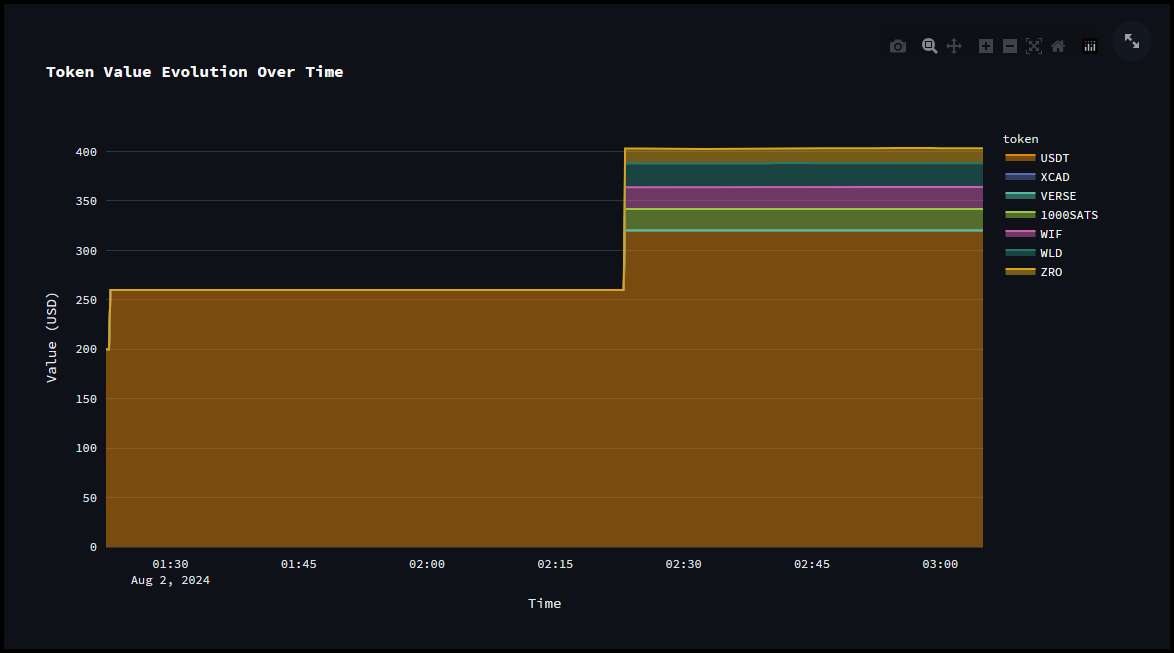
- Token Value Evolution over Time
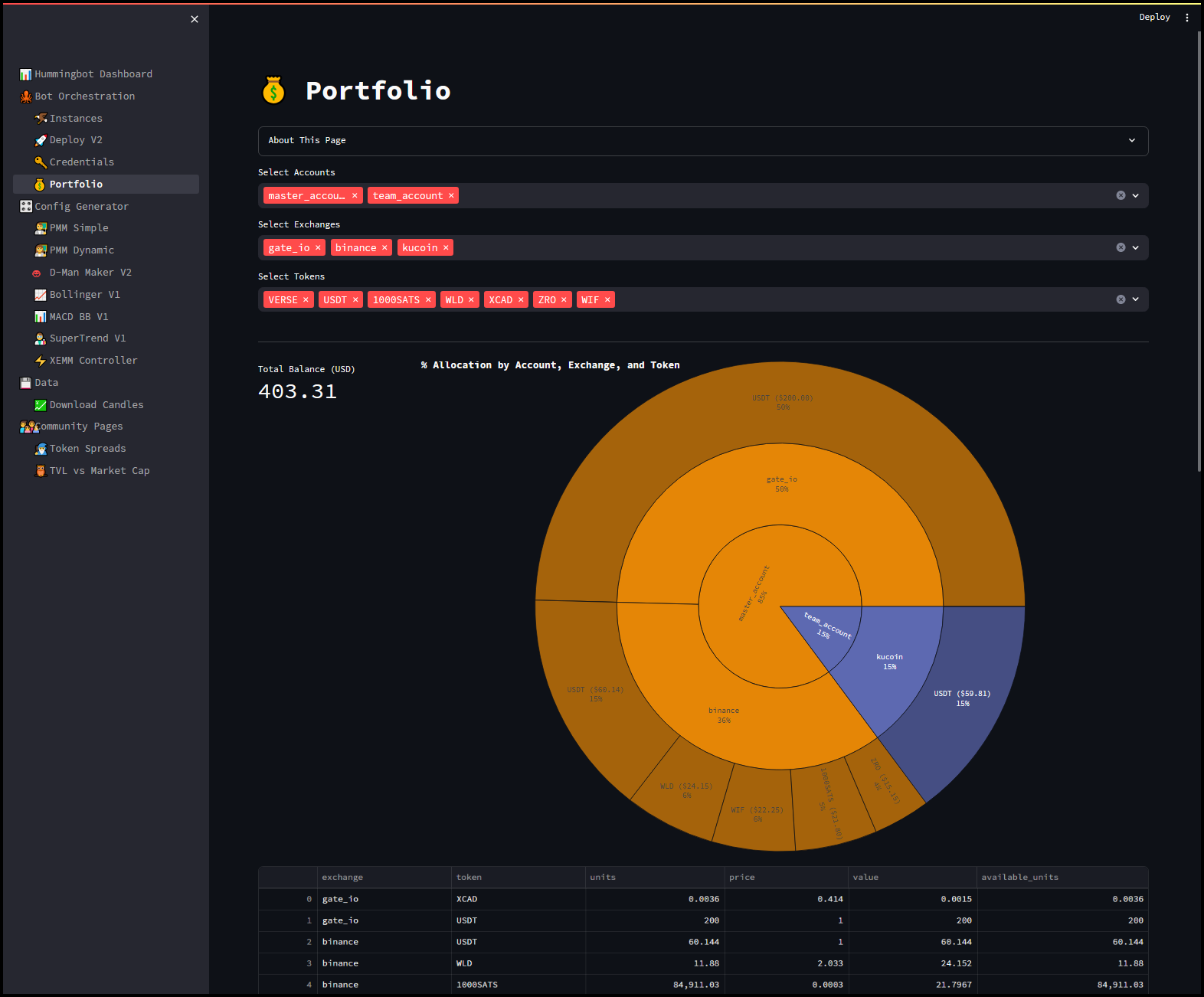
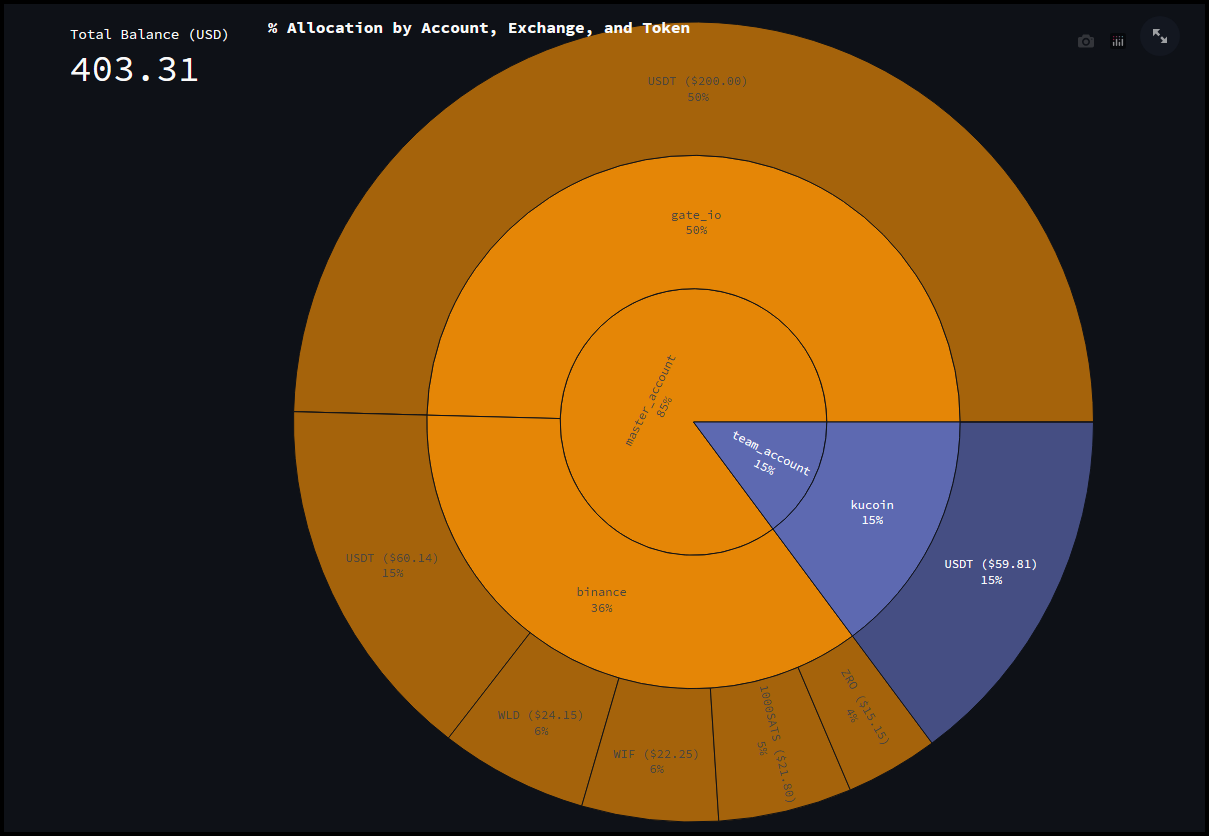
The Portfolio page in the Hummingbot Dashboard provides a detailed overview and management interface for your cryptocurrency holdings across different accounts and exchanges. It provides a holistic view of your cryptocurrency assets, allowing for better portfolio management and decision-making.
Select Accounts: Allows you to choose individual or multiple accounts to view their combined portfolio. In the Credentials page we added two accounts, the master_account and team_account and both can be selected here.
Select Exchanges: Lets you filter and view the portfolio for specific exchanges you've added API keys for. In this example we have gate_io, binance, and kucoin.
Select Tokens: Enables you to focus on specific tokens within your selected accounts and exchanges. In this example we can select multiple tokens like VERSE, USDT, 1000SATS, etc., to get a detailed view of their distribution and value.
Total Balance (USD): Displays the aggregated value of all selected tokens across the chosen accounts and exchanges in USD.
Allocation Visualization: A sunburst chart visualizes the percentage allocation of your portfolio by account, exchange, and token. This helps in understanding the distribution and weight of each token in your overall portfolio.
URL: https://hummingbot.org/dashboard/instance.png
Governance - Hummingbot
URL: https://hummingbot.org/governance/
Contents:
- Governance
- Governance Forums
- HBOT Tracker
Hummingbot Foundation's purpose is to empower Hummingbot Governance Token (HBOT) token holders to govern how the Hummingbot open source codebase evolves over time. HBOT holders can vote on Proposals and Polls that:
Learn more about the HBOT token and how the Hummingbot governance system works in this HBOT governance FAQ!
Pages in this section include:
Discord contains various channels that users can use to discuss proposals and polls, as well as general discussions:
Hummingbot Foundation maintains a public Google Sheet that provides an overview of the Foundation governance process:
Adding Credentials - Hummingbot
URL: https://hummingbot.org/dashboard/credentials/
Contents:
- Adding Credentials
- Available Accounts and Credentials
- Manage Accounts
- Add Credentials (API Keys)
- Known Issues
- Manually adding credentials for DEXes
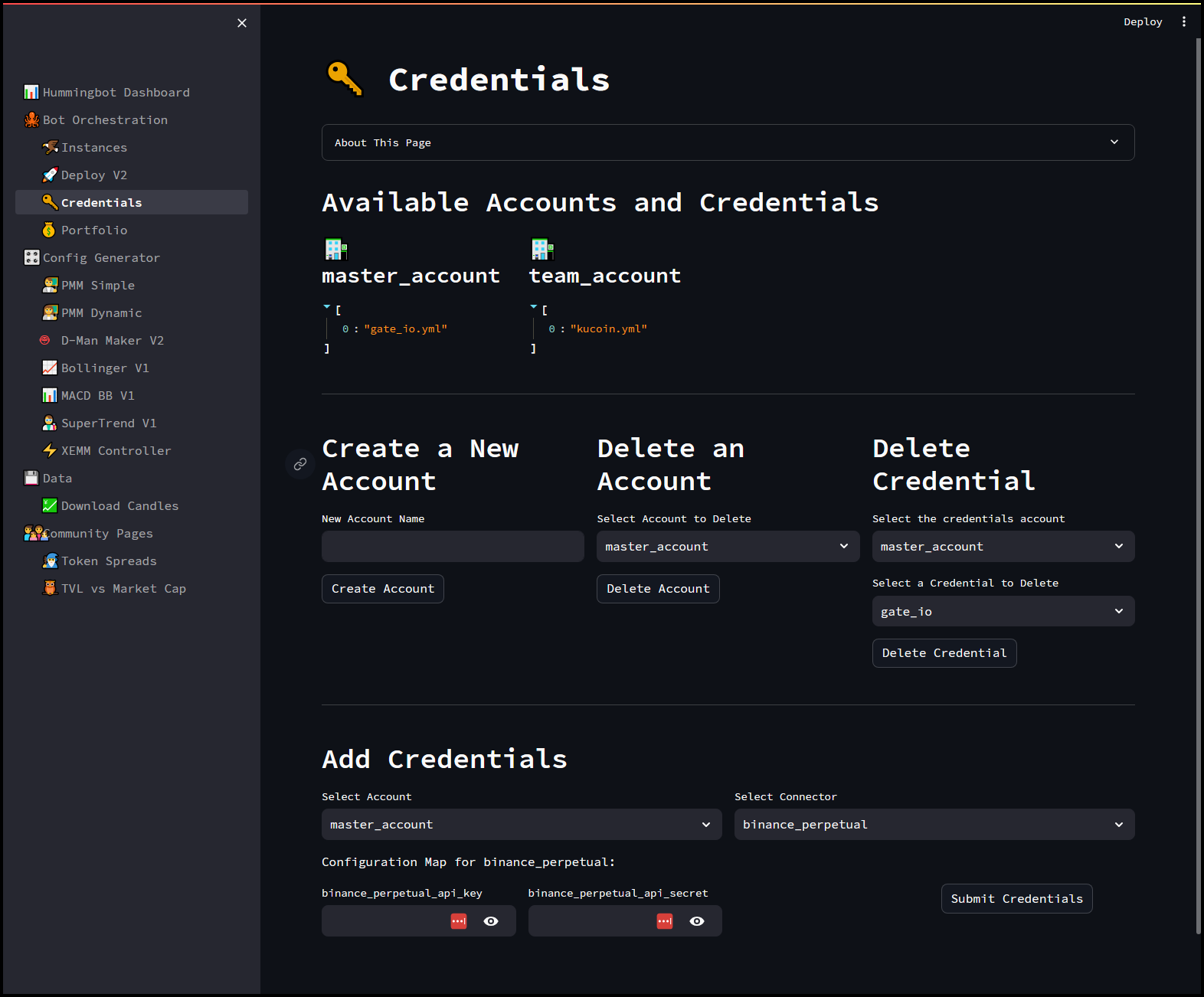
The Credentials page in the Hummingbot Dashboard is a comprehensive interface for managing your API keys and related credentials. It offers several functionalities to streamline the process of handling multiple accounts and their respective credentials.
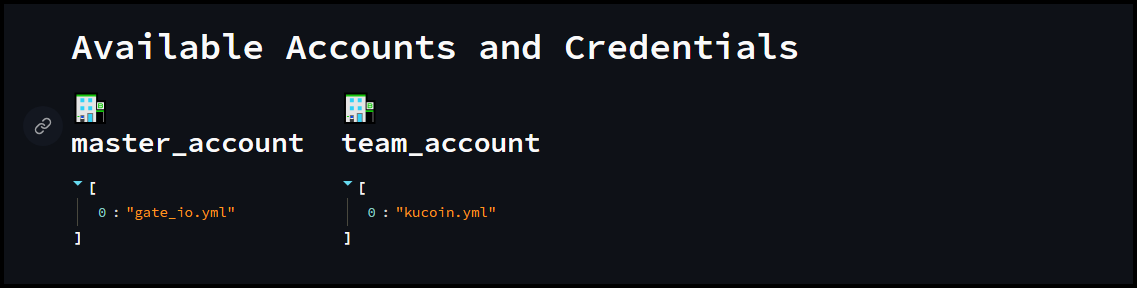
In the example above we have two accounts currently setup, the master account with gate_io API keys and a team_account with Kucoin API keys.
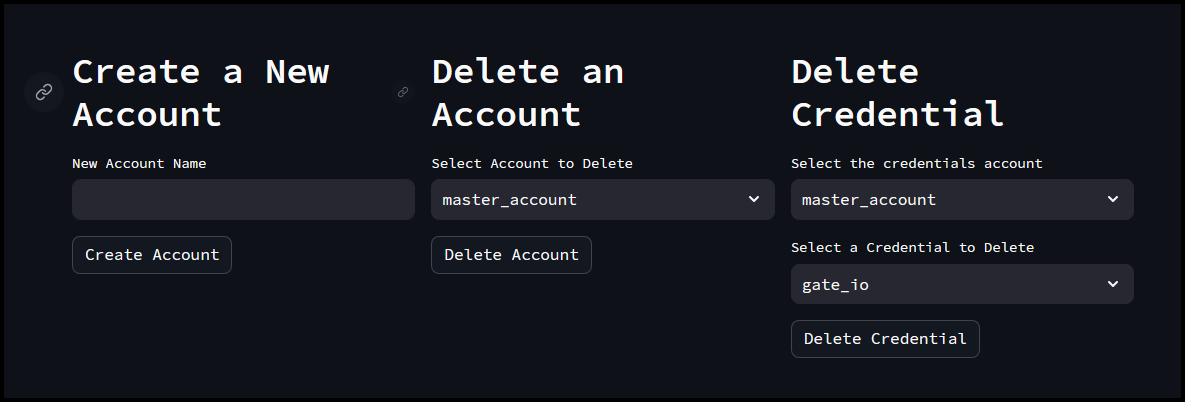
In this section we can create & delete an account or delete a credential from the existing accounts.
Allows you to create a new account by providing a name. This is useful for organizing credentials under different categories or user profiles.
Provides an option to delete an existing account along with all its associated credentials, helping you keep your credential management clean and up-to-date.
Enables you to remove specific credentials from an account without deleting the entire account. This is useful when you need to update or revoke access to a particular exchange.
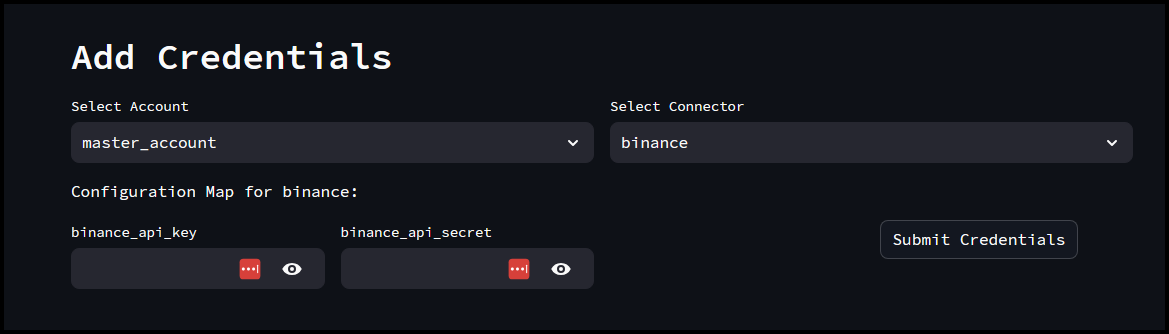
In this section we can add new credentials to an account by selecting the account and connector (e.g., exchange). You can enter the required API key and secret, which will be securely stored and used by Hummingbot for trading activities.
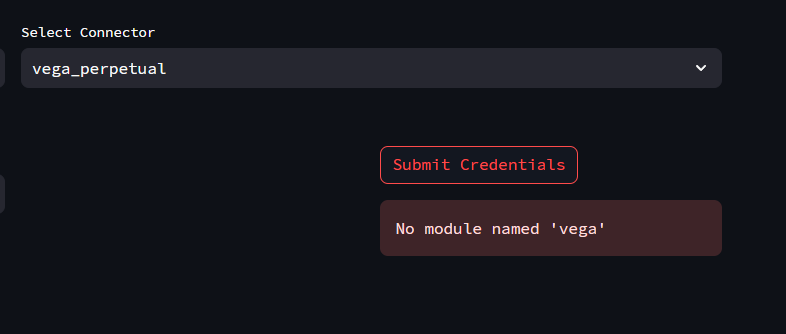
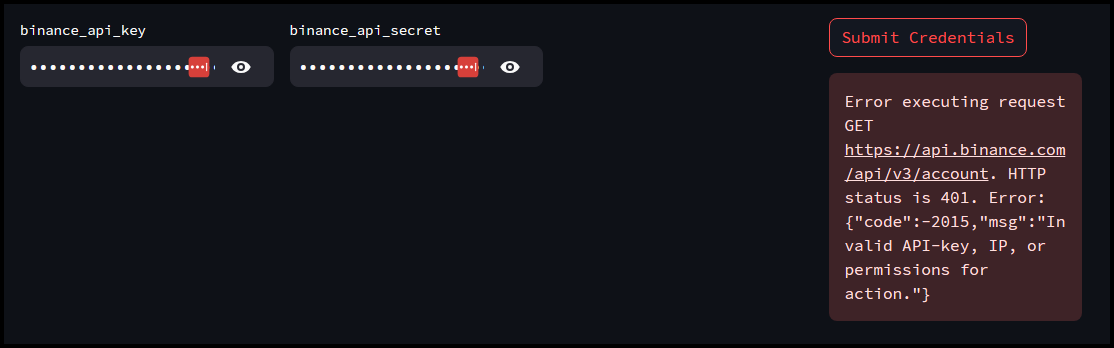
Some exchanges, like DEXes will have issues trying to add the API credentials using Dashboard. You may get an error message similar to the one below:
If you get the above message, you can try the workaround below:
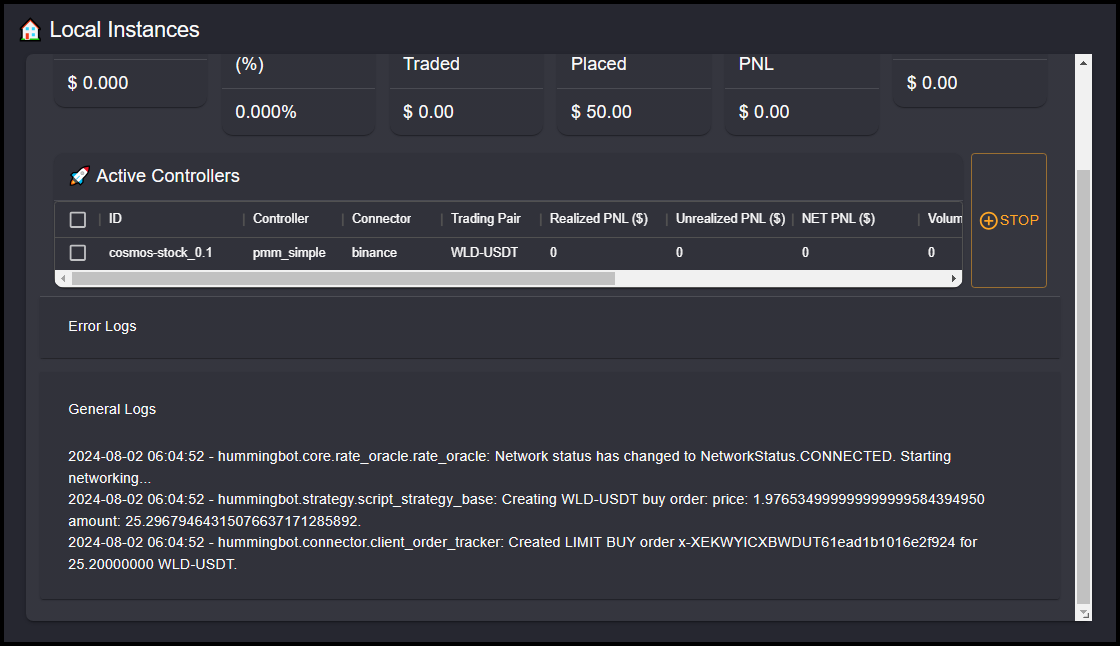
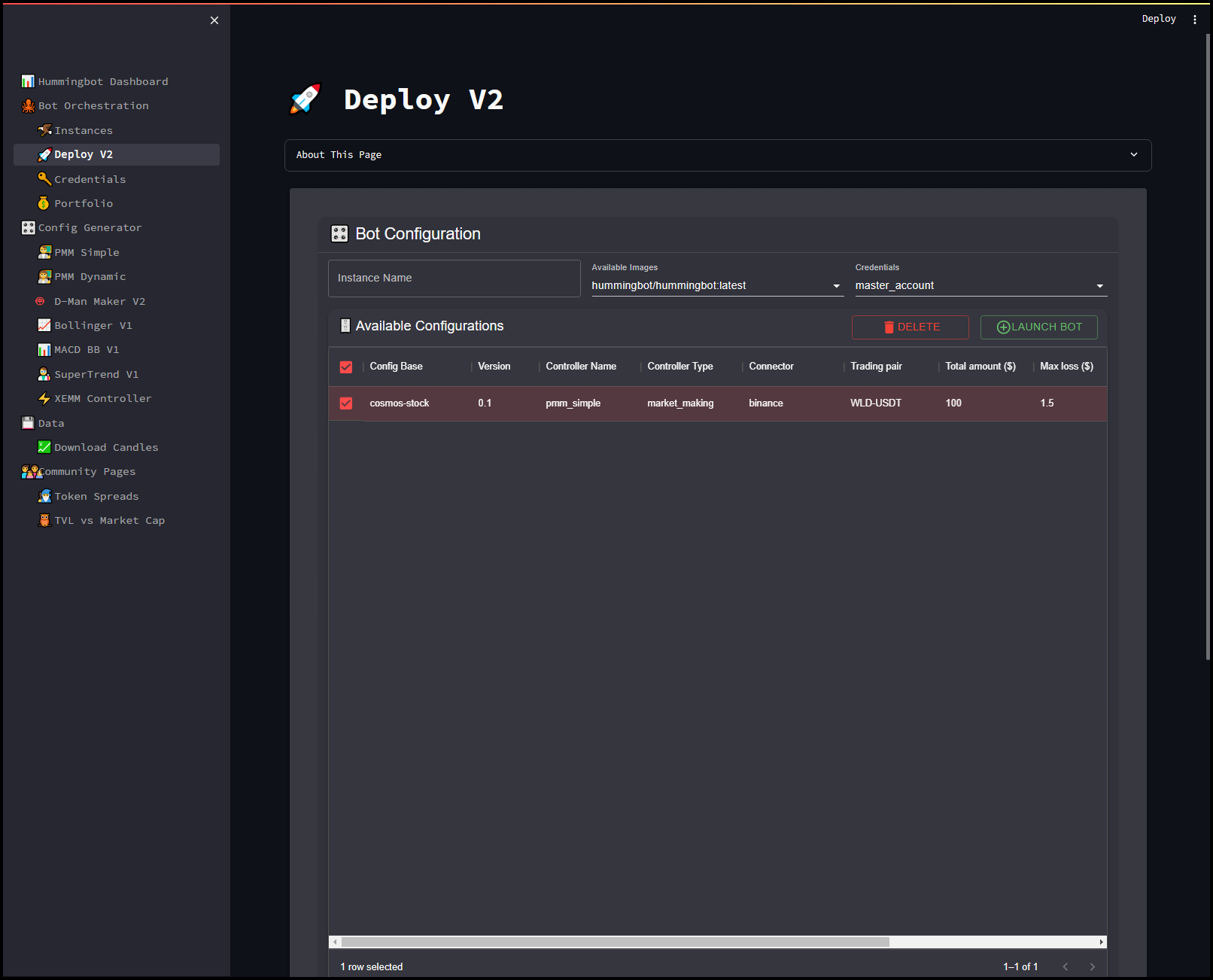
Go to the PMM_Simple (or any controller) page and create a random config and Upload Config
Next in the Deploy V2 page, select the controller you just created and then under Instance Name, enter credentials and then click Launch Bot
Open your terminal and run the command
This should filter the docker containers that have the name credentials. Take note of the container ID of that instance.
Run the docker attach command to attach to the Hummingbot instance
Examples:
Example 1 (unknown):
docker ps -a | grep credentials
Example 2 (unknown):
docker attach [container_ID]
Example 3 (unknown):
connect [exchange_name]
Example 4 (unknown):
cp bots/instances/hummingbot-credentials*/conf/connectors/*.yml bots/credentials/master_account/connectors/
Launch/Exit Hummingbot - Hummingbot
URL: https://hummingbot.org/client/launch-exit
Contents:
- Launch and Exit Hummingbot
- Launch via Docker
- Launch from source
- Exit Hummingbot
This page contains information on launching and exiting the application, assuming Hummingbot is installed already on your machine.
Check the list of running Docker containers
Take note of the container name and use the following command to attach to it using the command below -
If no containers are running, follow the steps below to create a Hummingbot instance.
Make sure the hummingbot conda environment is enabled.
In the hummingbot parent directory, run this command to launch the application:
As of version 1.19.0, use ./start command to launch hummingbot from source. Read more
Running the exit command cancels all outstanding orders and exit the Hummingbot interface. In case of errors, the command exit -f will force the application to close.
If you're running Hummingbot installed via binary, exiting Hummingbot by clicking the close window icon will leave your active orders open in the exchange.
You can also press the keyboard shortcut CTRL + C twice to exit.
Examples:
Example 1 (unknown):
docker ps -a
Example 2 (unknown):
docker attach [container_name]
Example 3 (unknown):
git clone https://github.com/hummingbot/hummingbot
cd hummingbot
docker compose up -d
Example 4 (unknown):
conda activate hummingbot
Create/Delete Password - Hummingbot
URL: https://hummingbot.org/client/password
Contents:
- Create and Delete Password
- Creating a password
- Deleting a password
The password in Hummingbot encrypts sensitive data such as API keys, secret keys, and wallet private keys. For security reasons, the password is only stored locally in encrypted form, and we do not have access to it.
If you are using Hummingbot for the first time, the system will prompt you to create a password. There are no character requirements, although we recommend using a strong password for additional security.
You can click the OK button on the welcome screen or you can press TAB to navigate the selection and ENTER to confirm.
Passwords are stored locally in your computer. No passwords are uploaded to any server.
The password is stored as an encrypted .password_verification file in the /conf directory within the hummingbot folder.
Delete the .password_verification file under the hummingbot_conf folder to reset the password. Note that the .password_verification file is hidden so you won't be able to see it by default unless you set your system to show all hidden files. In the terminal use the ls -a command to list all files
Note that if you do remove the .password_verification file you'll also need to remove the existing connector.yml files under the conf/connector folder otherwise you'll run into an issue where the bot throws an error message and doesn't start.
This is because Hummingbot encrypts the connector files with the same password you use to login. Resetting the password by deleting the password verification file will prevent the existing connector files from being decrypted which means you'll also need to reconnect your API keys.
Use the command sudo rm -rf .password_verification to delete the file
In older versions the passwords and private keys are saved as encrypted files in hummingbotconf (via Docker and binary) or /conf directory (installed from source). To reset your password, delete all files starting with encrypted prefix.
This will disconnect your API keys from Hummingbot. You will have to re-connect your API keys.
1.12.0 - Hummingbot
URL: https://hummingbot.org/release-notes/1.12.0/
Contents:
- Release Notes - Version 1.12.0
- Epoch 3 Polls Changes
- Orchestration Module Phase I
- hedge Strategy Updates
- New Exchange Connector: CI-EX
- New Gateway Chain: Cosmos
- Gateway UX improvements
- Other Fixes and Updates
Released on January 27, 2023
We are very excited to ship the January 2023 Hummingbot release (v1.12.0) today! See below for the highlights in this release.
Recently, we finished the first set of Polls, a new initiative that lets HBOT holders decide how the Foundation allocates its engineering bandwidth and developer bounties across the components in the Hummingbot codebase. Based on the results of the Polls, below are the outline of the changes made initially in this release.
For more details of the Epoch 3 poll results check out this blog post: https://blog.hummingbot.org/epoch-3-polls/
Last year, the community voted to allocate a bounty to fund development of an orchestration module that lets users control multiples instances of Hummingbot. See this Notion doc for an overview of the project.
Phase 1 will provide a clean communication and messaging layer and allow for remote control and monitoring of multi-bot environments in a distributed context. Meaning that bots can "live" on different machines and infrastructures (e.g. having a bot local and another bot on AWS).
To achieve this approach, Phase 1 implements an MQTT layer for bots to connect remotely to message brokers, as a single point of reference, using asynchronous bidirectional communication channels (push/pull). In this architecture, bots can be considered as clients to the overall environment. Bot scaling is seamless and does not require any further setup, anyone can connect any number of bots the a message broker (e.g. RabbitMQ, EMQX etc) without any other dependencies.
Outline of the features included in Phase I
Interface to execute remote commands - Start , Stop , Import , Config strategy, Balance , Change balance limits
All these commands can be called using an unified web application that also receives the following information from the bots - Heartbeat - Status, PNL - History
The configuration of the broker in the client should be in the conf_client.yml file
See this page for a requirements doc for this project and past discussions.
Thanks to klpanagi and TheHolyRoger for your work! 🙏
Thanks to leastchaos for this contribution! 🙏
Centurion Invest Exchange (CI-EX)'s vision is to bring avant-gardist investment tools and instruments into one platform, bridging the fiat and forex world with cryptocurrency through multiple services. See the CI-EX documentation for more information.
Thanks to CoinAlpha for this contribution! 🙏
This release adds a Cosmos chain base that can be used to add other Cosmos-based chains and connectors like Sifchain.
See the Cosmos documentation for more information.
Thanks to pecuniafinance for this contribution! 🙏
We've added multiple ways users can approve tokens for spending on Gateway in this pull request
6005 Added methods to approve tokens
Using the approve-token command
See the Gateway Setup documentation page for more information on how to approve tokens.
Also removed the auto approval method from Gateway and added the btc.b token to the tokenlist
URL: https://hummingbot.org/dashboard/instance-6.png
URL: https://hummingbot.org/dashboard/instance-3.png
1.1.0 - Hummingbot
URL: https://hummingbot.org/release-notes/1.1.0/
Contents:
- Release Notes - Version 1.1.0
- New Spot Connector: AltMarkets.io
- Developer Updates
- Bug Fixes
Released on February 28, 2022
Install via Docker: Linux | Windows | macOS | Raspberry Pi
Binary builds are no longer supported. Docker and Source are now the only supported methods of install.
We are very excited to ship the February 2022 Hummingbot release (v1.1.0) today!
AltMarkets.io is a centralised cryptocurrency exchange focusing on lower tier cryptocurrencies. They offer a stable, easy to use platform for anyone in the cryptocurrency industry looking to trade upcoming tokens/coins before they hit bigger/more established exchanges.
More information about the connector in AltMarkets.io documentation.
Tools Reference - Hummingbot
URL: https://hummingbot.org/mcp/tools/
Contents:
- MCP Tools Reference
- Account Tools
- get_accounts
- get_account_balance
- Portfolio Tools
- get_portfolio_balances
- get_portfolio_performance
- Trading Tools
- place_order
- cancel_order
The Hummingbot MCP Server exposes the following tools to AI assistants for automated trading and portfolio management.
List all connected exchange accounts and their status.
Returns: Array of account objects with connection details
Example Usage: AI: "Show me all my connected exchange accounts"
Get balance for a specific exchange account.
Parameters: - account_name (string): Name of the exchange account
Returns: Balance details for the specified account
Example Usage: AI: "What's my balance on Binance?"
View aggregated portfolio across all connected exchanges.
Returns: Consolidated view of all assets across exchanges
Example Usage: AI: "Show me my total portfolio balances"
Analyze portfolio performance metrics including P&L.
Returns: Performance metrics, returns, and analysis
Example Usage: AI: "How has my portfolio performed this month?"
Execute buy/sell orders on supported exchanges.
Parameters: - exchange (string): Target exchange - trading_pair (string): Trading pair (e.g., "BTC-USDT") - side (string): "buy" or "sell" - amount (number): Order amount - order_type (string): "market" or "limit" - price (number, optional): Price for limit orders
Returns: Order confirmation with order ID
Example Usage: AI: "Buy 0.1 BTC at market price on Binance"
Cancel existing orders.
Parameters: - order_id (string): ID of order to cancel - exchange (string): Exchange where order was placed
Returns: Cancellation confirmation
Example Usage: AI: "Cancel order 12345 on OKX"
View all active orders across exchanges.
Parameters: - exchange (string, optional): Filter by specific exchange
Returns: List of open orders with details
Example Usage: AI: "Show me all my open orders"
Review past order execution history.
Parameters: - exchange (string, optional): Filter by exchange - trading_pair (string, optional): Filter by trading pair - limit (number, optional): Number of results to return
Returns: Historical order data
Example Usage: AI: "Show my last 10 BTC orders"
View open positions for derivatives trading.
Parameters: - exchange (string, optional): Filter by exchange
Returns: List of open positions with P&L data
Example Usage: AI: "What positions do I have open on Hyperliquid?"
Close a specific position programmatically.
Parameters: - exchange (string): Exchange where position is held - symbol (string): Position symbol - amount (number, optional): Partial close amount
Returns: Position close confirmation
Example Usage: AI: "Close my ETH position on Hyperliquid"
Review historical position data and performance.
Parameters: - exchange (string, optional): Filter by exchange - limit (number, optional): Number of results
Returns: Historical position data with P&L
Example Usage: AI: "Show my position history for the last month"
Get current price data for trading pairs.
Parameters: - exchange (string): Target exchange - symbol (string): Trading pair symbol
Returns: Current price, volume, and 24h statistics
Example Usage: AI: "What's the current BTC price on Binance?"
Access order book depth data.
Parameters: - exchange (string): Target exchange - symbol (string): Trading pair symbol - depth (number, optional): Order book depth level
Returns: Current bid/ask orders with quantities
Example Usage: AI: "Show me the BTC orderbook on OKX"
Monitor perpetual funding rates across exchanges.
Parameters: - exchange (string, optional): Filter by exchange - symbol (string, optional): Filter by symbol
Returns: Current funding rates and next funding time
Example Usage: AI: "What are the funding rates for BTC perpetuals?"
Portfolio Rebalancing: AI: "Analyze my portfolio and rebalance to 60% BTC, 30% ETH, 10% SOL" 1. Uses get_portfolio_balances to assess current allocation 2. Calculates required trades using market data tools 3. Executes rebalancing orders with place_order 4. Confirms new allocation with updated portfolio data
Risk Management: AI: "Close any positions with more than 10% unrealized loss" 1. Uses get_positions to analyze all open positions 2. Identifies positions exceeding loss threshold 3. Uses close_position for each position meeting criteria 4. Reports actions taken and updated risk exposure
Funding Rate Arbitrage: AI: "Find negative funding rate opportunities for BTC" 1. Uses get_funding_rates across multiple exchanges 2. Identifies profitable funding rate spreads 3. Opens positions to capture funding payments 4. Monitors and manages positions automatically
All tools return structured JSON responses that AI assistants can parse and present to users in natural language. The MCP server handles the technical API interactions while the AI provides user-friendly explanations and recommendations.
Tools include comprehensive error handling for: - Invalid parameters - Exchange connectivity issues - Insufficient balance errors - Rate limiting - Authentication failures
Error responses include descriptive messages that AI assistants can interpret and explain to users in plain language.
Examples:
Example 1 (unknown):
AI: "Show me all my connected exchange accounts"
Example 2 (unknown):
AI: "What's my balance on Binance?"
Example 3 (unknown):
AI: "Show me my total portfolio balances"
Example 4 (unknown):
AI: "How has my portfolio performed this month?"
URL: https://hummingbot.org/dashboard/credentials.png
Academy - Hummingbot
URL: https://hummingbot.org/academy
Contents:
- How to Trade Crypto
Crypto trading has been in a frenzy lately and many investors are looking for ways to participate in the crypto market. There are several ways to gain profit from cryptocurrency and various methods to do so. If you exclude crypto mining from the equation, which is a whole different method of crypto-acquiring process, the steps that one would need to follow to enter the crypto market are the following:
In this topic we will elaborate each of the steps mentioned above presenting the main aspects that a new trader should take into consideration before making a decision.
URL: https://hummingbot.org/dashboard/credentials-4.png
Glossary - Hummingbot
URL: https://hummingbot.org/glossary/
Contents:
- Glossary
- Base asset
- Bollinger Bands
- Centralized exchange (“CEX”)
- Decentralized exchange (“DEX”)
- MACD
- Maker
- Maker order
- Order book
- Quote asset
When you start diving into the Hummingbot ecosystem, you'll probably encounter some unfamiliar terms and phrases along the way. To help you on your journey, we've defined some of the most common trading vocabularies here in this handy cheat sheet.
The asset in a trading pair whose quantity is fixed as a single unit in a price quote. For example, in a price quotation of ETH/DAI 100, ETH is the base asset and 100 is the amount of DAI exchangeable for each unit of ETH.In Hummingbot, the first token in a trading pair is always the base asset. See quote asset for more info.
Bollinger Bands (BB) are a widely popular technical analysis instrument created by John Bollinger in the early 1980’s. Bollinger Bands consist of a band of three lines which are plotted in relation to security prices. The line in the middle is usually a Simple Moving Average (SMA) based on a certain historical window length.
The SMA then serves as a base for the Upper and Lower Bands, which are used as a way to measure volatility by observing the relationship between the Bands and price. Typically the Upper and Lower Bands are set a number of standard deviations away from the SMA (The Middle Line).
Parameters used in V2 Strategies:
An exchange which is operated by a central authority. In addition to order matching and broadcasting, the centralized exchange keeps custody of users’ assets.
An exchange which operates in a decentralized way, using smart contracts to facilitate the transacting in and settling of assets. Generally, one distinguishing feature of a decentralized exchange is that participants keep custody of their own assets in their own wallets; the DEX facilitates the direct wallet-to-wallet settlement between counterparties in a transaction.
MACD (Mean Average Convergence Divergence) is an extremely popular indicator used in technical analysis. MACD can be used to identify aspects of a security's overall trend. Most notably these aspects are momentum, as well as trend direction and duration. What makes MACD so informative is that it is actually the combination of two different types of indicators. First, MACD employs two Moving Averages of varying lengths (which are lagging indicators) to identify trend direction and duration. Then, MACD takes the difference in values between those two Moving Averages (MACD Line) and an EMA of those Moving Averages (Signal Line) and plots that difference between the two lines as a histogram which oscillates above and below a center Zero Line. The histogram is used as a good indication of a security's momentum.
To fully understand the MACD indicator, it is first necessary to break down each of the indicator's components.
The three major components of MACD
Parameters used in V2 Strategies:
A party that places maker orders, and in doing so, provides liquidity to the market.
A “limit order”; which is an order to buy or sell an asset at a specified price and quantity. Executing this order is not guaranteed; the order is only filled if there is a taker that accepts the price and quantity and transacts.
A list of currently available (maker) orders on an exchange, showing all of the current buyer and seller interest in an asset.
The asset in a asset pair whose quantity varies and whose quantity is denoted by the numerical figure of the price quote. For example, in a price quotation of ETH/DAI 100, DAI is the quote currency and 100 units of DAI are referenced in this exchange.In Hummingbot, the second token in a trading pair is always the quote asset. See base asset for more info.
A party that places taker orders, which execute immediately and fill a maker order.
A “market order”; an order to buy or sell a specified quantity of an asset which is filled immediately at the best available price(s) available on the exchange.
The average of best bid and best ask price in the orderbook.
In cross exchange strategy, is the net cost of the other side of your limit order i.e., the cost of you making a taker order.For example on your taker market, if you can buy 25 tokens for say a net price of $100 (other market makers have limit sell orders at a net price of 100 for all 25, e.g. 7.5 @ $99, 10 @ $100, 7.5 @ $101), then on your maker side, you would place a limit sell order for 25 @ $101 (assume 1% min profitability). If someone fills your sell order (you sell at $101), you immediately try to hedge by buying on the taker side at $100.
URL: https://hummingbot.org/dashboard/credentials-6.png
URL: https://hummingbot.org/dashboard/instance-1.png
1.8.0 - Hummingbot
URL: https://hummingbot.org/release-notes/1.8.0/
Contents:
- Release Notes - Version 1.8.0
- Variable Tick Size
- New Connector: Serum
- New Community Tool: Hummingbot Postprocess
- All Changes
- Developer updates
- Gateway updates
- Bug fixes
Released on September 30, 2022
We are very excited to ship the September 2022 Hummingbot release (v1.8.0) today!
Previously, the default tick size (how long it takes Hummingbot to loop through a strategy iteration) was set at 1 second. Now, users can adjust this setting and define a custom tick_size parameter.
Project Serum is a Solana-based decentralized liquidity infrastructure protocol that brings a fully functional centralized exchange experience – full central limit order books, matching engine, fast settlement and trading, and low transaction costs – to the DeFi marketplace at scale.
See the Serum documentation for more information for future plans for this connector.
Thanks to MHHukiewitz and Danilo-Araujo-Silva for this fix! 🙏
A companion tool that helps you visualise and analyse performance of Hummingbot trade logs.
Thanks to rkc2000 for this fix! 🙏
https://github.com/hummingbot/community-tools
Check Balances - Hummingbot
URL: https://hummingbot.org/client/balance/
Contents:
- How to get Balances
- Exchange and wallet balance
- Paper Trade balance
- Adding Paper Trade Balance
- Balance limits
- How it works
- Example Scenario
- Displaying token symbols in balance
Run the balance command to check the balances of all connected wallets and exchanges.
The "Allocated" column shows how much of your assets are being used when there are active orders.
Run the balance paper command to check your paper trade account balance.
By default, these are the paper trade balances pre-loaded in Hummingbot. You can also enter additional assets and credits to use in paper trade mode.
By default, the paper trade account has the following tokens and balances which you can see when you run the balance paper command.
When adding balances, specify the asset and balance you want by running this command balance paper [asset] [amount].
For example, we want to add 0.5 BTC and check our paper account balance to confirm.
Sets the amount limit on how much assets Hummingbot can use in an exchange or wallet. This can be useful when running multiple bots on different trading pairs with same tokens e.g. running a BTC-USDT pair and another bot on ETH-USDT using the same account.
You can set how much of a particular token the bot can use by running the command balance limit [exchange] [asset] [amount]. You can disable this feature by editing it in the global config file and set it to -1. While setting it to 0 will initially not place any order for a specific asset until a trade is executed to accumulate the said asset.
Run the balance limit command to confirm if the changes are applied
Create a pure market making strategy, run the config command to view the whole configuration. The command balance limit bybit USDT 20 is used as example
On this scenario we set a config with order_levels 2 this way we can also see how the balance limit works. The strategy would only be able to create orders that will not be more than 20 USDT. On the screenshot below, the client was trying to buy a XRP on a amount of 10.137 USDT and observed that the second buy order amount adjusted due to balance limit.
On the screenshot below, a buy order has been successfully filled and after order refresh time the client created orders again but observed that now it did not created another order level since it is beyond the set balance limit of 20 USDT.
You can use the gateway connector-tokens command to include tokens in the balance command. See Working with Tokens for more information.
Examples:
Example 1 (unknown):
>>>  balance paper
Paper account balances:
    Asset    Balance
      DAI  1000.0000
      ETH    10.0000
      ONE  1000.0000
     TUSD  1000.0000
     USDC  1000.0000
     USDQ  1000.0000
     USDT  1000.0000
     WETH    10.0000
      ZRX  1000.0000
Example 2 (unknown):
>>>  balance paper BTC 0.5
Paper balance for BTC token set to 0.5

>>>  balance paper
Paper account balances:
    Asset    Balance
      BTC     0.5000
      DAI  1000.0000
      ETH    10.0000
      ONE  1000.0000
     TUSD  1000.0000
     USDC  1000.0000
     USDQ  1000.0000
     USDT  1000.0000
     WETH    10.0000
      ZRX  1000.0000
Example 3 (unknown):
>>>  balance limit binance USDT 20
Limit for USDT on bybit exchange set to 20.0
Dashboard - Hummingbot
URL: https://hummingbot.org/dashboard
Contents:
- Dashboard
- Overview
- Highlights
- Getting Started
Hummingbot Dashboard is an open-source graphical interface designed to help users manage their portfolios across multiple exchanges, configure and backtest strategies, and deploy and manage multiple Hummingbot instances efficiently.
Starting with v2.7.0, Dashboard is powered by the new Hummingbot API and Hummingbot API Client, providing a robust and scalable architecture for managing trading operations at scale.
Dashboard simplifies bot management and is fully compatible with Controllers, allowing users to configure and backtest strategies before deploying them live.
All dashboard pages have been updated to work with the new API architecture. Detailed documentation for each page will be added soon.
To get started, check out the Hummingbot Dashboard Quickstart guide, or the links below with a short explanation of each page (also in the sidebar).
Configuring Strategies:
Backtesting Strategies:
1.18.0 - Hummingbot
URL: https://hummingbot.org/release-notes/1.18.0/
Contents:
- Release Notes - Version 1.18.0
- Monthly Community Call
- Python 3.10 Upgrade
- Refactored Chain Endpoints
- Uniswap Direct Pool Interaction
- AscendEx Candles Feed and Market Orders Support
- New DEX Connector: Vertex
- Hummingbot Dashboard Updates
- New Script Examples
- Removed Connectors and Strategies
Released on July 24, 2023
We are very excited to ship the July 2023 release of Hummingbot (v1.18.0) today! This release features a significant upgrade to Python 3.10, providing enhanced performance and reliability for users. In Gateway, the Uniswap connector now supports fetching prices directly from pools, which lowers latency and resolves past issues. In addition, we added Candles Feeds and Market Orders support to the Ascendex connector, as well as a new DEX connector to Vertex!
Install or update Hummingbot by cloning the latest hummingbot/deploy-examples repo and running the following command for your desired configuration:
Ongoing Gateway issue
When running Gateway, if you encounter the following error message, Price query failed: Token not supported, a simultaneous restart of both the Gateway and client should fix the issue. For updates on this issue, see #164.
Each month, we livestream a community call on our Discord server that highlights the new features included in each release:
Check out the Hummingbot Events Calendar for links to these and other upcoming events!
#6389 upgrades Hummingbot's Python version to 3.10 and updates its most important dependencies. This upgrade improves the client's performance, reliability, and security. It also allows users who install from source to utilize the latest version of Anaconda and Miniconda and enables support for the Apple M2 chipset.
#147 and #6445 refactored the Gateway route structure to standardize endpoints to use /chain rather than blockchain-specific endpoints. This enables Gateway to scale the number of chains it can support without introducing bloat.
All chains should now utilize the following routes:
Thanks to vic-en for this fix! 🙏
The initial design of the Uniswap connector utilizes its smart order router to price and route swaps, but users have reported latency issues with the router. #136 and #153 added the ability to use the QuoterV2 rather than the router.
This introduces two additional parameters defined in the uniswap.yml config file:
Thanks to VPashkov for this fix! 🙏
This release adds additional features for Ascendex, which the community used HBOT governance to prioritze as a Silver-tier connector for Epoch 4.
Candles Feed helps you generate custom OHLCV candles using both historical and live Websocket data, and create real-time custom technical indicators using pandas_ta. We have added support for ascendex:
Following our Technical Roadmap, we are expanding our connectors to support to include all order types offered by an exchange. In this release, we integrated the market_order type for Ascendex.
Thanks to yancong001 for this contribution! 🙏
Vertex is a fully decentralized peer-to-peer orderbook-based cryptocurrency exchange for the DeFi ecosystem built on Substrate.
See Vertex for the exchange connector docs.
Snapshot Proposal: https://snapshot.org/#/hbot-prp.eth/proposal/0x68a4b91e9461266b32ad16e8a78219df04623ad529cf63ac109499e18317b661
Thanks to R-K-H for this contribution! 🙏
Hummingbot Dashboard is a community-driven project to build a control center for Hummingbot instances.
We hold bi-weekly calls in the Hummingbot Discord to discuss Dashboard:
While Dashboard is a new, highly experimental project, we encourage users to try it out and provide feedback on the ##dashboard channel in Discord. For more information, see the Task Backlog as well as the Wiki where you can see the current tasks being worked on as well as the contributors assigned.
This release adds a couple directional strategies including a script example to test the newly added DEX data feed.
amm_data_feed_example.py: This is a script example using two DEX data feeds of different networks. Pull Request: #6477
directional_strategy_trend_follower.py: This is a trend following strategy. Pull Request: #6415
directional_strategy_widening_ema_bands.py: This strategy uses two EMAs one short and one long to generate trading signals and execute trades based on the percentage of distance between them. Pull Request: #6390
The following connectors and strategies did not receive enough votes in the Epoch 5 polls to meet the Minimum Voting Power threshold, so they have been removed from the Hummingbot codebase. Check the poll results here: https://blog.hummingbot.org/epoch-5-polls-recap/
Examples:
Example 1 (unknown):
docker compose up --force-recreate --build -d
Example 2 (unknown):
/chain/allowances
/chain/cancel
/chain/approve
/chain/nonce
/chain/tokens
/chain/balances
/chain/poll
/chain/transfer
/chain/status
/chain/config
Example 3 (unknown):
candles = [CandlesFactory.get_candle(connector="ascendex",
           trading_pair="ETH-USDT", interval="1m", max_records=100)]
URL: https://hummingbot.org/dashboard/portfolio-2.png
URL: https://hummingbot.org/dashboard/credentials-2.png
Foundation - Hummingbot
URL: https://hummingbot.org/about/
Contents:
- Foundation
- Mission
- History
- Staff
Hummingbot Foundation is a not-for-profit organization established in the Cayman Islands. The Foundation’s mission is to democratize high-frequency trading by maintaining the open-source Hummingbot code repository and the HBOT governance system.
The official Foundation bylaws are located at: .
Our mission is to make sophisticated trading strategies and technology accessible to everyone and to level the playing field for traders around the globe Here are the core principles that underpin Hummingbot’s development:
Hummingbot was originally built and open sourced by CoinAlpha in April 2019. Hummingbot pioneered a modular architecture that allowed external developers to contribute new exchange connectors and trading strategies into a shared, community-maintained codebase. Read the original Hummingbot whitepaper and the origin story blog post for more details.
Later, the Hummingbot team wrote the Liquidity Mining whitepaper that described an economic model for decentralized market making and subsequently launched the Miner liquidity mining platform.
In December 2021, CoinAlpha spun off the Hummingbot Foundation as a new open source entity that maintains the Hummingbot Github repository and administers a decentralized, community-driven governance system utilizing the HBOT token.
Today, Hummingbot is a bazaar-style open source project with many contributors and users around the world, both individual and professional.
The Foundation maintain a lean, globally-distributed team who handle the day-to-day operations of maintaining the Hummingbot codebase and the Foundation governance system, such as:
User Interface - Hummingbot
URL: https://hummingbot.org/client/user-interface
Contents:
- User Interface Guide
- Show and hide log pane
- Tabs
- Opening and Closing
- Opening a tab
- Closing a tab
- Keyboard shortcuts
- Linux
- macOS
- Windows
The CLI is divided into five panes:
Top navigation bar: Displays the status/information of the following items
Bottom navigation bar: Displays the information of the following items
The log pane on the right can be shown or hidden in two ways:
Users can now open another tab in the left pane of Hummingbot where the log pane is supposed to be upon entering a command associated with the Tabs feature. Users can now switch between the log pane and the new tab they have opened simulateneously.
Currently, the feature only works with the order_book parameter.
Use the tabs by simply inputting a command associated with the tabs feature.
Upon using the order_book command and any suffix it will open a tab automatically.
Simply click on the x at the top right corner or inputting parameter_name --close
One option to close the tab is by clicking on the x next to order_book
Alternatively, you can remove the new tab by inputting the order_book --close command to close the tab
- Used for text edit in input pane only.
Press CTRL + F to trigger display the search field
Enter your search keyword (not case sensitive)
Hit Enter to jump to the next matching keyword (incremental search)
When you are done, press CTRL + F again to go back to reset
To highlight, hold SHIFT + LMB (left mouse button) and drag across the text you want to select.
To select text on macOS, you may need to enable the Allow Mouse Reporting option by pressing ⌘ + R or selecting View > Allow Mouse Reporting in the menu bar.
Then you should be able to select text by holding LMB (left mouse button) and drag. You can also hold down ⌥ + shift to select specific lines like the image below.
When accessing Hummingbot on a Linux cloud server through ssh using a macOS terminal, hold down the Option ⌥ key or ⌥ + ⌘ to highlight text.
To use this shortcut, check this box by doing a right-click on the title bar at the top of the Hummingbot window, then select Properties.
URL: https://hummingbot.org/dashboard/credentials-1.png
1.2.0 - Hummingbot
URL: https://hummingbot.org/release-notes/1.2.0/
Contents:
- Release Notes - Version 1.2.0
- Developer Updates
- Bug Fixes
Released on March 31, 2022
Install via Docker: Linux | Windows | macOS | Raspberry Pi
Binary builds are no longer supported. Docker and Source are now the only supported methods of install.
We are very excited to ship the March 2022 Hummingbot release (v1.2.0) today!
Governance - Hummingbot
URL: https://hummingbot.org/governance
Contents:
- Governance
- Governance Forums
- HBOT Tracker
Hummingbot Foundation's purpose is to empower Hummingbot Governance Token (HBOT) token holders to govern how the Hummingbot open source codebase evolves over time. HBOT holders can vote on Proposals and Polls that:
Learn more about the HBOT token and how the Hummingbot governance system works in this HBOT governance FAQ!
Pages in this section include:
Discord contains various channels that users can use to discuss proposals and polls, as well as general discussions:
Hummingbot Foundation maintains a public Google Sheet that provides an overview of the Foundation governance process:
1.28.0 - Hummingbot
URL: https://hummingbot.org/release-notes/1.28.0/
Contents:
- Hummingbot v1.28.0 Release Notes
- Introduction
- How to Update
- Docker
- Source
- Hummingbot 2.0 Preview
- Consensus2024 Launch Event
- Other Updates
Released on May 31, 2024
We are thrilled to announce the release of Hummingbot version 1.28.0! This is a relatively light release since we are preparing for the big Hummingbot 2.0 release next month, which will add the Dashboard and Backend-API repos that enable strategy backtesting, credentials management, 1-click deployment, and more!
In this release, we have:
Make sure to exit all running containers using docker compose down
Run the following command to pull the latest Docker image:
Update your Hummingbot branch to this release by running:
The next release, Hummingbot 2.0, will be a massive overhaul of the Hummingbot framework. No longer just a command line tool, you can now use the Hummingbot Dashboard application to create, backtest, and deploy strategies. Backtesting is available for Directional and Market Making [Controllers].
For users that want to test it out, we recommend use the https://github.com/cardosofede/hummingbot-deploy repo. By running bash setup.sh script, you will launches Dashboard, Backend API, as well as the Brokers repo as Docker containers. Since this is still currently in beta, we welcome any feedback you may have and please let us know on Discord if you encounter any issues.
During the Consensus2024 conference, we held a launch event to give the commununity an early look at Hummingbot 2.0. We demonstrated how you can use Hummingbot Dashboard to construct, backtestm and deploy powerful market making strategies. The event recording will soon be posted to the Hummingbot YouTube channel.
For more community events, check out the Hummingbot Events Calendar.
Examples:
Example 1 (unknown):
docker compose down
Example 2 (unknown):
docker pull hummingbot/hummingbot:latest
Example 3 (unknown):
docker compose up -d
Example 4 (unknown):
git pull origin master
URL: https://hummingbot.org/dashboard/deploy.png
Community - Hummingbot
URL: https://hummingbot.org/community
Contents:
- Community
- Official Channels
- Hummingbot Live
- Community Calls
Hummingbot is a global community of developers and traders who use the Hummingbot open source framework to build all kinds of algo trading strategies.
We foster an open, technical, and community-driven approach to learning the discipline of market making.
For security purposes, ensure that you use only the official channels below to access Hummingbot content and code:
Each week, we livestream Hummingbot Live on YouTube. Every Friday at 8am PST / 3pm UTC, Hummingbot core maintainers Mike and Fede go live to:
Join us on our YouTube channel to catch these weekly sessions live or watch the recordings later.
Each month, we livestream one or more community calls on our Discord server. Afterwards, we post recordings on our YouTube channel.
Check out the Hummingbot Events Calendar for links to these monthly calls and other upcoming events.
Hummingbot Foundation team members will never initiate direct messages to users. If a random user imitating the core team or any of the community members sends you a DM don't hesitate to report it in our official Discord channel.
URL: https://hummingbot.org/dashboard/instance-2.png
Dashboard - Hummingbot
URL: https://hummingbot.org/dashboard/
Contents:
- Dashboard
- Overview
- Highlights
- Getting Started
Hummingbot Dashboard is an open-source graphical interface designed to help users manage their portfolios across multiple exchanges, configure and backtest strategies, and deploy and manage multiple Hummingbot instances efficiently.
Starting with v2.7.0, Dashboard is powered by the new Hummingbot API and Hummingbot API Client, providing a robust and scalable architecture for managing trading operations at scale.
Dashboard simplifies bot management and is fully compatible with Controllers, allowing users to configure and backtest strategies before deploying them live.
All dashboard pages have been updated to work with the new API architecture. Detailed documentation for each page will be added soon.
To get started, check out the Hummingbot Dashboard Quickstart guide, or the links below with a short explanation of each page (also in the sidebar).
Configuring Strategies:
Backtesting Strategies:
Releases - Hummingbot
URL: https://hummingbot.org/release-notes/
Contents:
- Releases
- 2.9.0
- 2.8.0
- 2.7.0
- 2.6.1
- 2.5.0
- 2.4.0
- 2.3.0
- 2.2.0
- 2.1.0
We generally release a new version of Hummingbot every month. See below for information about each release.
Released September 24, 2025
Released August 21, 2025
Released July 16, 2025
Released June 9, 2025
Released April 21, 2025
Released March 3, 2025
Released February 3, 2025
Released December 26, 2024
Released October 28, 2024
Released August 28, 2024
Released July 3, 2024
Released May 27, 2024
Released April 29, 2024
Released March 26, 2024
Released February 26, 2024
Released January 29, 2024
Released December 25, 2023
Released November 27, 2023
Released October 30, 2023
Released October 02, 2023
Released August 28, 2023
Released July 24, 2023
Released June 26, 2023
Released May 29, 2023
Released April 26, 2023
Released March 30, 2023
Released: February 27, 2023
Reporting - Hummingbot
URL: https://hummingbot.org/reporting/
Contents:
- Reporting
- Reported Volumes Dashboard
- What the Reported Volumes Dashboard Shows
- Exchange Connector Usage
- Version Insights
- Interactive Filters
- Data Transparency
- What Data Is Collected
- Privacy Protection
- Data Usage Policy
Hummingbot Foundation maintains a public, real-time dashboard that provides transparent insights into Hummingbot usage across all exchanges. This data is essential for exchanges to track their integration success and understand community adoption.
View Live Dashboard →
The Reported Volumes dashboard provides comprehensive, real-time metrics including:
You can customize the view using several controls:
Hummingbot instances automatically report the following anonymized metrics every 15 minutes:
Users who prefer not to participate in data reporting can disable it:
Set to anonymized_metrics_disabled to opt out of all data collection.
The entire data collection process is open source and auditable:
The Reported Volumes dashboard represents Hummingbot's commitment to transparency and community-driven development. By providing open access to usage metrics, we enable data-driven decisions that benefit the entire ecosystem.
Examples:
Example 1 (unknown):
config anonymized_metrics_mode
Whitepaper - Hummingbot
URL: https://hummingbot.org/governance/whitepaper/
Contents:
- Hummingbot Foundation Governance
- Overview
- Principles
- Ecosystem
- Governance
- Foundation
- Sources of funds
- Exchange fee share agreements
- Administration of bounties, grants, and hackathons
- Roles
See State of the Foundation 2024 for an update to this whitepaper.
Originally posted on December 17, 2021
The Hummingbot Foundation (the “Foundation”) is a not-for-profit organization established in the Cayman Islands. The Foundation’s mission is to democratize high-frequency trading by enabling decentralized maintenance and community governance over the open-source Hummingbot code repository.
Hummingbot is software that helps you build and run automated trading strategies (“bots”), freely and publicly available under the Apache 2.0 open source license at https://github.com/hummingbot/hummingbot.
Launched in April 2019, Hummingbot’s latest v0.46.0 release spans 1.8 million lines of code across 12,625 commits from 112 unique code contributors, and it contains over 30 different exchange/blockchain connectors and 14 strategy templates. Approximately 1100 Github users have forked the Hummingbot codebase for their own use.
Below are the core principles that underpin Hummingbot’s development:
The Hummingbot Foundation’s primary role is to coordinate the ongoing maintenance and improvement of the open source Hummingbot codebase via a decentralized set of actors: Exchanges, Contributors, and Users.
Exchanges are centralized or decentralized exchanges, blockchain protocols, other other organizations who enter into fee share and/or other referral agreements with Hummingbot Foundation based on user trading volume. Polls define the level of maintenance that the Foundation spends on each connector.
Contributors are individual developers and firms that build and maintain Hummingbot components. Contributors submit their work as pull requests to the official Github repository, and they are paid bounties when that work has been merged and included in an official release. Bounties may be funded by either Hummingbot Foundation or other community members.
Users are individual and professional traders who install and use the Hummingbot open source software, released every month, to run trading bots. The volume they generate on partner exchanges sustains the operations of Hummingbot Foundation.
The Foundation will administer a system that will empower holders of the Hummingbot Governance Token (“HBOT”) to govern Hummingbot. The sole use case for HBOT Tokens will be to empower holders to decide how the Hummingbot codebase changes over time through voting on proposals.
All pull requests, or proposed code changes to the Github code repository, will need to be submitted as a Pull Request Proposal and be approved by HBOT holders in order to be merged into the codebase and included in an official release.
In addition, HBOT holders will be able to create and vote on Improvement Proposals that direct the Foundation to implement architectural changes or prioritize specific enhancements or bug fixes. HBOT holders will also be able to create and vote on Governance Proposals that modify aspects of the governance system or allocate funding toward grant programs. Development work that results from an approved grant or Improvement Proposal also will need to undergo the pull request approval process in order to be merged into the development branch.
Pull requests will be continually approved and merged through the month. Approximately once per month, the development branch of the codebase will be cloned onto the master branch of the codebase, which will subsequently be packaged into an official release in various formats for different operating systems.
In order to enable decentralized maintenance and democratic governance of the Hummingbot codebase, the Foundation plans to engage in the following functions:
Hummingbot exchange connectors integrate with the API of a cryptocurrency exchange in order to expose standardized data format and endpoints to Hummingbot strategies (automated processes that interact with exchange APIs) that are created and configured by Users. Since exchange APIs vary widely, these connectors allow anyone to run bots across multiple exchanges without requiring engineering time on low-level exchange API integrations.
Thus far, CoinAlpha has built many of the connectors in the Hummingbot codebase, and it has agreements and contracts with many of the connected exchanges that rebate a portion of fees incurred by Users, measured via unique identifiers in API requests executed with the Hummingbot software, to CoinAlpha.
In the future, the Foundation plans to negotiate and enter into similar agreements with new exchanges for connectors. To support the Foundation and the Hummingbot community, CoinAlpha also plans to remit to the Foundation all income from its existing agreements, or assign them to the Foundation. The Foundation anticipates using this income to compensate community Maintainers for their services.
One of the Foundation’s primary responsibilities will be to work with Sponsors seeking to fund specific work items such as new connectors, new strategies, or enhancements or fixes to existing components (bounties), as well as others who want to fund more work in more general areas such as strategies for new assets or exchange types (grants and hackathons).
The Foundation may charge Sponsors a fee in order to administer the programs, liaise with Contributors, and review/merge the resulting development work.
Similar to the Linux and Apache Foundations, the Foundation’s Board of Directors will provide oversight over the Foundation and its staff, as well as manage the HBOT multi-sig wallet. All transfers of HBOT from the wallet will be approved by a majority of the Board.
The initial 5-person Board of Directors will be elected by HBOT holders. Board members will serve 12-month terms and will not receive any compensation for Board service. No more than a maximum of 2 Board members will be full-time employees and/or directors of the same outside entity, such as CoinAlpha.
The Foundation plans to employ a Chief Financial Officer (CFO) who will oversee the Foundation’s budget and finances and a Chief Operating Officer (COO) who will represent the Foundation in executing partnerships with Sponsors and contracts with Maintainers.
In addition, the Foundation plans to employ engineering, project management, community management, and quality assurance personnel who will handle the day-to-day operations of maintaining the Hummingbot codebase and the HBOT governance system, such as:
The HBOT governance system will allow holders to propose and approve changes to the Hummingbot codebase and the Hummingbot Foundation governance process.
The Hummingbot Foundation expects to use Snapshot for effecting HBOT governance. All proposals will be found on the official Hummingbot Snapshot hosted at https://snapshot.org/#/hbot.eth.
There will initially be three types of proposals, and each type will have different initial governance parameters:
HBOT token holdings entitles the holder to an equivalent amount of votes, including any fractional token amounts.
A Pull Request Proposal (PRP) will be a proposal linked to an open pull request in the Hummingbot code repository. Each PRP will go through the process below:
During either the preliminary or the final review, the Foundation may unilaterally reject a proposal (e.g., to prevent a security vulnerability or merge conflict) as long as it communicates the rationale behind the decision to the community. It is anticipated that such authority would be used sparingly and in legitimate circumstances. If the community disagrees with the Foundation’s decision to reject a proposal, the community has the power to replace the Foundation’s directors with more like-minded directors to ensure that the community’s directives are followed.
An Improvement Proposal (IP) will be a proposal linked to an issue in the Hummingbot Github repository that specifies a proposed improvement to a component of the Hummingbot codebase. While there will be no formal restriction on what types of Improvement Proposals can be created, the Foundation expects that the community will approve proposals that benefit the Hummingbot user base as a whole, either by fixing a critical bug, adding a key new feature, or making a necessary refactor of the architecture.
Each IP will go through the process below:
A Governance Proposal (GP) will be a proposal linked to an issue in the Hummingbot Github repository that specifies either a proposed modification to the Foundation governance system, or a proposed distribution of HBOT tokens from the treasury for a community activity such as a grant.
Each GP will go through the process below:
Aspects of the Foundation governance system that Governance Proposals may modify will include approval thresholds, quorum thresholds, board of director elections, and Maintainer elections. GPs may not modify the Foundation bylaws, HBOT token distribution and issuance mechanics, or HBOT total supply.
One of the main activities of the Foundation will be enabling third party Sponsors to fund bounties and hackathons that compensate developers for submitting pull requests, such as feature enhancements, bug fixes, and new connectors/strategies, to the open source Hummingbot codebase. Sponsors are expected to comprise exchanges, blockchain protocols, trading firms, and other institutions who use Hummingbot or benefit from usage on their platforms.
Pull requests linked to bounties and hackathons will go through the same Pull Request Process as other pull requests. The Foundation will charge a fee to Sponsors to administer these pull requests.
One of the primary ways that Foundation will distribute tokens to Hummingbot Users is through grant programs that reward developers to make contributions to the codebase. These grant programs will aim to incentivize contributions similar to the launch contributions described in the Hummingbot Foundation announcement, which include a new strategy template that enables Users to run triangular arbitrage, a web-based graphical interface for the Hummingbot client, and webhooks that enable TradingView integration.
The Foundation expects that a significant portion of the HBOT tokens that will be allocated over the next 4 years (36% of total tokens) will be allocated toward grants to facilitate similar contributions. In 2022, the Foundation will begin accepting applications for HBOT token grants. Once accepted, developers will need to issue a pull request and have it merged via the governance system in order to receive grant funds.
The initial governance framework described above is intended to lay the groundwork for a viable governance system that will enable the Hummingbot community to decide how the Hummingbot codebase evolves, while allowing developers to maintain and contribute to the codebase. The Foundation hopes and expects that the community will improve and expand upon this initial governance framework as the community sees fit in order to meet the needs of a growing, diversified user base.
Chains - Hummingbot
URL: https://hummingbot.org/gateway/chains
Contents:
- Chains
- Ethereum
- Chain Configuration
- Network Configuration
- API Endpoints
- Solana
- Chain Configuration
- Network Configuration
- API Endpoints
- Chain Schema
Gateway provides standardized access to multiple blockchain networks, enabling wallet management, transaction execution, and node RPC interactions. Each chain integration is customized to handle the specific requirements and features of that blockchain.
Gateway currently supports the following blockchain architectures:
Gateway's Ethereum integration supports the Ethereum mainnet and all EVM-compatible Layer 1 and Layer 2 blockchains as networks. These networks share the same basic architecture, allowing for unified handling of wallets, transactions, and smart contract interactions.
Each chain and network can be configured in Gateway through YAML configuration files:
All EVM chains share the same API structure:
Gateway's Solana integration provides access to the Solana blockchain and other networks that utilize the Solana Virtual Machine.
Each chain and network can be configured in Gateway through YAML configuration files:
All Solana networks share the same API structure:
Gateway implements a standardized schema for chain operations across all supported blockchains. These schemas define the structure of requests and responses for common blockchain operations.
Returns chain connection status and current block/slot information.
Request Schema: { "network": "string (optional)" // Network identifier (e.g., "mainnet", "mainnet-beta") }
Response Schema: { "chain": "string", // Chain name (e.g., "ethereum", "solana") "network": "string", // Network identifier "rpcUrl": "string", // Current RPC endpoint "currentBlockNumber": 12345, // Current block number or slot "nativeCurrency": "string" // Native token symbol (e.g., "ETH", "SOL") }
Retrieves token metadata including addresses and decimals.
Request Schema: { "network": "string (optional)", // Network identifier "tokenSymbols": "string | string[] (optional)" // Single symbol or array of symbols/addresses }
Response Schema: { "tokens": [ { "symbol": "string", // Token symbol "address": "string", // Token contract address "decimals": 6, // Token decimals "name": "string" // Token full name } ] }
Fetches wallet balances for native and specified tokens.
Request Schema: { "network": "string (optional)", // Network identifier "address": "string (optional)", // Wallet address to query "tokens": "string"", // Array of token symbols or addresses "fetchAll": false // Fetch all tokens in wallet, not just those in token list }
Response Schema: { "balances": { "TOKEN_SYMBOL": 1234.56 // Token symbol/address as key, balance as number } }
Polls the status of a submitted transaction.
Request Schema: { "network": "string (optional)", // Network identifier "signature": "string", // Transaction signature/hash "tokens": "string"", // Token symbols/addresses for balance change calculation "walletAddress": "string (optional)" // Wallet address for balance change calculation }
Response Schema: { "currentBlock": 12345, // Current block number "signature": "string", // Transaction signature "txBlock": 12340 | null, // Block where transaction was included "txStatus": 0 | 1 | -1, // 0=PENDING, 1=CONFIRMED, -1=FAILED "fee": 0.001 | null, // Transaction fee paid "tokenBalanceChanges": { // Optional: token balance changes "TOKEN": 100.5 // Change amount for each token }, "txData": {} | null, // Additional transaction data "error": "string (optional)" // Error message if failed }
Estimates transaction fees for the network.
Request Schema: { "network": "string (optional)" // Network identifier }
Response Schema: { "feePerComputeUnit": 0.000001, // Fee per compute unit or gas unit "denomination": "string", // Unit denomination ("lamports" for Solana, "gwei" for Ethereum) "computeUnits": 200000, // Default compute units/gas limit used for calculation "feeAsset": "string", // Native currency symbol (ETH, SOL, etc.) "fee": 0.002, // Total estimated fee using default limits "timestamp": 1234567890 // Unix timestamp of estimate }
All chains use a standardized transaction status enum:
Gateway's modular architecture makes it easy to add support for new EVM- and SVM-based blockchain networks.
Create network configuration file: # /conf/chains/ethereum/mynetwork.yml nodeURL: "https://rpc.mynetwork.com" chainId: 12345 nativeCurrencySymbol: "MYT" minGasPrice: 0.1
Add token list: Create /conf/tokens/ethereum/mynetwork.json with supported tokens
Update connectors Update each supported connector's configuration file (i.e. uniswap.config.ts) to include the new network
Examples:
Example 1 (unknown):
defaultNetwork: mainnet
defaultWallet: '<ethereum-wallet-address>'
Example 2 (unknown):
chainID: 1
nodeURL: https://eth.llamarpc.com
nativeCurrencySymbol: ETH
minGasPrice: 0.1
Example 3 (unknown):
defaultNetwork: mainnet-beta
defaultWallet: '<solana-wallet-address>'
Example 4 (unknown):
nodeURL: "https://api.mainnet-beta.solana.com"
commitment: "confirmed"
skipPreflight: false
preflightCommitment: "confirmed"
maxFee: 0.01
priorityFee: 0.00001
Release Process - Hummingbot
URL: https://hummingbot.org/governance/releases
Contents:
- Release Process
- Pull Request Status Board
- Review Process
- Branches
- development
- staging
- master or main
Changes to the Hummingbot and Hummingbot Gateway codebases are made through pull requests, which undergo a thorough engineering and QA review before they are merged into the codebase, coordinated by the Foundation.
Only the following pull requests will be reviewed:
Hummingbot Foundation maintains a Github board in which you can see the status of all active pull requests, including ongoing PRPs, bug fixes, in review, etc.
While approval via HBOT voting signals that the community wants the fix or improvement to be added into the codebase, pull requests go through a series of automated and manual checks to ensure that the new code: * Does not conflict or cause problems with other parts of the codebase * Does not introduce security risks * Does not contain merge conflicts * Contains manual tests, documentation, and meets code quality guidelines * Passes automated testing
The Foundation Quality Assurance (QA) and Engineering team members coordinate this process, assisted by members of the community, such as Technical Review DAO.
After a pull request has been approved, it will go through the following development cycle:
The Hummingbot code repository has three main branches related to the development cycle of each monthly release:
All pull requests aiming to be included on the master branch must be targeted to the development branch. They are then promoted from development to staging before passing to master. Pull requests targeting the development branch will only be merged into staging only when there is an approved PRP related to it.
staging is used by the Foundation QA team to conduct a thorough test all code changes before adding them to the master or main branch.
master is the main release branch and contains the latest stable version of the Hummingbot software client and is released once per month.
Hummingbot Gateway's main branch serves the same purpose.
URL: https://hummingbot.org/dashboard/deploy-1.png
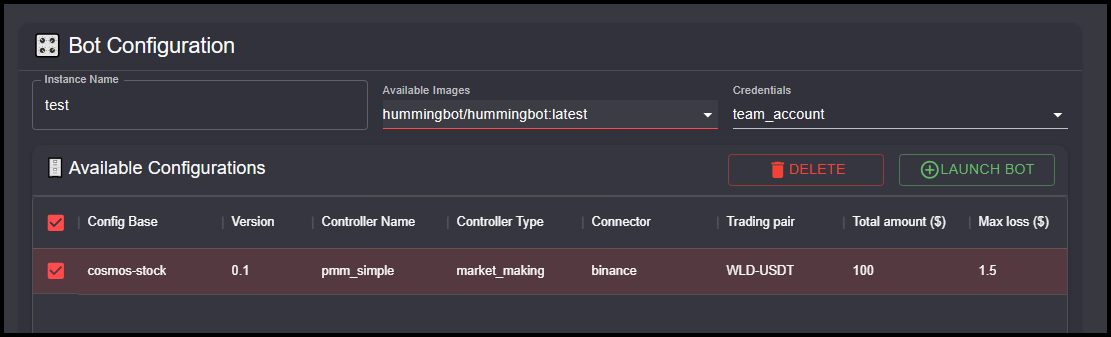
URL: https://hummingbot.org/dashboard/portfolio-4.png
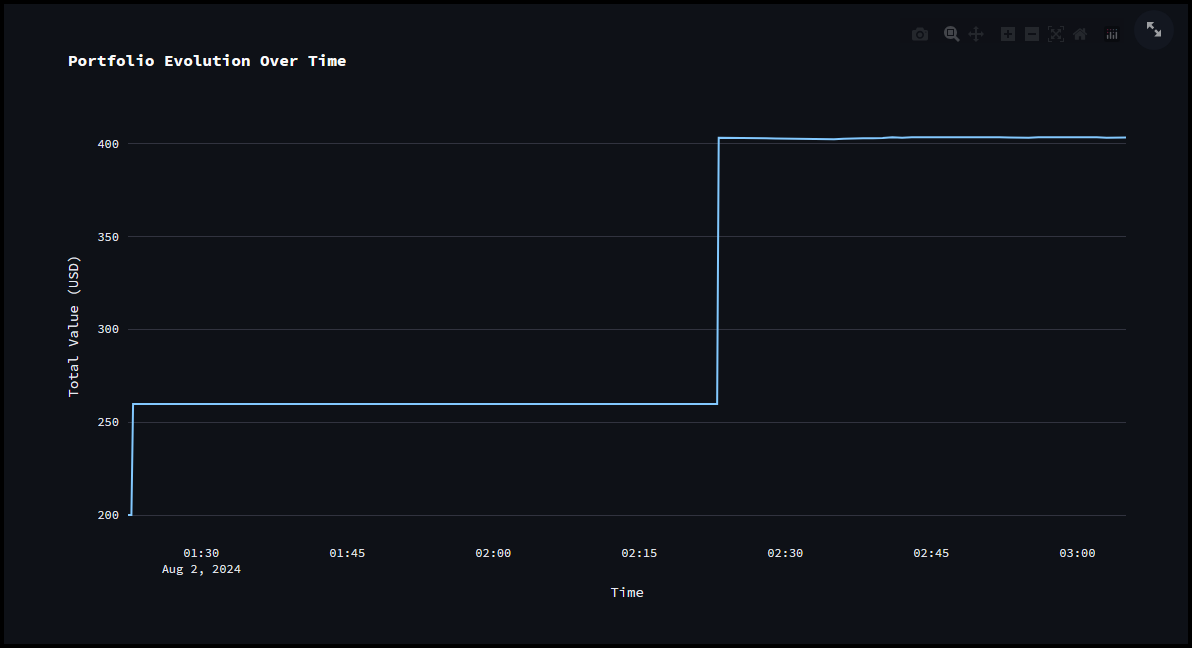
1.4.0 - Hummingbot
URL: https://hummingbot.org/release-notes/1.4.0/
Contents:
- Release Notes - Version 1.4.0
- Gateway V2
- Script Strategies
- Developer Updates
- Bug Fixes
Released on May 30, 2022
Install via Docker: Linux | Windows | macOS | Raspberry Pi
Binary builds are no longer supported. Docker and Source are now the only supported methods of install.
We are very excited to ship the May 2022 Hummingbot release (v1.4.0) today!
This release adds Gateway V2, as previously described in the following Hummingbot blog posts:
Gateway V2 Code Architecture
Gateway V2 Code Architecture part 2
Gateway V2 is a major overhaul to the Gateway system, in which Hummingbot uses to communicate with decentralized markets such as Uniswap and Pangolin. Compared to the original Hummingbot Gateway, Gateway V2 adds major improvements to the reliability, user experience and security.
Gateway Documentation
This release also introduces a simplified version of the trading strategies called Script. The scripts are intended to be used without requiring a configuration. All data used by the script should be included in the script file.
The script is a Python class. It can be created by subclassing the new ScriptStrategyBase class. All scripts modules should be stored in the /scripts folder (the old scripts folder is renamed to pmm_scripts). There is a new version of the start command for the scripts: start --script
Check out the Script Strategies documentation
URL: https://hummingbot.org/dashboard/credentials-5.png
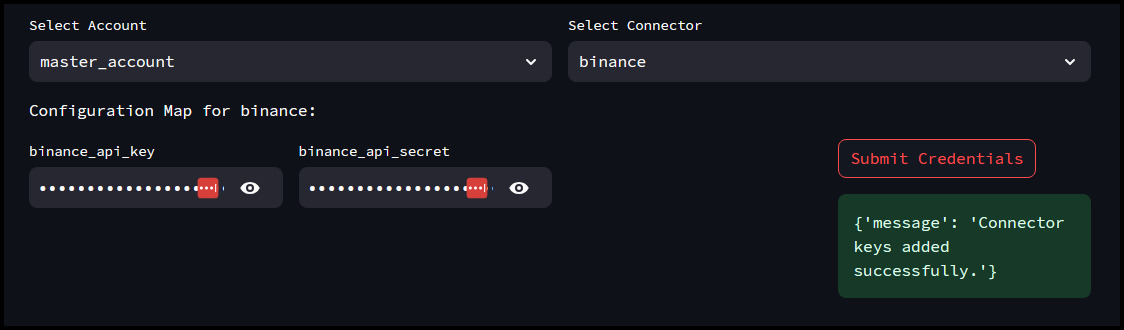
URL: https://hummingbot.org/assets/img/all-commands.png
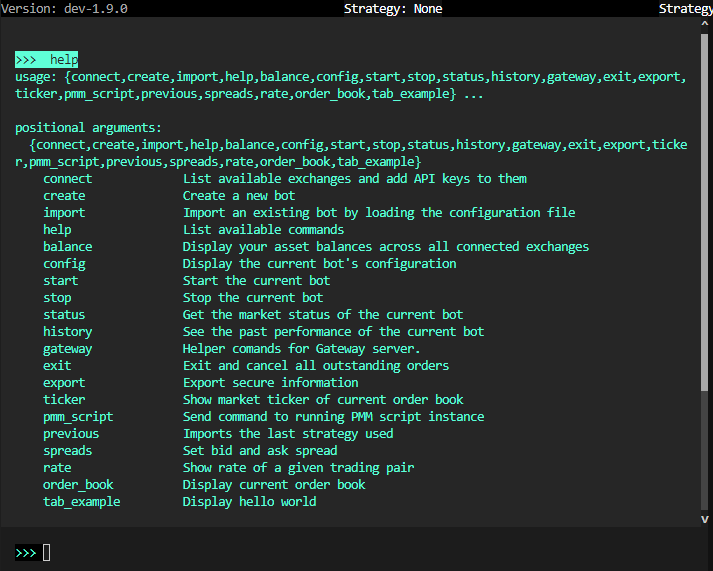
URL: https://hummingbot.org/dashboard/instance-5.png
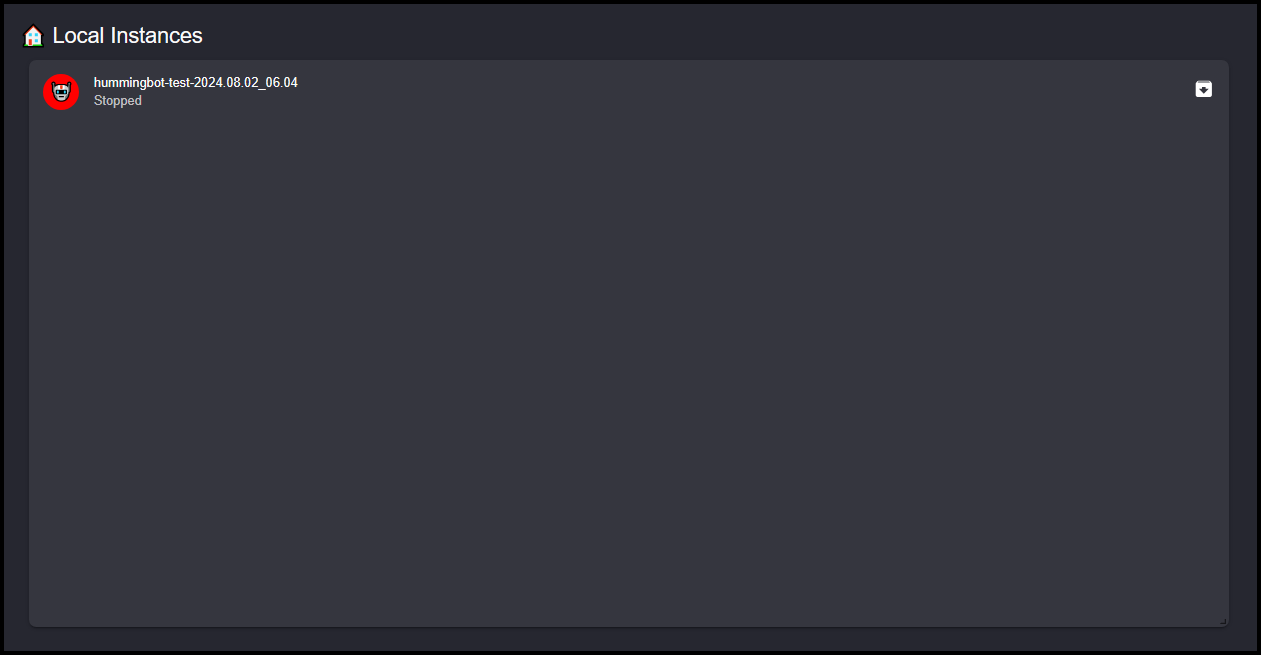
Hummingbot Client - Hummingbot
URL: https://hummingbot.org/client
Contents:
- Hummingbot Client
- Basic Operations
- Advanced Features
If you have installed Hummingbot successfully, you should see a welcome screen like the one below:
Hummingbot features a command-line interface (CLI) that helps you building and run trading bots without coding skills.
Basic features in Hummingbot.
Advanced features in Hummingbot for quant traders and developers.
URL: https://hummingbot.org/dashboard/portfolio-1.png
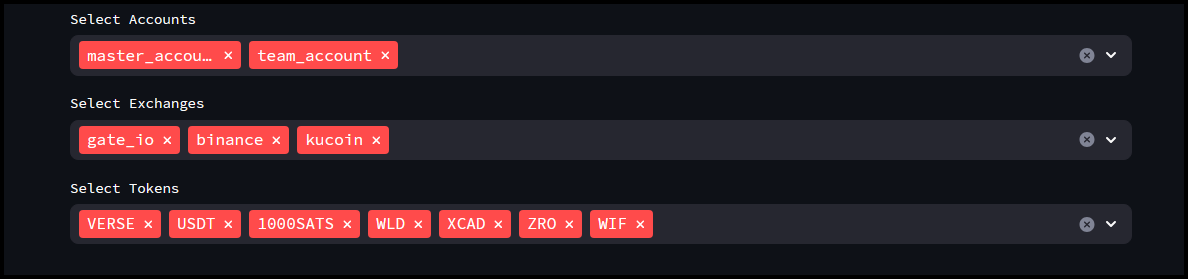
RPC Providers - Hummingbot
URL: https://hummingbot.org/gateway/rpc
Contents:
- RPC Providers
- Overview
- Setup
- Supported Providers
- Helius
- Infura
- Troubleshooting
- Provider Not Connecting
- Rate Limiting
Starting with v2.9.0, deep integrations with leading RPC providers like Helius and Infura are available to optimize speed and reduce latency for DEX trading.
The RPC provider controls your bot's connection to the blockchain network, which is crucial in DEX trading because it directly impacts the speed, reliability, and security of your transactions. A robust node connection ensures:
When you set up Gateway initially, the standard nodeURL for each network uses default public RPC endpoints.
By adding an API key from a RPC provider (as shown below), you will override the default nodeURL for each supported network, ensuring more reliable and performant blockchain connectivity. This step is essential for optimal DEX trading performance.
Run gateway ping to check your current network and node connection:
Helius is a leading Solana validator and infrastructure provider, offering fast, reliable, and scalable RPC endpoints and other services.
Helius Supported Networks:
Adding Helius API Keys:
Create a free account at Helius to get your API key
Run gateway config helius update and add the API key. Alternatively, modify the file conf/rpc/helius.yml and restart Gateway.
Run gateway config solana update and change rpcProvider from url to helius. Alternatively, modify the file conf/chains/solana.yml and restart Gateway.
Adjust these settings in your conf/rpc/helius.yml file as needed for your deployment.
Infura, a division of Metamask, is a leading RPC provider for EVM-based networks.
Infura Supported Networks:
Adding Infura API Key:
Create a free account at Infura to get your API key
Run gateway config infura update and add the API key. Alternatively, modify the file conf/rpc/infura.yml and restart Gateway.
Run gateway config ethereum update and change rpcProvider from url to infura. Alternatively, modify the file conf/chains/ethereum.yml and restart Gateway.
Infura Configuration:
Adjust these settings in your conf/rpc/infura.yml file as needed for your deployment.
Examples:
Example 1 (unknown):
>>> gateway ping

Gateway service is online.
Testing network status for 2 chains...

ethereum (mainnet):
- RPC URL: https://mainnet.infura.io/v3/<api-key>
- Current Block: 23440952
- Native Currency: ETH
- Status: ✓ Connected

solana (mainnet-beta):
- RPC URL: https://mainnet.helius-rpc.com/?api-key=<api-key>
- Current Block: 369194830
- Native Currency: SOL
- Status: ✓ Connected
Example 2 (unknown):
helius:
  apiKey: YOUR_HELIUS_API_KEY
  useWebSocketRPC: false
  useSender: false
  regionCode: slc
  jitoTipSOL: 0.001
Example 3 (unknown):
apiKey: YOUR_INFURA_API_KEY
useWebSocket: false
URL: https://hummingbot.org/dashboard/credentials-7.png
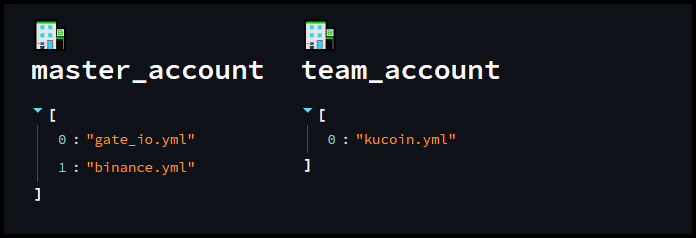
URL: https://hummingbot.org/assets/img/command-init.png
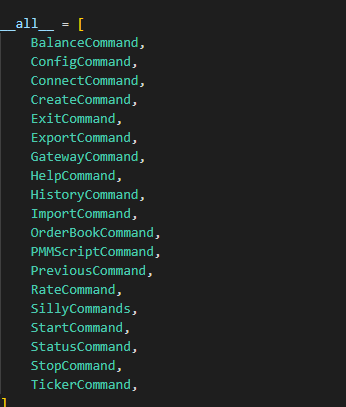
1.27.0 - Hummingbot
URL: https://hummingbot.org/release-notes/1.27.0/
Contents:
- Hummingbot v1.27.0 Release Notes
- Introduction
- How to Update
- Docker
- Source
- Monthly Community Call
- New Strategy: Funding Rate Arbitrage
- New Strategy: Cross Exchange Market Making (XEMM)
- Updated Docker Installation Process
- Updated CEX Connector: Coinbase
Released on April 29, 2024
We are thrilled to announce the release of Hummingbot version 1.27.0! In this update, we have added new strategy templates that use the new StrategyV2 framework:
We have also streamlined the Docker installation process, making it easier and quicker to get started with Hummingbot.
Also New in This Release
Make sure to exit all running containers using docker compose down
Run the following command to pull the latest Docker image:
Update your Hummingbot branch to this release by running:
Join the next community call on Discord to learn about the new features in this release and other Hummingbot news:
For more community events, check out the Hummingbot Events Calendar.
The new Funding Rate Arbitrage sample script works by exploiting differences in funding rates across different cryptocurrency exchanges to make a profit.
It evaluates the current funding rates across all configured connectors for the specified tokens. The script calculates the profitability of entering trades based on the difference in these rates and compares it against a profitability threshold set in the configuration.
XEMM Executor is a new Strategy V2 component which is designed to handle cross-exchange market making (XEMM) operations within the Hummingbot framework.
You can use the v2_xemm.py script to run it. We have also added a Controller version taht supports multiple order levels: xemm_multiple_levels.py.
We have simplified and updated the Docker installation instructions so that users can install from the base Hummingbot Github repo. This change aims to enhance user experience by providing a more organized and straightforward approach to using Hummingbot's powerful features.
The page includes advanced configuration examples as well that were previously hosted in the deploy-examples repo, which now features a single, comprehensive deployment example designed to launch multiple bots efficiently.
Pull Request: #6887 - Added Coinbase Advanced Trade connector
Thanks to MementoRC for this contribution! 🙏
Cube Exchange is an MPC-based exchange that boasts high security & low latency when trading. It is being built by a team around ex-Solana engineer Bartosz Lipinski and aims to be the slickest trading experience the crypto space has ever seen.
This connector has been developed by the Robotter.ai team, most notably Wojak, who put in a massive effort to deliver a high-quality integration of Cube into Hummingbot.
For more information, refer to the Cube connector docs.
Snapshot Proposal: NCP-10
Thanks to mlguys for this contribution! 🙏
Examples:
Example 1 (unknown):
docker compose down
Example 2 (unknown):
docker pull hummingbot/hummingbot:latest
Example 3 (unknown):
docker compose up -d
Example 4 (unknown):
git pull origin master
URL: https://hummingbot.org/assets/img/instances.png
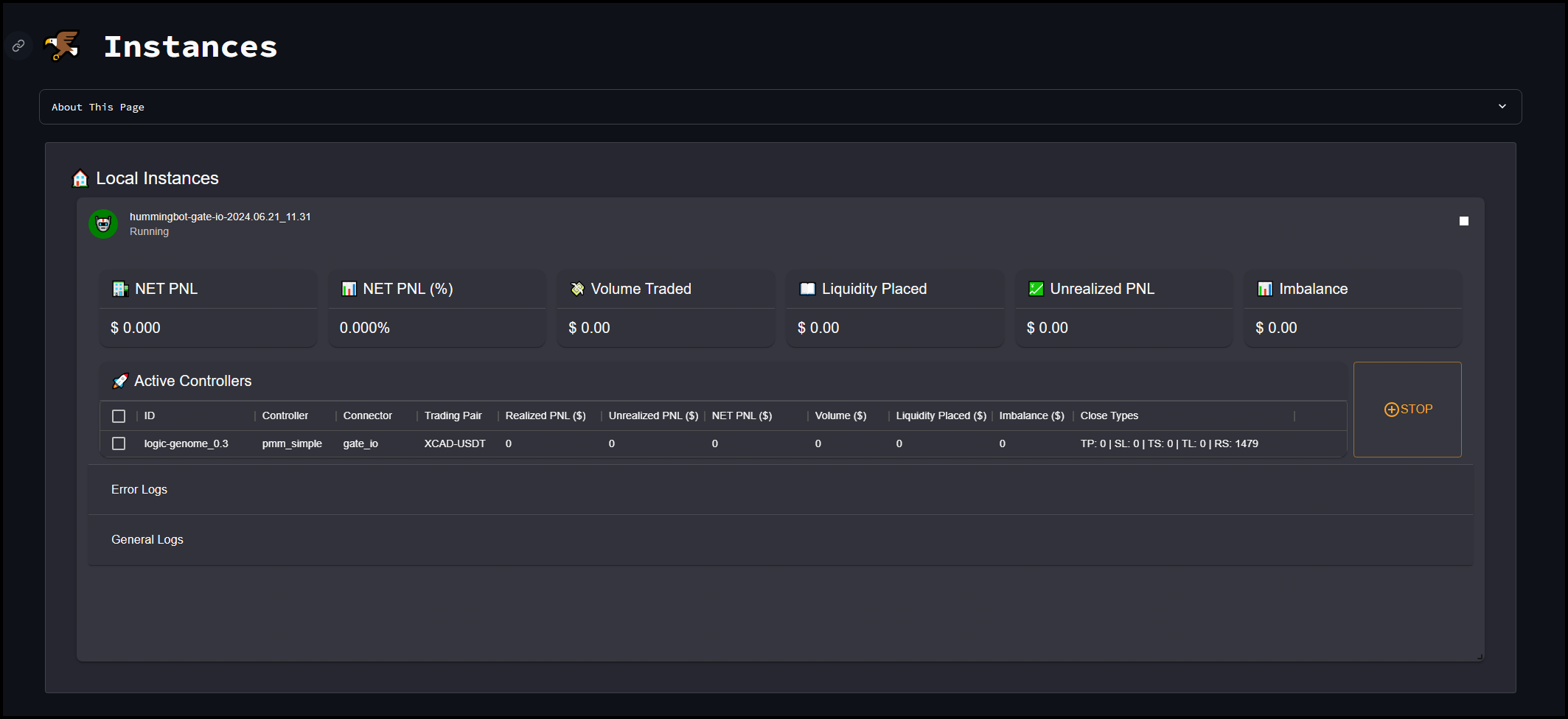
URL: https://hummingbot.org/assets/img/deploy.png
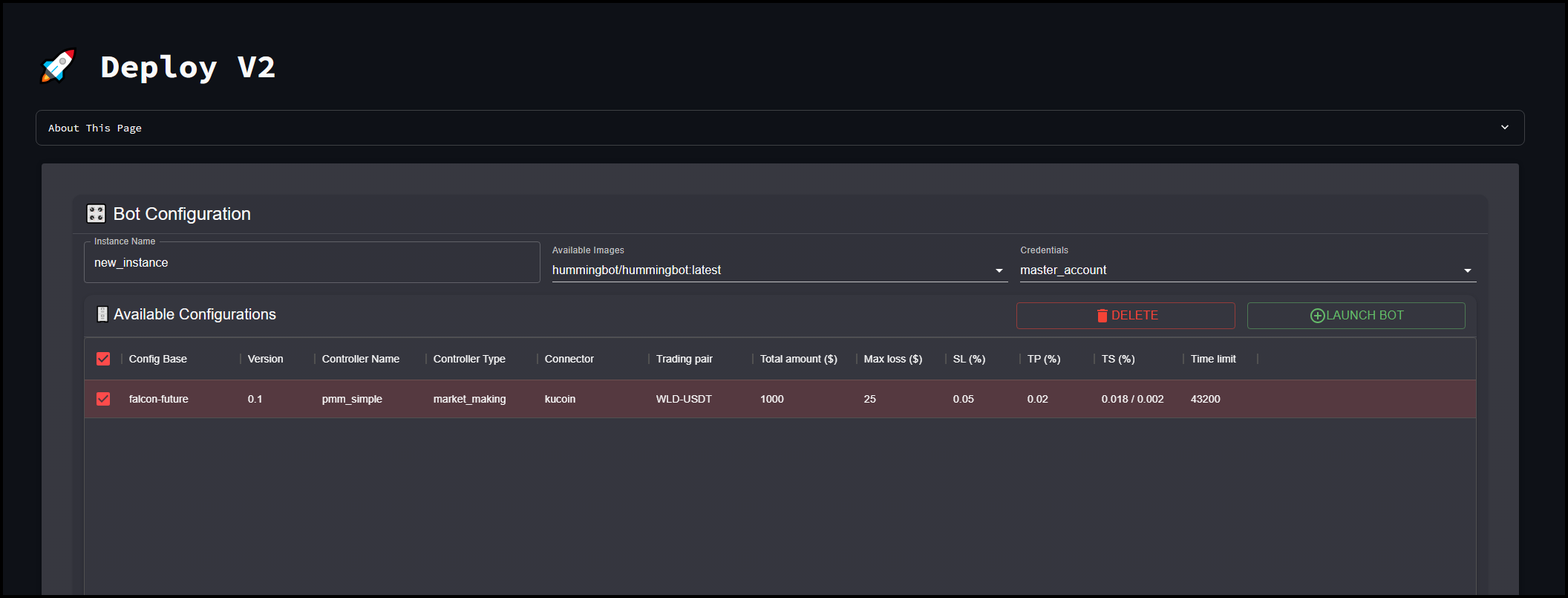
URL: https://hummingbot.org/dashboard/portfolio-3.png
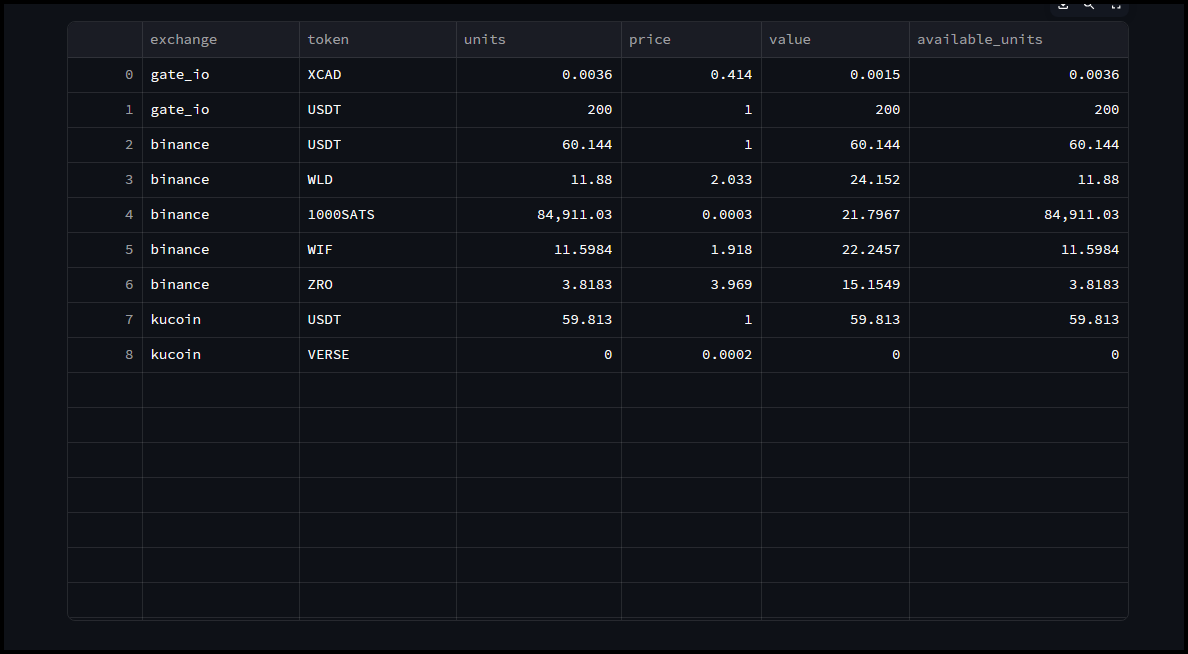
Hummingbot Client - Hummingbot
URL: https://hummingbot.org/client/
Contents:
- Hummingbot Client
- Basic Operations
- Advanced Features
If you have installed Hummingbot successfully, you should see a welcome screen like the one below:
Hummingbot features a command-line interface (CLI) that helps you building and run trading bots without coding skills.
Basic features in Hummingbot.
Advanced features in Hummingbot for quant traders and developers.
1.5.0 - Hummingbot
URL: https://hummingbot.org/release-notes/1.5.0/
Contents:
- Release Notes - Version 1.5.0
- New Perpetual Exchange Connector: CoinFLEX
- New Spot Exchange Connector: Bybit
- New Gateway DEX Connector: TraderJoe
- New Gateway DEX Connector: Sushiswap
- New Fixed Grid Strategy
- Removed Documentation for celo-arb, uniswap-v3-lp, and balancer
- Developer Updates
- Hummingbot changes
- Gateway changes
Released on June 30, 2022
Install via Docker: Linux | Windows | macOS | Raspberry Pi
Binary builds are no longer supported. Docker and Source are now the only supported methods of install.
We are very excited to ship the June 2022 Hummingbot release (v1.5.0) today!
CoinFLEX is a centralized cryptocurrency exchange located in Seychelles. There are 23 coins and 26 trading pairs on the exchange. CoinFLEX volume in the last 24 hours is reported to be at ₿54,774.17. The most active trading pair on CoinFLEX exchange is FLEX/USD. Launched on 16/4/2019, CoinFLEX is a centralized exchange that supports physically delivered derivatives as well as the spot market.
See the coinflex_perpetual documentation for more information.
Bybit is one of the fastest growing cryptocurrency derivatives exchanges, with more than 1.6 million registered users. Built on customer-centric values, we endeavor to provide a professional, smart, intuitive and innovative trading experience for retail and professional clients around the world. Bybit is committed to creating a fair, transparent and efficient trading environment, and offer 24/7 multi-language customer support to provide assistance in a timely manner.
See the bybit documentation for more information.
TraderJoe is an AMM DEX on the Avalanche (AVAX) blockchain that offers DeFi services, including swapping, staking and yield farming. The exchange has been growing rapidly, attracting over $4 billion in total value locked (TVL) since it was launched in June 2021. Trader Joe claims to take a community-first approach, and to prioritize innovation, speed and safety. It aims to provide a one-stop-shop DeFi experience and to integrate new products without compromising on security.
See the traderjoe documentation for more information.
SushiSwap (SUSHI) is an AMM DEX built on the Ethereum network. Originally forked from Uniswap, SushiSwap leverages smart contracts in order to provide liquidity pools that allow users to directly trade crypto assets — with no intermediary. Users can also become liquidity pool providers, supplying an equal value pair of two cryptocurrencies in order to receive rewards whenever anyone utilizes that pool. It is a decentralized finance (or DeFi) protocol.
See the sushiswap documentation for more information.
In this release, we are happy to introduce the fixed_grid strategy for Hummingbot, the first community strategy created under the Developer Grant proposal HGP-4
The fixed_grid strategy is similar to "Grid Trading Bot" strategies available on popular exchanges such as Binance and Kucoin, which are often the entry point of users to algorithmic trading in crypto. The strategy may provide a useful tool for market making in consolidating or range-bound markets, as well as for stablecoin pairs.
The main parameters needed to set up this strategy are grid_price_ceiling, grid_price_floor, n_levels (the number of grid levels).
See the fixed_grid documentation for more information.
We have removed the documentation pages for the celo-arb amd uniswap-v3-lp strategies since they were designed to work with DEX connectors in Gateway-V1, an earlier, deprecated version of Gateway. For the same reason, we have removed the balancer connector page.
We plan to restore these pages if the community adds support for UbeSwap (Celo), Balancer, and Uniswap-V3, respectively, in future releases.
Managing Instances - Hummingbot
URL: https://hummingbot.org/dashboard/instances/
Contents:
- Managing Instances
- Local Instances
- Stopping an Instance
- Restarting an Instance
The Instances page in the Hummingbot Dashboard is designed to monitor and manage your active trading bot instances. It provides a real-time overview of the performance and status of each running instance, offering valuable metrics and logs to help you keep track of your bots’ activities.
Instance Information: Displays details about the currently running instance, including the instance name and the time it started.
If you need to manually connect to the Docker container in the terminal, you can copy the full instance name in the top left corner and then in the terminal do docker attach [instance name]
A table listing all active controllers (trading strategies) within the instance. Each row in the table provides detailed information about a specific controller, including:
If an instance was stopped using the STOP button, the instance will move from the Active Controllers section to the Stopped Controllers section.
Check the box next to the instance you want to resume and then click the START button
Hummingbot Botcamp
URL: https://hummingbot.org/botcamp
Overview - Hummingbot
URL: https://hummingbot.org/mcp/
Contents:
- Hummingbot MCP Server
- Overview
- What is Model Context Protocol (MCP)?
- Key Features
- 🏦 Account Management
- 💰 Portfolio Tracking
- 📊 Order Management
- 📈 Position Management
- 🔍 Market Data Access
- 📉 Funding Rates Monitoring
The Hummingbot Model Context Protocol (MCP) Server enables AI assistants like Claude and Gemini to interact with Hummingbot for automated cryptocurrency trading across multiple exchanges.
GitHub Repository: github.com/hummingbot/mcp
The MCP Server acts as a bridge between AI language models and the Hummingbot trading platform, enabling programmatic interaction with cryptocurrency trading infrastructure. This allows AI assistants to manage trading operations, analyze portfolios, and execute strategies on behalf of users.
Model Context Protocol is an open standard that enables AI assistants to securely interact with external systems and data sources. In the context of Hummingbot, MCP allows AI models to:
The Hummingbot MCP Server provides the following capabilities:
Ready to build AI trading agents with Hummingbot? Follow these steps:
The MCP server provides comprehensive trading capabilities through these tool categories:
Monitor balances, track performance, and analyze portfolio allocation across all connected exchanges.
Execute trades, manage orders, and control positions programmatically with AI oversight.
Access real-time prices, funding rates, and order book data for informed decision making.
Install Claude CLI following Anthropic's guide
Configure MCP server in your Claude configuration: { "mcpServers": { "hummingbot": { "command": "uv", "args": ["run", "mcp"], "cwd": "/path/to/hummingbot-mcp" } } }
Start trading conversation: You: Show me my portfolio balances across all exchanges Claude: I'll check your portfolio balances using the Hummingbot MCP server...
The configuration process for Gemini CLI - refer to Google's documentation for MCP setup or check out Gemini CLI Installation
See Codex CLI Installation for setup.
The Hummingbot MCP Server is open source. Contributions are welcome!
You can extend the MCP server by adding custom tools:
Examples:
Example 1 (unknown):
graph TB
    subgraph "AI Assistants"
        CLAUDE[Claude CLI]
        GEMINI[Gemini CLI]
    end

    subgraph "MCP Server"
        MCP[Hummingbot<br/>MCP Server]
    end

    subgraph "Hummingbot Infrastructure"
        API[Hummingbot API<br/>Server]
        BOTS[Trading Bots]
    end

    subgraph "Exchanges"
        EX[Binance, OKX,<br/>Hyperliquid, etc.]
    end

    %% AI to MCP connections
    CLAUDE -->|MCP Protocol| MCP
    GEMINI -->|MCP Protocol| MCP

    %% MCP to Hummingbot API
    MCP -->|REST API| API

    %% API to infrastructure
    API <--> BOTS
    BOTS <--> EX
    API <--> EX

    %% Styling
    classDef aiStyle stroke:#5FFFD7,stroke-width:3px
    classDef mcpStyle stroke:#E549FF,stroke-width:3px
    classDef hbStyle stroke:#00B1BB,stroke-width:3px

    class CLAUDE,GEMINI aiStyle
    class MCP mcpStyle
    class API,BOTS hbStyle
Example 2 (unknown):
{
  "mcpServers": {
    "hummingbot": {
      "command": "uv",
      "args": ["run", "mcp"],
      "cwd": "/path/to/hummingbot-mcp"
    }
  }
}
Example 3 (unknown):
You: Show me my portfolio balances across all exchanges
Claude: I'll check your portfolio balances using the Hummingbot MCP server...
Example 4 (unknown):
AI: "What's my current portfolio worth and how is it distributed?"
MCP: Retrieves balances across all exchanges and calculates total value
AI: Provides detailed breakdown with recommendations
URL: https://hummingbot.org/assets/img/xrpl.png