
api.md 65 KB
Timescaledb - Api
Pages: 100
UUIDv7 functions
URL: llms-txt#uuidv7-functions
Contents:
- Examples
- Functions
UUIDv7 is a time-ordered UUID that includes a Unix timestamp (with millisecond precision) in its first 48 bits. Like other UUIDs, it uses 6 bits for version and variant info, and the remaining 74 bits are random.
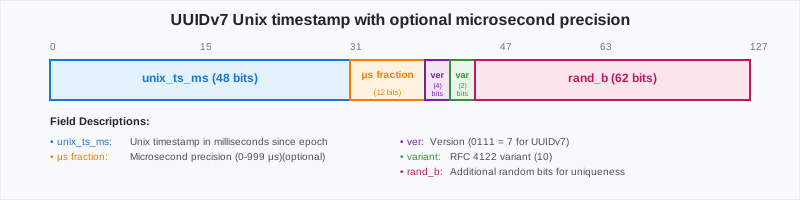
UUIDv7 is ideal anywhere you create lots of records over time, not only observability. Advantages are:
- No extra column required to partition by time with sortability: you can sort UUIDv7 instances by their value. This is useful for ordering records by creation time without the need for a separate timestamp column.
- Indexing performance: UUIDv7s increase with time, so new rows append near the end of a B-tree instead of This results in fewer page splits, less fragmentation, faster inserts, and efficient time-range scans.
- Easy keyset pagination:
WHERE id > :cursorand natural sharding. - UUID: safe across services, replicas, and unique across distributed systems.
UUIDv7 also increases query speed by reducing the number of chunks scanned during queries. For example, in a database with 25 million rows, the following query runs in 25 seconds:
Using UUIDv7 excludes chunks at startup and reduces the query time to 550ms:
You use UUIDvs for events, orders, messages, uploads, runs, jobs, spans, and more.
- High-rate event logs for observability and metrics:
UUIDv7 gives you globally unique IDs (for traceability) and time windows (“last hour”), without the need for a
separate created_at column. UUIDv7 create less churn because inserts land at the end of the index, and you can
filter by time using UUIDv7 objects.
Last hour:
- Keyset pagination
Workflow / durable execution runs:
Each run needs a stable ID for joins and retries, and you often ask “what started since X?”. UUIDs help by serving both as the primary key and a time cursor across services. For example:
- Orders / activity feeds / messages (SaaS apps):
Human-readable timestamps are not mandatory in a table. However, you still need time-ordered pages and day/week ranges.
UUIDv7 enables clean date windows and cursor pagination with just the ID. For example:
- [generate_uuidv7()][generate_uuidv7]: generate a version 7 UUID based on current time
- [to_uuidv7()][to_uuidv7]: create a version 7 UUID from a PostgreSQL timestamp
- [to_uuidv7_boundary()][to_uuidv7_boundary]: create a version 7 "boundary" UUID from a PostgreSQL timestamp
- [uuid_timestamp()][uuid_timestamp]: extract a PostgreSQL timestamp from a version 7 UUID
- [uuid_timestamp_micros()][uuid_timestamp_micros]: extract a PostgreSQL timestamp with microsecond precision from a version 7 UUID
- [uuid_version()][uuid_version]: extract the version of a UUID
===== PAGE: https://docs.tigerdata.com/api/approximate_row_count/ =====
Examples:
Example 1 (sql):
WITH ref AS (SELECT now() AS t0)
SELECT count(*) AS cnt_ts_filter
FROM events e, ref
WHERE uuid_timestamp(e.event_id) >= ref.t0 - INTERVAL '2 days';
Example 2 (sql):
WITH ref AS (SELECT now() AS t0)
SELECT count(*) AS cnt_boundary_filter
FROM events e, ref
WHERE e.event_id >= to_uuidv7_boundary(ref.t0 - INTERVAL '2 days')
Example 3 (sql):
SELECT count(*) FROM logs WHERE id >= to_uuidv7_boundary(now() - interval '1 hour');
Example 4 (sql):
SELECT * FROM logs WHERE id > to_uuidv7($last_seen'::timestamptz, true) ORDER BY id LIMIT 1000;
lttb()
URL: llms-txt#lttb()
===== PAGE: https://docs.tigerdata.com/api/_hyperfunctions/saturating_add/ =====
state_agg()
URL: llms-txt#state_agg()
===== PAGE: https://docs.tigerdata.com/api/_hyperfunctions/state_agg/state_timeline/ =====
compact_state_agg()
URL: llms-txt#compact_state_agg()
===== PAGE: https://docs.tigerdata.com/api/_hyperfunctions/compact_state_agg/into_values/ =====
vwap()
URL: llms-txt#vwap()
===== PAGE: https://docs.tigerdata.com/api/_hyperfunctions/candlestick_agg/rollup/ =====
interpolated_state_timeline()
URL: llms-txt#interpolated_state_timeline()
===== PAGE: https://docs.tigerdata.com/api/_hyperfunctions/state_agg/interpolated_duration_in/ =====
close()
URL: llms-txt#close()
===== PAGE: https://docs.tigerdata.com/api/_hyperfunctions/candlestick_agg/open_time/ =====
interpolated_downtime()
URL: llms-txt#interpolated_downtime()
===== PAGE: https://docs.tigerdata.com/api/_hyperfunctions/min_n/min_n/ =====
Frequency analysis
URL: llms-txt#frequency-analysis
This section includes frequency aggregate APIs, which find the most common elements out of a set of vastly more varied values.
For these hyperfunctions, you need to install the [TimescaleDB Toolkit][install-toolkit] Postgres extension.
<HyperfunctionTable
hyperfunctionFamily='frequency analysis'
includeExperimental
sortByType
/>
===== PAGE: https://docs.tigerdata.com/api/informational-views/ =====
stderror()
URL: llms-txt#stderror()
===== PAGE: https://docs.tigerdata.com/api/_hyperfunctions/hyperloglog/approx_count_distinct/ =====
tdigest()
URL: llms-txt#tdigest()
===== PAGE: https://docs.tigerdata.com/api/_hyperfunctions/tdigest/mean/ =====
volume()
URL: llms-txt#volume()
===== PAGE: https://docs.tigerdata.com/api/_hyperfunctions/candlestick_agg/candlestick_agg/ =====
high_time()
URL: llms-txt#high_time()
===== PAGE: https://docs.tigerdata.com/api/_hyperfunctions/count_min_sketch/approx_count/ =====
open()
URL: llms-txt#open()
===== PAGE: https://docs.tigerdata.com/api/_hyperfunctions/candlestick_agg/low/ =====
interpolated_average()
URL: llms-txt#interpolated_average()
===== PAGE: https://docs.tigerdata.com/api/_hyperfunctions/time_weight/average/ =====
slope()
URL: llms-txt#slope()
===== PAGE: https://docs.tigerdata.com/api/_hyperfunctions/counter_agg/num_elements/ =====
irate_right()
URL: llms-txt#irate_right()
===== PAGE: https://docs.tigerdata.com/api/_hyperfunctions/counter_agg/last_val/ =====
trim_to()
URL: llms-txt#trim_to()
===== PAGE: https://docs.tigerdata.com/api/_hyperfunctions/heartbeat_agg/intro/ =====
Given a series of timestamped heartbeats and a liveness interval, determine the overall liveness of a system. This aggregate can be used to report total uptime or downtime as well as report the time ranges where the system was live or dead.
It's also possible to combine multiple heartbeat aggregates to determine the overall health of a service. For example, the heartbeat aggregates from a primary and standby server could be combined to see if there was ever a window where both machines were down at the same time.
===== PAGE: https://docs.tigerdata.com/api/_hyperfunctions/heartbeat_agg/dead_ranges/ =====
irate_left()
URL: llms-txt#irate_left()
===== PAGE: https://docs.tigerdata.com/api/_hyperfunctions/counter_agg/num_changes/ =====
interpolated_delta()
URL: llms-txt#interpolated_delta()
===== PAGE: https://docs.tigerdata.com/api/_hyperfunctions/counter_agg/counter_zero_time/ =====
counter_zero_time()
URL: llms-txt#counter_zero_time()
===== PAGE: https://docs.tigerdata.com/api/_hyperfunctions/counter_agg/irate_left/ =====
Tiger Cloud REST API reference
URL: llms-txt#tiger-cloud-rest-api-reference
Contents:
- Overview
- Authentication
- Basic Authentication
- Example
- Service Management
- List All Services
- Create a Service
- Get a Service
- Delete a Service
- Resize a Service
A comprehensive RESTful API for managing Tiger Cloud resources including VPCs, services, and read replicas.
API Version: 1.0.0
Base URL: https://console.cloud.timescale.com/public/api/v1
The Tiger REST API uses HTTP Basic Authentication. Include your access key and secret key in the Authorization header.
Basic Authentication
Service Management
You use this endpoint to create a Tiger Cloud service with one of more of the following addons:
time-series: a Tiger Cloud service optimized for real-time analytics. For time-stamped data like events, prices, metrics, sensor readings, or any information that changes over time.ai: a Tiger Cloud service instance with vector extensions.
To have multiple addons when you create a new service, set "addons": ["time-series", "ai"]. To create a
vanilla Postgres instance, set addons to an empty list [].
List All Services
Retrieve all services within a project.
Response: 200 OK
Create a new Tiger Cloud service. This is an asynchronous operation.
Response: 202 Accepted
Service Types:
TIMESCALEDB: a Tiger Cloud service instance optimized for real-time analytics service For time-stamped data like events, prices, metrics, sensor readings, or any information that changes over timePOSTGRES: a vanilla Postgres instanceVECTOR: a Tiger Cloud service instance with vector extensions
Retrieve details of a specific service.
Response: 200 OK
Service Status:
QUEUED: Service creation is queuedDELETING: Service is being deletedCONFIGURING: Service is being configuredREADY: Service is ready for useDELETED: Service has been deletedUNSTABLE: Service is in an unstable statePAUSING: Service is being pausedPAUSED: Service is pausedRESUMING: Service is being resumedUPGRADING: Service is being upgradedOPTIMIZING: Service is being optimized
Delete a specific service. This is an asynchronous operation.
Response: 202 Accepted
Change CPU and memory allocation for a service.
Response: 202 Accepted
Update Service Password
Set a new master password for the service.
Response: 204 No Content
Set Service Environment
Set the environment type for the service.
Environment Values:
PROD: Production environmentDEV: Development environment
Response: 200 OK
Configure High Availability
Change the HA configuration for a service. This is an asynchronous operation.
Response: 202 Accepted
Connection Pooler Management
Enable Connection Pooler
Activate the connection pooler for a service.
Response: 200 OK
Disable Connection Pooler
Deactivate the connection pooler for a service.
Response: 200 OK
Create a new, independent service by taking a snapshot of an existing one.
Response: 202 Accepted
Manage read replicas for improved read performance.
List Read Replica Sets
Retrieve all read replica sets associated with a primary service.
Response: 200 OK
Replica Set Status:
creating: Replica set is being createdactive: Replica set is active and readyresizing: Replica set is being resizeddeleting: Replica set is being deletederror: Replica set encountered an error
Create a Read Replica Set
Create a new read replica set. This is an asynchronous operation.
Response: 202 Accepted
Delete a Read Replica Set
Delete a specific read replica set. This is an asynchronous operation.
Response: 202 Accepted
Resize a Read Replica Set
Change resource allocation for a read replica set. This operation is async.
Response: 202 Accepted
Read Replica Set Connection Pooler
Enable Replica Set Pooler
Activate the connection pooler for a read replica set.
Response: 200 OK
Disable Replica Set Pooler
Deactivate the connection pooler for a read replica set.
Response: 200 OK
Set Replica Set Environment
Set the environment type for a read replica set.
Response: 200 OK
Virtual Private Clouds (VPCs) provide network isolation for your TigerData services.
List all Virtual Private Clouds in a project.
Response: 200 OK
Response: 201 Created
Retrieve details of a specific VPC.
Response: 200 OK
Update the name of a specific VPC.
Response: 200 OK
Delete a specific VPC.
Response: 204 No Content
Manage peering connections between VPCs across different accounts and regions.
List VPC Peerings
Retrieve all VPC peering connections for a given VPC.
Response: 200 OK
Create VPC Peering
Create a new VPC peering connection.
Response: 201 Created
Retrieve details of a specific VPC peering connection.
Delete VPC Peering
Delete a specific VPC peering connection.
Response: 204 No Content
Service VPC Operations
Attach Service to VPC
Associate a service with a VPC.
Response: 202 Accepted
Detach Service from VPC
Disassociate a service from its VPC.
Response: 202 Accepted
Read Replica Set Object
Tiger Cloud REST API uses standard HTTP status codes and returns error details in JSON format.
Error Response Format
Common Error Codes
400 Bad Request: Invalid request parameters or malformed JSON401 Unauthorized: Missing or invalid authentication credentials403 Forbidden: Insufficient permissions for the requested operation404 Not Found: Requested resource does not exist409 Conflict: Request conflicts with current resource state500 Internal Server Error: Unexpected server error
Example Error Response
===== PAGE: https://docs.tigerdata.com/api/glossary/ =====
Examples:
Example 1 (http):
Authorization: Basic <base64(access_key:secret_key)>
Example 2 (bash):
curl -X GET "https://console.cloud.timescale.com/public/api/v1/projects/{project_id}/services" \
  -H "Authorization: Basic $(echo -n 'your_access_key:your_secret_key' | base64)"
Example 3 (http):
GET /projects/{project_id}/services
Example 4 (json):
[
  {
    "service_id": "p7zm9wqqii",
    "project_id": "jz22xtzemv",
    "name": "my-production-db",
    "region_code": "eu-central-1",
    "service_type": "TIMESCALEDB",
    "status": "READY",
    "created": "2024-01-15T10:30:00Z",
    "paused": false,
    "resources": [
      {
        "id": "resource-1",
        "spec": {
          "cpu_millis": 1000,
          "memory_gbs": 4,
          "volume_type": "gp2"
        }
      }
    ],
    "endpoint": {
      "host": "my-service.com",
      "port": 5432
    }
  }
]
approx_count_distinct()
URL: llms-txt#approx_count_distinct()
===== PAGE: https://docs.tigerdata.com/api/_hyperfunctions/max_n/max_n/ =====
variance()
URL: llms-txt#variance()
===== PAGE: https://docs.tigerdata.com/api/_hyperfunctions/gauge_agg/delta/ =====
low()
URL: llms-txt#low()
===== PAGE: https://docs.tigerdata.com/api/_hyperfunctions/candlestick_agg/candlestick/ =====
Administrative functions
URL: llms-txt#administrative-functions
Contents:
- Dump TimescaleDB meta data
- get_telemetry_report()
- Sample usage
- timescaledb_post_restore()
- Sample usage
- timescaledb_pre_restore()
- Sample usage
These administrative APIs help you prepare a database before and after a restore event. They also help you keep track of your TimescaleDB setup data.
Dump TimescaleDB meta data
To help when asking for support and reporting bugs, TimescaleDB includes an SQL dump script. It outputs metadata from the internal TimescaleDB tables, along with version information.
This script is available in the source distribution in scripts/. To use it, run:
Inspect dumpfile.txt before sending it together with a bug report or support question.
get_telemetry_report()
Returns the background [telemetry][telemetry] string sent to Tiger Data.
If telemetry is turned off, it sends the string that would be sent if telemetry were enabled.
View the telemetry report:
timescaledb_post_restore()
Perform the required operations after you have finished restoring the database using pg_restore. Specifically, this resets the timescaledb.restoring GUC and restarts any background workers.
For more information, see [Migrate using pg_dump and pg_restore].
Prepare the database for normal use after a restore:
timescaledb_pre_restore()
Perform the required operations so that you can restore the database using pg_restore. Specifically, this sets the timescaledb.restoring GUC to on and stops any background workers which could have been performing tasks.
The background workers are stopped until the timescaledb_post_restore() function is run, after the restore operation is complete.
For more information, see [Migrate using pg_dump and pg_restore].
After using timescaledb_pre_restore(), you need to run timescaledb_post_restore() before you can use the database normally.
Prepare to restore the database:
===== PAGE: https://docs.tigerdata.com/api/api-tag-overview/ =====
Examples:
Example 1 (bash):
psql [your connect flags] -d your_timescale_db < dump_meta_data.sql > dumpfile.txt
Example 2 (sql):
SELECT get_telemetry_report();
Example 3 (sql):
SELECT timescaledb_post_restore();
Example 4 (sql):
SELECT timescaledb_pre_restore();
into_array()
URL: llms-txt#into_array()
===== PAGE: https://docs.tigerdata.com/api/_hyperfunctions/max_n/into_values/ =====
live_ranges()
URL: llms-txt#live_ranges()
===== PAGE: https://docs.tigerdata.com/api/_hyperfunctions/heartbeat_agg/interpolate/ =====
num_resets()
URL: llms-txt#num_resets()
===== PAGE: https://docs.tigerdata.com/api/_hyperfunctions/counter_agg/last_time/ =====
uptime()
URL: llms-txt#uptime()
===== PAGE: https://docs.tigerdata.com/api/_hyperfunctions/heartbeat_agg/num_gaps/ =====
API Reference
URL: llms-txt#api-reference
===== PAGE: https://docs.tigerdata.com/api/_hyperfunctions/counter_agg/time_delta/ =====
saturating_mul()
URL: llms-txt#saturating_mul()
===== PAGE: https://docs.tigerdata.com/api/_hyperfunctions/downsampling-intro/ =====
Downsample your data to visualize trends while preserving fewer data points. Downsampling replaces a set of values with a much smaller set that is highly representative of the original data. This is particularly useful for graphing applications.
===== PAGE: https://docs.tigerdata.com/api/_hyperfunctions/saturating_sub/ =====
average()
URL: llms-txt#average()
===== PAGE: https://docs.tigerdata.com/api/_hyperfunctions/time_weight/rollup/ =====
downtime()
URL: llms-txt#downtime()
===== PAGE: https://docs.tigerdata.com/api/_hyperfunctions/heartbeat_agg/interpolated_uptime/ =====
Create and manage jobs
URL: llms-txt#create-and-manage-jobs
Contents:
- Prerequisites
- Create a job
- Test and debug a job
- Alter and delete a job
Jobs in TimescaleDB are custom functions or procedures that run on a schedule that you define. This page explains how to create, test, alter, and delete a job.
To follow the procedure on this page you need to:
- Create a [target Tiger Cloud service][create-service].
This procedure also works for [self-hosted TimescaleDB][enable-timescaledb].
To create a job, create a [function][postgres-createfunction] or [procedure][postgres-createprocedure] that you want your database to execute, then set it up to run on a schedule.
- Define a function or procedure in the language of your choice
Wrap it in a CREATE statement:
For example, to create a function that reindexes a table within your database:
job_id and config are required arguments in the function signature. This returns CREATE FUNCTION to indicate that the function has successfully been created.
- Call the function to validate
The result looks like this:
- Register your job with [
add_job][api-add_job]
Pass the name of your job, the schedule you want it to run on, and the content of your config. For the config value, if you don't need any special configuration parameters, set to NULL. For example, to run the reindex_mytable function every hour:
The call returns a job_id and stores it along with config in the TimescaleDB catalog.
The job runs on the schedule you set. You can also run it manually with [run_job][api-run_job] passing job_id. When the job runs, job_id and config are passed as arguments.
- Validate the job
List all currently registered jobs with [timescaledb_information.jobs][api-timescaledb_information-jobs]:
The result looks like this:
Test and debug a job
To debug a job, increase the log level and run the job manually with [run_job][api-run_job] in the foreground. Because run_job is a stored procedure and not a function, run it with [CALL][postgres-call] instead of SELECT.
- Set the minimum log level to
DEBUG1
Replace 1000 with your job_id:
Alter and delete a job
Alter an existing job with [alter_job][api-alter_job]. You can change both the config and the schedule on which the job runs.
- Change a job's config
To replace the entire JSON config for a job, call alter_job with a new config object. For example, replace the JSON config for a job with ID 1000:
- Turn off job scheduling
To turn off automatic scheduling of a job, call alter_job and set scheduledto false. You can still run the job manually with run_job. For example, turn off the scheduling for a job with ID 1000:
- Re-enable automatic scheduling of a job
To re-enable automatic scheduling of a job, call alter_job and set scheduled to true. For example, re-enable scheduling for a job with ID 1000:
- Delete a job with [
delete_job][api-delete_job]
For example, to delete a job with ID 1000:
===== PAGE: https://docs.tigerdata.com/use-timescale/hyperfunctions/function-pipelines/ =====
Examples:
Example 1 (sql):
CREATE FUNCTION <function_name> (job_id INT DEFAULT NULL, config JSONB DEFAULT NULL)
    RETURNS VOID
	DECLARE
		<declaration>;
	BEGIN
		<function_body>;
	END;
	$<variable_name>$ LANGUAGE <language>;
Example 2 (sql):
CREATE FUNCTION reindex_mytable(job_id INT DEFAULT NULL, config JSONB DEFAULT NULL)
    RETURNS VOID
    AS $$
    BEGIN
       REINDEX TABLE mytable;
    END;
    $$ LANGUAGE plpgsql;
Example 3 (sql):
select reindex_mytable();
Example 4 (sql):
reindex_mytable
    -----------------

    (1 row)
topn()
URL: llms-txt#topn()
===== PAGE: https://docs.tigerdata.com/api/_hyperfunctions/freq_agg/intro/ =====
Get the most common elements of a set and their relative frequency. The estimation uses the [SpaceSaving][spacingsaving-algorithm] algorithm.
This group of functions contains two aggregate functions, which let you set the
cutoff for keeping track of a value in different ways. freq_agg
allows you to specify a minimum frequency, and mcv_agg allows
you to specify the target number of values to keep.
To estimate the absolute number of times a value appears, use [count_min_sketch][count_min_sketch].
===== PAGE: https://docs.tigerdata.com/api/_hyperfunctions/freq_agg/min_frequency/ =====
duration_in()
URL: llms-txt#duration_in()
===== PAGE: https://docs.tigerdata.com/api/_hyperfunctions/compact_state_agg/intro/ =====
Given a system or value that switches between discrete states, aggregate the
amount of time spent in each state. For example, you can use the compact_state_agg
functions to track how much time a system spends in error, running, or
starting states.
compact_state_agg is designed to work with a relatively small number of states. It
might not perform well on datasets where states are mostly distinct between
rows.
If you need to track when each state is entered and exited, use the
[state_agg][state_agg] functions. If you need to track the liveness of a
system based on a heartbeat signal, consider using the
[heartbeat_agg][heartbeat_agg] functions.
===== PAGE: https://docs.tigerdata.com/api/_hyperfunctions/compact_state_agg/compact_state_agg/ =====
high()
URL: llms-txt#high()
===== PAGE: https://docs.tigerdata.com/api/_hyperfunctions/candlestick_agg/high_time/ =====
corr()
URL: llms-txt#corr()
===== PAGE: https://docs.tigerdata.com/api/_hyperfunctions/counter_agg/idelta_right/ =====
last_time()
URL: llms-txt#last_time()
===== PAGE: https://docs.tigerdata.com/api/_hyperfunctions/counter_agg/counter_agg/ =====
gp_lttb()
URL: llms-txt#gp_lttb()
===== PAGE: https://docs.tigerdata.com/api/_hyperfunctions/saturating-math-intro/ =====
The saturating math hyperfunctions help you perform saturating math on integers.
In saturating math, the final result is bounded. If the result of a normal
mathematical operation exceeds either the minimum or maximum bound, the result
of the corresponding saturating math operation is capped at the bound. For
example, 2 + (-3) = -1. But in a saturating math function with a lower bound
of 0, such as saturating_add_pos, the result is 0.
You can use saturating math to make sure your results don't overflow the allowed range of integers, or to force a result to be greater than or equal to zero.
===== PAGE: https://docs.tigerdata.com/api/_hyperfunctions/lttb/ =====
intercept()
URL: llms-txt#intercept()
===== PAGE: https://docs.tigerdata.com/api/_hyperfunctions/counter_agg/extrapolated_rate/ =====
min_n()
URL: llms-txt#min_n()
===== PAGE: https://docs.tigerdata.com/api/_hyperfunctions/min_n/intro/ =====
Get the N smallest values from a column.
The min_n() functions give the same results as the regular SQL query SELECT
... ORDER BY ... LIMIT n. But unlike the SQL query, they can be composed and
combined like other aggregate hyperfunctions.
To get the N largest values, use [max_n()][max_n]. To get the N smallest
values with accompanying data, use [min_n_by()][min_n_by].
===== PAGE: https://docs.tigerdata.com/api/_hyperfunctions/min_n/into_array/ =====
state_timeline()
URL: llms-txt#state_timeline()
===== PAGE: https://docs.tigerdata.com/api/_hyperfunctions/state_agg/interpolated_state_timeline/ =====
mcv_agg()
URL: llms-txt#mcv_agg()
===== PAGE: https://docs.tigerdata.com/api/_hyperfunctions/compact_state_agg/interpolated_duration_in/ =====
into_values()
URL: llms-txt#into_values()
===== PAGE: https://docs.tigerdata.com/api/_hyperfunctions/max_n/rollup/ =====
heartbeat_agg()
URL: llms-txt#heartbeat_agg()
===== PAGE: https://docs.tigerdata.com/api/_hyperfunctions/heartbeat_agg/rollup/ =====
saturating_add_pos()
URL: llms-txt#saturating_add_pos()
===== PAGE: https://docs.tigerdata.com/api/_hyperfunctions/saturating_multiply/ =====
rate()
URL: llms-txt#rate()
===== PAGE: https://docs.tigerdata.com/api/_hyperfunctions/counter_agg/with_bounds/ =====
state_at()
URL: llms-txt#state_at()
===== PAGE: https://docs.tigerdata.com/api/_hyperfunctions/state_agg/interpolated_state_periods/ =====
close_time()
URL: llms-txt#close_time()
===== PAGE: https://docs.tigerdata.com/api/_hyperfunctions/candlestick_agg/close/ =====
saturating_add()
URL: llms-txt#saturating_add()
===== PAGE: https://docs.tigerdata.com/api/_hyperfunctions/asap_smooth/ =====
freq_agg()
URL: llms-txt#freq_agg()
===== PAGE: https://docs.tigerdata.com/api/_hyperfunctions/freq_agg/max_frequency/ =====
num_live_ranges()
URL: llms-txt#num_live_ranges()
===== PAGE: https://docs.tigerdata.com/api/_hyperfunctions/heartbeat_agg/interpolated_downtime/ =====
candlestick()
URL: llms-txt#candlestick()
===== PAGE: https://docs.tigerdata.com/api/_hyperfunctions/candlestick_agg/volume/ =====
first_time()
URL: llms-txt#first_time()
===== PAGE: https://docs.tigerdata.com/api/_hyperfunctions/counter_agg/intro/ =====
Analyze data whose values are designed to monotonically increase, and where any
decreases are treated as resets. The counter_agg functions simplify this task,
which can be difficult to do in pure SQL.
If it's possible for your readings to decrease as well as increase, use [gauge_agg][gauge_agg]
instead.
===== PAGE: https://docs.tigerdata.com/api/_hyperfunctions/counter_agg/irate_right/ =====
extrapolated_delta()
URL: llms-txt#extrapolated_delta()
===== PAGE: https://docs.tigerdata.com/api/_hyperfunctions/counter_agg/interpolated_delta/ =====
asap_smooth()
URL: llms-txt#asap_smooth()
===== PAGE: https://docs.tigerdata.com/api/_hyperfunctions/saturating_sub_pos/ =====
open_time()
URL: llms-txt#open_time()
===== PAGE: https://docs.tigerdata.com/api/_hyperfunctions/candlestick_agg/vwap/ =====
extrapolated_rate()
URL: llms-txt#extrapolated_rate()
===== PAGE: https://docs.tigerdata.com/api/_hyperfunctions/counter_agg/rollup/ =====
error()
URL: llms-txt#error()
===== PAGE: https://docs.tigerdata.com/api/_hyperfunctions/uddsketch/rollup/ =====
first_val()
URL: llms-txt#first_val()
===== PAGE: https://docs.tigerdata.com/api/_hyperfunctions/counter_agg/num_resets/ =====
interpolated_uptime()
URL: llms-txt#interpolated_uptime()
===== PAGE: https://docs.tigerdata.com/api/_hyperfunctions/heartbeat_agg/uptime/ =====
interpolate()
URL: llms-txt#interpolate()
===== PAGE: https://docs.tigerdata.com/api/_hyperfunctions/heartbeat_agg/downtime/ =====
delta()
URL: llms-txt#delta()
===== PAGE: https://docs.tigerdata.com/api/_hyperfunctions/counter_agg/idelta_left/ =====
saturating_sub_pos()
URL: llms-txt#saturating_sub_pos()
===== PAGE: https://docs.tigerdata.com/api/_hyperfunctions/state_agg/timeline_agg/ =====
approx_count()
URL: llms-txt#approx_count()
===== PAGE: https://docs.tigerdata.com/api/_hyperfunctions/count_min_sketch/intro/ =====
Count the number of times a value appears in a column, using the probabilistic
[count-min sketch][count-min-sketch] data structure and its associated
algorithms. For applications where a small error rate is tolerable, this can
result in huge savings in both CPU time and memory, especially for large
datasets.
===== PAGE: https://docs.tigerdata.com/api/_hyperfunctions/count_min_sketch/count_min_sketch/ =====
idelta_right()
URL: llms-txt#idelta_right()
===== PAGE: https://docs.tigerdata.com/api/_hyperfunctions/counter_agg/first_val/ =====
idelta_left()
URL: llms-txt#idelta_left()
===== PAGE: https://docs.tigerdata.com/api/_hyperfunctions/counter_agg/first_time/ =====
gauge_zero_time()
URL: llms-txt#gauge_zero_time()
===== PAGE: https://docs.tigerdata.com/api/_hyperfunctions/gauge_agg/corr/ =====
min_frequency()
URL: llms-txt#min_frequency()
===== PAGE: https://docs.tigerdata.com/api/_hyperfunctions/freq_agg/freq_agg/ =====
num_gaps()
URL: llms-txt#num_gaps()
===== PAGE: https://docs.tigerdata.com/api/_hyperfunctions/heartbeat_agg/trim_to/ =====
Function pipelines
URL: llms-txt#function-pipelines
Contents:
- Anatomy of a function pipeline
- Timevectors
- Custom operator
- Pipeline elements
- Transform elements
- Vectorized math functions
- Unary mathematical functions
- Binary mathematical functions
- Compound transforms
- Lambda elements
Function pipelines are an experimental feature, designed to radically improve how you write queries to analyze data in Postgres and SQL. They work by applying principles from functional programming and popular tools like Python Pandas, and PromQL.
Experimental features could have bugs. They might not be backwards compatible, and could be removed in future releases. Use these features at your own risk, and do not use any experimental features in production.
The timevector() function materializes all its data points in
memory. This means that if you use it on a very large dataset,
it runs out of memory. Do not use the timevector function
on a large dataset, or in production.
SQL is the best language for data analysis, but it is not perfect, and at times it can be difficult to construct the query you want. For example, this query gets data from the last day from the measurements table, sorts the data by the time column, calculates the delta between the values, takes the absolute value of the delta, and then takes the sum of the result of the previous steps:
You can express the same query with a function pipeline like this:
Function pipelines are completely SQL compliant, meaning that any tool that speaks SQL is able to support data analysis using function pipelines.
Anatomy of a function pipeline
Function pipelines are built as a series of elements that work together to
create your query. The most important part of a pipeline is a custom data type
called a timevector. The other elements then work on the timevector to build
your query, using a custom operator to define the order in which the elements
are run.
A timevector is a collection of time,value pairs with a defined start and end
time, that could something like this:

Your entire database might have time,value pairs that go well into the past and
continue into the future, but the timevector has a defined start and end time
within that dataset, which could look something like this:

To construct a timevector from your data, use a custom aggregate and pass
in the columns to become the time,value pairs. It uses a WHERE clause to
define the limits of the subset, and a GROUP BY clause to provide identifying
information about the time-series. For example, to construct a timevector from
a dataset that contains temperatures, the SQL looks like this:
Function pipelines use a single custom operator of ->. This operator is used
to apply and compose multiple functions. The -> operator takes the inputs on
the left of the operator, and applies the operation on the right of the
operator. To put it more plainly, you can think of it as "do the next thing."
A typical function pipeline could look something like this:
While it might look at first glance as though timevector(ts, val) operation is
an argument to sort(), in a pipeline these are all regular function calls.
Each of the calls can only operate on the things in their own parentheses, and
don't know about anything to the left of them in the statement.
Each of the functions in a pipeline returns a custom type that describes the
function and its arguments, these are all pipeline elements. The -> operator
performs one of two different types of actions depending on the types on its
right and left sides:
- Applies a pipeline element to the left hand argument: performing the function described by the pipeline element on the incoming data type directly.
- Compose pipeline elements into a combined element that can be applied at some point in the future. This is an optimization that allows you to nest elements to reduce the number of passes that are required.
The operator determines the action to perform based on its left and right arguments.
Pipeline elements
There are two main types of pipeline elements:
- Transforms change the contents of the
timevector, returning the updated vector. - Finalizers finish the pipeline and output the resulting data.
Transform elements take in a timevector and produce a timevector. They are
the simplest element to compose, because they produce the same type.
For example:
Finalizer elements end the timevector portion of a pipeline. They can produce
an output in a specified format. or they can produce an aggregate of the
timevector.
For example, a finalizer element that produces an output:
Or a finalizer element that produces an aggregate:
The third type of pipeline elements are aggregate accessors and mutators. These
work on a timevector in a pipeline, but they also work in regular aggregate
queries. An example of using these in a pipeline:
Transform elements
Transform elements take a timevector, and produce a timevector.
Vectorized math functions
Vectorized math function elements modify each value inside the timevector
with the specified mathematical function. They are applied point-by-point and
they produce a one-to-one mapping from the input to output timevector. Each
point in the input has a corresponding point in the output, with its value
transformed by the mathematical function specified.
Elements are always applied left to right, so the order of operations is not
taken into account even in the presence of explicit parentheses. This means for
a timevector row ('2020-01-01 00:00:00+00', 20.0), this pipeline works:
And this pipeline works in the same way:
Both of these examples produce ('2020-01-01 00:00:00+00', 31.0).
If multiple arithmetic operations are needed and precedence is important, consider using a Lambda instead.
Unary mathematical functions
Unary mathematical function elements apply the corresponding mathematical
function to each datapoint in the timevector, leaving the timestamp and
ordering the same. The available elements are:
|Element|Description|
|-|-|
|abs()|Computes the absolute value of each value|
|cbrt()|Computes the cube root of each value|
|ceil()|Computes the first integer greater than or equal to each value|
|floor()|Computes the first integer less than or equal to each value|
|ln()|Computes the natural logarithm of each value|
|log10()|Computes the base 10 logarithm of each value|
|round()|Computes the closest integer to each value|
|sign()|Computes +/-1 for each positive/negative value|
|sqrt()|Computes the square root for each value|
|trunc()|Computes only the integer portion of each value|
Even if an element logically computes an integer, timevectors only deal with
double precision floating point values, so the computed value is the
floating point representation of the integer. For example:
The output for this example:
Binary mathematical functions
Binary mathematical function elements run the corresponding mathematical function
on the value in each point in the timevector, using the supplied number as
the second argument of the function. The available elements are:
|Element|Description|
|-|-|
|add(N)|Computes each value plus N|
|div(N)|Computes each value divided by N|
|logn(N)|Computes the logarithm base N of each value|
|mod(N)|Computes the remainder when each number is divided by N|
|mul(N)|Computes each value multiplied by N|
|power(N)|Computes each value taken to the N power|
|sub(N)|Computes each value less N|
These elements calculate vector -> power(2) by squaring all of the values,
and vector -> logn(3) gives the log-base-3 of each value. For example:
The output for this example:
Compound transforms
Mathematical transforms are applied only to the value in each
point in a timevector and always produce one-to-one output timevectors.
Compound transforms can involve both the time and value parts of the points
in the timevector, and they are not necessarily one-to-one. One or more points
in the input can be used to produce zero or more points in the output. So, where
mathematical transforms always produce timevectors of the same length,
compound transforms can produce larger or smaller timevectors as an output.
Delta transforms
A delta() transform calculates the difference between consecutive values in
the timevector. The first point in the timevector is omitted as there is no
previous value and it cannot have a delta(). Data should be sorted using the
sort() element before passing into delta(). For example:
The output for this example:
The first row of the output is missing, as there is no way to compute a delta without a previous value.
Fill method transform
The fill_to() transform ensures that there is a point at least every
interval, if there is not a point, it fills in the point using the method
provided. The timevector must be sorted before calling fill_to(). The
available fill methods are:
|fill_method|description| |-|-| |LOCF|Last object carried forward, fill with last known value prior to the hole| |Interpolate|Fill the hole using a collinear point with the first known value on either side| |Linear|This is an alias for interpolate| |Nearest|Fill with the matching value from the closer of the points preceding or following the hole|
The output for this example:
Largest triangle three buckets (LTTB) transform
The largest triangle three buckets (LTTB) transform uses the LTTB graphical
downsampling algorithm to downsample a timevector to the specified resolution
while maintaining visual acuity.
The sort() transform sorts the timevector by time, in ascending order. This
transform is ignored if the timevector is already sorted. For example:
The output for this example:
The Lambda element functions use the Toolkit's experimental Lambda syntax to transform
a timevector. A Lambda is an expression that is applied to the elements of a timevector.
It is written as a string, usually $$-quoted, containing the expression to run.
For example:
A Lambda expression can be constructed using these components:
- Variable declarations such as
let $foo = 3; $foo * $foo. Variable declarations end with a semicolon. All Lambdas must end with an expression, this does not have a semicolon. Multiple variable declarations can follow one another, for example:let $foo = 3; let $bar = $foo * $foo; $bar * 10 - Variable names such as
$foo. They must start with a$symbol. The variables$timeand$valueare reserved; they refer to the time and value of the point in the vector the Lambda expression is being called on. - Function calls such as
abs($foo). Most mathematical functions are supported. - Binary operations containing the arithmetic binary operators
and,or,=,!=,<,<=,>,>=,^,*,/,+, and-are supported. - Interval literals are expressed with a trailing
i. For example,'1 day'i. Except for the trailingi, these follow the PostgresINTERVALinput format. - Time literals such as
'2021-01-02 03:00:00'texpressed with a trailingt. Except for the trailingtthese follow the PostgresTIMESTAMPTZinput format. - Number literals such as
42,0.0,-7, or1e2.
Lambdas follow a grammar that is roughly equivalent to EBNF. For example:
The map() Lambda maps each element of the timevector. This Lambda must
return either a DOUBLE PRECISION, where only the values of each point in the
timevector is altered, or a (TIMESTAMPTZ, DOUBLE PRECISION), where both the
times and values are changed. An example of the map() Lambda with a
DOUBLE PRECISION return:
The output for this example:
An example of the map() Lambda with a (TIMESTAMPTZ, DOUBLE PRECISION)
return:
The output for this example:
The filter() Lambda filters a timevector based on a Lambda expression that
returns true for every point that should stay in the timevector timeseries,
and false for every point that should be removed. For example:
The output for this example:
Finalizer elements
Finalizer elements complete the function pipeline, and output a value or an aggregate.
You can finalize a pipeline with a timevector output element. These are used
at the end of a pipeline to return a timevector. This can be useful if you
need to use them in another pipeline later on. The two types of output are:
unnest(), which returns a set of(TimestampTZ, DOUBLE PRECISION)pairs.materialize(), which forces the pipeline to materialize atimevector. This blocks any optimizations that lazily materialize atimevector.
Aggregate output elements
These elements take a timevector and run the corresponding aggregate over it
to produce a result.. The possible elements are:
average()integral()counter_agg()hyperloglog()stats_agg()sum()num_vals()
An example of an aggregate output using num_vals():
The output for this example:
An example of an aggregate output using stats_agg():
The output for this example:
Aggregate accessors and mutators
Aggregate accessors and mutators work in function pipelines in the same way as they do in other aggregates. You can use them to get a value from the aggregate part of a function pipeline. For example:
When you use them in a pipeline instead of standard function accessors and mutators, they can make the syntax clearer by getting rid of nested functions. For example, the nested syntax looks like this:
Using a function pipeline with the -> operator instead looks like this:
Counter aggregates
Counter aggregates handle resetting counters. Counters are a common type of
metric in application performance monitoring and metrics. All values have resets
accounted for. These elements must have a CounterSummary to their left when
used in a pipeline, from a counter_agg() aggregate or pipeline element. The
available counter aggregate functions are:
|Element|Description|
|-|-|
|counter_zero_time()|The time at which the counter value is predicted to have been zero based on the least squares fit of the points input to the CounterSummary(x intercept)|
|corr()|The correlation coefficient of the least squares fit line of the adjusted counter value|
|delta()|Computes the last - first value of the counter|
|extrapolated_delta(method)|Computes the delta extrapolated using the provided method to bounds of range. Bounds must have been provided in the aggregate or a with_bounds call.|
|idelta_left()/idelta_right()|Computes the instantaneous difference between the second and first points (left) or last and next-to-last points (right)|
|intercept()|The y-intercept of the least squares fit line of the adjusted counter value|
|irate_left()/irate_right()|Computes the instantaneous rate of change between the second and first points (left) or last and next-to-last points (right)|
|num_changes()|Number of times the counter changed values|
|num_elements()|Number of items - any with the exact same time have been counted only once|
|num_changes()|Number of times the counter reset|
|slope()|The slope of the least squares fit line of the adjusted counter value|
|with_bounds(range)|Applies bounds using the range (a TSTZRANGE) to the CounterSummary if they weren't provided in the aggregation step|
Percentile approximation
Percentile approximation aggregate accessors are used to approximate
percentiles. Currently, only accessors are implemented for percentile_agg and
uddsketch based aggregates. We have not yet implemented the pipeline aggregate
for percentile approximation with tdigest.
| Element | Description |
|---|---|
approx_percentile(p) |
The approximate value at percentile p |
approx_percentile_rank(v) |
The approximate percentile a value v would fall in |
error() |
The maximum relative error guaranteed by the approximation |
mean() |
The exact average of the input values. |
num_vals() |
The number of input values |
Statistical aggregates
Statistical aggregate accessors add support for common statistical aggregates.
These allow you to compute and rollup() common statistical aggregates like
average and stddev, more advanced aggregates like skewness, and
two-dimensional aggregates like slope and covariance. Because there are
both single-dimensional and two-dimensional versions of these, the accessors can
have multiple forms. For example, average() calculates the average on a
single-dimension aggregate, while average_y() and average_x() calculate the
average on each of two dimensions. The available statistical aggregates are:
|Element|Description|
|-|-|
|average()/average_y()/average_x()|The average of the values|
|corr()|The correlation coefficient of the least squares fit line|
|covariance(method)|The covariance of the values using either population or sample method|
| determination_coeff()|The determination coefficient (or R squared) of the values|
|kurtosis(method)/kurtosis_y(method)/kurtosis_x(method)|The kurtosis (fourth moment) of the values using either the population or sample method|
|intercept()|The intercept of the least squares fit line|
|num_vals()|The number of values seen|
|skewness(method)/skewness_y(method)/skewness_x(method)|The skewness (third moment) of the values using either the population or sample method|
|slope()|The slope of the least squares fit line|
|stddev(method)/stddev_y(method)/stddev_x(method)|The standard deviation of the values using either the population or sample method|
|sum()|The sum of the values|
|variance(method)/variance_y(method)/variance_x(method)|The variance of the values using either the population or sample method|
|x_intercept()|The x intercept of the least squares fit line|
Time-weighted averages aggregates
The average() accessor can be called on the output of a time_weight(). For
example:
Approximate count distinct aggregates
This is an approximation for distinct counts. The distinct_count() accessor
can be called on the output of a hyperloglog(). For example:
Formatting timevectors
You can turn a timevector into a formatted text representation. There are two functions for turning a timevector to text:
to_text, which allows you to specify the templateto_plotly, which outputs a format suitable for use with the [Plotly JSON chart schema][plotly]
This function produces a text representation, formatted according to the
format_string. The format string can use any valid Tera template
syntax, and it can include any of the built-in variables:
TIMES: All the times in the timevector, as an arrayVALUES: All the values in the timevector, as an arrayTIMEVALS: All the time-value pairs in the timevector, formatted as{"time": $TIME, "val": $VAL}, as an array
For example, given this table of data:
You can use a format string with TIMEVALS to produce the following text:
Or you can use a format string with TIMES and VALUES to produce the
following text:
This function produces a text representation, formatted for use with Plotly.
For example, given this table of data:
You can produce the following Plotly-compatible text:
All function pipeline elements
This table lists all function pipeline elements in alphabetical order:
|Element|Category|Output|
|-|-|-|
|abs()|Unary Mathematical|timevector pipeline|
|add(val DOUBLE PRECISION)|Binary Mathematical|timevector pipeline|
|average()|Aggregate Finalizer|DOUBLE PRECISION|
|cbrt()|Unary Mathematical| timevector pipeline|
|ceil()|Unary Mathematical| timevector pipeline|
|counter_agg()|Aggregate Finalizer| CounterAgg|
|delta()|Compound|timevector pipeline|
|div|Binary Mathematical|timevector pipeline|
|fill_to|Compound|timevector pipeline|
|filter|Lambda|timevector pipeline|
|floor|Unary Mathematical|timevector pipeline|
|hyperloglog|Aggregate Finalizer|HyperLogLog|
|ln|Unary Mathematical|timevector pipeline|
|log10|Unary Mathematical|timevector pipeline|
|logn|Binary Mathematical|timevector pipeline|
|lttb|Compound|timevector pipeline|
|map|Lambda|timevector pipeline|
|materialize|Output|timevector pipeline|
|mod|Binary Mathematical|timevector pipeline|
|mul|Binary Mathematical|timevector pipeline|
|num_vals|Aggregate Finalizer|BIGINT|
|power|Binary Mathematical|timevector pipeline|
|round|Unary Mathematical|timevector pipeline|
|sign|Unary Mathematical|timevector pipeline|
|sort|Compound|timevector pipeline|
|sqrt|Unary Mathematical|timevector pipeline|
|stats_agg|Aggregate Finalizer|StatsSummary1D|
|sub|Binary Mathematical|timevector pipeline|
|sum|Aggregate Finalizer|timevector pipeline|
|trunc|Unary Mathematical|timevector pipeline|
|unnest|Output|TABLE (time TIMESTAMPTZ, value DOUBLE PRECISION)|
===== PAGE: https://docs.tigerdata.com/use-timescale/hyperfunctions/time-weighted-averages/ =====
Examples:
Example 1 (sql):
SELECT device id,
sum(abs_delta) as volatility
FROM (
 SELECT device_id,
abs(val - lag(val) OVER last_day) as abs_delta
FROM measurements
WHERE ts >= now()-'1 day'::interval) calc_delta
GROUP BY device_id;
Example 2 (sql):
SELECT device_id,
    toolkit_experimental.timevector(ts, val)
        -> toolkit_experimental.sort()
        -> toolkit_experimental.delta()
        -> toolkit_experimental.abs()
        -> toolkit_experimental.sum() as volatility
FROM measurements
WHERE ts >= now()-'1 day'::interval
GROUP BY device_id;
Example 3 (sql):
SELECT device_id,
 toolkit_experimental.timevector(ts, val)
FROM measurements
WHERE ts >= now() - '1 day'::interval
GROUP BY device_id;
Example 4 (sql):
SELECT device_id,
  toolkit_experimental.timevector(ts, val)
        -> toolkit_experimental.sort()
        -> toolkit_experimental.delta()
        -> toolkit_experimental.abs()
        -> toolkit_experimental.sum() as volatility
FROM measurements
WHERE ts >= now() - '1 day'::interval
GROUP BY device_id;
low_time()
URL: llms-txt#low_time()
===== PAGE: https://docs.tigerdata.com/api/_hyperfunctions/candlestick_agg/intro/ =====
Perform analysis of financial asset data. These specialized hyperfunctions make it easier to write financial analysis queries that involve candlestick data.
They help you answer questions such as:
- What are the opening and closing prices of these stocks?
- When did the highest price occur for this stock?
This function group uses the [two-step aggregation][two-step-aggregation]
pattern. In addition to the usual aggregate function,
[candlestick_agg][candlestick_agg], it also includes the pseudo-aggregate
function candlestick. candlestick_agg produces a candlestick aggregate from
raw tick data, which can then be used with the accessor and rollup functions in
this group. candlestick takes pre-aggregated data and transforms it into the
same format that candlestick_agg produces. This allows you to use the
accessors and rollups with existing candlestick data.
===== PAGE: https://docs.tigerdata.com/api/_hyperfunctions/candlestick_agg/close_time/ =====
interpolated_state_periods()
URL: llms-txt#interpolated_state_periods()
===== PAGE: https://docs.tigerdata.com/api/_hyperfunctions/state_agg/state_periods/ =====
Time-weighted average functions
URL: llms-txt#time-weighted-average-functions
This section contains functions related to time-weighted averages and integrals. Time weighted averages and integrals are commonly used in cases where a time series is not evenly sampled, so a traditional average gives misleading results. For more information about these functions, see the [hyperfunctions documentation][hyperfunctions-time-weight-average].
Some hyperfunctions are included in the default TimescaleDB product. For additional hyperfunctions, you need to install the [TimescaleDB Toolkit][install-toolkit] Postgres extension.
<HyperfunctionTable
hyperfunctionFamily='time-weighted averages'
includeExperimental
sortByType
/>
===== PAGE: https://docs.tigerdata.com/api/counter_aggs/ =====
dead_ranges()
URL: llms-txt#dead_ranges()
===== PAGE: https://docs.tigerdata.com/api/_hyperfunctions/heartbeat_agg/live_at/ =====
time_weight()
URL: llms-txt#time_weight()
===== PAGE: https://docs.tigerdata.com/api/_hyperfunctions/time_weight/integral/ =====
interpolated_integral()
URL: llms-txt#interpolated_integral()
===== PAGE: https://docs.tigerdata.com/api/_hyperfunctions/time_weight/first_time/ =====
interpolated_rate()
URL: llms-txt#interpolated_rate()
===== PAGE: https://docs.tigerdata.com/api/_hyperfunctions/counter_agg/intercept/ =====
uuid_version()
URL: llms-txt#uuid_version()
Contents:
- Samples
- Arguments
Extract the version number from a UUID object:
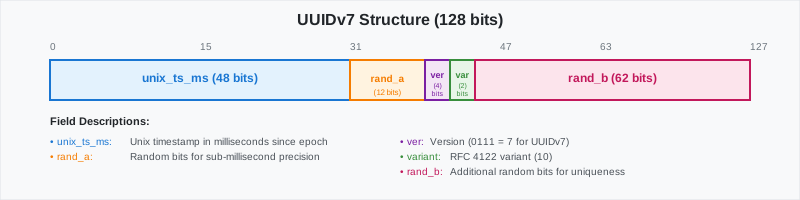
Returns something like:
| Name | Type | Default | Required | Description |
|-|------------------|-|----------|----------------------------------------------------|
|uuid|UUID| - | ✔ | The UUID object to extract the version number from |
===== PAGE: https://docs.tigerdata.com/api/uuid-functions/generate_uuidv7/ =====
Examples:
Example 1 (sql):
postgres=# SELECT uuid_version('019913ce-f124-7835-96c7-a2df691caa98');
Example 2 (terminaloutput):
uuid_version
--------------
            7
last_val()
URL: llms-txt#last_val()
===== PAGE: https://docs.tigerdata.com/api/_hyperfunctions/counter_agg/extrapolated_delta/ =====
count_min_sketch()
URL: llms-txt#count_min_sketch()
===== PAGE: https://docs.tigerdata.com/api/_hyperfunctions/freq_agg/topn/ =====
candlestick_agg()
URL: llms-txt#candlestick_agg()
===== PAGE: https://docs.tigerdata.com/api/_hyperfunctions/candlestick_agg/low_time/ =====
locf()
URL: llms-txt#locf()
===== PAGE: https://docs.tigerdata.com/api/_hyperfunctions/tdigest/tdigest/ =====
interpolated_duration_in()
URL: llms-txt#interpolated_duration_in()
===== PAGE: https://docs.tigerdata.com/api/_hyperfunctions/compact_state_agg/duration_in/ =====
integral()
URL: llms-txt#integral()
===== PAGE: https://docs.tigerdata.com/api/_hyperfunctions/time_weight/last_time/ =====
README
URL: llms-txt#readme
Contents:
- Bulk editing for API frontmatter
extract_excerpts.shinsert_excerpts.sh
This directory includes helper scripts for writing and editing docs content. It doesn't include scripts for building content; those are in the web-documentation repo.
Bulk editing for API frontmatter
API frontmatter metadata is stored with the API content it describes. This makes
sense in most cases, but sometimes you want to bulk edit metadata or compare
phrasing across all API references. There are 2 scripts to help with this. They
are currently written to edit the excerpts field, but can be adapted for other
fields.
extract_excerpts.sh
This extracts the excerpt from every API reference into a single file named
extracted_excerpts.md.
To use:
cdinto the_scripts/directory.- If you already have an
extracted_excerpts.mdfile from a previous run, delete it. - Run
./extract_excerpts.sh. - Open
extracted_excerpts.mdand edit the excerpts directly within the file. Only change the actual excerpts, not the filename orexcerpt:label. Otherwise, the next script fails.
insert_excerpts.sh
This takes the edited excerpts from extracted_excerpts.md and updates the
original files with the new edits. A backup is created so the data is saved if
something goes horribly wrong. (If something goes wrong with the backup, you can
always also restore from git.)
To use:
- Save your edited
extracted_excerpts.md. - Make sure you are in the
_scripts/directory. - Run
./insert_excerpts.sh. - Run
git diffto double-check that the update worked correctly. - Delete the unnecessary backups.
===== PAGE: https://docs.tigerdata.com/navigation/index/ =====
distinct_count()
URL: llms-txt#distinct_count()
===== PAGE: https://docs.tigerdata.com/api/_hyperfunctions/hyperloglog/hyperloglog/ =====
time_delta()
URL: llms-txt#time_delta()
===== PAGE: https://docs.tigerdata.com/api/_hyperfunctions/counter_agg/slope/ =====
Jobs
URL: llms-txt#jobs
Jobs allow you to run functions and procedures implemented in a language of your choice on a schedule within Timescale. This allows automatic periodic tasks that are not covered by existing policies and even enhancing existing policies with additional functionality.
The following APIs and views allow you to manage the jobs that you create and get details around automatic jobs used by other TimescaleDB functions like continuous aggregation refresh policies and data retention policies. To view the policies that you set or the policies that already exist, see [informational views][informational-views].
===== PAGE: https://docs.tigerdata.com/api/uuid-functions/ =====
API reference tag overview
URL: llms-txt#api-reference-tag-overview
Contents:
- Community Community
- Experimental (TimescaleDB Experimental Schema) Experimental
- Toolkit Toolkit
- Experimental (TimescaleDB Toolkit) Experimental
The TimescaleDB API Reference uses tags to categorize functions. The tags are
Community, Experimental, Toolkit, and Experimental (Toolkit). This
section explains each tag.
Community Community
This tag indicates that the function is available under TimescaleDB Community Edition, and are not available under the Apache 2 Edition. For more information, visit our [TimescaleDB License comparison sheet][tsl-comparison].
Experimental (TimescaleDB Experimental Schema) Experimental
This tag indicates that the function is included in the TimescaleDB experimental schema. Do not use experimental functions in production. Experimental features could include bugs, and are likely to change in future versions. The experimental schema is used by TimescaleDB to develop new features more quickly. If experimental functions are successful, they can move out of the experimental schema and go into production use.
When you upgrade the timescaledb extension, the experimental schema is removed
by default. To use experimental features after an upgrade, you need to add the
experimental schema again.
For more information about the experimental schema, [read the Tiger Data blog post][experimental-blog].
This tag indicates that the function is included in the TimescaleDB Toolkit extension. Toolkit functions are available under TimescaleDB Community Edition. For installation instructions, [see the installation guide][toolkit-install].
Experimental (TimescaleDB Toolkit) Experimental
This tag is used with the Toolkit tag. It indicates a Toolkit function that is under active development. Do not use experimental toolkit functions in production. Experimental toolkit functions could include bugs, and are likely to change in future versions.
These functions might not correctly handle unusual use cases or errors, and they could have poor performance. Updates to the TimescaleDB extension drop database objects that depend on experimental features like this function. If you use experimental toolkit functions on Timescale, this function is automatically dropped when the Toolkit extension is updated. For more information, [see the TimescaleDB Toolkit docs][toolkit-docs].
===== PAGE: https://docs.tigerdata.com/api/api-reference/ =====
saturating_sub()
URL: llms-txt#saturating_sub()
===== PAGE: https://docs.tigerdata.com/api/_hyperfunctions/gp_lttb/ =====
Using REST API in Managed Service for TimescaleDB
URL: llms-txt#using-rest-api-in-managed-service-for-timescaledb
Contents:
- Using cURL to get your details
Managed Service for TimescaleDB has an API for integration and automation tasks. For information about using the endpoints, see the [API Documentation][aiven-api]. MST offers an HTTP API with token authentication and JSON-formatted data. You can use the API for all the tasks that can be performed using the MST Console. To get started you need to first create an authentication token, and then use the token in the header to use the API endpoints.
- In [Managed Service for TimescaleDB][mst-login], click
User Informationin the top right corner. - In the
User Profilepage, navigate to theAuthenticationtab. - Click
Generate Token. - In the
Generate access tokendialog, type a descriptive name for the token and leave the rest of the fields blank. - Copy the generated authentication token and save it.
Using cURL to get your details
Set the environment variable
MST_API_TOKENwith the access token that you generate:To get the details about the current user session using the
/meendpoint:
The output looks similar to this:
===== PAGE: https://docs.tigerdata.com/mst/identify-index-issues/ =====
Examples:
Example 1 (bash):
export MST_API_TOKEN="access token"
Example 2 (bash):
curl -s -H "Authorization: aivenv1 $MST_API_TOKEN" https://api.aiven.io/v1/me|json_pp
Example 3 (bash):
{
        "user": {
            "auth": [],
            "create_time": "string",
            "features": { },
            "intercom": {},
            "invitations": [],
            "project_membership": {},
            "project_memberships": {},
            "projects": [],
            "real_name": "string",
            "state": "string",
            "token_validity_begin": "string",
            "user": "string",
            "user_id": "string"
        }
    }
num_changes()
URL: llms-txt#num_changes()
===== PAGE: https://docs.tigerdata.com/api/_hyperfunctions/counter_agg/interpolated_rate/ =====
counter_agg()
URL: llms-txt#counter_agg()
===== PAGE: https://docs.tigerdata.com/api/_hyperfunctions/counter_agg/rate/ =====
live_at()
URL: llms-txt#live_at()
===== PAGE: https://docs.tigerdata.com/api/_hyperfunctions/heartbeat_agg/heartbeat_agg/ =====
max_frequency()
URL: llms-txt#max_frequency()
===== PAGE: https://docs.tigerdata.com/api/_hyperfunctions/freq_agg/into_values/ =====
hyperloglog()
URL: llms-txt#hyperloglog()
===== PAGE: https://docs.tigerdata.com/api/_hyperfunctions/hyperloglog/rollup/ =====
gauge_agg()
URL: llms-txt#gauge_agg()
===== PAGE: https://docs.tigerdata.com/api/_hyperfunctions/gauge_agg/rate/ =====