
continuous_aggregates.md 89 KB
Timescaledb - Continuous Aggregates
Pages: 21
Permissions error when migrating a continuous aggregate
URL: llms-txt#permissions-error-when-migrating-a-continuous-aggregate
You might get a permissions error when migrating a continuous aggregate from old
to new format using cagg_migrate. The user performing the migration must have
the following permissions:
- Select, insert, and update permissions on the tables
_timescale_catalog.continuous_agg_migrate_planand_timescale_catalog.continuous_agg_migrate_plan_step - Usage permissions on the sequence
_timescaledb_catalog.continuous_agg_migrate_plan_step_step_id_seq
To solve the problem, change to a user capable of granting permissions, and grant the following permissions to the user performing the migration:
===== PAGE: https://docs.tigerdata.com/_troubleshooting/compression-high-cardinality/ =====
Examples:
Example 1 (sql):
GRANT SELECT, INSERT, UPDATE ON TABLE _timescaledb_catalog.continuous_agg_migrate_plan TO <USER>;
GRANT SELECT, INSERT, UPDATE ON TABLE _timescaledb_catalog.continuous_agg_migrate_plan_step TO <USER>;
GRANT USAGE ON SEQUENCE _timescaledb_catalog.continuous_agg_migrate_plan_step_step_id_seq TO <USER>;
CREATE MATERIALIZED VIEW (Continuous Aggregate)
URL: llms-txt#create-materialized-view-(continuous-aggregate)
Contents:
- Samples
- Parameters
The CREATE MATERIALIZED VIEW statement is used to create continuous
aggregates. To learn more, see the
[continuous aggregate how-to guides][cagg-how-tos].
<select_query> is of the form:
The continuous aggregate view defaults to WITH DATA. This means that when the
view is created, it refreshes using all the current data in the underlying
hypertable or continuous aggregate. This occurs once when the view is created.
If you want the view to be refreshed regularly, you can use a refresh policy. If
you do not want the view to update when it is first created, use the
WITH NO DATA parameter. For more information, see
[refresh_continuous_aggregate][refresh-cagg].
Continuous aggregates have some limitations of what types of queries they can support. For more information, see the [continuous aggregates section][cagg-how-tos].
TimescaleDB v2.17.1 and greater dramatically decrease the amount
of data written on a continuous aggregate in the presence of a small number of changes,
reduce the i/o cost of refreshing a continuous aggregate, and generate fewer Write-Ahead
Logs (WAL), set thetimescaledb.enable_merge_on_cagg_refresh
configuration parameter to TRUE. This enables continuous aggregate
refresh to use merge instead of deleting old materialized data and re-inserting.
For more settings for continuous aggregates, see [timescaledb_information.continuous_aggregates][info-views].
Create a daily continuous aggregate view:
Add a thirty day continuous aggregate on top of the same raw hypertable:
Add an hourly continuous aggregate on top of the same raw hypertable:
|Name|Type|Description|
|-|-|-|
|<view_name>|TEXT|Name (optionally schema-qualified) of continuous aggregate view to create|
|<column_name>|TEXT|Optional list of names to be used for columns of the view. If not given, the column names are calculated from the query|
|WITH clause|TEXT|Specifies options for the continuous aggregate view|
|<select_query>|TEXT|A SELECT query that uses the specified syntax|
Required WITH clause options:
|Name|Type|Description|
|-|-|-|
|timescaledb.continuous|BOOLEAN|If timescaledb.continuous is not specified, this is a regular PostgresSQL materialized view|
Optional WITH clause options:
|Name|Type| Description |Default value|
|-|-|----------------------------------------------------------------------------------------------------------------------------------------------------------------------------------------------------------------------------------------------------------------------------------------------------------------------------------------------------------------------------------------------------------------------------------|-|
|timescaledb.chunk_interval|INTERVAL| Set the chunk interval. The default value is 10x the original hypertable. |
|timescaledb.create_group_indexes|BOOLEAN| Create indexes on the continuous aggregate for columns in its GROUP BY clause. Indexes are in the form (<GROUP_BY_COLUMN>, time_bucket) |TRUE|
|timescaledb.finalized|BOOLEAN| In TimescaleDB 2.7 and above, use the new version of continuous aggregates, which stores finalized results for aggregate functions. Supports all aggregate functions, including ones that use FILTER, ORDER BY, and DISTINCT clauses. |TRUE|
|timescaledb.materialized_only|BOOLEAN| Return only materialized data when querying the continuous aggregate view |TRUE|
| timescaledb.invalidate_using | TEXT | Since TimescaleDB v2.22.0Set to wal to read changes from the WAL using logical decoding, then update the materialization invalidations for continuous aggregates using this information. This reduces the I/O and CPU needed to manage the hypertable invalidation log. Set to trigger to collect invalidations whenever there are inserts, updates, or deletes to a hypertable. This default behaviour uses more resources than wal. | trigger |
For more information, see the [real-time aggregates][real-time-aggregates] section.
===== PAGE: https://docs.tigerdata.com/api/continuous-aggregates/alter_materialized_view/ =====
Examples:
Example 1 (unknown):
`<select_query>` is of the form:
Example 2 (unknown):
The continuous aggregate view defaults to `WITH DATA`. This means that when the
view is created, it refreshes using all the current data in the underlying
hypertable or continuous aggregate. This occurs once when the view is created.
If you want the view to be refreshed regularly, you can use a refresh policy. If
you do not want the view to update when it is first created, use the
`WITH NO DATA` parameter. For more information, see
[`refresh_continuous_aggregate`][refresh-cagg].

Continuous aggregates have some limitations of what types of queries they can
support. For more information, see the
[continuous aggregates section][cagg-how-tos].

TimescaleDB v2.17.1 and greater dramatically decrease the amount
of data written on a continuous aggregate in the presence of a small number of changes,
reduce the i/o cost of refreshing a continuous aggregate, and generate fewer Write-Ahead
Logs (WAL), set the`timescaledb.enable_merge_on_cagg_refresh`
configuration parameter to `TRUE`. This enables continuous aggregate
refresh to use merge instead of deleting old materialized data and re-inserting.

For more settings for continuous aggregates, see [timescaledb_information.continuous_aggregates][info-views].

## Samples

Create a daily continuous aggregate view:
Example 3 (unknown):
Add a thirty day continuous aggregate on top of the same raw hypertable:
Example 4 (unknown):
Add an hourly continuous aggregate on top of the same raw hypertable:
Queries fail when defining continuous aggregates but work on regular tables
URL: llms-txt#queries-fail-when-defining-continuous-aggregates-but-work-on-regular-tables
Continuous aggregates do not work on all queries. For example, TimescaleDB does not support window functions on continuous aggregates. If you use an unsupported function, you see the following error:
The following table summarizes the aggregate functions supported in continuous aggregates:
| Function, clause, or feature |TimescaleDB 2.6 and earlier|TimescaleDB 2.7, 2.8, and 2.9|TimescaleDB 2.10 and later|
|------------------------------------------------------------|-|-|-|
| Parallelizable aggregate functions |✅|✅|✅|
| [Non-parallelizable SQL aggregates][postgres-parallel-agg] |❌|✅|✅|
| ORDER BY |❌|✅|✅|
| Ordered-set aggregates |❌|✅|✅|
| Hypothetical-set aggregates |❌|✅|✅|
| DISTINCT in aggregate functions |❌|✅|✅|
| FILTER in aggregate functions |❌|✅|✅|
| FROM clause supports JOINS |❌|❌|✅|
DISTINCT works in aggregate functions, not in the query definition. For example, for the table:
The following works:
This does not:
===== PAGE: https://docs.tigerdata.com/_troubleshooting/caggs-real-time-previously-materialized-not-shown/ =====
Examples:
Example 1 (sql):
ERROR:  invalid continuous aggregate view
      SQL state: 0A000
Example 2 (sql):
CREATE TABLE public.candle(
symbol_id uuid                     NOT NULL,
symbol    text                     NOT NULL,
"time"    timestamp with time zone NOT NULL,
open      double precision         NOT NULL,
high      double precision         NOT NULL,
low       double precision         NOT NULL,
close     double precision         NOT NULL,
volume    double precision         NOT NULL
);
Example 3 (sql):
CREATE MATERIALIZED VIEW candles_start_end
  WITH (timescaledb.continuous) AS
  SELECT time_bucket('1 hour', "time"), COUNT(DISTINCT symbol), first(time, time) as first_candle, last(time, time) as last_candle
  FROM candle
  GROUP BY 1;
Example 4 (sql):
CREATE MATERIALIZED VIEW candles_start_end
  WITH (timescaledb.continuous) AS
  SELECT DISTINCT ON (symbol)
  symbol,symbol_id, first(time, time) as first_candle, last(time, time) as last_candle
  FROM candle
  GROUP BY symbol_id;
Hierarchical continuous aggregate fails with incompatible bucket width
URL: llms-txt#hierarchical-continuous-aggregate-fails-with-incompatible-bucket-width
If you attempt to create a hierarchical continuous aggregate, you must use compatible time buckets. You can't create a continuous aggregate with a fixed-width time bucket on top of a continuous aggregate with a variable-width time bucket. For more information, see the restrictions section in [hierarchical continuous aggregates][h-caggs-restrictions].
===== PAGE: https://docs.tigerdata.com/_troubleshooting/caggs-migrate-permissions/ =====
About data retention with continuous aggregates
URL: llms-txt#about-data-retention-with-continuous-aggregates
Contents:
- Data retention on a continuous aggregate itself
You can downsample your data by combining a data retention policy with [continuous aggregates][continuous_aggregates]. If you set your refresh policies correctly, you can delete old data from a hypertable without deleting it from any continuous aggregates. This lets you save on raw data storage while keeping summarized data for historical analysis.
To keep your aggregates while dropping raw data, you must be careful about refreshing your aggregates. You can delete raw data from the underlying table without deleting data from continuous aggregates, so long as you don't refresh the aggregate over the deleted data. When you refresh a continuous aggregate, TimescaleDB updates the aggregate based on changes in the raw data for the refresh window. If it sees that the raw data was deleted, it also deletes the aggregate data. To prevent this, make sure that the aggregate's refresh window doesn't overlap with any deleted data. For more information, see the following example.
As an example, say that you add a continuous aggregate to a conditions
hypertable that stores device temperatures:
This creates a conditions_summary_daily aggregate which stores the daily
temperature per device. The aggregate refreshes every day. Every time it
refreshes, it updates with any data changes from 7 days ago to 1 day ago.
You should not set a 24-hour retention policy on the conditions
hypertable. If you do, chunks older than 1 day are dropped. Then the aggregate
refreshes based on data changes. Since the data change was to delete data older
than 1 day, the aggregate also deletes the data. You end up with no data in the
conditions_summary_daily table.
To fix this, set a longer retention policy, for example 30 days:
Now, chunks older than 30 days are dropped. But when the aggregate refreshes, it doesn't look for changes older than 30 days. It only looks for changes between 7 days and 1 day ago. The raw hypertable still contains data for that time period. So your aggregate retains the data.
Data retention on a continuous aggregate itself
You can also apply data retention on a continuous aggregate itself. For example, you can keep raw data for 30 days, as mentioned earlier. Meanwhile, you can keep daily data for 600 days, and no data beyond that.
===== PAGE: https://docs.tigerdata.com/use-timescale/data-retention/about-data-retention/ =====
Examples:
Example 1 (sql):
CREATE MATERIALIZED VIEW conditions_summary_daily (day, device, temp)
WITH (timescaledb.continuous) AS
  SELECT time_bucket('1 day', time), device, avg(temperature)
  FROM conditions
  GROUP BY (1, 2);

SELECT add_continuous_aggregate_policy('conditions_summary_daily', '7 days', '1 day', '1 day');
Example 2 (sql):
SELECT add_retention_policy('conditions', INTERVAL '30 days');
Jobs in TimescaleDB
URL: llms-txt#jobs-in-timescaledb
TimescaleDB natively includes some job-scheduling policies, such as:
- [Continuous aggregate policies][caggs] to automatically refresh continuous aggregates
- [Hypercore policies][setup-hypercore] to optimize and compress historical data
- [Retention policies][retention] to drop historical data
- [Reordering policies][reordering] to reorder data within chunks
If these don't cover your use case, you can create and schedule custom-defined jobs to run within your database. They help you automate periodic tasks that aren't covered by the native policies.
In this section, you see how to:
- [Create and manage jobs][create-jobs]
- Set up a [generic data retention][generic-retention] policy that applies across all hypertables
- Implement [automatic moving of chunks between tablespaces][manage-storage]
- Automatically [downsample and compress][downsample-compress] older chunks
===== PAGE: https://docs.tigerdata.com/use-timescale/security/ =====
Continuous aggregate doesn't refresh with newly inserted historical data
URL: llms-txt#continuous-aggregate-doesn't-refresh-with-newly-inserted-historical-data
Materialized views are generally used with ordered data. If you insert historic data, or data that is not related to the current time, you need to refresh policies and reevaluate the values that are dragging from past to present.
You can set up an after insert rule for your hypertable or upsert to trigger something that can validate what needs to be refreshed as the data is merged.
Let's say you inserted ordered timeframes named A, B, D, and F, and you already have a continuous aggregation looking for this data. If you now insert E, you need to refresh E and F. However, if you insert C we'll need to refresh C, D, E and F.
- A, B, D, and F are already materialized in a view with all data.
- To insert C, split the data into
ABandDEFsubsets. ABare consistent and the materialized data is too; you only need to reuse it.- Insert C,
DEF, and refresh policies after C.
This can use a lot of resources to process, especially if you have any important data in the past that also needs to be brought to the present.
Consider an example where you have 300 columns on a single hypertable and use, for example, five of them in a continuous aggregation. In this case, it could be hard to refresh and would make more sense to isolate these columns in another hypertable. Alternatively, you might create one hypertable per metric and refresh them independently.
===== PAGE: https://docs.tigerdata.com/_troubleshooting/locf-queries-null-values-not-missing/ =====
Convert continuous aggregates to the columnstore
URL: llms-txt#convert-continuous-aggregates-to-the-columnstore
Contents:
- Enable compression on continuous aggregates
- Enabling and disabling compression on continuous aggregates
- Compression policies on continuous aggregates
Continuous aggregates are often used to downsample historical data. If the data is only used for analytical queries and never modified, you can compress the aggregate to save on storage.
Old API since TimescaleDB v2.18.0 Replaced by Convert continuous aggregates to the columnstore.
Before version
2.18.1, you can't
refresh the compressed regions of a continuous aggregate. To avoid conflicts
between compression and refresh, make sure you set compress_after to a larger
interval than the start_offset of your refresh
policy.
Compression on continuous aggregates works similarly to [compression on
hypertables][compression]. When compression is enabled and no other options are
provided, the segment_by value will be automatically set to the group by
columns of the continuous aggregate and the time_bucket column will be used as
the order_by column in the compression configuration.
Enable compression on continuous aggregates
You can enable and disable compression on continuous aggregates by setting the
compress parameter when you alter the view.
Enabling and disabling compression on continuous aggregates
For an existing continuous aggregate, at the
psqlprompt, enable compression:Disable compression:
Disabling compression on a continuous aggregate fails if there are compressed chunks associated with the continuous aggregate. In this case, you need to decompress the chunks, and then drop any compression policy on the continuous aggregate, before you disable compression. For more detailed information, see the [decompress chunks][decompress-chunks] section:
Compression policies on continuous aggregates
Before setting up a compression policy on a continuous aggregate, you should set up a [refresh policy][refresh-policy]. The compression policy interval should be set so that actively refreshed regions are not compressed. This is to prevent refresh policies from failing. For example, consider a refresh policy like this:
With this kind of refresh policy, the compression policy needs the
compress_after parameter greater than the start_offset parameter of the
continuous aggregate policy:
===== PAGE: https://docs.tigerdata.com/use-timescale/compression/manual-compression/ =====
Examples:
Example 1 (sql):
ALTER MATERIALIZED VIEW cagg_name set (timescaledb.compress = true);
Example 2 (sql):
ALTER MATERIALIZED VIEW cagg_name set (timescaledb.compress = false);
Example 3 (sql):
SELECT decompress_chunk(c, true) FROM show_chunks('cagg_name') c;
Example 4 (sql):
SELECT add_continuous_aggregate_policy('cagg_name',
  start_offset => INTERVAL '30 days',
  end_offset => INTERVAL '1 day',
  schedule_interval => INTERVAL '1 hour');
Time and continuous aggregates
URL: llms-txt#time-and-continuous-aggregates
Contents:
- Declare an explicit timezone
- Integer-based time
Functions that depend on a local timezone setting inside a continuous aggregate are not supported. You cannot adjust to a local time because the timezone setting changes from user to user.
To manage this, you can use explicit timezones in the view definition. Alternatively, you can create your own custom aggregation scheme for tables that use an integer time column.
Declare an explicit timezone
The most common method of working with timezones is to declare an explicit timezone in the view query.
At the
psqlprompt, create the view and declare the timezone:Alternatively, you can cast to a timestamp after the view using
SELECT:
Integer-based time
Date and time is usually expressed as year-month-day and hours:minutes:seconds. Most TimescaleDB databases use a [date/time-type][postgres-date-time] column to express the date and time. However, in some cases, you might need to convert these common time and date formats to a format that uses an integer. The most common integer time is Unix epoch time, which is the number of seconds since the Unix epoch of 1970-01-01, but other types of integer-based time formats are possible.
These examples use a hypertable called devices that contains CPU and disk
usage information. The devices measure time using the Unix epoch.
To create a hypertable that uses an integer-based column as time, you need to provide the chunk time interval. In this case, each chunk is 10 minutes.
- At the
psqlprompt, create a hypertable and define the integer-based time column and chunk time interval:
If you are self-hosting TimescaleDB v2.19.3 and below, create a [Postgres relational table][pg-create-table], then convert it using [create_hypertable][create_hypertable]. You then enable hypercore with a call to [ALTER TABLE][alter_table_hypercore].
To define a continuous aggregate on a hypertable that uses integer-based time,
you need to have a function to get the current time in the correct format, and
set it for the hypertable. You can do this with the
[set_integer_now_func][api-set-integer-now-func]
function. It can be defined as a regular Postgres function, but needs to be
[STABLE][pg-func-stable],
take no arguments, and return an integer value of the same type as the time
column in the table. When you have set up the time-handling, you can create the
continuous aggregate.
At the
psqlprompt, set up a function to convert the time to the Unix epoch:Create the continuous aggregate for the
devicestable:Insert some rows into the table:
This command uses the tablefunc extension to generate a normal
distribution, and uses the `row_number` function to turn it into a
cumulative sequence.
- Check that the view contains the correct data:
===== PAGE: https://docs.tigerdata.com/use-timescale/continuous-aggregates/materialized-hypertables/ =====
Examples:
Example 1 (sql):
CREATE MATERIALIZED VIEW device_summary
    WITH (timescaledb.continuous)
    AS
    SELECT
      time_bucket('1 hour', observation_time) AS bucket,
      min(observation_time AT TIME ZONE 'EST') AS min_time,
      device_id,
      avg(metric) AS metric_avg,
      max(metric) - min(metric) AS metric_spread
    FROM
      device_readings
    GROUP BY bucket, device_id;
Example 2 (sql):
SELECT min_time::timestamp FROM device_summary;
Example 3 (sql):
CREATE TABLE devices(
      time BIGINT,        -- Time in minutes since epoch
      cpu_usage INTEGER,  -- Total CPU usage
      disk_usage INTEGER, -- Total disk usage
      PRIMARY KEY (time)
    ) WITH (
      tsdb.hypertable,
      tsdb.partition_column='time',
      tsdb.chunk_interval='10'
    );
Example 4 (sql):
CREATE FUNCTION current_epoch() RETURNS BIGINT
    LANGUAGE SQL STABLE AS $$
    SELECT EXTRACT(EPOCH FROM CURRENT_TIMESTAMP)::bigint;$$;

     SELECT set_integer_now_func('devices', 'current_epoch');
Create an index on a continuous aggregate
URL: llms-txt#create-an-index-on-a-continuous-aggregate
Contents:
- Automatically created indexes
- Turn off automatic index creation
- Manually create and drop indexes
- Limitations on created indexes
By default, some indexes are automatically created when you create a continuous aggregate. You can change this behavior. You can also manually create and drop indexes.
Automatically created indexes
When you create a continuous aggregate, an index is automatically created for
each GROUP BY column. The index is a composite index, combining the GROUP BY
column with the time_bucket column.
For example, if you define a continuous aggregate view with GROUP BY device,
location, bucket, two composite indexes are created: one on {device, bucket}
and one on {location, bucket}.
Turn off automatic index creation
To turn off automatic index creation, set timescaledb.create_group_indexes to
false when you create the continuous aggregate.
Manually create and drop indexes
You can use a regular Postgres statement to create or drop an index on a continuous aggregate.
For example, to create an index on avg_temp for a materialized hypertable
named weather_daily:
Indexes are created under the _timescaledb_internal schema, where the
continuous aggregate data is stored. To drop the index, specify the schema. For
example, to drop the index avg_temp_idx, run:
Limitations on created indexes
In TimescaleDB v2.7 and later, you can create an index on any column in the materialized view. This includes aggregated columns, such as those storing sums and averages. In earlier versions of TimescaleDB, you can't create an index on an aggregated column.
You can't create unique indexes on a continuous aggregate, in any of the TimescaleDB versions.
===== PAGE: https://docs.tigerdata.com/use-timescale/continuous-aggregates/about-continuous-aggregates/ =====
Examples:
Example 1 (sql):
CREATE MATERIALIZED VIEW conditions_daily
  WITH (timescaledb.continuous, timescaledb.create_group_indexes=false)
  AS
  ...
Example 2 (sql):
CREATE INDEX avg_temp_idx ON weather_daily (avg_temp);
Example 3 (sql):
DROP INDEX _timescaledb_internal.avg_temp_idx
ALTER MATERIALIZED VIEW (Continuous Aggregate)
URL: llms-txt#alter-materialized-view-(continuous-aggregate)
Contents:
- Samples
- Arguments
You use the ALTER MATERIALIZED VIEW statement to modify some of the WITH
clause [options][create_materialized_view] for a continuous aggregate view. You can only set the continuous and create_group_indexes options when you [create a continuous aggregate][create_materialized_view]. ALTER MATERIALIZED VIEW also supports the following
[Postgres clauses][postgres-alterview] on the continuous aggregate view:
RENAME TO: rename the continuous aggregate viewRENAME [COLUMN]: rename the continuous aggregate columnSET SCHEMA: set the new schema for the continuous aggregate viewSET TABLESPACE: move the materialization of the continuous aggregate view to the new tablespaceOWNER TO: set a new owner for the continuous aggregate viewEnable real-time aggregates for a continuous aggregate:
Enable hypercore for a continuous aggregate Since TimescaleDB v2.18.0:
Rename a column for a continuous aggregate:
| Name | Type | Default | Required | Description |
|---|---|---|---|---|
view_name |
TEXT | - | ✖ | The name of the continuous aggregate view to be altered. |
timescaledb.materialized_only |
BOOLEAN | true |
✖ | Enable real-time aggregation. |
timescaledb.enable_columnstore |
BOOLEAN | true |
✖ | Since TimescaleDB v2.18.0 Enable columnstore. Effectively the same as timescaledb.compress. |
timescaledb.compress |
TEXT | Disabled. | ✖ | Enable compression. |
timescaledb.orderby |
TEXT | Descending order on the time column in table_name. |
✖ | Since TimescaleDB v2.18.0 Set the order in which items are used in the columnstore. Specified in the same way as an ORDER BY clause in a SELECT query. |
timescaledb.compress_orderby |
TEXT | Descending order on the time column in table_name. |
✖ | Set the order used by compression. Specified in the same way as the ORDER BY clause in a SELECT query. |
timescaledb.segmentby |
TEXT | No segementation by column. | ✖ | Since TimescaleDB v2.18.0 Set the list of columns used to segment data in the columnstore for table. An identifier representing the source of the data such as device_id or tags_id is usually a good candidate. |
timescaledb.compress_segmentby |
TEXT | No segementation by column. | ✖ | Set the list of columns used to segment the compressed data. An identifier representing the source of the data such as device_id or tags_id is usually a good candidate. |
column_name |
TEXT | - | ✖ | Set the name of the column to order by or segment by. |
timescaledb.compress_chunk_time_interval |
TEXT | - | ✖ | Reduce the total number of compressed/columnstore chunks for table. If you set compress_chunk_time_interval, compressed/columnstore chunks are merged with the previous adjacent chunk within chunk_time_interval whenever possible. These chunks are irreversibly merged. If you call to [decompress][decompress]/[convert_to_rowstore][convert_to_rowstore], merged chunks are not split up. You can call compress_chunk_time_interval independently of other compression settings; timescaledb.compress/timescaledb.enable_columnstore is not required. |
timescaledb.enable_cagg_window_functions |
BOOLEAN | false |
✖ | EXPERIMENTAL: enable window functions on continuous aggregates. Support is experimental, as there is a risk of data inconsistency. For example, in backfill scenarios, buckets could be missed. |
timescaledb.chunk_interval (formerly timescaledb.chunk_time_interval) |
INTERVAL | 10x the original hypertable. | ✖ | Set the chunk interval. Renamed in TimescaleDB V2.20. |
===== PAGE: https://docs.tigerdata.com/api/continuous-aggregates/cagg_migrate/ =====
Examples:
Example 1 (sql):
ALTER MATERIALIZED VIEW contagg_view SET (timescaledb.materialized_only = false);
Example 2 (sql):
ALTER MATERIALIZED VIEW contagg_view SET (
     timescaledb.enable_columnstore = true,
     timescaledb.segmentby = 'symbol' );
Example 3 (sql):
ALTER MATERIALIZED VIEW contagg_view RENAME COLUMN old_name TO new_name;
cagg_migrate()
URL: llms-txt#cagg_migrate()
Contents:
- Required arguments
- Optional arguments
Migrate a continuous aggregate from the old format to the new format introduced in TimescaleDB 2.7.
TimescaleDB 2.7 introduced a new format for continuous aggregates that improves performance. It also makes continuous aggregates compatible with more types of SQL queries.
The new format, also called the finalized format, stores the continuous aggregate data exactly as it appears in the final view. The old format, also called the partial format, stores the data in a partially aggregated state.
Use this procedure to migrate continuous aggregates from the old format to the new format.
For more information, see the [migration how-to guide][how-to-migrate].
There are known issues with cagg_migrate() in version TimescaleDB 2.8.0.
Upgrade to version 2.8.1 or above before using it.
Required arguments
|Name|Type|Description|
|-|-|-|
|cagg|REGCLASS|The continuous aggregate to migrate|
Optional arguments
|Name|Type|Description|
|-|-|-|
|override|BOOLEAN|If false, the old continuous aggregate keeps its name. The new continuous aggregate is named <OLD_CONTINUOUS_AGGREGATE_NAME>_new. If true, the new continuous aggregate gets the old name. The old continuous aggregate is renamed <OLD_CONTINUOUS_AGGREGATE_NAME>_old. Defaults to false.|
|drop_old|BOOLEAN|If true, the old continuous aggregate is deleted. Must be used together with override. Defaults to false.|
===== PAGE: https://docs.tigerdata.com/api/continuous-aggregates/drop_materialized_view/ =====
Examples:
Example 1 (sql):
CALL cagg_migrate (
    cagg REGCLASS,
    override BOOLEAN DEFAULT FALSE,
    drop_old BOOLEAN DEFAULT FALSE
);
Dropping data
URL: llms-txt#dropping-data
Contents:
- Drop a continuous aggregate view
- Dropping a continuous aggregate view
- Drop raw data from a hypertable
- PolicyVisualizerDownsampling
When you are working with continuous aggregates, you can drop a view, or you can drop raw data from the underlying hypertable or from the continuous aggregate itself. A combination of [refresh][cagg-refresh] and data retention policies can help you downsample your data. This lets you keep historical data at a lower granularity than recent data.
However, you should be aware if a retention policy is likely to drop raw data from your hypertable that you need in your continuous aggregate.
To simplify the process of setting up downsampling, you can use the [visualizer and code generator][visualizer].
Drop a continuous aggregate view
You can drop a continuous aggregate view using the DROP MATERIALIZED VIEW
command. This command also removes refresh policies defined on the continuous
aggregate. It does not drop the data from the underlying hypertable.
Dropping a continuous aggregate view
- From the
psqlprompt, drop the view:
Drop raw data from a hypertable
If you drop data from a hypertable used in a continuous aggregate it can lead to problems with your continuous aggregate view. In many cases, dropping underlying data replaces the aggregate with NULL values, which can lead to unexpected results in your view.
You can drop data from a hypertable using drop_chunks in the usual way, but
before you do so, always check that the chunk is not within the refresh window
of a continuous aggregate that still needs the data. This is also important if
you are manually refreshing a continuous aggregate. Calling
refresh_continuous_aggregate on a region containing dropped chunks
recalculates the aggregate without the dropped data.
If a continuous aggregate is refreshing when data is dropped because of a
retention policy, the aggregate is updated to reflect the loss of data. If you
need to retain the continuous aggregate after dropping the underlying data, set
the start_offset value of the aggregate policy to a smaller interval than the
drop_after parameter of the retention policy.
For more information, see the data retention documentation.
PolicyVisualizerDownsampling
Refer to the installation documentation for detailed setup instructions.
===== PAGE: https://docs.tigerdata.com/use-timescale/continuous-aggregates/migrate/ =====
Examples:
Example 1 (sql):
DROP MATERIALIZED VIEW view_name;
Continuous aggregates on continuous aggregates
URL: llms-txt#continuous-aggregates-on-continuous-aggregates
Contents:
- Create a continuous aggregate on top of another continuous aggregate
- Use real-time aggregation with hierarchical continuous aggregates
- Roll up calculations
- Restrictions
The more data you have, the more likely you are to run a more sophisticated analysis on it. When a simple one-level aggregation is not enough, TimescaleDB lets you create continuous aggregates on top of other continuous aggregates. This way, you summarize data at different levels of granularity, while still saving resources with precomputing.
For example, you might have an hourly continuous aggregate that summarizes minute-by-minute data. To get a daily summary, you can create a new continuous aggregate on top of your hourly aggregate. This is more efficient than creating the daily aggregate on top of the original hypertable, because you can reuse the calculations from the hourly aggregate.
This feature is available in TimescaleDB v2.9 and later.
Create a continuous aggregate on top of another continuous aggregate
Creating a continuous aggregate on top of another continuous aggregate works the same way as creating it on top of a hypertable. In your query, select from a continuous aggregate rather than from the hypertable, and use the time-bucketed column from the existing continuous aggregate as your time column.
For more information, see the instructions for [creating a continuous aggregate][create-cagg].
Use real-time aggregation with hierarchical continuous aggregates
In TimescaleDB v2.13 and later, real-time aggregates are DISABLED by default. In earlier versions, real-time aggregates are ENABLED by default; when you create a continuous aggregate, queries to that view include the results from the most recent raw data.
Real-time aggregates always return up-to-date data in response to queries. They accomplish this by joining the materialized data in the continuous aggregate with unmaterialized raw data from the source table or view.
When continuous aggregates are stacked, each continuous aggregate is only aware of the layer immediately below. The joining of unmaterialized data happens recursively until it reaches the bottom layer, giving you access to recent data down to that layer.
If you keep all continuous aggregates in the stack as real-time aggregates, the bottom layer is the source hypertable. That means every continuous aggregate in the stack has access to all recent data.
If there is a non-real-time continuous aggregate somewhere in the stack, the recursive joining stops at that non-real-time continuous aggregate. Higher-level continuous aggregates don't receive any unmaterialized data from lower levels.
For example, say you have the following continuous aggregates:
- A real-time hourly continuous aggregate on the source hypertable
- A real-time daily continuous aggregate on the hourly continuous aggregate
- A non-real-time, or materialized-only, monthly continuous aggregate on the daily continuous aggregate
- A real-time yearly continuous aggregate on the monthly continuous aggregate
Queries on the hourly and daily continuous aggregates include real-time, non-materialized data from the source hypertable. Queries on the monthly continuous aggregate only return already-materialized data. Queries on the yearly continuous aggregate return materialized data from the yearly continuous aggregate itself, plus more recent data from the monthly continuous aggregate. However, the data is limited to what is already materialized in the monthly continuous aggregate, and doesn't get even more recent data from the source hypertable. This happens because the materialized-only continuous aggregate provides a stopping point, and the yearly continuous aggregate is unaware of any layers beyond that stopping point. This is similar to [how stacked views work in Postgres][postgresql-views].
To make queries on the yearly continuous aggregate access all recent data, you can either:
- Make the monthly continuous aggregate real-time, or
- Redefine the yearly continuous aggregate on top of the daily continuous aggregate.

Roll up calculations
When summarizing already-summarized data, be aware of how stacked calculations work. Not all calculations return the correct result if you stack them.
For example, if you take the maximum of several subsets, then take the maximum of the maximums, you get the maximum of the entire set. But if you take the average of several subsets, then take the average of the averages, that can result in a different figure than the average of all the data.
To simplify such calculations when using continuous aggregates on top of continuous aggregates, you can use the [hyperfunctions][hyperfunctions] from TimescaleDB Toolkit, such as the [statistical aggregates][stats-aggs]. These hyperfunctions are designed with a two-step aggregation pattern that allows you to roll them up into larger buckets. The first step creates a summary aggregate that can be rolled up, just as a maximum can be rolled up. You can store this aggregate in your continuous aggregate. Then, you can call an accessor function as a second step when you query from your continuous aggregate. This accessor takes the stored data from the summary aggregate and returns the final result.
For example, you can create an hourly continuous aggregate using percentile_agg
over a hypertable, like this:
To then stack another daily continuous aggregate over it, you can use a rollup
function, like this:
The mean function of the TimescaleDB Toolkit is used to calculate the concrete
mean value of the rolled up values. The additional percentile_daily attribute
contains the raw rolled up values, which can be used in an additional continuous
aggregate on top of this continuous aggregate (for example a continuous
aggregate for the daily values).
For more information and examples about using rollup functions to stack
calculations, see the [percentile approximation API documentation][percentile_agg_api].
There are some restrictions when creating a continuous aggregate on top of another continuous aggregate. In most cases, these restrictions are in place to ensure valid time-bucketing:
You can only create a continuous aggregate on top of a finalized continuous aggregate. This new finalized format is the default for all continuous aggregates created since TimescaleDB 2.7. If you need to create a continuous aggregate on top of a continuous aggregate in the old format, you need to [migrate your continuous aggregate][migrate-cagg] to the new format first.
The time bucket of a continuous aggregate should be greater than or equal to the time bucket of the underlying continuous aggregate. It also needs to be a multiple of the underlying time bucket. For example, you can rebucket an hourly continuous aggregate into a new continuous aggregate with time buckets of 6 hours. You can't rebucket the hourly continuous aggregate into a new continuous aggregate with time buckets of 90 minutes, because 90 minutes is not a multiple of 1 hour.
A continuous aggregate with a fixed-width time bucket can't be created on top of a continuous aggregate with a variable-width time bucket. Fixed-width time buckets are time buckets defined in seconds, minutes, hours, and days, because those time intervals are always the same length. Variable-width time buckets are time buckets defined in months or years, because those time intervals vary by the month or on leap years. This limitation prevents a case such as trying to rebucket monthly buckets into
61 daybuckets, where there is no good mapping between time buckets for month combinations such as July/August (62 days).
Note that even though weeks are fixed-width intervals, you can't use monthly
or yearly time buckets on top of weekly time buckets for the same reason.
The number of weeks in a month or year is usually not an integer.
However, you can stack a variable-width time bucket on top of a fixed-width
time bucket. For example, creating a monthly continuous aggregate on top of
a daily continuous aggregate works, and is the one of the main use cases for
this feature.
===== PAGE: https://docs.tigerdata.com/use-timescale/hypercore/secondary-indexes/ =====
Examples:
Example 1 (sql):
CREATE MATERIALIZED VIEW response_times_hourly
WITH (timescaledb.continuous)
AS SELECT
    time_bucket('1 h'::interval, ts) as bucket,
    api_id,
    avg(response_time_ms),
    percentile_agg(response_time_ms) as percentile_hourly
FROM response_times
GROUP BY 1, 2;
Example 2 (sql):
CREATE MATERIALIZED VIEW response_times_daily
WITH (timescaledb.continuous)
AS SELECT
    time_bucket('1 d'::interval, bucket) as bucket_daily,
    api_id,
    mean(rollup(percentile_hourly)) as mean,
    rollup(percentile_hourly) as percentile_daily
FROM response_times_hourly
GROUP BY 1, 2;
Continuous aggregate watermark is in the future
URL: llms-txt#continuous-aggregate-watermark-is-in-the-future
Contents:
- Creating a new continuous aggregate with an explicit refresh window
Continuous aggregates use a watermark to indicate which time buckets have already been materialized. When you query a continuous aggregate, your query returns materialized data from before the watermark. It returns real-time, non-materialized data from after the watermark.
In certain cases, the watermark might be in the future. If this happens, all buckets, including the most recent bucket, are materialized and below the watermark. No real-time data is returned.
This might happen if you refresh your continuous aggregate over the time window
<START_TIME>, NULL, which materializes all recent data. It might also happen
if you create a continuous aggregate using the WITH DATA option. This also
implicitly refreshes your continuous aggregate with a window of NULL, NULL.
To fix this, create a new continuous aggregate using the WITH NO DATA option.
Then use a policy to refresh this continuous aggregate over an explicit time
window.
Creating a new continuous aggregate with an explicit refresh window
Create a continuous aggregate using the
WITH NO DATAoption:Refresh the continuous aggregate using a policy with an explicit
end_offset. For example:Check your new continuous aggregate's watermark to make sure it is in the past, not the future.
Get the ID for the materialization hypertable that contains the actual
continuous aggregate data:
- Use the returned ID to query for the watermark's timestamp:
For TimescaleDB >= 2.12:
For TimescaleDB < 2.12:
If you choose to delete your old continuous aggregate after creating a new one, beware of historical data loss. If your old continuous aggregate contained data that you dropped from your original hypertable, for example through a data retention policy, the dropped data is not included in your new continuous aggregate.
===== PAGE: https://docs.tigerdata.com/_troubleshooting/scheduled-jobs-stop-running/ =====
Examples:
Example 1 (sql):
CREATE MATERIALIZED VIEW <continuous_aggregate_name>
        WITH (timescaledb.continuous)
        AS SELECT time_bucket('<interval>', <partition_column>),
        <other_columns_to_select>,
        ...
        FROM <hypertable>
        GROUP BY bucket,
        WITH NO DATA;
Example 2 (sql):
SELECT add_continuous_aggregate_policy('<continuous_aggregate_name>',
        start_offset => INTERVAL '30 day',
        end_offset => INTERVAL '1 hour',
        schedule_interval => INTERVAL '1 hour');
Example 3 (sql):
SELECT id FROM _timescaledb_catalog.hypertable
        WHERE table_name=(
            SELECT materialization_hypertable_name
                FROM timescaledb_information.continuous_aggregates
                WHERE view_name='<continuous_aggregate_name>'
        );
Example 4 (sql):
SELECT COALESCE(
        _timescaledb_functions.to_timestamp(_timescaledb_functions.cagg_watermark(<ID>)),
        '-infinity'::timestamp with time zone
    );
About continuous aggregates
URL: llms-txt#about-continuous-aggregates
Contents:
- Types of aggregation
- Continuous aggregates on continuous aggregates
- Continuous aggregates with a
JOINclause- JOIN examples
- Function support
- Components of a continuous aggregate
- Materialization hypertable
- Materialization engine
- Invalidation engine
In modern applications, data usually grows very quickly. This means that aggregating it into useful summaries can become very slow. If you are collecting data very frequently, you might want to aggregate your data into minutes or hours instead. For example, if an IoT device takes temperature readings every second, you might want to find the average temperature for each hour. Every time you run this query, the database needs to scan the entire table and recalculate the average. TimescaleDB makes aggregating data lightning fast, accurate, and easy with continuous aggregates.
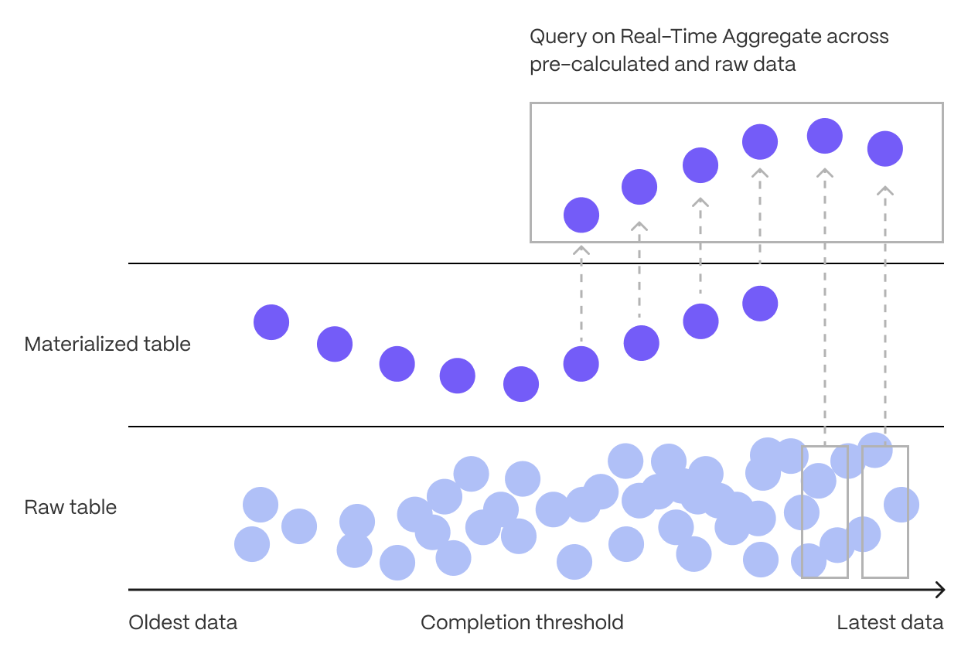
Continuous aggregates in TimescaleDB are a kind of hypertable that is refreshed automatically in the background as new data is added, or old data is modified. Changes to your dataset are tracked, and the hypertable behind the continuous aggregate is automatically updated in the background.
Continuous aggregates have a much lower maintenance burden than regular Postgres materialized views, because the whole view is not created from scratch on each refresh. This means that you can get on with working your data instead of maintaining your database.
Because continuous aggregates are based on hypertables, you can query them in exactly the same way as your other tables. This includes continuous aggregates in the rowstore, compressed into the [columnstore][hypercore], or [tiered to object storage][data-tiering]. You can even create [continuous aggregates on top of your continuous aggregates][hierarchical-caggs], for an even more fine-tuned aggregation.
[Real-time aggregation][real-time-aggregation] enables you to combine pre-aggregated data from the materialized view with the most recent raw data. This gives you up-to-date results on every query. In TimescaleDB v2.13 and later, real-time aggregates are DISABLED by default. In earlier versions, real-time aggregates are ENABLED by default; when you create a continuous aggregate, queries to that view include the results from the most recent raw data.
Types of aggregation
There are three main ways to make aggregation easier: materialized views, continuous aggregates, and real-time aggregates.
[Materialized views][pg-materialized views] are a standard Postgres function. They are used to cache the result of a complex query so that you can reuse it later on. Materialized views do not update regularly, although you can manually refresh them as required.
[Continuous aggregates][about-caggs] are a TimescaleDB-only feature. They work in a similar way to a materialized view, but they are updated automatically in the background, as new data is added to your database. Continuous aggregates are updated continuously and incrementally, which means they are less resource intensive to maintain than materialized views. Continuous aggregates are based on hypertables, and you can query them in the same way as you do your other tables.
[Real-time aggregates][real-time-aggs] are a TimescaleDB-only feature. They are the same as continuous aggregates, but they add the most recent raw data to the previously aggregated data to provide accurate and up-to-date results, without needing to aggregate data as it is being written.
Continuous aggregates on continuous aggregates
You can create a continuous aggregate on top of another continuous aggregate. This allows you to summarize data at different granularity. For example, you might have a raw hypertable that contains second-by-second data. Create a continuous aggregate on the hypertable to calculate hourly data. To calculate daily data, create a continuous aggregate on top of your hourly continuous aggregate.
For more information, see the documentation about [continuous aggregates on continuous aggregates][caggs-on-caggs].
Continuous aggregates with a JOIN clause
Continuous aggregates support the following JOIN features:
| Feature | TimescaleDB < 2.10.x | TimescaleDB <= 2.15.x | TimescaleDB >= 2.16.x|
|-|-|-|-|
|INNER JOIN|❌|✅|✅|
|LEFT JOIN|❌|❌|✅|
|LATERAL JOIN|❌|❌|✅|
|Joins between ONE hypertable and ONE standard Postgres table|❌|✅|✅|
|Joins between ONE hypertable and MANY standard Postgres tables|❌|❌|✅|
|Join conditions must be equality conditions, and there can only be ONE JOIN condition|❌|✅|✅|
|Any join conditions|❌|❌|✅|
JOINS in TimescaleDB must meet the following conditions:
- Only the changes to the hypertable are tracked, and they are updated in the continuous aggregate when it is refreshed. Changes to standard Postgres table are not tracked.
- You can use an
INNER,LEFT, andLATERALjoins; no other join type is supported. - Joins on the materialized hypertable of a continuous aggregate are not supported.
- Hierarchical continuous aggregates can be created on top of a continuous
aggregate with a
JOINclause, but cannot themselves have aJOINclause.
Given the following schema:
See the following JOIN examples on continuous aggregates:
INNER JOINon a single equality condition, using theONclause:INNER JOINon a single equality condition, using theONclause, with a further condition added in theWHEREclause:INNER JOINon a single equality condition specified inWHEREclause:INNER JOINon multiple equality conditions:
TimescaleDB v2.16.x and higher.
INNER JOINwith a single equality condition specified inWHEREclause can be combined with further conditions in theWHEREclause:
TimescaleDB v2.16.x and higher.
INNER JOINbetween a hypertable and multiple Postgres tables:
TimescaleDB v2.16.x and higher.
LEFT JOINbetween a hypertable and a Postgres table:
TimescaleDB v2.16.x and higher.
LATERAL JOINbetween a hypertable and a subquery:
TimescaleDB v2.16.x and higher.
In TimescaleDB v2.7 and later, continuous aggregates support all Postgres
aggregate functions. This includes both parallelizable aggregates, such as SUM
and AVG, and non-parallelizable aggregates, such as RANK.
In TimescaleDB v2.10.0 and later, the FROM clause supports JOINS, with
some restrictions. For more information, see the [JOIN support section][caggs-joins].
In older versions of TimescaleDB, continuous aggregates only support [aggregate functions that can be parallelized by Postgres][postgres-parallel-agg]. You can work around this by aggregating the other parts of your query in the continuous aggregate, then [using the window function to query the aggregate][cagg-window-functions].
The following table summarizes the aggregate functions supported in continuous aggregates:
| Function, clause, or feature |TimescaleDB 2.6 and earlier|TimescaleDB 2.7, 2.8, and 2.9|TimescaleDB 2.10 and later|
|------------------------------------------------------------|-|-|-|
| Parallelizable aggregate functions |✅|✅|✅|
| [Non-parallelizable SQL aggregates][postgres-parallel-agg] |❌|✅|✅|
| ORDER BY |❌|✅|✅|
| Ordered-set aggregates |❌|✅|✅|
| Hypothetical-set aggregates |❌|✅|✅|
| DISTINCT in aggregate functions |❌|✅|✅|
| FILTER in aggregate functions |❌|✅|✅|
| FROM clause supports JOINS |❌|❌|✅|
DISTINCT works in aggregate functions, not in the query definition. For example, for the table:
The following works:
This does not:
If you want the old behavior in later versions of TimescaleDB, set the
timescaledb.finalized parameter to false when you create your continuous
aggregate.
Components of a continuous aggregate
Continuous aggregates consist of:
- Materialization hypertable to store the aggregated data in
- Materialization engine to aggregate data from the raw, underlying, table to the materialization hypertable
- Invalidation engine to determine when data needs to be re-materialized, due to changes in the data
- Query engine to access the aggregated data
Materialization hypertable
Continuous aggregates take raw data from the original hypertable, aggregate it, and store the aggregated data in a materialization hypertable. When you query the continuous aggregate view, the aggregated data is returned to you as needed.
Using the same temperature example, the materialization table looks like this:
|day|location|chunk|avg temperature| |-|-|-|-| |2021/01/01|New York|1|73| |2021/01/01|Stockholm|1|70| |2021/01/02|New York|2|| |2021/01/02|Stockholm|2|69|
The materialization table is stored as a TimescaleDB hypertable, to take
advantage of the scaling and query optimizations that hypertables offer.
Materialization tables contain a column for each group-by clause in the query,
and an aggregate column for each aggregate in the query.
For more information, see [materialization hypertables][cagg-mat-hypertables].
Materialization engine
The materialization engine performs two transactions. The first transaction blocks all INSERTs, UPDATEs, and DELETEs, determines the time range to materialize, and updates the invalidation threshold. The second transaction unblocks other transactions, and materializes the aggregates. The first transaction is very quick, and most of the work happens during the second transaction, to ensure that the work does not interfere with other operations.
Invalidation engine
Any change to the data in a hypertable could potentially invalidate some materialized rows. The invalidation engine checks to ensure that the system does not become swamped with invalidations.
Fortunately, time-series data means that nearly all INSERTs and UPDATEs have a recent timestamp, so the invalidation engine does not materialize all the data, but to a set point in time called the materialization threshold. This threshold is set so that the vast majority of INSERTs contain more recent timestamps. These data points have never been materialized by the continuous aggregate, so there is no additional work needed to notify the continuous aggregate that they have been added. When the materializer next runs, it is responsible for determining how much new data can be materialized without invalidating the continuous aggregate. It then materializes the more recent data and moves the materialization threshold forward in time. This ensures that the threshold lags behind the point-in-time where data changes are common, and that most INSERTs do not require any extra writes.
When data older than the invalidation threshold is changed, the maximum and minimum timestamps of the changed rows is logged, and the values are used to determine which rows in the aggregation table need to be recalculated. This logging does cause some write load, but because the threshold lags behind the area of data that is currently changing, the writes are small and rare.
===== PAGE: https://docs.tigerdata.com/use-timescale/continuous-aggregates/time/ =====
Examples:
Example 1 (sql):
CREATE TABLE locations (
  id TEXT PRIMARY KEY,
  name TEXT
);

CREATE TABLE devices (
  id SERIAL PRIMARY KEY,
  location_id TEXT,
  name TEXT
);

CREATE TABLE conditions (
  "time" TIMESTAMPTZ,
  device_id INTEGER,
  temperature FLOAT8
) WITH (
  tsdb.hypertable,
  tsdb.partition_column='time'
);
Example 2 (sql):
CREATE MATERIALIZED VIEW conditions_by_day WITH (timescaledb.continuous) AS
    SELECT time_bucket('1 day', time) AS bucket, devices.name, MIN(temperature), MAX(temperature)
    FROM conditions
    JOIN devices ON devices.id = conditions.device_id
    GROUP BY bucket, devices.name
    WITH NO DATA;
Example 3 (sql):
CREATE MATERIALIZED VIEW conditions_by_day WITH (timescaledb.continuous) AS
    SELECT time_bucket('1 day', time) AS bucket, devices.name, MIN(temperature), MAX(temperature)
    FROM conditions
    JOIN devices ON devices.id = conditions.device_id
    WHERE devices.location_id = 'location123'
    GROUP BY bucket, devices.name
    WITH NO DATA;
Example 4 (sql):
CREATE MATERIALIZED VIEW conditions_by_day WITH (timescaledb.continuous) AS
    SELECT time_bucket('1 day', time) AS bucket, devices.name, MIN(temperature), MAX(temperature)
    FROM conditions, devices
    WHERE devices.id = conditions.device_id
    GROUP BY bucket, devices.name
    WITH NO DATA;
Continuous aggregates
URL: llms-txt#continuous-aggregates
In modern applications, data usually grows very quickly. This means that aggregating it into useful summaries can become very slow. If you are collecting data very frequently, you might want to aggregate your data into minutes or hours instead. For example, if an IoT device takes temperature readings every second, you might want to find the average temperature for each hour. Every time you run this query, the database needs to scan the entire table and recalculate the average. TimescaleDB makes aggregating data lightning fast, accurate, and easy with continuous aggregates.
Continuous aggregates in TimescaleDB are a kind of hypertable that is refreshed automatically in the background as new data is added, or old data is modified. Changes to your dataset are tracked, and the hypertable behind the continuous aggregate is automatically updated in the background.
Continuous aggregates have a much lower maintenance burden than regular Postgres materialized views, because the whole view is not created from scratch on each refresh. This means that you can get on with working your data instead of maintaining your database.
Because continuous aggregates are based on hypertables, you can query them in exactly the same way as your other tables. This includes continuous aggregates in the rowstore, compressed into the [columnstore][hypercore], or [tiered to object storage][data-tiering]. You can even create [continuous aggregates on top of your continuous aggregates][hierarchical-caggs], for an even more fine-tuned aggregation.
[Real-time aggregation][real-time-aggregation] enables you to combine pre-aggregated data from the materialized view with the most recent raw data. This gives you up-to-date results on every query. In TimescaleDB v2.13 and later, real-time aggregates are DISABLED by default. In earlier versions, real-time aggregates are ENABLED by default; when you create a continuous aggregate, queries to that view include the results from the most recent raw data.
For more information about using continuous aggregates, see the documentation in [Use Tiger Data products][cagg-docs].
===== PAGE: https://docs.tigerdata.com/api/data-retention/ =====
refresh_continuous_aggregate()
URL: llms-txt#refresh_continuous_aggregate()
Contents:
- Samples
- Required arguments
- Optional arguments
Refresh all buckets of a continuous aggregate in the refresh window given by
window_start and window_end.
A continuous aggregate materializes aggregates in time buckets. For example,
min, max, average over 1 day worth of data, and is determined by the time_bucket
interval. Therefore, when
refreshing the continuous aggregate, only buckets that completely fit within the
refresh window are refreshed. In other words, it is not possible to compute the
aggregate over, for an incomplete bucket. Therefore, any buckets that do not
fit within the given refresh window are excluded.
The function expects the window parameter values to have a time type that is
compatible with the continuous aggregate's time bucket expression—for
example, if the time bucket is specified in TIMESTAMP WITH TIME ZONE, then the
start and end time should be a date or timestamp type. Note that a continuous
aggregate using the TIMESTAMP WITH TIME ZONE type aligns with the UTC time
zone, so, if window_start and window_end is specified in the local time
zone, any time zone shift relative UTC needs to be accounted for when refreshing
to align with bucket boundaries.
To improve performance for continuous aggregate refresh, see [CREATE MATERIALIZED VIEW ][create_materialized_view].
Refresh the continuous aggregate conditions between 2020-01-01 and
2020-02-01 exclusive.
Alternatively, incrementally refresh the continuous aggregate conditions
between 2020-01-01 and 2020-02-01 exclusive, working in 12h intervals:
Force the conditions continuous aggregate to refresh between 2020-01-01 and
2020-02-01 exclusive, even if the data has already been refreshed.
Required arguments
|Name|Type|Description|
|-|-|-|
|continuous_aggregate|REGCLASS|The continuous aggregate to refresh.|
|window_start|INTERVAL, TIMESTAMPTZ, INTEGER|Start of the window to refresh, has to be before window_end.|
|window_end|INTERVAL, TIMESTAMPTZ, INTEGER|End of the window to refresh, has to be after window_start.|
You must specify the window_start and window_end parameters differently,
depending on the type of the time column of the hypertable. For hypertables with
TIMESTAMP, TIMESTAMPTZ, and DATE time columns, set the refresh window as
an INTERVAL type. For hypertables with integer-based timestamps, set the
refresh window as an INTEGER type.
A NULL value for window_start is equivalent to the lowest changed element
in the raw hypertable of the CAgg. A NULL value for window_end is
equivalent to the largest changed element in raw hypertable of the CAgg. As
changed element tracking is performed after the initial CAgg refresh, running
CAgg refresh without window_start and window_end covers the entire time
range.
Note that it's not guaranteed that all buckets will be updated: refreshes will not take place when buckets are materialized with no data changes or with changes that only occurred in the secondary table used in the JOIN.
Optional arguments
|Name|Type| Description |
|-|-|------------------------------------------------------------------------------------------------------------------------------------------------------------------------------------------------------------------------|
| force | BOOLEAN | Force refresh every bucket in the time range between window_start and window_end, even when the bucket has already been refreshed. This can be very expensive when a lot of data is refreshed. Default is FALSE. |
| refresh_newest_first | BOOLEAN | Set to FALSE to refresh the oldest data first. Default is TRUE. |
===== PAGE: https://docs.tigerdata.com/api/continuous-aggregates/remove_policies/ =====
Examples:
Example 1 (sql):
CALL refresh_continuous_aggregate('conditions', '2020-01-01', '2020-02-01');
Example 2 (sql):
DO
$$
DECLARE
  refresh_interval INTERVAL = '12h'::INTERVAL;
  start_timestamp TIMESTAMPTZ = '2020-01-01T00:00:00Z';
  end_timestamp TIMESTAMPTZ = start_timestamp + refresh_interval;
BEGIN
  WHILE start_timestamp < '2020-02-01T00:00:00Z' LOOP
    CALL refresh_continuous_aggregate('conditions', start_timestamp, end_timestamp);
    COMMIT;
    RAISE NOTICE 'finished with timestamp %', end_timestamp;
    start_timestamp = end_timestamp;
    end_timestamp = end_timestamp + refresh_interval;
  END LOOP;
END
$$;
Example 3 (sql):
CALL refresh_continuous_aggregate('conditions', '2020-01-01', '2020-02-01', force => TRUE);
DROP MATERIALIZED VIEW (Continuous Aggregate)
URL: llms-txt#drop-materialized-view-(continuous-aggregate)
Contents:
- Samples
- Parameters
Continuous aggregate views can be dropped using the DROP MATERIALIZED VIEW statement.
This statement deletes the continuous aggregate and all its internal
objects. It also removes refresh policies for that
aggregate. To delete other dependent objects, such as a view
defined on the continuous aggregate, add the CASCADE
option. Dropping a continuous aggregate does not affect the data in
the underlying hypertable from which the continuous aggregate is
derived.
Drop existing continuous aggregate.
| Name | Type | Description |
|---|---|---|
<view_name> |
TEXT | Name (optionally schema-qualified) of continuous aggregate view to be dropped. |
===== PAGE: https://docs.tigerdata.com/api/continuous-aggregates/remove_all_policies/ =====
Examples:
Example 1 (unknown):
## Samples

Drop existing continuous aggregate.
Migrate a continuous aggregate to the new form
URL: llms-txt#migrate-a-continuous-aggregate-to-the-new-form
Contents:
- Configure continuous aggregate migration
- Check on continuous aggregate migration status
- Troubleshooting
- Permissions error when migrating a continuous aggregate
In TimescaleDB v2.7 and later, continuous aggregates use a new format that
improves performance and makes them compatible with more SQL queries. Continuous
aggregates created in older versions of TimescaleDB, or created in a new version
with the option timescaledb.finalized set to false, use the old format.
To migrate a continuous aggregate from the old format to the new format, you can use this procedure. It automatically copies over your data and policies. You can continue to use the continuous aggregate while the migration is happening.
Connect to your database and run:
There are known issues with cagg_migrate() in version 2.8.0.
Upgrade to version 2.8.1 or later before using it.
Configure continuous aggregate migration
The migration procedure provides two boolean configuration parameters,
override and drop_old. By default, the name of your new continuous
aggregate is the name of your old continuous aggregate, with the suffix _new.
Set override to true to rename your new continuous aggregate with the
original name. The old continuous aggregate is renamed with the suffix _old.
To both rename and drop the old continuous aggregate entirely, set both
parameters to true. Note that drop_old must be used together with
override.
Check on continuous aggregate migration status
To check the progress of the continuous aggregate migration, query the migration planning table:
Permissions error when migrating a continuous aggregate
You might get a permissions error when migrating a continuous aggregate from old
to new format using cagg_migrate. The user performing the migration must have
the following permissions:
- Select, insert, and update permissions on the tables
_timescale_catalog.continuous_agg_migrate_planand_timescale_catalog.continuous_agg_migrate_plan_step - Usage permissions on the sequence
_timescaledb_catalog.continuous_agg_migrate_plan_step_step_id_seq
To solve the problem, change to a user capable of granting permissions, and grant the following permissions to the user performing the migration:
===== PAGE: https://docs.tigerdata.com/use-timescale/continuous-aggregates/compression-on-continuous-aggregates/ =====
Examples:
Example 1 (sql):
CALL cagg_migrate('<CONTINUOUS_AGGREGATE_NAME>');
Example 2 (sql):
SELECT * FROM _timescaledb_catalog.continuous_agg_migrate_plan_step;
Example 3 (sql):
GRANT SELECT, INSERT, UPDATE ON TABLE _timescaledb_catalog.continuous_agg_migrate_plan TO <USER>;
GRANT SELECT, INSERT, UPDATE ON TABLE _timescaledb_catalog.continuous_agg_migrate_plan_step TO <USER>;
GRANT USAGE ON SEQUENCE _timescaledb_catalog.continuous_agg_migrate_plan_step_step_id_seq TO <USER>;
Refresh continuous aggregates
URL: llms-txt#refresh-continuous-aggregates
Contents:
- Prerequisites
- Change the refresh policy
- Add concurrent refresh policies
- Manually refresh a continuous aggregate
Continuous aggregates can have a range of different refresh policies. In addition to refreshing the continuous aggregate automatically using a policy, you can also refresh it manually.
To follow the procedure on this page you need to:
- Create a [target Tiger Cloud service][create-service].
This procedure also works for [self-hosted TimescaleDB][enable-timescaledb].
Change the refresh policy
Continuous aggregates require a policy for automatic refreshing. You can adjust this to suit different use cases. For example, you can have the continuous aggregate and the hypertable stay in sync, even when data is removed from the hypertable. Alternatively, you could keep source data in the continuous aggregate even after it is removed from the hypertable.
You can change the way your continuous aggregate is refreshed by calling
add_continuous_aggregate_policy.
Among others, add_continuous_aggregate_policy takes the following arguments:
start_offset: the start of the refresh window relative to when the policy runsend_offset: the end of the refresh window relative to when the policy runsschedule_interval: the refresh interval in minutes or hours. Defaults to 24 hours.If you set the
start_offsetorend_offsettoNULL, the range is open-ended and extends to the beginning or end of time.If you set
end_offsetwithin the current time bucket, this bucket is excluded from materialization. This is done for the following reasons:The current bucket is incomplete and can't be refreshed.
- The current bucket gets a lot of writes in the timestamp order, and its aggregate becomes outdated very quickly. Excluding it improves performance.
To include the latest raw data in queries, enable [real-time aggregation][future-watermark].
See the [API reference][api-reference] for the full list of required and optional arguments and use examples.
The policy in the following example ensures that all data in the continuous aggregate is up to date with the hypertable, except for data written within the last hour of wall-clock time. The policy also does not refresh the last time bucket of the continuous aggregate.
Since the policy in this example runs once every hour (schedule_interval) while also excluding data within the most recent hour (end_offset), it takes up to 2 hours for data written to the hypertable to be reflected in the continuous aggregate. Backfills, which are usually outside the most recent hour of data, will be visible after up to 1 hour depending on when the policy last ran when the data was written.
Because it has an open-ended start_offset parameter, any data that is removed
from the table, for example with a DELETE or with drop_chunks, is also removed
from the continuous aggregate view. This means that the continuous aggregate
always reflects the data in the underlying hypertable.
To changing a refresh policy to use a NULL start_offset:
- Connect to your Tiger Cloud service
In [Tiger Cloud Console][services-portal] open an [SQL editor][in-console-editors]. You can also connect to your service using [psql][connect-using-psql].
- Create a new policy on
conditions_summary_hourlythat keeps the continuous aggregate up to date, and runs every hour:
If you want to keep data in the continuous aggregate even if it is removed from
the underlying hypertable, you can set the start_offset to match the
[data retention policy][sec-data-retention] on the source hypertable. For example,
if you have a retention policy that removes data older than one month, set
start_offset to one month or less. This sets your policy so that it does not
refresh the dropped data.
- Connect to your Tiger Cloud service.
In [Tiger Cloud Console][services-portal] open an [SQL editor][in-console-editors]. You can also connect to your service using [psql][connect-using-psql].
- Create a new policy on
conditions_summary_hourlythat keeps data removed from the hypertable in the continuous aggregate, and runs every hour:
It is important to consider your data retention policies when you're setting up continuous aggregate policies. If the continuous aggregate policy window covers data that is removed by the data retention policy, the data will be removed when the aggregates for those buckets are refreshed. For example, if you have a data retention policy that removes all data older than two weeks, the continuous aggregate policy will only have data for the last two weeks.
Add concurrent refresh policies
You can add concurrent refresh policies on each continuous aggregate, as long as their start and end offsets don't overlap. For example, to backfill data into older chunks you set up one policy that refreshes recent data, and another that refreshes backfilled data.
The first policy in this example is keeps the continuous aggregate up to date with data that was inserted in the past day. Any data that was inserted or updated for previous days is refreshed by the second policy.
- Connect to your Tiger Cloud service.
In [Tiger Cloud Console][services-portal] open an [SQL editor][in-console-editors]. You can also connect to your service using [psql][connect-using-psql].
Create a new policy on
conditions_summary_dailyto refresh the continuous aggregate with recently inserted data which runs hourly:At the
psqlprompt, create a concurrent policy onconditions_summary_dailyto refresh the continuous aggregate with backfilled data:
Manually refresh a continuous aggregate
If you need to manually refresh a continuous aggregate, you can use the
refresh command. This recomputes the data within the window that has changed
in the underlying hypertable since the last refresh. Therefore, if only a few
buckets need updating, the refresh runs quickly.
If you have recently dropped data from a hypertable with a continuous aggregate,
calling refresh_continuous_aggregate on a region containing dropped chunks
recalculates the aggregate without the dropped data. See
[drop data][cagg-drop-data] for more information.
The refresh command takes three arguments:
- The name of the continuous aggregate view to refresh
- The timestamp of the beginning of the refresh window
- The timestamp of the end of the refresh window
Only buckets that are wholly within the specified range are refreshed. For
example, if you specify 2021-05-01', '2021-06-01 the only buckets that are
refreshed are those up to but not including 2021-06-01. It is possible to
specify NULL in a manual refresh to get an open-ended range, but we do not
recommend using it, because you could inadvertently materialize a large amount
of data, slow down your performance, and have unintended consequences on other
policies like data retention.
To manually refresh a continuous aggregate, use the refresh command:
Follow the logic used by automated refresh policies and avoid refreshing time buckets that are likely to have a lot of writes. This means that you should generally not refresh the latest incomplete time bucket. To include the latest raw data in your queries, use [real-time aggregation][real-time-aggregates] instead.
===== PAGE: https://docs.tigerdata.com/use-timescale/continuous-aggregates/drop-data/ =====
Examples:
Example 1 (sql):
SELECT add_continuous_aggregate_policy('conditions_summary_hourly',
      start_offset => NULL,
      end_offset => INTERVAL '1 h',
      schedule_interval => INTERVAL '1 h');
Example 2 (sql):
SELECT add_continuous_aggregate_policy('conditions_summary_hourly',
      start_offset => INTERVAL '1 month',
      end_offset => INTERVAL '1 h',
      schedule_interval => INTERVAL '1 h');
Example 3 (sql):
SELECT add_continuous_aggregate_policy('conditions_summary_daily',
      start_offset => INTERVAL '1 day',
      end_offset => INTERVAL '1 h',
      schedule_interval => INTERVAL '1 h');
Example 4 (sql):
SELECT add_continuous_aggregate_policy('conditions_summary_daily',
      start_offset => NULL
      end_offset => INTERVAL '1 day',
      schedule_interval => INTERVAL '1 hour');