
connectors.md 238 KB
Hummingbot - Connectors
Pages: 100
ETCSwap - Hummingbot
URL: https://hummingbot.org/exchanges/gateway/etcSwap
Contents:
- ETCSwap
- 🛠 Connector Info
- ℹ️ Exchange Info
- Configuration
This connector need to be migrated to the new Gateway architecture. See Legacy Connectors for more information.
Configure ETCSwap settings in your Gateway configuration files.
Connector Bounties - Hummingbot
URL: https://hummingbot.org/bounties
Contents:
- Connector Bounties
- Overview
- How It Works
- For Exchanges
- Bounty Management Service
- Why Choose Bounty Management?
- For Developers
- Bounty Workflow
- Bounties Board
- Learn More
Connector bounties enable community developers to build and maintain exchange connectors for Hummingbot through a flexible, transparent bounty system. The Hummingbot Foundation manages this process, connecting exchanges with skilled developers from our 40,000+ trading community.
This documentation provides information for: - Exchanges looking to integrate with Hummingbot - Developers interested in earning bounties by building connectors
The bounty system creates a sustainable ecosystem where:
Get your exchange integrated with Hummingbot through our comprehensive bounty management service. Email us at operations@hummingbot.org or contact Foundation team members on Hummingbot Discord to learn more. Sign the Bounty Escrow Agreement and escrow the funds to formalize the engagement.
Connector Development Includes:
1 Year of Maintenance and Governance:
View Bounty Lifecycle →
Earn HBOT and USDC bounties for building new exchange integrations and resolving issues in existing connectors:
Become an expert in building and maintaining one or more connector types:
See Building CLOB Connectors and Building Gateway connectors for more information.
Get Paid: Receive payment after merge
Open: Available for applications
View Open Bounties → Contributors Guide →
The Bounties Board is the central hub for all connector bounty activity. It provides transparency into:
🔥 Binance - Hummingbot
URL: https://hummingbot.org/exchanges/binance/
Contents:
- 🔥 Binance
- 🛠 Connector Info
- ℹ️ Exchange Info
- 🔑 How to Connect
- 🔀 Spot Connector
- Order Types
- Paper Trading
- 🔀 Perp Connector
- Usage
- Order Types
Binance is an exchange partner of Hummingbot Foundation, so when you use Hummingbot to run bots on Binance, a portion of your fees goes to support the Foundation and our mission to democratize algo trading with open source software. To enable this, create an account using our Binance referral link and enter that account's API keys into Hummingbot and run bots! Thanks for your support! 🙏
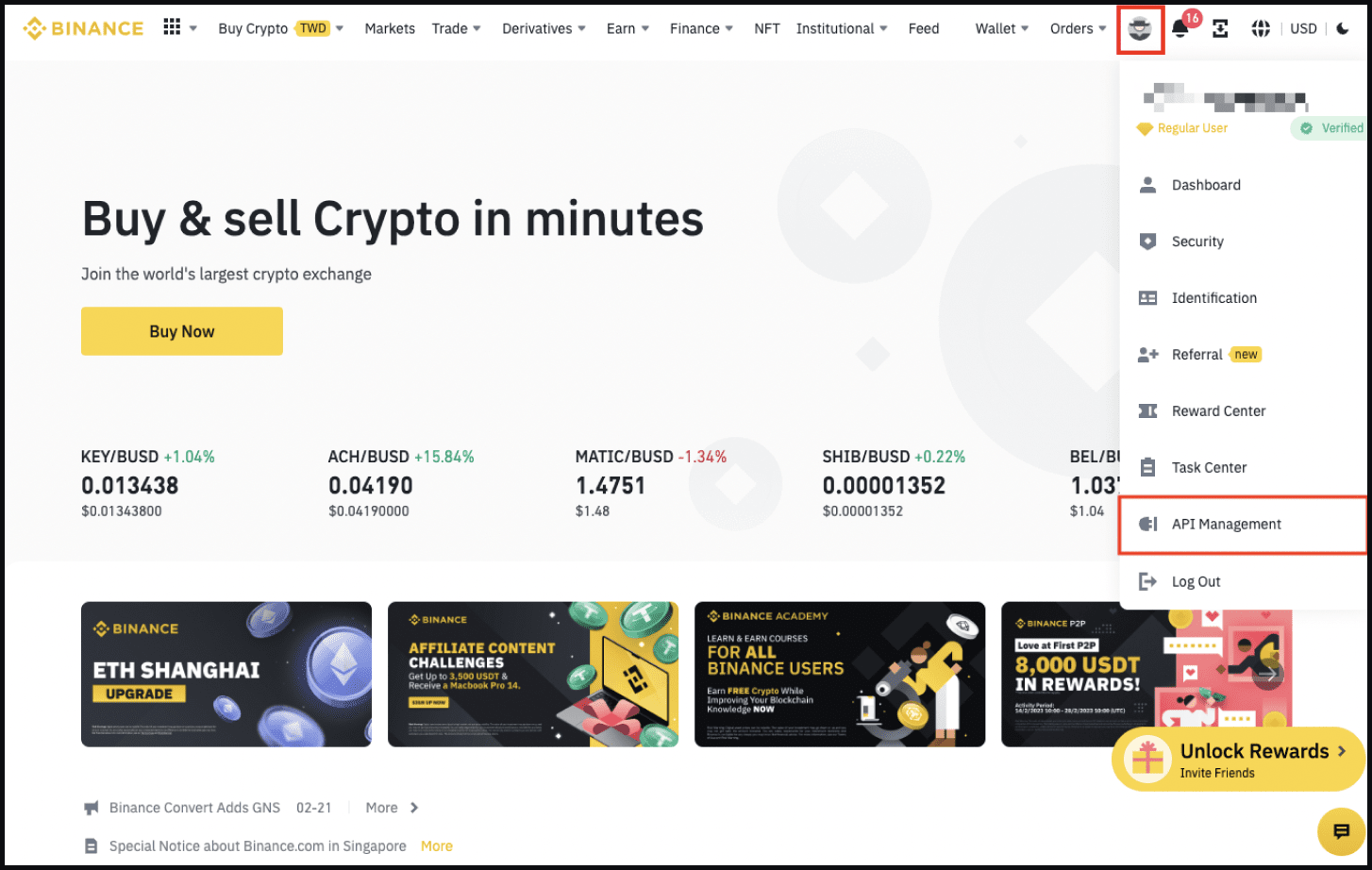
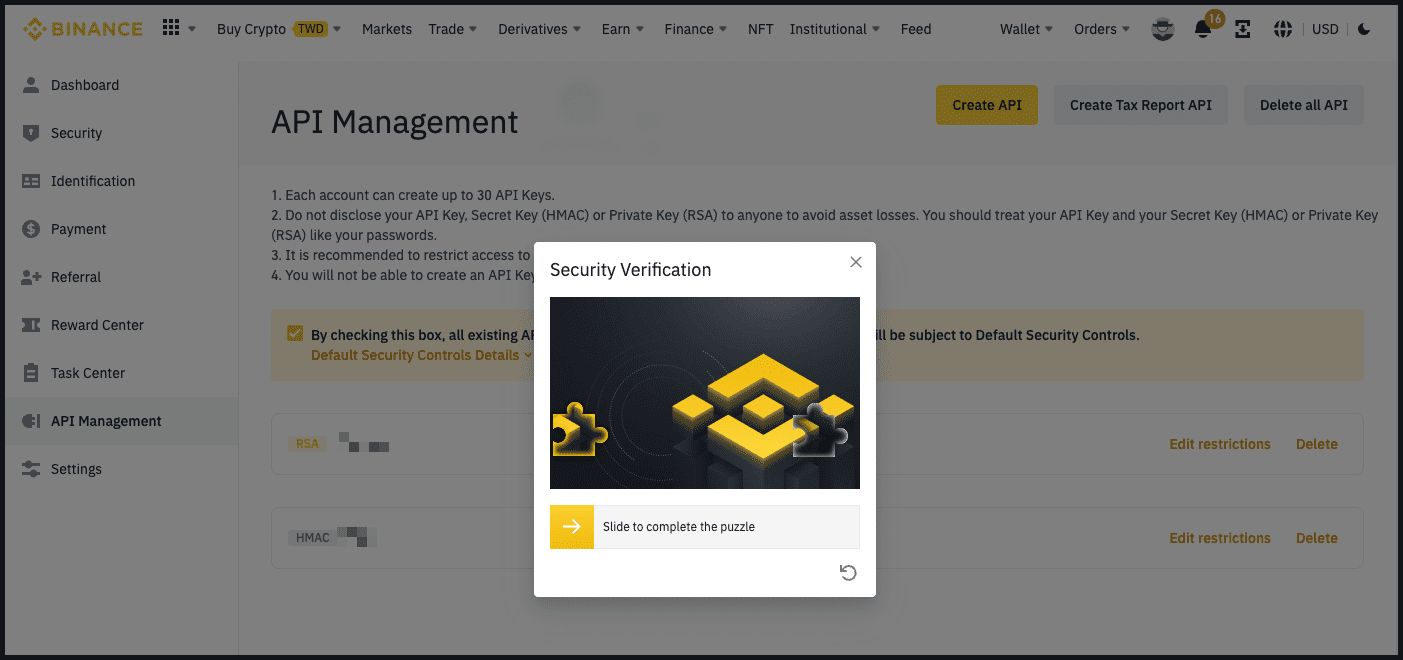
See the Binance Connector Guide for details on create API keys on Binance.
From inside the Hummingbot client, run connect binance:
If connection is successful:
Integration to spot markets API endpoints
This connector supports the following OrderType constants:
Access the Paper Trade version of this connector by running connect binance_paper_trade instead of connect binance.
If this is not available by default, you can configure Hummingbot to add this paper trade exchange. See Adding Exchanges for more information.
Integration to perpetual futures markets API endpoints
From inside the Hummingbot client, run connect binance_perpetual:
If connection is successful:
This connector supports the following OrderType constants:
This connector supports the following position modes:
This perp exchange offers a paper trading mode: https://testnet.binancefuture.com
Afer you create an account and create the API keys, you can enter them by using the connect binance_perpetual_testnet command within the Hummingbot client. Once connected, you should be able to use the testnet with the available perpetual strategies / scripts.
OHLCV candles data collector from spot markets
In a Hummingbot script, import CandlesFactory to create the candles that you want: from hummingbot.data_feed.candles_feed.candles_factory import CandlesFactory candles = CandlesFactory.get_candle(connector="binance", trading_pair="ETH-USDT", interval="1m", max_records=50)
See candles_example.py for more details.
OHLCV candles data collector from perpetual futures markets
In a Hummingbot script, import CandlesFactory to create the candles that you want: from hummingbot.data_feed.candles_feed.candles_factory import CandlesFactory candles = CandlesFactory.get_candle(connector="binance_perpetual", trading_pair=trading_pair, interval="3m", max_records=50)
See candles_example.py for more details.
Examples:
Example 1 (unknown):
>>> connect binance

Enter your binance API key >>>
Enter your binance secret key >>>
Example 2 (unknown):
You are now connected to binance
Example 3 (unknown):
>>> connect binance_perpetual

Enter your binance_perpetual API key >>>
Enter your binance_perpetual secret key >>>
Example 4 (unknown):
You are now connected to binance_perpetual
Index - Hummingbot
URL: https://hummingbot.org/exchanges/hashkey/
Contents:
- Index
- 🛠 Connector Info
- ℹ️ Exchange Info
- 🔑 How to Connect
- Generate API Keys
- Add Keys to Hummingbot
- 🔀 Spot Connector
- Order Types
- Paper Trading
- 🔀 Perp Connector
Hummingbot Foundation has a fee share partnership with Hashkey Global. When you use our software to trade on Hashkey Global, a custom API header tells Hashkey Global that the trade was executed using Hummingbot, so they share a portion of your fees with us, at no cost to you. To support us, just enter your API keys into Hummingbot and run bots! Thanks for your support! 🙏
Log in to your Hashkey Global account or Sign Up for a Hashkey Global account.
Click on your account icon at the top right corner of the screen, and select API Management from the drop-down menu.
Navigate to the API Management tab and click on Create API.
Input API Note Name", and select API Permissions" for your key, and enter the IP Access Restriction.
Click Confirm and enter your authentication on the sub-window.
Copy the API key and secret, and save them somewhere safe.
Log in to the third-party application and link the saved API.
From inside the Hummingbot client, run connect hashkey:
If connection is successful:
Integration to spot markets API endpoints
This connector supports the following OrderType constants:
Access the Paper Trade version of this connector by running connect hashkey_paper_trade instead of connect hashkey.
If this is not available by default, you can configure Hummingbot to add this paper trade exchange. See Adding Exchanges for more information.
Integration to perpetual futures markets API endpoints
This connector supports the following OrderType constants:
This connector supports the following position modes:
Access the Paper Trade version of this connector by running connect hashkey_perpetual_paper_trade instead of connect hashkey_perpetual.
If this is not available by default, you can configure Hummingbot to add this paper trade exchange. See Adding Exchanges for more information.
Examples:
Example 1 (unknown):
Enter your Hashkey Global api >>>
Enter your Hashkey Global secret >>>
Example 2 (unknown):
You are now connected to hashkey
AscendEx - Hummingbot
URL: https://hummingbot.org/exchanges/ascendex
Contents:
- AscendEx
- 🛠 Connector Info
- ℹ️ Exchange Info
- 🔑 How to Connect
- Generate API Keys
- Notes:
- Add Keys to Hummingbot
- 🔀 Spot Connector
- Order Types
- Paper Trading
Hummingbot Foundation has a fee share partnership with Ascendex. When you use our software to trade on Ascendex, a custom API header tells Ascendex that the trade was executed using Hummingbot, so they share a portion of your fees with us, at no cost to you. To support us, create an account using our Ascendex referral link and enter that account's API keys into Hummingbot and run bots! Thanks for your support! 🙏
Log in to your AscendEX account using your PC and visit profile icon – [API Setting].
Click [New API Key] in the upper right corner of the page.
Create a name for the new API key and set up API permissions and IP address restrictions. Complete a three-step verification by entering your phone, email, and Google verification code. Click [Generate API Key] to complete the process.
A pop-up containing both public and private API keys will appear on your screen. Please keep a copy of both keys, as they will only be viewable to you during this stage of the setup. For account security, never share your API keys. In the case of a lost or forgotten API key, it is advised to delete the old API and create new keys immediately.
After creating an API key, you can Edit or Delete your API keys under the Action tab.
If connection is successful:
Integration to spot markets API endpoints
This connector supports the following OrderType constants:
Access the Paper Trade version of this connector by running connect ascendex_paper_trade instead of connect ascendex.
If this is not available by default, you can configure Hummingbot to add this paper trade exchange. See Adding Exchanges for more information.
Collect historical OHCLV data from this exchange's spot markets
In a Hummingbot script, import CandlesFactory to create the candles that you want: from hummingbot.data_feed.candles_feed.candles_factory import CandlesFactory candles = CandlesFactory.get_candle(connector="ascendex", trading_pair="ETH-USDT", interval="1m", max_records=50)
See candles_example.py for more details.
Examples:
Example 1 (unknown):
>>> connect ascend_ex

Enter your ascend_ex API key >>>
Enter your ascend_ex secret key >>>
Example 2 (unknown):
You are now connected to ascend_ex
Example 3 (python):
from hummingbot.data_feed.candles_feed.candles_factory import CandlesFactory
    candles = CandlesFactory.get_candle(connector="ascendex",
                                        trading_pair="ETH-USDT",
                                        interval="1m", max_records=50)
BTC Markets - Hummingbot
URL: https://hummingbot.org/exchanges/btc-markets/
Contents:
- BTC Markets
- 🛠 Connector Info
- ℹ️ Exchange Info
- 🔑 How to Connect
- Generate API Keys
- Add Keys to Hummingbot
- 🔀 Spot Connector
- Order Types
- Paper Trading
From inside the Hummingbot client, run connect btc_markets:
If connection is successful:
Integration to spot markets API endpoints
This connector supports the following OrderType constants:
Access the Paper Trade version of this connector by running connect btc_markets_paper_trade instead of connect btc_markets.
If this is not available by default, you can configure Hummingbot to add this paper trade exchange. See Adding Exchanges for more information.
Examples:
Example 1 (unknown):
Enter your btc_markets API key >>>
Enter your btc_markets secret key >>>
Example 2 (unknown):
You are now connected to btc_markets
Epochs - Hummingbot
URL: https://hummingbot.org/governance/epochs/
Contents:
- Epochs
- Epoch 13 (Q3 2025)
- CLOB CEX Connectors
- CLOB DEX Connectors
- Gateway DEX Connectors
- Epoch 12 (Q2 2025)
- CEX Connectors
- CLOB DEX Connectors
- Gateway DEX Connectors
- Epoch 11 (Q1 2025)
The Hummingbot Foundation is an experiment in creating a self-sustainable open source ecosystem by distributing HBOT tokens to community developers who maintain the codebase.
We iterate to improve upon this distribution process via Epochs. Each Epoch is a quarterly period that are basically long agile sprints, after which the Foundation and the community may propose changes for the next Epoch.
Polls divide a fixed pool of HBOT between the connectors based on their pro-rata voting share. The Foundation assigns maintenance bounties to community developers for each connector using these amounts. See the Connector Pots tab in HBOT Tracker for the current allocations for each exchange.
Approved Governance Changes: HGP-70
The Foundation implemented three separate polls, one for each exchange type. To ensure room for new community-suggested exchanges while respecting the 20-choice limit, the following exchange removal conditions apply:
This system ensures at least 2 open slots in each exchange type for new additions every quarter. These removal conditions apply in addition to the current Minimum HBOT inclusion threshold (400K HBOT).
Approved Governance Changes: HGP-50
Approved Governance Changes: HGP-50
Approved Governance Changes: HGP-50
Approved Governance Changes: HGP-50
Approved Governance Changes: HGP-50
Recap: Epoch 6 Polls Recap
Approved Governance Changes: HGP-45
Recap: Epoch 5 Polls Recap
Approved Governance Changes: HGP-43
Recap: Epoch 4 Polls Recap
Recap: Epoch 3 Polls Recap
Approved Governance Changes: HGP-22, HGP-24
After Epoch 2, the Foundation conducted a retrospective and decided to enact the following changes to improve the governance process:
Approved Governance Changes: HGP-10, HGP-12, HGP-17
After Epoch 1, the Foundation conducted a retrospective and enacted a number of changes to the governance process. Specifically, the Foundation decided to start the following initiatives:
1.3.0 - Hummingbot
URL: https://hummingbot.org/release-notes/1.3.0/
Contents:
- Release Notes - Version 1.3.0
- 🔗 New Spot Connector: CoinFLEX
- ℹ️ More Resources sections
- 💻 Developer Updates
- 🐛 Bug Fixes
Released on April 29, 2022
Install via Docker: Linux | Windows | macOS | Raspberry Pi
Binary builds are no longer supported. Docker and Source are now the only supported methods of install.
We are very excited to ship the April 2022 Hummingbot release (v1.3.0) today!
CoinFLEX is the first connector built under Hummingbot Foundation's community maintenance model. Established in 2019, CoinFLEX is a centralized cryptocurrency exchange located in Seychelles with 26 trading pairs on the exchange.
For more information, check out the CoinFLEX documentation, including a special VIP tier trial offer for Hummingbot users!
Look for a new section titled ℹ️ More Resources in the documentation pages for each Hummingbot strategy, as well as for certain exchange connectors. This section contains community-submitted resources such as guide, videos, and other useful content related to each strategy and connector.
🔥 Binance - Hummingbot
URL: https://hummingbot.org/exchanges/binance
Contents:
- 🔥 Binance
- 🛠 Connector Info
- ℹ️ Exchange Info
- 🔑 How to Connect
- 🔀 Spot Connector
- Order Types
- Paper Trading
- 🔀 Perp Connector
- Usage
- Order Types
Binance is an exchange partner of Hummingbot Foundation, so when you use Hummingbot to run bots on Binance, a portion of your fees goes to support the Foundation and our mission to democratize algo trading with open source software. To enable this, create an account using our Binance referral link and enter that account's API keys into Hummingbot and run bots! Thanks for your support! 🙏
See the Binance Connector Guide for details on create API keys on Binance.
From inside the Hummingbot client, run connect binance:
If connection is successful:
Integration to spot markets API endpoints
This connector supports the following OrderType constants:
Access the Paper Trade version of this connector by running connect binance_paper_trade instead of connect binance.
If this is not available by default, you can configure Hummingbot to add this paper trade exchange. See Adding Exchanges for more information.
Integration to perpetual futures markets API endpoints
From inside the Hummingbot client, run connect binance_perpetual:
If connection is successful:
This connector supports the following OrderType constants:
This connector supports the following position modes:
This perp exchange offers a paper trading mode: https://testnet.binancefuture.com
Afer you create an account and create the API keys, you can enter them by using the connect binance_perpetual_testnet command within the Hummingbot client. Once connected, you should be able to use the testnet with the available perpetual strategies / scripts.
OHLCV candles data collector from spot markets
In a Hummingbot script, import CandlesFactory to create the candles that you want: from hummingbot.data_feed.candles_feed.candles_factory import CandlesFactory candles = CandlesFactory.get_candle(connector="binance", trading_pair="ETH-USDT", interval="1m", max_records=50)
See candles_example.py for more details.
OHLCV candles data collector from perpetual futures markets
In a Hummingbot script, import CandlesFactory to create the candles that you want: from hummingbot.data_feed.candles_feed.candles_factory import CandlesFactory candles = CandlesFactory.get_candle(connector="binance_perpetual", trading_pair=trading_pair, interval="3m", max_records=50)
See candles_example.py for more details.
Examples:
Example 1 (unknown):
>>> connect binance

Enter your binance API key >>>
Enter your binance secret key >>>
Example 2 (unknown):
You are now connected to binance
Example 3 (unknown):
>>> connect binance_perpetual

Enter your binance_perpetual API key >>>
Enter your binance_perpetual secret key >>>
Example 4 (unknown):
You are now connected to binance_perpetual
Polls - Hummingbot
URL: https://hummingbot.org/governance/polls/
Contents:
- Polls
- Poll Parameters
- Connector Polls
- Connector Pots
- Connector Inclusion Threshold
- Polls Process
The Hummingbot open source codebase contains Connectors to various CEXs, DEXs and blockchain networks where users can execute automated trading strategies. The connected exchanges and networks are constantly changing and upgrading.
Each connector in the codebase requires ongoing maintenance, documentation and testing. The Foundation regularly reviews both new and existing connectors for security issues and breaking changes to ensure that they do not cause issues for other users. Without a way to maintain a high level of connector quality, the Hummingbot codebase may descend into an unusable spaghetti codebase.
Therefore, Polls allow HBOT holders to allocate maintenance bandwidth in the form of HBOT bounties toward the connectors in the codebase, as well as decide which connectors should be included going forward.
Prior to HGP-50, polls ranked connectors into Gold, Silver, and Bronze tiers. Afterwards, Polls allocate HBOT bounties among the connectors based on their pro-rata voting share, subject tor with a maximum allocation cap.
Each quarterly Epoch, HBOT voters vote on which connectors of each type should be included in the codebase, and how much HBOT maintenance bounty allocation should be assigned to each connector.
See Connectors for more information about the types of connectors.
Polls allocate a fixed pool of 3,000,000 HBOT (1,000,000 HBOT per poll) among the top exchanges for each Poll based on their pro-rata voting share. This per-exchange amount would be a public HBOT maintenance bounty allocation which the Foundation uses to fund bounties assigned to community developers for bug fixes and upgrades related to that exchange's Hummingbot connectors.
See the Connector Pots tab in HBOT Tracker for the current allocations for each exchange.
In each Poll, a connector needs to receive at least 400,000 HBOT in aggregate votes. Otherwise, the exchange's connectors will be removed from the Hummingbot codebase in the following monthly release.
During the first week of each quarter, the Foundation will create Hummingbot Governance Proposals in the HBOT Snapshot sub-space for each poll.
Each poll lasts for 14 days, and any Ethereum wallet holding HBOT tokens at poll creation may vote. 1 HBOT token equals 1 vote.
Afterwards, the Foundation will implement the approved changes in the subsequent release.
1.0.0 - Hummingbot
URL: https://hummingbot.org/release-notes/1.0.0/
Contents:
- Release Notes - Version 1.0.0
- Binance and Binance Perpetual Improvement
- Discontinued Binary Support
- Improved Avellaneda Market Making (Part 2)
- Developer Updates
- Bug Fixes
Released on January 27, 2022
We are very excited to ship the first official Hummingbot release (v1.0.0) today!
This release contains significant improvements to the avellaneda strategies, major updates of Binance and Binance Perpetual connectors, discontinue of the Binary build, and improved documentation for both Avellaneda and Perpetual market making strategies as well as developer documentation for perpetual connectors.
We have refactored binance and binance_perpetual with the best practices of a Hummingbot connector. Going forward, these connecotrs will be the standard for spot and perpetual type exchange connectors, respectively. Community developers who want to integrate an exchange into Hummingbot should use these two connectors as references.
Updates to these connectors include:
Some exclusive parameters for Binance have also been removed, following the major update to the Binance connector. These commands are no longer available: pnl, open_orders, trades, and binance_markets.
Changes can be seen here for Binance and Binance Perpetual.
We previously announced in the version 0.46 release notes about discontinuing binary installers. In this release, we have removed and cleaned up the codebase anything related to supporting binary installation, however, users can continue to use the older version of binaries available until version 0.46. that can be downloaded from the installation page.
New users who want to test and try out Hummingbot can launch an instance of Test Drive.
We are making improvements to the initial implementation of the Avellaneda-Stoikov strategy. In this release, we added improvements specifically to the infinite time horizon, making more sense for crypto markets since they run 24/7. The original strategy was invented for stock markets which are only active during certain trading hours.
Users can now set an infinite time horizon. Additionally, users can specify the strategy to run from time to time every day, or from one date to another date, making the strategy more flexible. For example, users can schedule the strategy to run only during a mining campaign or schedule it to only run during hours when the user is awake to keep an eye on it.
Three different use cases are possible in the current implementation:
More details are described in the Github issue #4650.
Bitrue - Hummingbot
URL: https://hummingbot.org/exchanges/bitrue/
Contents:
- Bitrue
- 🛠 Connector Info
- ℹ️ Exchange Info
- 🔑 How to Connect
- Generate API Keys
- Add Keys to Hummingbot
- 🔀 Spot Connector
- Order Types
- Paper Trading
Login to your Bitrue account on your computer.
Hover on your profile icon and click API from the dropdown menu
Click Get API key and Create a API name ( ex. Hummingbot_Bitrue), click Create API key button
Pass the authentication part and click Confirm
Go to your email Inbox and verify New API Creation by following the link in the email
Write somewhere your API key and Secret and give Not Limited to any IP access restriction and click Save Settings
Copy/paste your API Key and API Secret
From inside the Hummingbot client, run connect bitrue:
If connection is successful:
Integration to spot markets API endpoints
This connector supports the following OrderType constants:
Access the Paper Trade version of this connector by running connect bitrue_paper_trade instead of connect bitrue.
If this is not available by default, you can configure Hummingbot to add this paper trade exchange. See Adding Exchanges for more information.
Examples:
Example 1 (unknown):
Enter your bitrue API key >>>
Enter your bitrue secret key >>>
Example 2 (unknown):
You are now connected to bitrue
Building Gateway Connectors - Hummingbot
URL: https://hummingbot.org/developers/gateway-connectors/
Contents:
- Building Gateway Connectors
- Overview
- Prerequisites
- Development Environment
- Protocol Knowledge
- Gateway Setup
- Connector Architecture
- Implementation Steps
- Step 1: Choose Connector Type
- Step 2: Create Connector Class
This guide walks you through the process of building new Gateway connectors for decentralized exchanges (DEXs). Gateway connectors enable Hummingbot to interact with blockchain-based trading protocols through a standardized REST API interface.
Gateway supports three types of DEX connectors:
Before building a Gateway connector, ensure you have:
Gateway connectors follow a modular architecture:
Determine which trading types your DEX supports:
Create the main connector class - reference Uniswap if you are building an Ethereum-based DEX connector and Raydium if you are building a Solana-based DEX connector.
Based on your connector type, implement the required methods:
Create route handler files for your supported operations:
Create configuration files for your connector:
Register your connector in the main connector routes:
Create comprehensive tests for your connector:
Gateway is currently not accepting pull requests for new blockchain implementations. The framework currently supports: - EVM chains: Ethereum and EVM-compatible chains (Arbitrum, Optimism, Base, Polygon, BSC, Avalanche, etc.) - SVM chains: Solana and SVM-compatible chains
If your connector requires a chain built on either EVM or SVM architecture, you can proceed with the implementation below. For entirely new blockchain architectures, please check the GitHub repository for updates on when new chain support will be accepted.
If your connector requires a new blockchain:
All Gateway connectors must meet these testing standards:
Gateway uses ESLint and Prettier for code quality:
Before submitting your connector:
Examples:
Example 1 (unknown):
src/connectors/{protocol}/
├── {protocol}.ts           # Main connector class
├── {protocol}.config.ts    # Configuration interface
├── {protocol}.constants.ts # Protocol-specific constants
├── {protocol}.utils.ts     # Helper functions
├── router-routes/          # Router endpoints (if applicable)
├── amm-routes/            # AMM endpoints (if applicable)
└── clmm-routes/           # CLMM endpoints (if applicable)
Example 2 (javascript):
// src/connectors/mydex/mydex.ts
export class MyDex {
  private static instances: Record<string, MyDex> = {};
  public solana: Solana; // or Ethereum
  public sdk: MyDEXSDK;
  public config: MyDexConfig.RootConfig;

  private constructor() {
    this.config = MyDexConfig.config;
    this.txVersion = TxVersion.V0;
  }

  // Gets singleton instance
  public static getInstance(network: string): MyDex {
    if (!MyDex._instances) {
      MyDex._instances = {};
    }

    if (!MyDex._instances[network]) {
      const instance = new MyDex();
      await instance.init(network);
      MyDex._instances[network] = instance;
    }

    return MyDex._instances[network];
  }

  // Initializes instance
  private async init(network: string) {
    try {
      this.solana = await Solana.getInstance(network);
      this.sdk = await MyDEXSDK.load({
        connection: this.solana.connection,
        blockhashCommitment: 'confirmed',
      });

      logger.info('MyDEX initialized successfully');
    } catch (error) {
      logger.error('MyDEX initialization failed:', error);
      throw error;
    }
  }
}
Example 3 (unknown):
// Quote a swap
async quote(
  base: Token,
  quote: Token,
  amount: BigNumber,
  side: 'BUY' | 'SELL'
): Promise<SwapQuote> {
  // Implement quote logic
  return {
    route: optimalRoute,
    expectedOut: outputAmount,
    priceImpact: impact,
    gasEstimate: gasLimit
  };
}

// Execute a swap
async trade(
  wallet: Wallet,
  quote: SwapQuote,
  slippage: number
): Promise<Transaction> {
  // Build and execute transaction
  return transaction;
}
Example 4 (unknown):
// Get pool information
async poolInfo(
  base: Token,
  quote: Token
): Promise<PoolInfo> {
  // Fetch pool data
  return {
    reserves: [baseReserve, quoteReserve],
    fee: poolFee,
    liquidity: totalLiquidity
  };
}

// Add liquidity
async addLiquidity(
  wallet: Wallet,
  base: Token,
  quote: Token,
  baseAmount: BigNumber,
  quoteAmount: BigNumber,
  slippage: number
): Promise<Transaction> {
  // Add liquidity logic
  return transaction;
}
🔥 Gate.io - Hummingbot
URL: https://hummingbot.org/exchanges/gate-io
Contents:
- 🔥 Gate.io
- 🛠 Connector Info
- ℹ️ Exchange Info
- 🔑 How to Connect
- Generate API Keys
- Add Keys to Hummingbot
- 🔀 Spot Connector
- Order Types
- Paper Trading
- 🔀 Perp Connector
Gate.io is an exchange partner of Hummingbot Foundation, so when you use Hummingbot to run bots on Gate.io, a portion of your fees goes to support the Foundation and our mission to democratize algo trading with open source software. To help support us, create an account using our Gate.io referral link and enter that account's API keys into Hummingbot and run bots! Thanks for your help! 🙏
Go to Gate.io Log in or create a new account at https://www.gate.io/.
Open the API Management page Hover over the profile icon on the top right corner and go to the API Management page:
Click on the Create API Key button
Add IP whitelist (optional) Enable Bind IP and input the IP addresses, separated by a comma. You'll need to find the public IP address of the machine you are running Hummingbot If you don't want to whitelist your IP then select Later instead but the API keys you create will only be valid for 90 days.
Choose API v4 Key and a Classic Account type
Select Permissions Please select the following permissions and then click on the Submit button.
Carefully read the Risk Reminder, tick both paragraphs, and click I Accept
Enter Fund Password, choose 2FA Authentication method and enter its code
Copy your API keys and store them somewhere safe.
Now, you have created API keys for your Gate.io exchange!
From inside the Hummingbot client, run connect gate_io:
If connection is successful:
Integration to spot markets API endpoints
This connector supports the following OrderType constants:
Access the Paper Trade version of this connector by running connect gate_io_paper_trade instead of connect gate_io.
If this is not available by default, you can configure Hummingbot to add this paper trade exchange. See Adding Exchanges for more information.
Integration to perpetual futures markets API endpoints
This connector supports the following OrderType constants:
This connector supports the following position modes:
This perp exchange offers a paper trading mode: https://www.gate.io/testnet/futures_trade/USDT/BTC_USDT
Users can use the perpetual testnet by clicking on the link above - however the testnet does not currently work with Hummingbot
Collect historical OHCLV data from this exchange's spot markets
In a Hummingbot script, import CandlesFactory to create the candles that you want: from hummingbot.data_feed.candles_feed.candles_factory import CandlesFactory candles = CandlesFactory.get_candle(connector="gate_io", trading_pair="ETH-USDT", interval="1m", max_records=50)
See candles_example.py for more details.
Collect historical OHCLV data from this exchange's perp markets
In a Hummingbot script, import CandlesFactory to create the candles that you want: from hummingbot.data_feed.candles_feed.candles_factory import CandlesFactory candles = CandlesFactory.get_candle(connector="gate_io_perpetual", trading_pair=trading_pair, interval="3m", max_records=50)
See candles_example.py for more details.
Examples:
Example 1 (unknown):
>>> connect gate_io

Enter your gate_io API key >>>
Enter your gate_io secret key >>>
Example 2 (unknown):
You are now connected to gate_io
Example 3 (python):
from hummingbot.data_feed.candles_feed.candles_factory import CandlesFactory
    candles = CandlesFactory.get_candle(connector="gate_io",
                                        trading_pair="ETH-USDT",
                                        interval="1m", max_records=50)
Example 4 (python):
from hummingbot.data_feed.candles_feed.candles_factory import CandlesFactory
    candles = CandlesFactory.get_candle(connector="gate_io_perpetual",
                                        trading_pair=trading_pair,
                                        interval="3m", max_records=50)
Gateway DEX Connectors - Hummingbot
URL: https://hummingbot.org/gateway/connectors
Contents:
- Gateway DEX Connectors
- Supported Connectors
- Active Connectors
- Legacy Connectors
- Connector Schemas
- Router Schema
- AMM Schema
- CLMM Schema
- Building Custom Connectors
Gateway provides standardized connectors for interacting with decentralized exchanges (DEXs) across different blockchain networks. Each connector implements one or more trading types (Router, AMM, CLMM) to support various DeFi protocols.
The Gateway refactoring approved in NCP-22 has been completed with the v2.8.0 release. The new standard is now ready, and developers can help upgrade the legacy connectors to the new architecture. Community developers can claim bounties for these upgrades where available.
The following connectors are available in legacy versions but need to be upgraded to the v2.8.0 standard:
Gateway implements three standardized schemas that define the API structure for different trading types. Each connector must implement one or more of these schemas to ensure compatibility with Hummingbot.
For DEX aggregators and swap-only protocols. Focuses on quoting optimal trade routes across multiple liquidity sources and executing quotes.
For traditional Automated Market Maker pools with constant product (x*y=k) formulas, such as Uniswap V2 and Raydium Standard Pools.
For Concentrated Liquidity Market Maker pools where liquidity providers can specify custom price ranges such as Uniswap V3 and Raydium Concentrated Pools.
For detailed instructions on building custom Gateway DEX connectors, see Building Gateway Connectors.
Handling Rate Limits with API Throttler - Hummingbot
URL: https://hummingbot.org/developers/connectors/api_throttler
Contents:
- Handling Rate Limits with API Throttler
- RateLimit & LinkedLimitWeightPair data classes
- Types of rate limits
- 1. Rate limit per endpoint
- 2. Rate limit pools
- 3. Weighted request rate limits
- Integrating rate limits into the connector
- Consuming the throttler
The information below are for developers building spot and perp connectors that integrate directly into the Hummingbot client. For information on developing gateway connectors that use Gateway, see Building Gateway Connectors.
This section will detail the necessary steps to integrate the AsyncThrottler into the connector. The AsyncThrottler class utilizes asynchronous context managers to throttle API and/or WebSocket requests and avoid reaching the exchange's server rate limits.
The integration of the AsyncThrottler into the connector is entirely optional, but it is recommended to enable a better user experience as well as allowing users to manually configure the usable rate limits per Hummingbot instance.
The RateLimit data class is used to represent a rate limit defined by exchanges, while the LinkedLimitWeightPair data class is used to associate an endpoint consumption weight to its API Pool (defaults to 1 if it is not specified)
limit_id can be any arbitrarily assigned value. In the examples given in the next few sections, the limit_id assigned to the various rate limits are either a generic API pool name or the path url of the API endpoint.
It is important to identify the exchange's rate limit implementation before starting development.
There are several types of rate limits that can be handled by the AsyncThrottler class. The following sections will detail (with examples) how to initialize the necessary RateLimit and the interaction between the connector and the throttler for each of the different rate limit types.
kucoin is an example of a connector that utilizes this rate limit implementation.
This refers to rate limits that are applied on a per endpoint basis. For this rate limit type, the key information to retrieve for each endpoint would be its assigned limit and time interval. Note that the time interval is on a rolling basis. For example, if an endpoint's rate limit is 20 and the time interval is 60, this meant that the throttler will check if there are 20 calls made (to the same endpoint) within the past 60 seconds from the current moment.
Configuring Rate Limits
As mentioned above, the key information to retrieve from the exchange are the limit and time_interval (in seconds) of each endpoint. An example of an exchange implementing this can be seen in the kucoin connector.
Rate limits for Kucoin can be found here.
All the rate limits are to be initialized in the kucoin_constants.py file.
binance, binance_perpetual, and ndax are examples of connectors that utilizes this rate limit implementation
Rate limit pools refer to a group of endpoints that consumes from a single rate limit. For this rate limit type, the key information to retrieve for each endpoint are its assigned pool(s) and its respective limit and time interval.
Configuring Rate Limits
An example of an exchange implementing this can be seen in the ndax connector.
All the rate limit are initialized in the ndax_constants.py file.
Notice that we assign an arbitrary limit id (i.e. HTTP_ENDPOINTS_LIMIT_ID) to the API pools and we use the LinkedLimitWeightPair to assign an endpoint to the API pool. Also do note that an endpoint may belong to multiple other endpoints.
It is also worth noting that there can be more complex implementations to API pools as seen in the bybit_perpetual connector here.
binance and binance_perpetual are examples of connectors that utilizes this rate limit implementation
For weighted rate limits, each endpoint is assigned a request weight. Generally, these exchanges would utilize Rate Limit Pools in conjunction with the request weights, where different endpoints will have a different impact on the given pool. Key information to retrieve for these exchanges are the weights for each endpoint, limits and the time intervals for the API Pool.
Configuring Rate Limits
An example of an exchange implementing this type of rate limit can be seen in the binance connector.
Rate limits for Binance can be found in the API response for the GET /api/v3/exchangeInfo endpoint here.
Binance implements both API Pools as well as weighted requests. In the example above, the BINANCE_CREATE_ORDER endpoint has a request weight of 1 for 3 API Pools, while the SNAPSHOT_PATH_URL endpopint has a request weight of 50 for the REQUEST_WEIGHT API Pool. Notice that the API Pools have different rate limits and time intervals.
The throttler should be consumed by all relevant classes that issue server API calls that are limited by the exchange (either http requests or websocket requests). Namely the Exchange/Derivative, APIOrderBookDataSource and UserStreamDataSource classes. Doing so ensures that the throttler manages all REST API/Websocket requests issued by any of the connector components.
The throttler is used as an asynchronous context manager.
The path_url must be match the limit_id of the endpoint as defined in the RATE_LIMITS constant. The throttler will match the path_url to its assigned rate limits or API pools.
Examples:
Example 1 (unknown):
RATE_LIMITS = [
    RateLimit(WS_CONNECTION_LIMIT_ID, limit=WS_CONNECTION_LIMIT, time_interval=WS_CONNECTION_TIME_INTERVAL),
    RateLimit(WS_REQUEST_LIMIT_ID, limit=100, time_interval=10),

    RateLimit(limit_id=PUBLIC_WS_DATA_PATH_URL, limit=NO_LIMIT, time_interval=1),
    RateLimit(limit_id=PRIVATE_WS_DATA_PATH_URL, limit=NO_LIMIT, time_interval=1),
    RateLimit(limit_id=TICKER_PRICE_CHANGE_PATH_URL, limit=NO_LIMIT, time_interval=1),
    RateLimit(limit_id=SYMBOLS_PATH_URL, limit=NO_LIMIT, time_interval=1),
    RateLimit(limit_id=SNAPSHOT_NO_AUTH_PATH_URL, limit=NO_LIMIT, time_interval=1),
    RateLimit(limit_id=ACCOUNTS_PATH_URL, limit=NO_LIMIT, time_interval=1),
    RateLimit(limit_id=SERVER_TIME_PATH_URL, limit=NO_LIMIT, time_interval=1),
    RateLimit(limit_id=GET_ORDER_LIMIT_ID, limit=NO_LIMIT, time_interval=1),
    RateLimit(limit_id=FEE_PATH_URL, limit=NO_LIMIT, time_interval=1),
    RateLimit(limit_id=ALL_TICKERS_PATH_URL, limit=NO_LIMIT, time_interval=1),
    RateLimit(limit_id=LIMIT_FILLS_PATH_URL, limit=NO_LIMIT, time_interval=1),
    RateLimit(limit_id=ORDER_CLIENT_ORDER_PATH_URL, limit=NO_LIMIT, time_interval=1),
    RateLimit(limit_id=POST_ORDER_LIMIT_ID, limit=45, time_interval=3),
    RateLimit(limit_id=DELETE_ORDER_LIMIT_ID, limit=60, time_interval=3),
    RateLimit(limit_id=ORDERS_PATH_URL, limit=45, time_interval=3),
    RateLimit(limit_id=FILLS_PATH_URL, limit=9, time_interval=3),
]
Example 2 (unknown):
# Pool IDs
HTTP_ENDPOINTS_LIMIT_ID = "AllHTTP"
WS_ENDPOINTS_LIMIT_ID = "AllWs"

RATE_LIMITS = [
  # REST API Pool(applies to all REST API endpoints)
  RateLimit(limit_id=HTTP_ENDPOINTS_LIMIT_ID, limit=HTTP_LIMIT, time_interval=MINUTE),
  # WebSocket Pool(applies to all WS requests)
  RateLimit(limit_id=WS_ENDPOINTS_LIMIT_ID, limit=WS_LIMIT, time_interval=MINUTE),
  # Public REST API endpoint
  RateLimit(
      limit_id=MARKETS_URL,
      limit=HTTP_LIMIT,
      time_interval=MINUTE,
      linked_limits=[LinkedLimitWeightPair(HTTP_ENDPOINTS_LIMIT_ID)],
  ),
  # WebSocket Auth endpoint
  RateLimit(
      limit_id=ACCOUNT_POSITION_EVENT_ENDPOINT_NAME,
      limit=WS_LIMIT,
      time_interval=MINUTE,
      linked_limits=[LinkedLimitWeightPair(WS_ENDPOINTS_LIMIT_ID)],
  ),
]
Example 3 (unknown):
RATE_LIMITS = [
    # Pools
    RateLimit(limit_id=REQUEST_WEIGHT, limit=1200, time_interval=ONE_MINUTE),
    RateLimit(limit_id=ORDERS, limit=10, time_interval=ONE_SECOND),
    RateLimit(limit_id=ORDERS_24HR, limit=100000, time_interval=ONE_DAY),
    # Weighted Limits
    RateLimit(limit_id=SNAPSHOT_PATH_URL, limit=MAX_REQUEST, time_interval=ONE_MINUTE,
              linked_limits=[LinkedLimitWeightPair(REQUEST_WEIGHT, 50)]),
    RateLimit(limit_id=BINANCE_CREATE_ORDER, limit=MAX_REQUEST, time_interval=ONE_MINUTE,
              linked_limits=[LinkedLimitWeightPair(REQUEST_WEIGHT, 1),
                             LinkedLimitWeightPair(ORDERS, 1),
                             LinkedLimitWeightPair(ORDERS_24HR, 1)]),
]
Example 4 (unknown):
async with throttler.execute_task(path_url):
    res = await aiohttp.ClientSession().get(path_url)
Perp Connector QA Checklist - Hummingbot
URL: https://hummingbot.org/developers/connectors/test-perp/
Contents:
- Perp Connector QA Checklist
Before approving new connectors, the Hummingbot Foundation Qualtiy Assurance (QA) team will do test pull requests to ensure it is working as expected. Below is our test template for perp connectors.
1.15.0 - Hummingbot
URL: https://hummingbot.org/release-notes/1.15.0/
Contents:
- Release Notes - Version 1.15.0
- Community Calls
- Candles Feed Improvements
- New Script Examples
- New Chain/DEX: Injective
- New DEX: ZigZag
- New CEX: Bit.com
- New DEX: Hotbit
- Other Updates
- Hummingbot
Released on April 26, 2023
We are very excited to ship the April 2023 release of Hummingbot (v1.15.0) today!
This release adds new connectors to Injective, ZigZag, Hotbit, and Bit.com (perp), fixes bugs in Binance, Kucoin (perp), and introduces the new Hummingbot Strategy Performance Dashboard!
See below for what's new this month!
Each month, we livestream two community calls on our Discord server:
Below are the Youtube recordings of last month's calls:
We published a new video How to Use Streamlit Apps that introduces the new Hummingbot Dashboard that helps you visualize and analyze strategy performance. Soon, you will be able to see the performance of all your bots as they are running!
In the April 2023 community call, we discussed the highlights from the v1.14.0 release and the Epoch 4 governance polls.
We improved the Candles Feed Smart Component introduced in the last release. Specifically, we improved the collection of candles via REST to allow processing of WebSocket messages while the fill historical candles task is collecting the missing candles via REST.
This release added the following new Script examples:
download_candles.py: This script provides an example of how to use the Candles Feed to download and store historical data. It downloads 3-minute candles for 3 Binance trading pairs ["APE-USDT", "BTC-USDT", "BNB-USDT"] and stores them in CSV files in the /data directory. The script stops after it has downloaded 175,000 max_records records for each pair
pmm_with_shifted_mid_dynamic_spreads.py: This script will demonstrate how to extend the Simple PMM example to shift the mid-price and make the spreads dynamic by using the Candles Feed component and applying technical indicators.
Snapshot Proposal: https://snapshot.org/#/hbot-prp.eth/proposal/0x1e36039ae9ff72c133b2bcf4e7c3aa66b25693b195ac3e5c31ab7fe3f813d745
Injective is a decentralized, peer-to-peer trading platform constructed on the Ethereum blockchain, designed to furnish users with a swift, secure, and efficient trading experience for cryptocurrencies, tokens, and other digital assets. The platform accommodates a wide spectrum of financial products, including spot trading, futures, and perpetual swaps, and boasts notable features such as zero gas fees and instantaneous transaction finality.
See below for the documentation for the Injective chain and exchange connectors:
There were some fixes to the Injective spot and perpetual connectors that on development branch, but not on master. Until the May 2023 release, we recommend running the development branch of Hummingbot and Hummingbot Gateway.
Thanks to CoinAlpha for this contribution! 🙏
Snapshot Proposal: https://snapshot.org/#/hbot-prp.eth/proposal/0x44ae8b7b6aa7064bdb8b042ab37a3cde86f6f8dfe39a41dcbba4859965798d57
ZigZag Exchange is a sophisticated decentralized exchange (DEX) developed on the Ethereum network. Utilizing state-of-the-art Layer-2 technologies from StarkWare and Matter Labs, ZigZag enables rapid transactions at reduced costs, all while maintaining decentralization and eliminating the need for a centralized authority.
See the Zigzag connector documentation for more information.
Thanks to CoinAlpha for this contribution! 🙏
Snapshot Proposal: https://snapshot.org/#/hbot-prp.eth/proposal/0xf6b80e2a79b021f6248a159257a11a89f17f7f0cfba1b9276c208a9a57a584b6
BIT is a sophisticated cryptocurrency exchange tailored for professional use. The platform offers an array of services, including trading strategy execution, price discovery, and liquidity provision. Committed to fostering innovation, BIT.com supports the development of cutting-edge financial products, enhances user trading tools, and presents a diverse range of tokens.
See the bit-com-perpetual connector documentation for more information.
Thanks to yancong001 for this contribution! 🙏
Snapshot Proposal: https://snapshot.org/#/hbot-prp.eth/proposal/0xf6b80e2a79b021f6248a159257a11a89f17f7f0cfba1b9276c208a9a57a584b6
Hotbit is a comprehensive trading platform that seamlessly integrates various business components, including spot trading, financial derivatives, cryptocurrency investments, and decentralized applications (DAPPs). Serving over 210 countries and regions, Hotbit consistently pursues globalized and unified strategies, concentrating on emerging markets such as Russia, Turkey, and Southeast Asia. In 2019, Russian media recognized Hotbit as one of the top three most popular exchanges.
See the Hotbit connector documentation for more information.
Thanks to yangchunbudeze for this contribution! 🙏
URL: https://hummingbot.org/academy-content/using-binance-with-hummingbot/binance-api1.png
Quickswap - Hummingbot
URL: https://hummingbot.org/exchanges/gateway/quickswap
Contents:
- Quickswap
- 🛠 Connector Info
- ℹ️ Exchange Info
- Configuration
This connector need to be migrated to the new Gateway architecture. See Legacy Connectors for more information.
Configure QuickSwap settings in your Gateway configuration files.
Paper Trade - Hummingbot
URL: https://hummingbot.org/global-configs/paper-trade/
Contents:
- Paper Trade
- Adding Exchanges
- Enabling and Disabling
- Adding Paper Trade Balance
This feature allows users to test Hummingbot and simulate trading strategies without risking any actual assets.
Exchange APIs are not required to run the bot on paper_trade for Pure Market making, Cross Exchange Market Making and Avellaneda Market Making.
Users can now add paper exchanges by adding the exchange of choice in conf_client.yml. Previously, it was only available for AscendEX, Binance, Gate io, and Kucoin. Users can find conf_client.yml in hummingbot/conf/conf_client.yml
Add the paper trade exchange, for example kraken, to conf_client.yml:
In the Hummingbot client, kraken_paper_trade should now be available when you select an exchange:
Enter your maker spot connector >>> kraken_paper_trade
Paper trading can be enabled when creating a strategy and choosing an exchange when prompted Enter your maker spot connector during the creation of the strategy.
Alternatively, you can enable paper trading by inputting config exchange then choose the exchange that supports paper trade.
To choose a different connector and go live, simply choose the exchange name without the paper_trade suffix then do the command stop and start so the changes will reflect on your configuration.
By default, the paper trade account has the following tokens and balances which you can see when you run the balance paper command.
When adding balances, specify the asset and balance you want by running this command balance paper [asset] [amount].
For example, we want to add 0.5 BTC and check our paper account balance to confirm.
Examples:
Example 1 (unknown):
paper_trade:
  paper_trade_exchange:
    - binance
    - kucoin
    - ascend_ex
    - gate_io
    - kraken
Example 2 (unknown):
>>>  balance paper
Paper account balances:
    Asset    Balance
      DAI  1000.0000
      ETH    10.0000
      ONE  1000.0000
     TUSD  1000.0000
     USDC  1000.0000
     USDQ  1000.0000
     USDT  1000.0000
     WETH    10.0000
      ZRX  1000.0000
Example 3 (unknown):
>>>  balance paper BTC 0.5
Paper balance for BTC token set to 0.5

>>>  balance paper
Paper account balances:
    Asset    Balance
      BTC     0.5000
      DAI  1000.0000
      ETH    10.0000
      ONE  1000.0000
     TUSD  1000.0000
     USDC  1000.0000
     USDQ  1000.0000
     USDT  1000.0000
     WETH    10.0000
      ZRX  1000.0000
Paper Trade - Hummingbot
URL: https://hummingbot.org/global-configs/paper-trade
Contents:
- Paper Trade
- Adding Exchanges
- Enabling and Disabling
- Adding Paper Trade Balance
This feature allows users to test Hummingbot and simulate trading strategies without risking any actual assets.
Exchange APIs are not required to run the bot on paper_trade for Pure Market making, Cross Exchange Market Making and Avellaneda Market Making.
Users can now add paper exchanges by adding the exchange of choice in conf_client.yml. Previously, it was only available for AscendEX, Binance, Gate io, and Kucoin. Users can find conf_client.yml in hummingbot/conf/conf_client.yml
Add the paper trade exchange, for example kraken, to conf_client.yml:
In the Hummingbot client, kraken_paper_trade should now be available when you select an exchange:
Enter your maker spot connector >>> kraken_paper_trade
Paper trading can be enabled when creating a strategy and choosing an exchange when prompted Enter your maker spot connector during the creation of the strategy.
Alternatively, you can enable paper trading by inputting config exchange then choose the exchange that supports paper trade.
To choose a different connector and go live, simply choose the exchange name without the paper_trade suffix then do the command stop and start so the changes will reflect on your configuration.
By default, the paper trade account has the following tokens and balances which you can see when you run the balance paper command.
When adding balances, specify the asset and balance you want by running this command balance paper [asset] [amount].
For example, we want to add 0.5 BTC and check our paper account balance to confirm.
Examples:
Example 1 (unknown):
paper_trade:
  paper_trade_exchange:
    - binance
    - kucoin
    - ascend_ex
    - gate_io
    - kraken
Example 2 (unknown):
>>>  balance paper
Paper account balances:
    Asset    Balance
      DAI  1000.0000
      ETH    10.0000
      ONE  1000.0000
     TUSD  1000.0000
     USDC  1000.0000
     USDQ  1000.0000
     USDT  1000.0000
     WETH    10.0000
      ZRX  1000.0000
Example 3 (unknown):
>>>  balance paper BTC 0.5
Paper balance for BTC token set to 0.5

>>>  balance paper
Paper account balances:
    Asset    Balance
      BTC     0.5000
      DAI  1000.0000
      ETH    10.0000
      ONE  1000.0000
     TUSD  1000.0000
     USDC  1000.0000
     USDQ  1000.0000
     USDT  1000.0000
     WETH    10.0000
      ZRX  1000.0000
Vertex - Hummingbot
URL: https://hummingbot.org/exchanges/vertex/
Contents:
- Vertex
- 🛠 Connector Info
- ℹ️ Exchange Info
- 🔑 How to Connect
- 🔀 Spot Connector
- Order Types
- Paper Trading
Create a wallet on one of the supported networks below:
From inside the Hummingbot client, run gateway connect vertex in order to connect your wallet:
If connection is successful: You are now connected to vertex.
Integration to spot markets API endpoints
This connector supports the following OrderType constants:
Access the Paper Trade version of this connector by running connect vertex_testnet instead of connect vertex.
Examples:
Example 1 (javascript):
Enter your Arbitrum private key >>>
Enter your Arbitrum wallet address >>>
Example 2 (unknown):
You are now connected to vertex.
🔥 dYdX - Hummingbot
URL: https://hummingbot.org/exchanges/dydx/
Contents:
- 🔥 dYdX
- 🛠 Connector Info
- ℹ️ Exchange Info
- ⚙️ Install Instructions
- Docker
- Source
- 🔑 How to Connect to dYdX (v4)
- Generate API Keys
- Add Keys to Hummingbot
- 🔀 Perp Connector
dYdX is a sponsor of Hummingbot Foundation, so when you use Hummingbot to run bots on dYdX, you're supporting the Foundation and our mission to democratize algo trading with open source software.
At the moment there are some issues with dependencies and installing dydx can be a bit trickier due to some software conflicts. We've created these simple instructions to get you up and running quickly using either Docker or Source.
Open your docker-compose.yml file. This file is usually located in your Hummingbot project directory.
Update the image line. Find the line that starts with image: under the hummingbot service. Change it to the following, depending on whether you are trying to run the latest or development branch.
For latest stable version:
For development version:
After cloning the Hummingbot repo, use the --dydx flag when running the install command
See below for the full commands:
Open the dYdX exchange platform and connect your wallet (e.g., MetaMask or another supported wallet). This will allow you to interact with the exchange and manage your funds.
Once your wallet is connected, deposit USDC into your dYdX account. USDC is required for trading on the platform.
Access Your Wallet Connection:
In the top right corner of the dYdX interface, locate and click on your wallet icon or address. This will open the wallet connection settings.
Copy Your dYdX Chain Address:
At the top of the wallet connection settings window, you’ll find your dYdX Chain Address. Copy this address and keep it secure for future reference.
Export Your Secret Phrase:
You will need the following to connect Hummingbot to dydx_v4_perpetual:
From inside the Hummingbot client, run connect dydx_v4_perpetual in Hummingbot in order to connect your wallet:
Integration to perpetual futures markets API endpoints
This connector supports the following OrderType constants:
This connector supports the following position modes:
This exchange offers a staging (testnet) mode: https://v4.testnet.dydx.exchange/
While users can trade on testnet using the link above, it is not currently supported in Hummingbot.
Examples:
Example 1 (unknown):
image: hummingbot/hummingbot:latest_dydx
Example 2 (unknown):
image: hummingbot/hummingbot:development_dydx
Example 3 (unknown):
./install --dydx
Example 4 (unknown):
git clone https://github.com/hummingbot/hummingbot.git
cd hummingbot
./install --dydx
conda activate hummingbot
./compile
TraderJoe - Hummingbot
URL: https://hummingbot.org/exchanges/gateway/traderjoe
Contents:
- TraderJoe
- 🛠 Connector Info
- ℹ️ Exchange Info
- Configuration
This connector need to be migrated to the new Gateway architecture. See Legacy Connectors for more information.
Configure TraderJoe settings in your Gateway configuration files.
1.7.0 - Hummingbot
URL: https://hummingbot.org/release-notes/1.7.0/
Contents:
- Release Notes - Version 1.7.0
- New Exchange Certification Program
- Upgraded FTX and ByBit Perpetual connectors
- New Gateway DEX Connector: Perpetual Protocol
- Added cross-chain support for Uniswap
- Added DEX support to Cross-Exchange Market Making
- New Script examples
- New Gateway DEX Connector: OpenOcean
- New Gateway DEX Connector: Defi Kingdoms
- New Gateway DEX Connector: Defira
Released on August 31, 2022
We are very excited to ship the August 2022 Hummingbot release (v1.7.0) today!
We introduce a new program that certifies certain exchanges in the Hummingbot codebase, selected via a Snapshot vote by the Hummingbot community. This allows the Foundation to support these exchange connectors better via bug bounties and improvement bounties, as well as partner with these exchanges to promote usage of their connectors.
We are proud to announce significant upgrades to the ftx and bybit_perpetual connectors:
We are excited to re-introduce support for Perpetual Protocol, an on-chain perpetual futures DEX with deep liquidity and builder-ready composability.
See the Perpetual Protocol documentation for more information.
We extended support for Uniswap across to the Polygon blockchain, as well as to the Arbitrum and Optimism networks on Ethereum.
Now, the cross exchange market making strategy now has an option to use DEXes as taker exchanges. Now, you can hedge your filled orders on any Gateway-supported AMM!
We have added more examples of Scripts for the upcoming Hummingbot BotCamp developer bootcamp.
OpenOcean is the leading DEX aggregator, integrating the most liquidity sources across a wide range of blockchains into one seamless trading interface, to bring users a one-stop trading solution!
See the OpenOcean documentation for more information.
DeFi Kingdoms is a blockchain game combining the aspect of decentralized finance (DeFi) and play-to-earn on the Harmony ONE network.
See the DeFi Kingdoms documentation for more information.
Defira is a fusion of DeFi and GameFi, creating a unique blockchain metaverse.
Jupiter - Hummingbot
URL: https://hummingbot.org/exchanges/gateway/jupiter
Contents:
- Jupiter
- 🛠 Connector Info
- ℹ️ Exchange Info
- 🔑 How to Connect
- Configuration
- Router Endpoints
Jupiter operates on Solana networks.
See Gateway Connect for instructions on connecting your wallet to Gateway.
Configure Jupiter settings in /conf/connectors/jupiter.yml.
Below are the Jupiter configuration parameters and their default values: # Default slippage percentage for swaps (as a decimal, e.g., 1 = 1%) slippagePct: 1 # Priority level for swap transaction processing # Options: medium, high, veryHigh priorityLevel: 'veryHigh' # Maximum priority fee in lamports (for dynamic priority fees) # Used when priorityLevel is set and no explicit priorityFeeLamports is provided maxLamports: 1000000 # Restrict routing to only go through 1 market # Default: false (allows multi-hop routes for better prices) onlyDirectRoutes: false # Restrict routing through highly liquid intermediate tokens only # Default: true (for better price and stability) restrictIntermediateTokens: true # Jupiter API key (optional) # For free tier, leave empty (uses https://lite-api.jup.ag) # For paid plans, generate key at https://portal.jup.ag (uses https://api.jup.ag) apiKey: ''
Jupiter DEX aggregator for optimal swap routing across Solana
For more info, run Gateway in development mode and go to http://localhost:15888 in your browser to see detailed documentation for each endpoint.
Examples:
Example 1 (unknown):
# Default slippage percentage for swaps (as a decimal, e.g., 1 = 1%)
slippagePct: 1

# Priority level for swap transaction processing
# Options: medium, high, veryHigh
priorityLevel: 'veryHigh'

# Maximum priority fee in lamports (for dynamic priority fees)
# Used when priorityLevel is set and no explicit priorityFeeLamports is provided
maxLamports: 1000000

# Restrict routing to only go through 1 market
# Default: false (allows multi-hop routes for better prices)
onlyDirectRoutes: false

# Restrict routing through highly liquid intermediate tokens only
# Default: true (for better price and stability)
restrictIntermediateTokens: true

# Jupiter API key (optional)
# For free tier, leave empty (uses https://lite-api.jup.ag)
# For paid plans, generate key at https://portal.jup.ag (uses https://api.jup.ag)
apiKey: ''
Sushiswap - Hummingbot
URL: https://hummingbot.org/exchanges/gateway/sushiswap
Contents:
- Sushiswap
- 🛠 Connector Info
- ℹ️ Exchange Info
- Configuration
This connector need to be migrated to the new Gateway architecture. See Legacy Connectors for more information.
Configure SushiSwap settings in your Gateway configuration files.
1.19.0 - Hummingbot
URL: https://hummingbot.org/release-notes/1.19.0/
Contents:
- Hummingbot v1.19.0 Release Notes
- Introduction
- Monthly Community Call
- V2 Strategy Framework
- New Dashboard Features
- New Script Examples
- Fixed Grid
- Wallet Hedging
- Arbitrage with Smart Component
- New Chain/DEX Connectors: Tezos/Plenty
Released on August 28, 2023
We're excited to present Hummingbot version 1.19.0! This release include the launch of the new V2 Strategies framework, major improvements to Dashboard, new sample scripts including the return of Fixed Grid, and new connectors to Injective (direct Python, no Gateway), the Tezos blockchain, and Plenty DEX on Tezos.
To install or update, clone the latest hummingbot/deploy-examples repository and run the following Docker command:
If you're using the source version, use the ./start command to launch Hummingbot. Read more.
Join our live community call on Discord to explore the new features. A recording will be available afterward.
For more community events, check out the Hummingbot Events Calendar.
Under Active Development
V2 Strategies are still in active development and haven't been officially released yet. For those eager to explore, you can test the initial templates for directional and market-making strategies in this pull request.
The new V2 Strategy Framework significantly expands Hummingbot's capabilities, allowing users to create modular, backtestable, and sophisticated strategies. Unlike the monolithic V1 strategies, V2 Strategies are designed to be highly adaptable, allowing seamless integration of various components. Whether you're a technical expert or a trading novice, you can easily create, backtest, and deploy strategies via Dashboard.
We're introducing specialized templates for different trading paradigms, including Market Making, Directional, and future strategy types. These new strategy templates allow users to combine different composable components:
Watch this video for a preview:
You may also try out this pull request.
Under Active Development
Dashboard is still under active development. If you're excited to explore its initial capabilities, you can find the first version here.
The Bot Orchestration section enables you to effortlessly deploy and manage multiple instances of Hummingbot. Key updates include:
The Backtest Manager section is designed to help you fine-tune your trading strategies using historical data. This month, we started to add the initial components, including integration with the Optuna optimization framework and minimal versions of the initial pages.
Watch this video to see how to deploy Dashboard on AWS:
It's important to note that the Hummingbot Dashboard is currently in its beta phase, which means new features and improvements are being added continuously. While the Dashboard offers a variety of functionalities, it is not yet a polished, finalized product. We highly encourage user feedback at this stage; your insights can greatly help us fine-tune the Dashboard's capabilities and user experience. Feel free to share your thoughts and suggestions on Discord or Github.
Here are new script examples added to the codebase in this release, along with demo videos:
fixed_grid.py: The script implements a fixed grid trading strategy, placing buy and sell orders at predetermined price levels, rebalancing assets if required, and providing status updates on trades and balances. Pull Request: #6495
Thanks to rkc2000 for this script and video! 🙏
wallet_hedge_example.py: The script implements a fixed grid trading strategy, placing buy and sell orders at predetermined price levels, rebalancing assets if required, and providing status updates on trades and balances. Pull Request: #6495
arbitrage_with_smart_component.py: The script defines an ArbitrageWithSmartComponent class that automates cryptocurrency arbitrage trading between CEX / DEX exchanges, ensuring sufficient balances and managing active and closed arbitrage executions. It uses ArbitrageExecutor, a new Hummingbot component designed to simplify and automate your arbitrage trading strategies. Part of the V2 Strategy Framework, this component is engineered to assess arbitrage profitability, execute buy and sell orders across multiple trading pairs, and provide real-time status updates. It also offers detailed metrics on profitability and transaction costs, along with configurable settings for arbitrage strategies.
Expand your trading possibilities with our new connectors for the Tezos blockchain and Plenty decentralized exchange. Tezos is a self-amending blockchain featuring on-chain governance and a liquid proof-of-stake consensus mechanism. Plenty is a standout decentralized exchange and automated market maker (Dex & AMM) that operates on the Tezos platform.
Tezos is a self-amending, decentralized blockchain platform with on-chain governance, emphasizing formal verification for smart contracts and utilizing a liquid proof-of-stake consensus mechanism. Plenty, is a leading decentralized exchange and automated market maker (Dex & AMM) on the Tezos blockchain.
See Tezos for the chain docs and the Plenty exchange connector docs.
Snapshot Proposal: https://snapshot.org/#/hbot-ncp.eth/proposal/0x86cecae5e1f31055559d51a30319a6b781dd1b6004527702a1a7ba2bce621291
Thanks to OjusWiZard for this contribution! 🙏
We've rolled out Python-native connectors that eliminates the need for Gateway when trading on Injective. In addition, These connectors are optimized for delegated accounts, allowing you to hold your funds in a primary account (portfolio or granter account) while signing trades and transactions with a separate trading account. The advantage? You can run multiple Hummingbot instances using the same pool of funds but different trading accounts, thus avoiding sequence number conflicts.
See the Injective documentation for more information.
Pull Requests: #6512, #6521, #6493
Thanks to aarmoa for this contribution! 🙏
#6519 Updated Dexalot connector Thanks to CoinAlpha for this contribution! 🙏
#6527 Fixed rebalance order price bug in fixed grid script Thanks to rkc2000 for this contribution! 🙏
Examples:
Example 1 (unknown):
docker compose up --force-recreate --build -d
Spot Connector QA Checklist - Hummingbot
URL: https://hummingbot.org/developers/connectors/test/
Contents:
- Spot Connector QA Checklist
Before approving new connectors, the Hummingbot Foundation Qualtiy Assurance (QA) team will do test pull requests to ensure it is working as expected. Below is our test template for spot connectors.
URL: https://hummingbot.org/academy-content/using-binance-with-hummingbot/binance-api5.png
Connector Bounties - Hummingbot
URL: https://hummingbot.org/bounties/
Contents:
- Connector Bounties
- Overview
- How It Works
- For Exchanges
- Bounty Management Service
- Why Choose Bounty Management?
- For Developers
- Bounty Workflow
- Bounties Board
- Learn More
Connector bounties enable community developers to build and maintain exchange connectors for Hummingbot through a flexible, transparent bounty system. The Hummingbot Foundation manages this process, connecting exchanges with skilled developers from our 40,000+ trading community.
This documentation provides information for: - Exchanges looking to integrate with Hummingbot - Developers interested in earning bounties by building connectors
The bounty system creates a sustainable ecosystem where:
Get your exchange integrated with Hummingbot through our comprehensive bounty management service. Email us at operations@hummingbot.org or contact Foundation team members on Hummingbot Discord to learn more. Sign the Bounty Escrow Agreement and escrow the funds to formalize the engagement.
Connector Development Includes:
1 Year of Maintenance and Governance:
View Bounty Lifecycle →
Earn HBOT and USDC bounties for building new exchange integrations and resolving issues in existing connectors:
Become an expert in building and maintaining one or more connector types:
See Building CLOB Connectors and Building Gateway connectors for more information.
Get Paid: Receive payment after merge
Open: Available for applications
View Open Bounties → Contributors Guide →
The Bounties Board is the central hub for all connector bounty activity. It provides transparency into:
Hummingbot - the open source framework for crypto market makers - Hummingbot
Contents:
- Many Individuals and Institutions Run Hummingbot
- See Reporting for a real-time dashboard of the volume reported by all Hummingbot instances, filterable by exchange and version.
- Sponsored by Leading Exchanges and Protocols
- See Exchanges for how Hummingbot Foundation works with these institutions.
- Hummingbot Github Repositories
- The Hummingbot framework contains multiple repositories that help you with various aspects of algorithmic trading. All code is open sourced under the Apache 2.0 license and supported by a vibrant global community of developers and traders.
- What Can You Build with Hummingbot?
- Market Maker Testimonials
- Hummingbot ❤️ Academic Research
- Hummingbot Foundation collaborates with leading academic institutions like Cornell University and supports them in using the open source Hummingbot framework for data collection and research.
A robust trading engine featuring connectors to numerous exchanges and a wide array of strategy frameworks.
Documentation · GitHub
Middleware that helps Hummingbot clients connect to DEXs and land transactions on various blockchain networks.
Documentation · GitHub
A comprehensive API server that provides a centralized platform for executing trades, fetching data, and deploying Hummingbot instances.
Documentation · GitHub
Model Context Protocol server that enables AI assistants like Claude and Gemini to utilize the Hummingbot API.
Documentation · GitHub
Web-based graphical interface for the Hummingbot API that lets you configure and deploy multiple Hummingbot instances.
Documentation · GitHub
Python framework for quantitative trading research with data collection, backtesting, and automated task scheduling.
Documentation · GitHub
Run Professional Trading Strategies
Users run or extend professional strategies such as market making, arbitrage, and directional trading using the modular strategy framework
Connect Your Exchange to Hummingbot
Exchanges can integrate with Hummingbot's 40,000+ trading community through our bounty-driven connector development program.
Manage and Deploy with Ease
Deploy and manage multiple bot instances easily using Hummingbot API, a command center for all your algo trading operations.
Fetch Market Data and Backtest
Use Quants Lab for quantitative trading research, data collection, backtesting, and automated task scheduling.
As the company that open-sourced Hummingbot, we're incredibly proud of how the community has embraced it. Today, we run bespoke strategies for our institutional clients using many custom Hummingbot instances. Jason Tomlinson Market Maker
We started with Hummingbot as the foundation for our market-making business. Their WebSocket connector architecture is the most accessible in the market. We still use it from time to time and enjoy their great documentation. Eugene Tartakovsky Market Maker
Hummingbot has served as a reliable base for us to build custom tools and strategies. It has many quality connectors and all components are well thought out, allowing us to flexibly modify the open source code. Jelle Buth Market Maker
Hummingbot allowed me to run profitable strategies and generate $2 billion in trade volume. I can't recommend Hummingbot enough for any algo trader seeking a 0 to 1 platform. Kollan Prop Trader
Hummingbot revolutionized my crypto trading. Using advanced strategies, I developed my own trading style and consistently ranked at the top of the Miner leaderboard for months. Wojak Prop Trader
Since 2021, I've been a dedicated user of Hummingbot, primarily utilizing the pure market making strategy. Based on my profitable strategies, I started an algo-trading startup in Saudi Arabia! Hyder Prop Trader
Kraken - Hummingbot
URL: https://hummingbot.org/exchanges/kraken/
Contents:
- Kraken
- 🛠 Connector Info
- ℹ️ Exchange Info
- 🔑 How to Connect
- Generate API Keys
- Add Keys to Hummingbot
- 🔀 Spot Connector
- Order Types
- Paper Trading
Ensure the Access Websockets connection box is on. This step is necessary to obtain an authentication token for the WebSocket APIs through the GetWebSocketsToken endpoint. Without this, the Kraken connector will be unable to reconstruct the order book and place trades. See Troubleshooting for an example of an error message in Hummingbot when this box is left unchecked
From inside the Hummingbot client, run connect kraken:
If connection is successful:
Integration to spot markets API endpoints
This connector supports the following OrderType constants:
Access the Paper Trade version of this connector by running connect kraken_paper_trade instead of connect kraken.
If this is not available by default, you can configure Hummingbot to add this paper trade exchange. See Adding Exchanges for more information.
Examples:
Example 1 (unknown):
Enter your Kraken API key >>>
Enter your Kraken secret key >>>
Enter your Kraken API Tier (Starter/intermediate/Pro) >>>
Example 2 (unknown):
You are now connected to kraken
BingX - Hummingbot
URL: https://hummingbot.org/exchanges/bing_x/
Contents:
- BingX
- 🛠 Connector Info
- ℹ️ Exchange Info
- 🔑 How to Connect
- Generate API Keys
- Add Keys to Hummingbot
- 🔀 Spot Connector
- Order Types
Go to BingX Exchange and log in or create a new account.
When creating your account you can use our Referral Code (7VFN4OVG) to enjoy 20% rebate.
Complete your KYC if you haven't already and then open the API Key page by clicking over the profile icon in the top right corner and go to the API Management page at https://bingx.com/account/api/.
Click on the Create API button
From inside the Hummingbot client, run connect bing_x:
If connection is successful:
Integration to spot markets API endpoints
This connector supports the following OrderType constants:
Examples:
Example 1 (unknown):
>>> connect bing_x

Enter your BingX Exchange API key >>>
Enter your BingX Exchange secret key >>>
Example 2 (unknown):
You are now connected to bing_x
URL: https://hummingbot.org/academy-content/using-binance-with-hummingbot/binance-api6.png
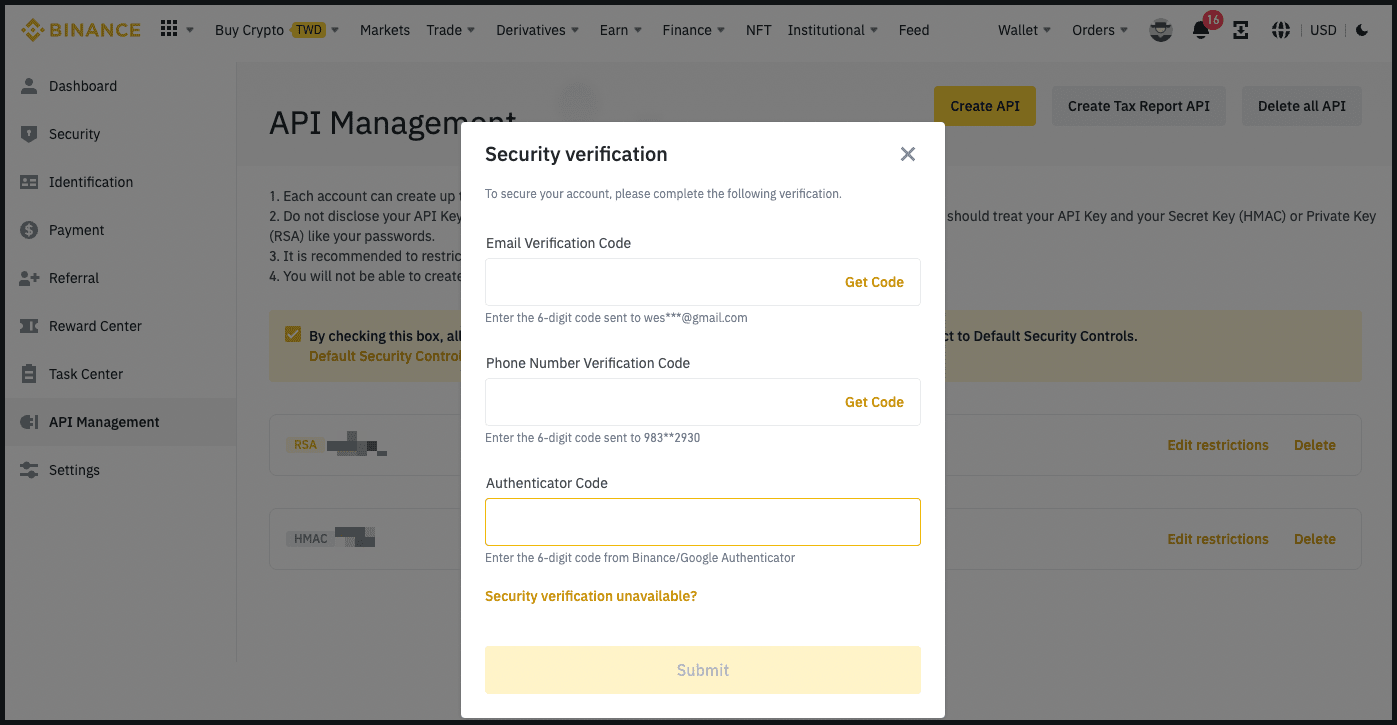
1.11.0 - Hummingbot
URL: https://hummingbot.org/release-notes/1.11.0/
Contents:
- Release Notes - Version 1.11.0
- Revamped hedge Strategy
- Improvements to AscendEx and Huobi connectors
- Gateway UX improvements
- Changes to governance and maintenance process
- Other Fixes and Updates
Released on December 21, 2022
We are very excited to ship the December 2022 Hummingbot release (v1.11.0) today! See below for the highlights in this release.
We awarded HIP-19 to community developer leastchaos who developed the hedge strategy, so that he could revamped and improve it. The changes have now been released!
Here are the key changes:
Thanks to leastchaos for this contribution! 🙏
The improvements below upgraded two of our certified exchanges to the latest CEX connector standard and should resolve issues that users have been encountering with them:
Thanks to CoinAlpha for these contributions! 🙏
Installing Gateway from source should now be much easier, since we have modified the generate_certs command so that it automatically populates the correct path in Gateway's ssl.yml file. The Gateway developer setup docs now reflect this new, simpler workflow. In addition, we also added prompts to guide users in using Gateway commands intended for Docker and non-Docker use cases in this pull request.
We also changed the default TokenList settings for each Gateway DEX connector so that it uses a local file rather than a URL. See the new Adding Tokens documentation page for more information.
In this blog post, we described some big upcoming changes to our monthly process. Starting in January, we will use regular Snapshot polls to let HBOT holders decide how maintenance bandwidth should be allocated the various exchanges, strategies, and issues. In particular, exchanges and strategies will need to get a certain minimum number of HBOT votes to stay in the codebase.
This month, we started the process by removing exchanges from the codebase that don't seem to be operational anymore:
We also started a Discord thread that lets users nominate issues for the first Issues Poll later this month.
1.25.0 - Hummingbot
URL: https://hummingbot.org/release-notes/1.25.0/
Contents:
- Hummingbot v1.25.0 Release Notes
- Introduction
- How to Update
- Docker
- Source
- Monthly Community Call
- Connector Guides
- Binance
- Hyperliquid
- Vega
Released on February 26, 2024
We're thrilled to unveil Hummingbot version 1.25.0! This release features new Connector Guides for Binance, Vega, Hyperliquid, and Polkadex, which make it easy for users to get started running bots on these exchanges with step-by-step instructions that show users how to generate credentials and use them with Hummingbot. Furthermore, we are excited to announce big improvements to the Discord Support Program, which rewards users for supporting other users on Discord by answering their questions. In addition, this release introduces the new Carbon DEX connector, adds Candles support for OKX Perpetual and Kraken, and greatly improves the XRP Ledger connector.
Last but not least, we are in the middle of a huge refactor to the V2 Strategies Framework and added two new sample strategies in this release. When this overhaul is complete, the V2 framework will be more intuitive and flexible for strategy development, paving the way for advanced trading strategies and customization.
Clone the latest hummingbot/deploy-examples repository and use the hummingbot-update.sh script under the /bash_scripts folder.
Alternatively, run the following command to pull the latest Docker image:
Update your Hummingbot branch to this release by running:
Join the next community call on Discord to learn about the new features in this release and other Hummingbot news:
Afterwards, we will publish the recording on the Hummingbot YouTube and post it here.
For more community events, check out the Hummingbot Events Calendar.
We are excited to introduce Connector Guides, step-by-step instructions that show users how to generate credentials on various centralized and decentralized exchanges and how to use them with Hummingbot.
The Binance guide helps users set up and use Hummingbot with the world's largest crypto exchange by trading volume. It includes step-by-step instructions for generating API keys on Binance, ensuring account security through two-factor authentication, and adding these keys to Hummingbot.
The Hyperliquid guide provides instructions for using Hummingbot with Hyperliquid Vaults, where traders can deposit funds to be used by an automated strategy and earn a share of the profits. It explains how Vaults work, covers creating a Vault as a leader who operates the trading strategy, and depositing in Vaults as a depositor to passively earn returns. The guide then shows how to connect Hummingbot to Hyperliquid using a Vault address, allowing depositors to share in the performance and profits of the bot's trading strategies.
The Vega guide covers setting up a Vega wallet using the Metamask Snaps, funding it with tokens, installing Hummingbot, and connecting the wallet by entering your Vega party ID and seed phrase when prompted. The guide also provides trading pair formatting examples, troubleshooting for common issues like failed orders, and additional resources like links to Vega's documentation.
The Polkadex guide walks through setting up a Polkadex wallet, funding your trading account, and connecting it to Hummingbot to enable trading. It covers installing the Polkadex wallet browser extension, registering accounts, transferring tokens for trading, importing your trading account, and integrating it with Hummingbot by adding your seed phrase.
See Tag: Connector Guides for a full list of the current guides. HBOT holders can propose Bounties to fund the creation of additional guides by community contributors.
Hummingbot's bounty system lets sponsors tap into the thousands of quant traders and developers globally who run Hummingbot.
In this release we've revamped the documentation for the Bounties program to make it a lot easier for both Contributors and Sponsors to follow the steps needed to sponsor or contribute to a bounty. See Lifecycle of a Bounty.
Also, see the new Bounty Pricing Guidance page as a guideline to make it easier for both developers and sponsors to agree on a price for external bounties.
Hummingbot is a community of algorithmic traders and developers that help each other on Discord. We're excited to announce the following changes to the Discord Support Program:
For more information, including how to sign up, please see this blog post
This release starts a comprehensive refactor of the V2 Strategies framework, building on the foundation laid by the introduction of initial components last year. While this new framework has significantly enhanced Hummingbot's capabilities, the initial design made it challenging for users to extend and customize. See the #6844 for the ongoing pull request, which will be merged into the development branch shortly.
In addition, aside from the refactor, we've also added a couple new sample strategies in this release:
The DMan-V5 strategy strategy utilizes the MACD indicator to generate buy or sell signals, then applies a Dollar Cost Averaging approach to execute trades. It dynamically adjusts order amounts and spreads based on geometric distributions and manages executor actions based on the strategy's rules and market conditions. It includes mechanisms for taking profit, stopping losses, and employing a trailing stop to optimize trade outcomes.
The DMan-V6 strategy focuses on executing trades using the new DCAExecutor, which uses the Dollar Cost Average (DCA) approach to place orders at different price levels and conditions based on the strategy's configuration. The strategy dynamically adjusts its actions based on market conditions, the status of existing orders, and predefined settings for managing trades. This includes leveraging technical indicators, order distribution strategies, and risk management tools like stop loss and take profit parameters.
Carbon is a decentralized trading protocol that enables users to execute advanced on-chain trading strategies in a non-custodial and fully on-chain manner. It offers features like automated limit orders, custom price range adjustments, and the ability to create "recurring strategies" for buying low and selling high within specified price ranges.
For more information, refer to the Carbon connector docs.
Snapshot Proposal: NCP-9
Thanks to tiagofilipenunes for this contribution! 🙏
Examples:
Example 1 (unknown):
docker pull hummingbot/hummingbot:latest
Example 2 (unknown):
git pull origin master
Foxbit - Hummingbot
URL: https://hummingbot.org/exchanges/foxbit
Contents:
- Foxbit
- 🛠 Connector Info
- ℹ️ Exchange Info
- 🔑 How to Connect
- Generate API Keys
- Add Keys to Hummingbot
- 🔀 Spot Connector
- Order Types
Docs: https://ajuda.foxbit.com.br/docs/exchange/minha-conta/o-que-e-api-key-e-como-utilizar/
From inside the Hummingbot client, run connect foxbit:
If connection is successful:
Integration to spot markets API endpoints
This connector supports the following OrderType constants:
Examples:
Example 1 (unknown):
Enter your Foxbit API key >>>
Enter your Foxbit API secret >>>
Enter your Foxbit User Id >>>
Example 2 (unknown):
You are now connected to foxbit
URL: https://hummingbot.org/academy-content/using-binance-with-hummingbot/binance-api3.png
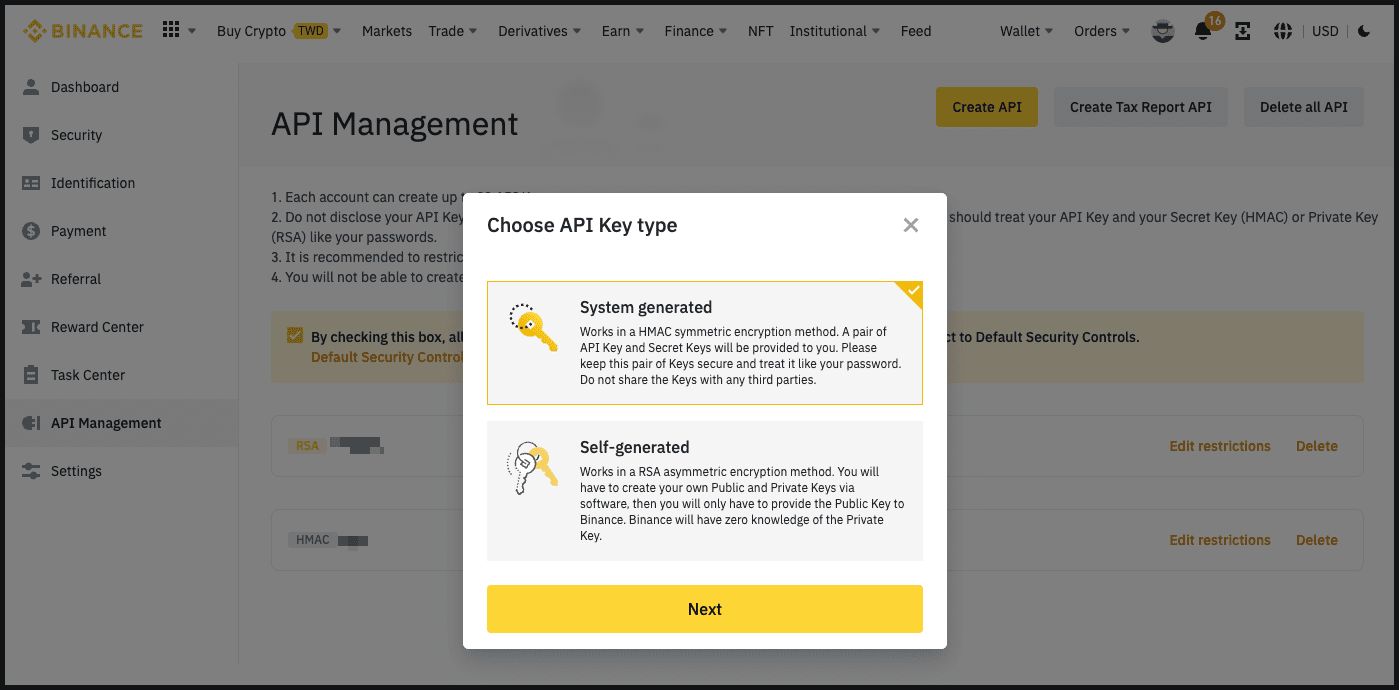
URL: https://hummingbot.org/assets/img/high-level-connector-architecture-diagram.svg

URL: https://hummingbot.org/assets/img/connector-architecture-diagram.svg

Polls - Hummingbot
URL: https://hummingbot.org/governance/polls
Contents:
- Polls
- Poll Parameters
- Connector Polls
- Connector Pots
- Connector Inclusion Threshold
- Polls Process
The Hummingbot open source codebase contains Connectors to various CEXs, DEXs and blockchain networks where users can execute automated trading strategies. The connected exchanges and networks are constantly changing and upgrading.
Each connector in the codebase requires ongoing maintenance, documentation and testing. The Foundation regularly reviews both new and existing connectors for security issues and breaking changes to ensure that they do not cause issues for other users. Without a way to maintain a high level of connector quality, the Hummingbot codebase may descend into an unusable spaghetti codebase.
Therefore, Polls allow HBOT holders to allocate maintenance bandwidth in the form of HBOT bounties toward the connectors in the codebase, as well as decide which connectors should be included going forward.
Prior to HGP-50, polls ranked connectors into Gold, Silver, and Bronze tiers. Afterwards, Polls allocate HBOT bounties among the connectors based on their pro-rata voting share, subject tor with a maximum allocation cap.
Each quarterly Epoch, HBOT voters vote on which connectors of each type should be included in the codebase, and how much HBOT maintenance bounty allocation should be assigned to each connector.
See Connectors for more information about the types of connectors.
Polls allocate a fixed pool of 3,000,000 HBOT (1,000,000 HBOT per poll) among the top exchanges for each Poll based on their pro-rata voting share. This per-exchange amount would be a public HBOT maintenance bounty allocation which the Foundation uses to fund bounties assigned to community developers for bug fixes and upgrades related to that exchange's Hummingbot connectors.
See the Connector Pots tab in HBOT Tracker for the current allocations for each exchange.
In each Poll, a connector needs to receive at least 400,000 HBOT in aggregate votes. Otherwise, the exchange's connectors will be removed from the Hummingbot codebase in the following monthly release.
During the first week of each quarter, the Foundation will create Hummingbot Governance Proposals in the HBOT Snapshot sub-space for each poll.
Each poll lasts for 14 days, and any Ethereum wallet holding HBOT tokens at poll creation may vote. 1 HBOT token equals 1 vote.
Afterwards, the Foundation will implement the approved changes in the subsequent release.
Pancakeswap - Hummingbot
URL: https://hummingbot.org/exchanges/gateway/pancakeswap/
Contents:
- PancakeSwap
- 🛠 Connector Info
- ℹ️ Exchange Info
- 🔑 How to Connect
- Configuration
- Router Endpoints
- AMM Endpoints
- CLMM Endpoints
PancakeSwap operates on BNB Chain and other EVM-compatible networks.
See Gateway Connect for instructions on connecting your wallet to Gateway.
Configure PancakeSwap settings in /conf/connectors/pancakeswap.yml.
Below are the PancakeSwap configuration parameters and their default values: # Global settings for PancakeSwap # Default slippage percentage for swaps (2%) slippagePct: 2 # For each swap, the maximum number of hops to consider maximumHops: 4
Integration to PancakeSwap's Smart Router for optimal trade execution
Integration to PancakeSwap V2 classic AMM pools
Integration to PancakeSwap V3 concentrated liquidity pools
For more info, run Gateway in development mode and go to http://localhost:15888 in your browser to see detailed documentation for each endpoint.
Examples:
Example 1 (unknown):
# Global settings for PancakeSwap
# Default slippage percentage for swaps (2%)
slippagePct: 2

# For each swap, the maximum number of hops to consider
maximumHops: 4
FAQ - Hummingbot
URL: https://hummingbot.org/faq
Contents:
- FAQ
- Hummingbot client
- What type of software is Hummingbot?
- Is Hummingbot a protocol or an exchange?
- How do people use Hummingbot?
- Why is Hummingbot open source?
- Why did you make Hummingbot available to the general public?
- What is market making?
- How does Hummingbot store my private keys and API keys?
- What does it cost for me to run Hummingbot?
See below for answers to frequently asked questions about:
Hummingbot is software that helps you build and run crypto trading bots, freely available at https://github.com/hummingbot/hummingbot under the open source Apache 2.0 license.
No, Hummingbot is open source client software that you install on a local machine that interacts with exchanges and protocols.
With many connectors and strategies being added all the time, Hummingbot is a constantly evolving publicly available codebase with frequent external contributors seeking to merge their changes into the master branch, which is released once a month and widely used by tens of thousands of individual and professional bot-runners globally.
You can use Hummingbot to build any type of automated crypto trading bot, with the most common bot types being market making and arbitrage bots. Market making bots provide liquidity to a trading pair on an exchange, while arbitrage bots exploit price differences between trading pairs on different exchanges.
Typically, users install the Docker image version on AWS or another cloud provider. Afterwards, they can add their API key or private keys to it, which allows them to configure and run one of Hummingbot's pre-built strategies on many different exchanges.
Since Hummingbot is an open, modular codebase, many developers and professional firms fork the codebase and use it for their own purposes.
Trust and transparency: Market makers need to keep their API keys, private keys, and strategy configuration private and secure, so which is why Hummingbot is a local software client, not a web-based platform. In addition, Hummingbot's open source codebase enables anyone to inspect and audit the code.
Community maintenance: Hummingbot's value proposition is that it connects to many different centralized and decentralized exchanges, along with pre-built strategy templates that enable users to run many different types of trading strategies. In order to scale the number of connectors and strategies, Hummingbot relies upon its open source community.
Democratizing HFT: From the beginning, our mission has been to democratize high-frequency trading with open source software.
As we wrote in the original Hummingbot whitepaper, market making is an important function critical to organic, efficient markets that should be decentralized to prevent the concentration risk that exists in traditional finance.
Later, we pioneered the concept of decentralized market making by writing the Liquidity Mining whitepaper and built the first such platform: Hummingbot Miner. Miner has turned into a successful, standalone business that provides liquidity to hundreds of tokens across multiple exchanges, powered by thousands of individual market makers running Hummingbot.
This has allowed CoinAlpha to spin off Hummingbot into a not-for-profit foundation, which is dedicated to keeping Hummingbot open source.
Market making is the act of simultaneously creating buy and sell orders for an asset in a market. By doing so, a market maker acts as a liquidity provider, facilitating other market participants to trade by giving them the ability to fill the market maker's orders. Traditionally, market-making industry has been dominated by highly technical quantitative hedge funds and trading firms that have the infrastructure and intelligence to deploy sophisticated algorithms at scale.
Market makers play an important role in providing liquidity to financial markets, especially in the highly fragmented cryptocurrency industry. While large professional market makers fight over the most actively traded pairs on the highest volume exchanges, there exists a massive long tail of smaller markets who also need liquidity: tokens outside the top 10, smaller exchanges, decentralized exchanges, and new blockchains.
See What is market making? for more information.
Similar to wallet software, Hummingbot stores your private keys and API keys in encrypted form, using the password you enter when you first start Hummingbot. These keys are saved in your /conf folder.
Since Hummingbot is a local client, your private keys and API keys are as secure as the computer you are running them on. This is because the keys are used to create authorized instructions locally on the local machine, and only the instructions which have already been signed or authorized are sent out from the client.
Hummingbot is a free software, so you can download, install, and run it for free.
Transactions from Hummingbot are normal transactions conducted on exchanges; therefore when operating Hummingbot, you would be subject to each exchange’s fees (e.g. maker, taker, and withdrawal fees), as you would if you were trading on that exchange normally (i.e. without Hummingbot).
There is no minimum amount of assets to use Hummingbot, but users should pay heed to exchange-specific minimum order sizes. We include links to the exchange's minimum order size page. This can be found in each exchange's page in Exchange Connectors.
💡 DEX / Blockchain Experience Needed
Since Hummingbot Gateway is still nascent and DEX trading bots entails more specialized blockchain engineering than running CEX bots, we recommend Gateway for users with blockchain engineering or DEX trading experience.
Hummingbot Gateway is API middleware that helps Hummingbot clients interact with decentralized exchanges (DEXs) on various blockchain networks. It:
Similar to Hummingbot client, Gateway is open source under the Apache 2.0 license. Community developers can contribute DEX and blockchain connectors to the Gateway codebase via Pull Request Proposals.
If you want to understand how Gateway works, install the standalone Gateway repository: https://github.com/hummingbot/gateway
If you just want to get Gateway up and running alongside Hummingbot, following the Install with Docker process is the easiest method.
Afterwards, follow the instructions at Using Gateway with Hummingbot.
Currently, Hummingbot Gateway is ideal for bots that:
In the future, as Gateway should support additional use cases, but we are currently focused on enabling these only.
Bots that compete with others for transactions on the same blockchain (single-domain) need to compete to get transactions confirmed and thus need to play at the MEV level.
However, to improve latency, you may explore using Flashbots Protect as the RPC endpoint, i.e. use it as nodeUrl.
Here are some helpful articles and videos:
Speed and latency in DEX trading is heavily dependent on your connection to the blockchain network. Your options are to:
1 - Use a node provider
This is the most common route. Gateway ships with [Ankr] as the default node provider, since they don’t require API keys. See default settings for each chain.
2 - Use a mempool service
For advanced or professional users, mempool services allow you to “skip the line” and send your transaction bundle to a miner for inclusion in a block.
3 - Run your own node
While this is infeasible on Solana or BNB Chain, this is possible on Ethereum and EVM-based chains. See Run a Node for more details.
Check out the amm-arb or amm-v3-lp strategies.
The Hummingbot Foundation is a not-for-profit organization established in the Cayman Islands. The Foundation’s mission is to democratize high-frequency trading by enabling decentralized maintenance and community governance over the open-source Hummingbot code repository.
Below are its main roles and responsibilities:
Since Hummingbot is not a blockchain protocol, but rather open source client software run locally on individual client devices that interacts with protocols and exchanges, the Foundation governance system aims to fits into the existing Hummingbot open source software release process, which has been used to handle thousands of Github issues and pull requests created by the community over the past three years.
A large part of Hummingbot’s value comes from the number of connectors it supports and its overall usage, which can be measured by the aggregate trading activity that Hummingbot users supply to connected exchanges and protocols. The Foundation has fee share agreements and other partnerships with these exchanges and protocols that rebate fees based on usage, tracked at the API header level.
Meanwhile, community developers can maintain Hummingbot components of the codebase and extend the toolset to more markets and asset types, keeping maintenance costs low.
In addition, the Foundation plans to charge bounty administration fees to administer, review and merge the development work performed by bounty contributors.
Based on the source of income above, the Foundation is projected to be self-sustainable at inception. Over time, we expect this margin to increase as volume and fees generated grow as the Hummingbot user base expands.
A five-person Board of Directors provides oversight over the Foundation and oversees staff who manage day-to-day operations. This board is elected by HBOT token holders every 12 months.
In addition, the Foundation has a Chief Operating Officer and Chief Finance Officer, who collectively manage partnerships with exchanges, negotiate contracts with maintainers, and oversee the Foundation’s budget and finances.
The Foundation also employs staff who administer the governance system, respond to users on Discord, and handle other day-to-day operations of maintaining Hummingbot, including:
For the past 20 years, the Cayman Islands has been one of the preferred global jurisdictions for the incorporation of new securitizations, special purpose vehicles, and other new organizations. In 2017, the Cayman Islands introduced the Foundation Company structure, a flexible structure that allows a limited liability legal entity to operate similar to a civil law foundation, steered by a decentralized set of participants. The Hummingbot Foundation uses this structure.
See What is a Cayman Foundation Company? from Zedra, our corporate services provider in the Cayman Islands.
Post a message with your CV to one of the Foundation staff on Discord.
The Hummingbot Governance Token (HBOT) is the medium of governance for the Hummingbot open source ecosystem. It is a standard Ethereum ERC-20 token with a fixed total supply of 1,000,000,000 HBOT tokens.
HBOT is a governance token that give holders control over the Hummingbot codebase, the HBOT community treasury, and the Hummingbot Foundation. For instance, holders can:
HBOT token holders make these decisions by creating proposals and voting with their token balances. One HBOT equals one vote, and voting does not consume any tokens.
No. All Hummingbot Foundation proposals are on Snapshot, which lets HBOT holders vote by signing messages using their HBOT token balance to vote on issues without paying gas. Snapshots are recorded to IPFS to generate a permanent record.
To prevent HBOT token holders from being scammed by fraudulent versions of the token, unverified pools/DEXs, or incorrect coin listings, we maintain a compilation of verified HBOT-related pages from Reputable Sources. This does not constitute investment advice or a recommendation for any platform or market listed.
Please see Reputable Sources for information about venues where HBOT may be traded.
The Foundation plans to distribute the remaining 36 million tokens (36% of total supply) to Hummingbot users over the 4 years after inception across fixed Epochs. The goal is to distribute tokens to developers who contribute improvements to the codebase, and users of the Hummingbot software on connected exchanges and market making platforms.
See Hummingbot Governance Proposals for more information on the categories of HBOT grants.
The Hummingbot Foundation is grateful to everyone who has used Hummingbot, found bugs, and contributed to the codebase in the past. However, for the Retroactive Distribution, the Foundation decided to allocate tokens only to two types of historical activity: 1) Github code contributors and 2) users of the Hummingbot Miner platform. We chose these two types because past activity can be verified through public commit history and Miner API keys, respectively.
Other than those listed in the HBOT announcement, there are no other eligible HBOT recipients.
If you accidentally entered a Binance.com deposit address to claim your tokens, here is how you may be able to retrieve those tokens:
Exchange API Requirements - Hummingbot
URL: https://hummingbot.org/developers/connectors/build
Contents:
- Exchange API Requirements
- API requirements
- Additional requirements for perp connectors
- Components
- Authorization
- Utils
- Order Book
- Order Book Data Source
- User Stream Data Source
- Connector
The information below are for developers building spot and perp connectors that integrate directly into the Hummingbot client. For information on developing gateway connectors that use Gateway, see Building Gateway Connectors.
Exchanges with REST APIs must provide:
It is useful if the REST API provides the following, but a connector can be built without them:
Exchanges with WebSocket APIs must provide:
It would be useful if the Websocket API also provides the following, but a connector can be built without them:
Below, we describe the components that need to be implemented to create a new connector. Some components can be implemented in parallel, but others have dependencies.
Class that provides the logic for the web assistant to correctly configure authenticated requests to the exchange (private endpoint). It should be a subclass of AuthBase
The Utils module is generally used to define functions that are used in several components from the connector. There is no need to add functions if the connector does not require special behavior when creating requests or does not have a special logic to generate order ids.
It is required to define in this module the configuration for the connector, including: - Default fees - Required parameters to establish a connection (for example the API Key and API secret).
The configurations have to be specified for each domain the connector will support (all connectors can handle multiple domains if configured correctly)
Subclass of OrderBook to define specialized methods to create the snapshot messages, difference messages and trade messages based on the events received by the data source
Subclass of OrderBookTrackerDataSource. It includes all the logic related to receiving updates through websocket for all public channels. The class should include: - Logic to provide the latest prices in the exchange for some one or more trading pairs - Logic to return all supported trading pairs (filtering out for example any pair that could be disabled in the exchange) - Functionality to translate trading pairs from exchange notation to the client notation, and the other way around - Method to get a full copy of the current order book for a particular trading pair - Logic to subscribe to the required public channels, and process all events received. The required channels would be: order book differences and public trades events. It also requires a method to regularly do a full update of the order book (snapshot).
A tracker class has to be created for the connector (subclass of OrderBookTracker) to start the background process that receives the events and updates.
Example: - https://github.com/hummingbot/hummingbot/blob/master/hummingbot/connector/exchange/binance/binance_api_order_book_data_source.py - https://github.com/hummingbot/hummingbot/blob/master/hummingbot/connector/exchange/binance/binance_order_book_tracker.py
Dependencies: Order Book (to create diff messages, snapshot messages and trade messages)
Subclass of UserStreamTrackerDataSource
The class should include: - Logic to subscribe to the private websocket channels to receive order updates, trade updates and balances updates - Logic to process each type of event
A tracker class has to be created for the connector (subclass of UserStreamTracker) to start the background process that receives the events and updates.
Subclass of ExchangeBase (for exchange connectors) or ConnectorBase (for Gateway connectors).
In the case of a perpetuals exchange connector, the connector component should subclass also PerpetualTrading, and has to include the following functionality:
It is expected that all the components mentioned before will have unit tests validating all methods. This is independent from any validation done by QA testing.
All connector unit tests should not depend on active connections to the exchange to perform the validations. Instead, the interactions with the exchange should always be mocked or emulated. That can be done using the aioresponses library for all REST requests, and using the class NetworkMockingAssistant for websocket interactions.
Examples for their use can be found in both Binance and Binance Perpetual connectors' unit tests.
Binance connector tests: https://github.com/hummingbot/hummingbot/tree/master/test/hummingbot/connector/exchange/binance
Binance Perpetual connector tests: https://github.com/hummingbot/hummingbot/tree/master/test/hummingbot/connector/derivative
When an exchange does not provide a websocket endpoint for balance updates, the connector has to be configured to estimate balances based on the connector activity.
As an example, please refer to the Bybit connector: https://github.com/hummingbot/hummingbot/blob/master/hummingbot/connector/derivative/bybit_perpetual/bybit_perpetual_derivative.py
Examples:
Example 1 (unknown):
self._in_flight_orders_snapshot = {k: copy.copy(v) for k, v in self._in_flight_orders.items()}
self._in_flight_orders_snapshot_timestamp = self.current_timestamp
Curve - Hummingbot
URL: https://hummingbot.org/exchanges/gateway/curve
Contents:
- Curve
- 🛠 Connector Info
- ℹ️ Exchange Info
- Configuration
This connector need to be migrated to the new Gateway architecture. See Legacy Connectors for more information.
Configure Curve settings in your Gateway configuration files.
Balancer - Hummingbot
URL: https://hummingbot.org/exchanges/gateway/balancer
Contents:
- Balancer
- 🛠 Connector Info
- ℹ️ Exchange Info
- Configuration
This connector need to be migrated to the new Gateway architecture. See Legacy Connectors for more information.
Configure Balancer settings in your Gateway configuration files.
MEXC - Hummingbot
URL: https://hummingbot.org/exchanges/mexc
Contents:
- MEXC
- 🛠 Connector Info
- ℹ️ Exchange Info
- 🔑 How to Connect
- Generate API Keys
- Add Keys to Hummingbot
- 🔀 Spot Connector
- Order Types
- Paper Trading
Hummingbot Foundation has a fee share partnership with MEXC. When you use our software to trade on MEXC, a custom API header tells MEXC that the trade was executed using Hummingbot, so they share a portion of your fees with us, at no cost to you. To support us, just enter your API keys into Hummingbot and run bots! Thanks for your support! 🙏
Log into your MEXC account and click on "API" located under the user centre icon
Tick all boxes on the next page except for the Withdraw section (Hummingbot doesn't support withdraw at the moment) name your API KEY and click on create
Add your phone number and validate it
Complete the security verification with your email and your phone number
Your API is now created. Please keep your Secret Key secure. It will not be shown again. If you forget your Secret Key, you will need to delete the API and create a new one.
Please note that not all trading pairs are available for trading by the MEXC API. For a list of trading pairs that are available please check this link - https://www.mexc.com/user/openapi
From inside the Hummingbot client, run connect mexc:
If connection is successful:
Integration to spot markets API endpoints
This connector supports the following OrderType constants:
Access the Paper Trade version of this connector by running connect mexc_paper_trade instead of connect mexc.
If this is not available by default, you can configure Hummingbot to add this paper trade exchange. See Adding Exchanges for more information. ```
Examples:
Example 1 (unknown):
Enter your mexc API key >>>
Enter your mexc secret key >>>
Example 2 (unknown):
You are now connected to mexc
Uniswap - Hummingbot
URL: https://hummingbot.org/exchanges/gateway/uniswap/
Contents:
- Uniswap
- 🛠 Connector Info
- ℹ️ Exchange Info
- 🔑 How to Connect
- Configuration
- Router Endpoints
- AMM Endpoints
- CLMM Endpoints
Uniswap operates on Ethereum and EVM-compatible networks.
See Gateway Connect for instructions on connecting your wallet to Gateway.
Configure Uniswap settings in /conf/connectors/uniswap.yml.
Below are the Uniswap configuration parameters and their default values: # Global settings for Uniswap # Default slippage percentage for swaps (2%) slippagePct: 2 # For each swap, the maximum number of hops to consider maximumHops: 4
Integration to Uniswap's Universal Router for optimal trade execution
Integration to Uniswap V2 classic AMM pools
Integration to Uniswap V3 concentrated liquidity pools
For more info, run Gateway in development mode and go to http://localhost:15888 in your browser to see detailed documentation for each endpoint.
Examples:
Example 1 (unknown):
# Global settings for Uniswap
# Default slippage percentage for swaps (2%)
slippagePct: 2

# For each swap, the maximum number of hops to consider
maximumHops: 4
Cube - Hummingbot
URL: https://hummingbot.org/exchanges/cube/
Contents:
- Cube
- 🛠 Connector Info
- ℹ️ Exchange Info
- 🔑 How to Connect
- Generate API Keys
- Add Keys to Hummingbot
- 🔀 Spot Connector
- Order Types
- 🔮 Rate Orcale
Go to Cube Exchange and log in or create a new account.
Open the API Key page by clicking over the profile icon on the top right corner and go to the Setting/API page at https://www.cube.exchange/settings/api.
Click on the Add another API button
Choose your account, select WRITE permission and click Create API Key
Copy your API keys and store them somewhere safe.
Go to Subaccounts page and copy your Subaccount ID number. You will need this to connect to Hummingbot.
Now, you have created API keys for your Cube Exchange!
From inside the Hummingbot client, run connect cube:
If connection is successful:
Integration to spot markets API endpoints
This connector supports the following OrderType constants:
The connector comes with its own rate oracle implementation. You can use it by using the folllowing command:
Make sure to set global token name to USDC as USDC is the main quote token for trading on Cube Exchange
Examples:
Example 1 (unknown):
>>> connect cube

Enter your Cube Exchange API key >>>
Enter your Cube Exchange secret key >>>
Enter your Cube Exchange Subaccount ID >>>
Enter your Cube environment (live or staging) >>>
Example 2 (unknown):
You are now connected to cube
Example 3 (unknown):
config rate_oracle_source cube
Example 4 (unknown):
config global_token.global_token_name USDC
🔥 dYdX - Hummingbot
URL: https://hummingbot.org/exchanges/dydx
Contents:
- 🔥 dYdX
- 🛠 Connector Info
- ℹ️ Exchange Info
- ⚙️ Install Instructions
- Docker
- Source
- 🔑 How to Connect to dYdX (v4)
- Generate API Keys
- Add Keys to Hummingbot
- 🔀 Perp Connector
dYdX is a sponsor of Hummingbot Foundation, so when you use Hummingbot to run bots on dYdX, you're supporting the Foundation and our mission to democratize algo trading with open source software.
At the moment there are some issues with dependencies and installing dydx can be a bit trickier due to some software conflicts. We've created these simple instructions to get you up and running quickly using either Docker or Source.
Open your docker-compose.yml file. This file is usually located in your Hummingbot project directory.
Update the image line. Find the line that starts with image: under the hummingbot service. Change it to the following, depending on whether you are trying to run the latest or development branch.
For latest stable version:
For development version:
After cloning the Hummingbot repo, use the --dydx flag when running the install command
See below for the full commands:
Open the dYdX exchange platform and connect your wallet (e.g., MetaMask or another supported wallet). This will allow you to interact with the exchange and manage your funds.
Once your wallet is connected, deposit USDC into your dYdX account. USDC is required for trading on the platform.
Access Your Wallet Connection:
In the top right corner of the dYdX interface, locate and click on your wallet icon or address. This will open the wallet connection settings.
Copy Your dYdX Chain Address:
At the top of the wallet connection settings window, you’ll find your dYdX Chain Address. Copy this address and keep it secure for future reference.
Export Your Secret Phrase:
You will need the following to connect Hummingbot to dydx_v4_perpetual:
From inside the Hummingbot client, run connect dydx_v4_perpetual in Hummingbot in order to connect your wallet:
Integration to perpetual futures markets API endpoints
This connector supports the following OrderType constants:
This connector supports the following position modes:
This exchange offers a staging (testnet) mode: https://v4.testnet.dydx.exchange/
While users can trade on testnet using the link above, it is not currently supported in Hummingbot.
Examples:
Example 1 (unknown):
image: hummingbot/hummingbot:latest_dydx
Example 2 (unknown):
image: hummingbot/hummingbot:development_dydx
Example 3 (unknown):
./install --dydx
Example 4 (unknown):
git clone https://github.com/hummingbot/hummingbot.git
cd hummingbot
./install --dydx
conda activate hummingbot
./compile
Contributors Guide - Hummingbot
URL: https://hummingbot.org/bounties/contributors/
Contents:
- Developer Guide
- Getting Started
- Step 1: Complete Application
- Step 2: Browse Available Bounties
- Types of Bounties
- New Connector Development
- Maintenance Bounties
- Application Process
- How to Apply
- Selection Criteria
This guide is for developers interested in earning bounties by building and maintaining exchange connectors for Hummingbot.
Fill out the New Bounty Contributor Form for compliance. After approval, you'll receive:
Visit the Bounties Board to find connector bounties.
Build complete exchange integrations:
Comprehensive connector maintenance including:
Comment on the GitHub issue with:
Foundation evaluates based on:
Point PR to development branch with:
Your PR will be reviewed for:
View Open Bounties → Complete Contributor Form → Join Discord →
Order Lifecycle and Market Events - Hummingbot
URL: https://hummingbot.org/developers/connectors/architecture/order_lifecycle
Contents:
- Order Lifecycle and Market Events
- Order Lifecycle Flowchart
- Creating an Order
- Order Tracking
- Submitting an Order
- Order Being Filled
- Order Completion
- Order Cancellation or Expiry
- Order Failure
The information below are for developers building spot and perp connectors that integrate directly into the Hummingbot client. For information on developing gateway connectors that use Gateway, see Building Gateway Connectors.
Exchange connectors track status updates of all orders created in Hummingbot and emit events on status updates of its orders for the strategy modules. Be careful when implementing a new exchange connector to ensure all the status updates and emitted events adhere to the semantics defined by Hummingbot.
An order is created when a script or strategy invokes the buy() or sell() method in an exchange connector. buy() and sell() would return immediately with a client-side order ID that Hummingbot uses to track the order's status.
They would schedule the order to be submitted to the exchange as soon as possible but would not wait for the reply from the exchange before returning.
Order tracking starts when _create_order() is called. It is called from within the buy() and sell() functions.
An exchange connector should keep tracking the order's status and emit events for any change of states until the order is completed, cancelled, expired, or failed.
This is done by calling start_tracking_order() method in the Exchange class. start_tracking_order() should be called before the API request for placing the order is executed.
In most of our built-in exchange connectors, order submission occurs in the _create_order() function - although it may be different for some decentralized exchange connectors.
The _create_order() method is responsible for performing the necessary trading rule checks before submitting the order via the REST API.
Upon receiving a successful response, a BuyOrderCreatedEvent or SellOrderCreatedEvent would be emitted. Otherwise, a MarketOrderFailureEvent would be emitted. Note that despite the naming, MarketOrderFailureEvent is emitted even for limit orders.
Other market participants could fill an order over time once it's live on an exchange. Depending on the order types, i.e. limit or market, the order could be filled either immediately or after another market participant fulfils it.
For every order fill on our orders, whether partially or entirely, the exchange connector must emit an OrderFilledEvent, to notify the strategy modules about the order's progress.
Once an order has been completely filled, the exchange connector must emit a BuyOrderCompletedEvent or SellOrderCompletedEvent.
The exchange connector would stop tracking the order afterward.
BuyOrderCompletedEvent or SellOrderCompletedEvent should always come after an OrderFilledEvent has been emitted.
If an order is canceled or expired before it has been completely filled, an OrderCancelledEvent or an OrderExpiredEvent should be emitted.
For centralized exchanges, order tracking should end after emitting an OrderCancelledEvent or OrderExpiredEvent.
On decentralized exchanges - since it's possible for orders to be filled after cancellation or even expiry, due to block delays - the exchange connector may keep tracking the order for a certain amount of time afterwards.
If a failed order has been rejected for any reason other than cancellation or expiry, MarketOrderFailureEvent must be emitted.
🔥 Derive - Hummingbot
URL: https://hummingbot.org/exchanges/derive/
Contents:
- 🛠 Connector Info
- ℹ️ Exchange Info
- 🔑 About Rate Limits
- Rate Limits
- Matching, Non-Matching, and Custom Requests
- Custom Rate-Limited Requests
- REST
- 🔑 How to Connect
- Generate API Keys
- Add Keys to Hummingbot
Derive is a sponsor of Hummingbot Foundation, so when you use Hummingbot to run bots on Derive, you're supporting the Foundation and our mission to democratize algo trading with open source software. To help support us, create an account using our Derive referral link. Thanks for your help! 🙏
The system enforces rate limits using a fixed window algorithm, replenishing the request allowance every 5 seconds to maintain system stability. Market makers can access higher rate limits upon request by contacting the support team.
Derive Rate Limit: https://docs.derive.xyz/reference/rate-limits
The below rate limits have been implemented to safeguard our system. Rate limiters use a "fixed window" algorithm to discretely refill the request allowance every 5 seconds.
Market makers are eligible for higher rate limits. To apply for increased rates, please contact our support team.
Note: Burst requests for both REST and WebSockets are refreshed every 5 seconds. For example, a trader can send 5× matching requests in a single burst but must wait 5 seconds before any further requests can be sent.
The below requests are counted as matching and per-instrument matching requests:
All requests outside of the above are counted as non-matching.
All non-matching requests over the REST API are rate limited per IP at a flat 10 TPS with a 5x burst.
If the limit is crossed, a 429 Too Many Requests response is returned.
Register your session KEY (i.e your public address e.g metamask)
Input a Name and your public address
Click Register button to exit. Now you can use your new Session Key.
From inside the Hummingbot client, run connect derive:
Input a Derive address as Derive Wallet address
Input your Subaccount ID
If connection is successful:
Integration to spot markets API endpoints
This connector supports the following OrderType constants:
Access the Paper Trade version of this connector by running connect derive_paper_trade instead of connect derive.
If this is not available by default, you can configure Hummingbot to add this paper trade exchange. See Adding Exchanges for more information.
Integration to perpetual futures markets API endpoints
From inside the Hummingbot client, run connect derive_perpetual:
Input a Derive address as DerivePerpetual Wallet address
Input your Subaccount ID
If connection is successful:
This connector supports the following OrderType constants:
This connector supports the following position modes:
This perp exchange offers a paper trading mode: https://testnet.derive.xyz
Afer you create an account and create the API keys, you can enter them by using the connect derive_perpetual_testnet command within the Hummingbot client. Once connected, you should be able to use the testnet with the available perpetual strategies / scripts.
Derive Leverage: https://docs.derive.xyz/reference/private-get_positions#:~:text=leverage
Examples:
Example 1 (javascript):
>>> connect derive

Enter Your Derive Wallet address >>>

Enter your wallet private key >>>

Enter your Subaccount ID >>>

Enter your Derive Account Type (trader/market_maker) >>>
Example 2 (unknown):
You are now connected to derive
Example 3 (javascript):
>>> connect derive_perpetual

Enter Your DerivePerpetual Wallet address >>>
Enter your wallet private key >>>
Enter your Subaccount ID >>>
Enter your Derive Account Type (trader/market_maker) >>>
Example 4 (unknown):
You are now connected to derive_perpetual
🔥 Kucoin - Hummingbot
URL: https://hummingbot.org/exchanges/kucoin
Contents:
- 🔥 Kucoin
- 🛠 Connector Info
- ℹ️ Exchange Info
- 🔑 How to Connect
- Generate API Keys
- Add Keys to Hummingbot
- 🔀 Spot Connector
- Order Types
- Paper Trading
- 🔀 Perp Connector
Kucoin is an exchange partner of Hummingbot Foundation, so when you use Hummingbot to run bots on Huobi, a portion of your fees goes to support the Foundation and our mission to democratize algo trading with open source software. To help support us, create an account using our Kucoin referral link and enter that account's API keys into Hummingbot and run bots! Thanks for your help! 🙏
Log in to Kucoin, click the avatar, in the drop-down menu, select API Management > Create API.
A window will pop up where you can choose either API Trading or Link Third-Party Applications.
For API trading, enter the API name and API passphrase.
For linking to a third-party application, first select the name of the third-party app you wish to link. Then, enter the API name and API passphrase, and select API permissions.
For account security purposes, withdrawals are not supported by linking a third-party application, and there is no need to link an IP address. During transactions, the platform will use the configured third-party IP addresses.
During the creation process, pay attention to the relevant prompts and rules on the API creation page. Here are some points for your special attention:
The API passphrase is crucial. It is highly recommended to write it down and store it in a secure location. You will need the API passphrase for verification when using the API. Additionally, do not disclose your API key to prevent any potential loss of assets.
To ensure the security of your funds, API keys that are enabled for spot, margin, or futures trading but not linked to an IP address will be automatically deleted or have their trade permissions disabled after 30 days of inactivity. However, there is no expiration limit for API keys that only have the General permissions.
To enable access to permissions, you must add your IP address to the whitelist.
A security verification will pop up. Enter your trading password, email verification code, and Google verification code.
Click the button to confirm and complete the creation.
From inside the Hummingbot client, run connect kucoin:
If connection is successful:
Integration to spot markets API endpoints
This connector supports the following OrderType constants:
Access the Paper Trade version of this connector by running connect kucoin_paper_trade instead of connect kucoin.
If this is not available by default, you can configure Hummingbot to add this paper trade exchange. See Adding Exchanges for more information.
Integration to perpetual futures markets API endpoints
This connector supports the following OrderType constants:
This connector supports the following position modes:
This perp exchange offers a paper trading mode: https://www.kucoin.com/support/7909075578521
Afer you create an account and create the API keys, you can enter them by using the connect kucoin_perpetual_testnet command within the Hummingbot client. Once connected, you should be able to use the testnet with the available perpetual strategies / scripts.
Collect historical OHCLV data from this exchange's spot markets
In a Hummingbot script, import CandlesFactory to create the candles that you want: from hummingbot.data_feed.candles_feed.candles_factory import CandlesFactory candles = CandlesFactory.get_candle(connector="kucoin", trading_pair="ETH-USDT", interval="1m", max_records=50)
See candles_example.py for more details.
Candles Feed not available for Perpetual
Examples:
Example 1 (unknown):
>>> connect kucoin

Enter your kucoin API key >>>
Enter your kucoin secret key >>>
Enter your kucoin passphrase >>>
Example 2 (unknown):
You are now connected to kucoin
Example 3 (python):
from hummingbot.data_feed.candles_feed.candles_factory import CandlesFactory
    candles = CandlesFactory.get_candle(connector="kucoin",
                                        trading_pair="ETH-USDT",
                                        interval="1m", max_records=50)
1.10.0 - Hummingbot
URL: https://hummingbot.org/release-notes/1.10.0/
Contents:
- Release Notes - Version 1.10.0
- New Chains and DEX Connectors: BNB Chain, Cronos, NEAR, PancakeSwap
- 3 New Spot CEX Connectors: BTC Markets, LBank, WhiteBIT
- 2 New Perpetual CEX Connectors: Gate.io, Bitget
- New Strategy: Cross Exchange Mining
- New Script Examples
- Other Changes
- Client Updates
- Gateway Updates
- Bug Fixes
Released on November 29, 2022
We are very excited to ship the November 2022 Hummingbot release (v1.10.0) today! See below for the highlights in this release.
Gateway continues to expand connectivity to leading DEX ecosystems, enabling Hummingbot users develop cross-chain, cross-exchange stategies. This release adds support for the following blockchains and the DEXs on them:
This release features 3 new connectors to spot markets on the following centralized exchanges:
BTC Markets is a centralized cryptocurrency exchange established in Australia, and is available for local residents only. BTC Markets aims to provide clients with an efficient, secure, and reliable trading platform. Its services are available to individuals, organizations, and Self-Managed Super Funds.
LBank is a Hong Kong-based centralized exchange (CEX) platform that was established in 2015, with offices in the British Virgin Islands, U.S., Australia and Canada. The platform allows users to buy and sell major crypto assets like Bitcoin (BTC) and Ethereum (ETH) in over 50 fiat currencies, with over 20 payment methods. The company has licenses from the National Futures Association, Australian Transaction Reports and Analysis Center and money services businesses in Canada.
Whitebit](/exchanges/whitebit/) is a European centralized exchange that offers crypto-to-crypto and crypto-to-fiat transactions with 0.1% trading fees.
This release features 3 new connectors to perpetual futures markets on the following centralized exchanges:
Gate.io is operated by Gate Technology Corp. Their mission is to serve the blockchain industry by providing secure and reliable products & services to consumers and companies around the world.
Bitget is a centralized cryptocurrency exchange established in 2018 and is registered in Singapore. Bitget is one of the world’s leading cryptocurrency exchanges with a core focus on social trading.
See the Bitget documentation for more information.
This new strategy offers sets orders on a maker exchange and seeks to profit off of the difference in the spread between taker and maker exchanges. The strategy is similar to the cross exchange market making strategy however it is more reliable in ensuring orders on the taker side are filled and assets remain hedged and balanced across exchanges. See cross exchange mining for more details.
Thanks to bsmeaton for this contribution! 🙏
Hummingbot has evolved from a simple market making bot into a powerful generalized framework for building any automated trading stategy on any CEX or DEX. Hummingbot codebase now features examples of 12 different scripts that you can customize and run using Hummingbot.
Each cohort of Hummingbot Botcamp, our new intensive 4-week bootcamp that teaches students how to create custom trading strategies as simple Hummingbot scripts, will add more examples into the codebase.
All scripts examples can be found here.
Building CLOB Connectors - Hummingbot
URL: https://hummingbot.org/developers/connectors/
Contents:
- Building CLOB Connectors
- Exchange API Requirements
- Building Connectors
- Spot Connectors
- Perp Connectors
- Contributing Connectors
- Additional Resources
The information below are for developers building spot and perp connectors that integrate directly into the Hummingbot client. For information on developing gateway connectors that use Gateway, see Building Gateway Connectors.
See Exchange API Requirements for what the exchange API requirements needed to support the latest Hummingbot spot and perp connector standards.
To gain a deeper understanding for how Hummingbot connectors work, we recommend reading the following engineering posts from Hummingbot's original technical founder:
The following pages offer more details on various components and classes of a connector:
Spot connectors provide WebSocket and REST-based integrations to spot order book-based markets offered by an exchange, which may be centralized (CEX) or decentralized (DEX). Each connector is a folder in the hummingbot/connector/exchange folder.
Perp connectors provide WebSocket and REST-based integrations to perpetual futures order book-based markets offered by an exchange, which may be centralized (CEX) or decentralized (DEX). Each connector is a folder in the hummingbot/connector/derivative folder. By convention, these connector names end in _perpetual.
Introducing an exchange connector into the Hummingbot code base requires a mutual commitment from both the Hummingbot Foundation team and the contributing developers to maintaining a high standard of code quality and software reliability.
We encourage and welcome new connector contributions from the community, subject to the guidelines and expectations outlined below.
Here is an overview of the process to get a new connector merged into the codebase:
For questions, please visit the #developer-chat channel on our Discord.
Sushiswap - Hummingbot
URL: https://hummingbot.org/exchanges/gateway/sushiswap/
Contents:
- Sushiswap
- 🛠 Connector Info
- ℹ️ Exchange Info
- Configuration
This connector need to be migrated to the new Gateway architecture. See Legacy Connectors for more information.
Configure SushiSwap settings in your Gateway configuration files.
Exchanges - Hummingbot
URL: https://hummingbot.org/exchanges/
Contents:
- Exchanges
- What Are Exchange Connectors?
- Supported Exchange Types
- Real-Time Usage Data
- How to Add a Hummingbot Connector
- 🔧 DIY Governance
- 💎 Bounty Management
- 🏆 Sponsor the Foundation
- Current Foundation Partners
- 🏆 Exchange Sponsors
Hummingbot is open source software that helps you create and deploy crypto trading bots across 50+ exchanges. The project has 14k+ GitHub stars and 3.9k+ forks, representing one of the most active trading bot communities.
Connectors are standardized API integrations that enable Hummingbot to communicate with different exchanges. Each connector implements a common interface for order management, balance tracking, and market data streaming, allowing strategies to work seamlessly across multiple exchanges.
See live trading activity across all exchanges via our public dashboard:
The Reported Volumes dashboard shows real-time, aggregated trading data from Hummingbot instances worldwide, including both official releases and community forks. This transparent data helps exchanges understand actual usage patterns and trading volume.
View Live Dashboard →
You can choose from three integration options to get an official Hummingbot connector built and maintained:
Build your own connector following other connectors in the development branch of Hummingbot's open source framework. Then, create a New Connector Proposal along with a valid, comprehensive pull request containing the connector code.
You'll need some HBOT tokens to create a proposal, and you'll be responsible for ongoing maintenance updates and periodic voting to keep your connector included in ongoing releases of Hummingbot.
Have a professional community developer build and maintain your connector through our Bounty Management service for $10,000. This comprehensive package includes full connector development for all supported trading types (spot, perpetuals, AMM), plus one year of maintenance and governance support. The Foundation handles developer assignment, code review, testing, and community approval processes.
See Bounties for more information or review the Bounty Escrow Agreement.
Partner directly with Hummingbot Foundation for priority development, exchange-specific content like Funding Rate Arbitrage on Hyperliquid, and co-marketing campaigns starting at $50,000.
This premium option includes dedicated engineering resources, custom content development, and ongoing collaboration. Ideal for exchanges with new technical requirements and those seeking joint go-to-market and educational initiatives.
Leading exchanges partnering with Hummingbot Foundation for strategic integration:
Exchanges supporting open-source development through revenue sharing:
Hummingbot uses a transparent, community-driven governance process that lets [HBOT] holders decide which exchanges the codebase should support:
Learn About Governance →
CLOB (Central Limit Order Book) connectors provide WebSocket and REST-based integrations for order book exchanges. These connectors handle order placement, cancellation, balance tracking, and real-time market data streaming.
Build CLOB Connectors →
Gateway connectors enable interaction with decentralized protocols through a standardized REST API interface. Gateway supports Router, AMM, and CLMM connector types for blockchain-based trading.
Build Gateway Connectors →
Get your exchange integrated with Hummingbot through our comprehensive bounty management service. Email us at operations@hummingbot.org or contact Foundation team members on Hummingbot Discord to learn more. Sign the Bounty Escrow Agreement and escrow the funds to formalize the engagement.
1.22.0 - Hummingbot
URL: https://hummingbot.org/release-notes/1.22.0/
Contents:
- Hummingbot v1.22.0 Release Notes
- Introduction
- How to Update
- Docker
- Source
- Monthly Community Call
- New Academy section
- New V2 Strategy Documentation
- New CEX Connector: FoxBit
- New DEX Connector: Curve
Released on November 27, 2023
We are thrilled to announce the release of Hummingbot version 1.22.0. This release adds an array of documentation improvements, including a dedicated Academy page tailored for new users and a comprehensive documentation for the new V2 Strategies Framework.
Additionally, we're unveiling a new Curve DEX connector and reintroducing Foxbit to our lineup of CEX connectors. Alongside these updates, this release brings numerous bug fixes, ensuring enhanced performance and reliability for a seamless trading experience.
Clone the latest hummingbot/deploy-examples repository and use the hummingbot-update.sh script under the /bash_scripts folder.
Alternatively, run the following command to pull the latest Docker image:
Update your Hummingbot branch to this release by running:
Join the next community call on Discord to learn about the new features in this release and other Hummingbot news:
Afterwards, we will publish the recording on the Hummingbot YouTube and post it here.
For more community events, check out the Hummingbot Events Calendar.
In #247, we have added Hummingbot Academy, a comprehensive learning hub designed for both new and experienced users. This section includes:
Explore Hummingbot Academy to enhance your trading skills and knowledge!
The V2 Strategies Framework documentation now includes comprehensive guides for each of the components below.
Dive into the documentation at V2 Strategies to explore the full potential of these new strategies!
Founded in 2014, FoxBit is a leading cryptocurrency exchange in Brazil, offering a user-friendly platform with advanced trading features. Renowned for its security and transparency, Foxbit provides a seamless experience for buying, selling, and storing a variety of cryptocurrencies. With a strong focus on customer support and education, Foxbit aims to empower users to navigate the digital currency space confidently.
See FoxBit for the exchange connector docs.
Snapshot Proposal: https://snapshot.org/#/hbot-ncp.eth/proposal/0x533acd5e246b94f8d823de0960122ed7f11ceed6f253c6a828abe71a55fcc7f4
Thanks to gabrielsilvafoxbit for this contribution! 🙏
Launched in 2020, Curve is a decentralized finance (DeFi) platform renowned for its low-slippage and low-fee liquidity provision on the Ethereum blockchain. Specializing in stablecoin trading, Curve leverages advanced algorithms to offer efficient and stable swaps. It's a popular choice among users looking to exchange stablecoins and wrapped assets with minimal price deviation. Curve also integrates with various DeFi protocols, enhancing liquidity and yield farming opportunities for its users.
See Curve for the exchange connector docs.
Snapshot Proposal: https://snapshot.org/#/hbot-ip.eth/proposal/0x0f86d963fc90c972efb78f6ae56b2ae2b189c6d6c8ffa1470aa000251a1163cb
Thanks to vic-en for this contribution! 🙏
In #6615, we are excited to announce the integration of the Order Level Builder into Hummingbot. This new feature allows users to create and manage order distributions with enhanced precision and flexibility, catering to a wide range of trading strategies.
The Order Level Builder introduces several distribution types, including Linear, Arithmetic, Geometric, and Logarithmic, each designed to meet different strategic needs. Users can now set parameters such as start_spread, end_spread, n_levels, and others depending on the chosen distribution type. This offers a tailored approach to order placement, allowing traders to optimize their strategies according to market conditions and personal preferences.
For more information check the Order Levels documentation.
Examples:
Example 1 (unknown):
docker pull hummingbot/hummingbot:latest
Example 2 (unknown):
git pull origin master
Injective Helix - Hummingbot
URL: https://hummingbot.org/exchanges/injective
Contents:
- Injective Helix
- 🛠 Connector Info
- ℹ️ Exchange Info
- 🔑 How to Connect
- Delegate account mode
- Trading permissions grant
- Mode parameters
- Off-chain vault mode
- Mode parameters
- Gas Fee Calculator Mode
Create a wallet on one of the supported networks below:
The connector supports two different account modes: - Trading with delegate accounts - Trading through off-chain vault contracts
There is a third account type called read_only_account. This mode only allows to request public information from the nodes, but since it does not require credentials it does not allow to perform trading operations.
When configuring the connector with this mode, the account used to send the transactions to the chain for trading is not the account holding the funds. The user will need to have one portfolio account and at least one trading account. And permissions should be granted with the portfolio account to the trading account for it to operate using the portfolio account's funds.
To grant permissions from a portfolio account to a trading account to operate using the portfolio account funds please refer to the script account_delegation_script.py
When configuring a new instance of the connector in Hummingbot the following parameters are required:
When configuring the connector with this mode, all the operations are sent to be executed by a vault contract in the chain. The user will need to have a vault contract deployed on chain, and use the vault's admin account to configure this mode's parameters. To know more about vaults please read the official Mito managed vaults documentation
When configuring a new instance of the connector in Hummingbot the following parameters are required:
Injective connectors support two different modes to calculate the gas fee when broadcasting transactions:
The gas estimation without simulation is more efficient because it does not require requesting the node to run the simulation (an action that could take around 200 milliseconds when using public nodes). But the gas estimation is not as accurate as the gas cost determined by the simulation. Using the gas estimation mode could result in spending a little bit more INJ on gas fee compared to the gas amount spent when using the fee calculator using simulation.
The gas estimation with transaction simulation uses a multiplier to estimate the gas fee. The default multiplier is 1.3, but users can change this value with the global variable GAS_LIMIT_ADJUSTMENT_MULTIPLIER in the constants module (hummingbot/connector/exchange/injective_v2/injective_constants.py).
Integration to spot markets API endpoints
This connector supports the following OrderType constants:
Integration to derivative markets API endpoints
This connector supports the following OrderType constants:
This connector supports the following position modes:
Injective Helix - Hummingbot
URL: https://hummingbot.org/exchanges/injective/
Contents:
- Injective Helix
- 🛠 Connector Info
- ℹ️ Exchange Info
- 🔑 How to Connect
- Delegate account mode
- Trading permissions grant
- Mode parameters
- Off-chain vault mode
- Mode parameters
- Gas Fee Calculator Mode
Create a wallet on one of the supported networks below:
The connector supports two different account modes: - Trading with delegate accounts - Trading through off-chain vault contracts
There is a third account type called read_only_account. This mode only allows to request public information from the nodes, but since it does not require credentials it does not allow to perform trading operations.
When configuring the connector with this mode, the account used to send the transactions to the chain for trading is not the account holding the funds. The user will need to have one portfolio account and at least one trading account. And permissions should be granted with the portfolio account to the trading account for it to operate using the portfolio account's funds.
To grant permissions from a portfolio account to a trading account to operate using the portfolio account funds please refer to the script account_delegation_script.py
When configuring a new instance of the connector in Hummingbot the following parameters are required:
When configuring the connector with this mode, all the operations are sent to be executed by a vault contract in the chain. The user will need to have a vault contract deployed on chain, and use the vault's admin account to configure this mode's parameters. To know more about vaults please read the official Mito managed vaults documentation
When configuring a new instance of the connector in Hummingbot the following parameters are required:
Injective connectors support two different modes to calculate the gas fee when broadcasting transactions:
The gas estimation without simulation is more efficient because it does not require requesting the node to run the simulation (an action that could take around 200 milliseconds when using public nodes). But the gas estimation is not as accurate as the gas cost determined by the simulation. Using the gas estimation mode could result in spending a little bit more INJ on gas fee compared to the gas amount spent when using the fee calculator using simulation.
The gas estimation with transaction simulation uses a multiplier to estimate the gas fee. The default multiplier is 1.3, but users can change this value with the global variable GAS_LIMIT_ADJUSTMENT_MULTIPLIER in the constants module (hummingbot/connector/exchange/injective_v2/injective_constants.py).
Integration to spot markets API endpoints
This connector supports the following OrderType constants:
Integration to derivative markets API endpoints
This connector supports the following OrderType constants:
This connector supports the following position modes:
Dexalot - Hummingbot
URL: https://hummingbot.org/exchanges/dexalot
Contents:
- Dexalot
- 🛠 Connector Info
- ℹ️ Exchange Info
- 🔑 How to Connect
- 🔀 Spot Connector
- Order Types
- Paper Trading
See the Dexalot Connector Guide for step-by-step instructions.
Create a wallet on one of the supported networks below:
From inside the Hummingbot client, run connect dexalot in order to connect your wallet:
If connection is successful:
Integration to spot markets API endpoints
This connector supports the following OrderType constants:
This perp exchange offers a paper trading mode:
Afer you create an account and create the API keys, you can enter them by using the connect dexalot_testnet command within the Hummingbot client. Once connected, you should be able to use the testnet with the available spot strategies / scripts.
Examples:
Example 1 (javascript):
Enter your Dexalot private key >>>
Enter your Dexalot wallet address >>>
Example 2 (unknown):
You are now connected to Dexalot!
URL: https://hummingbot.org/exchanges/kraken/1.png
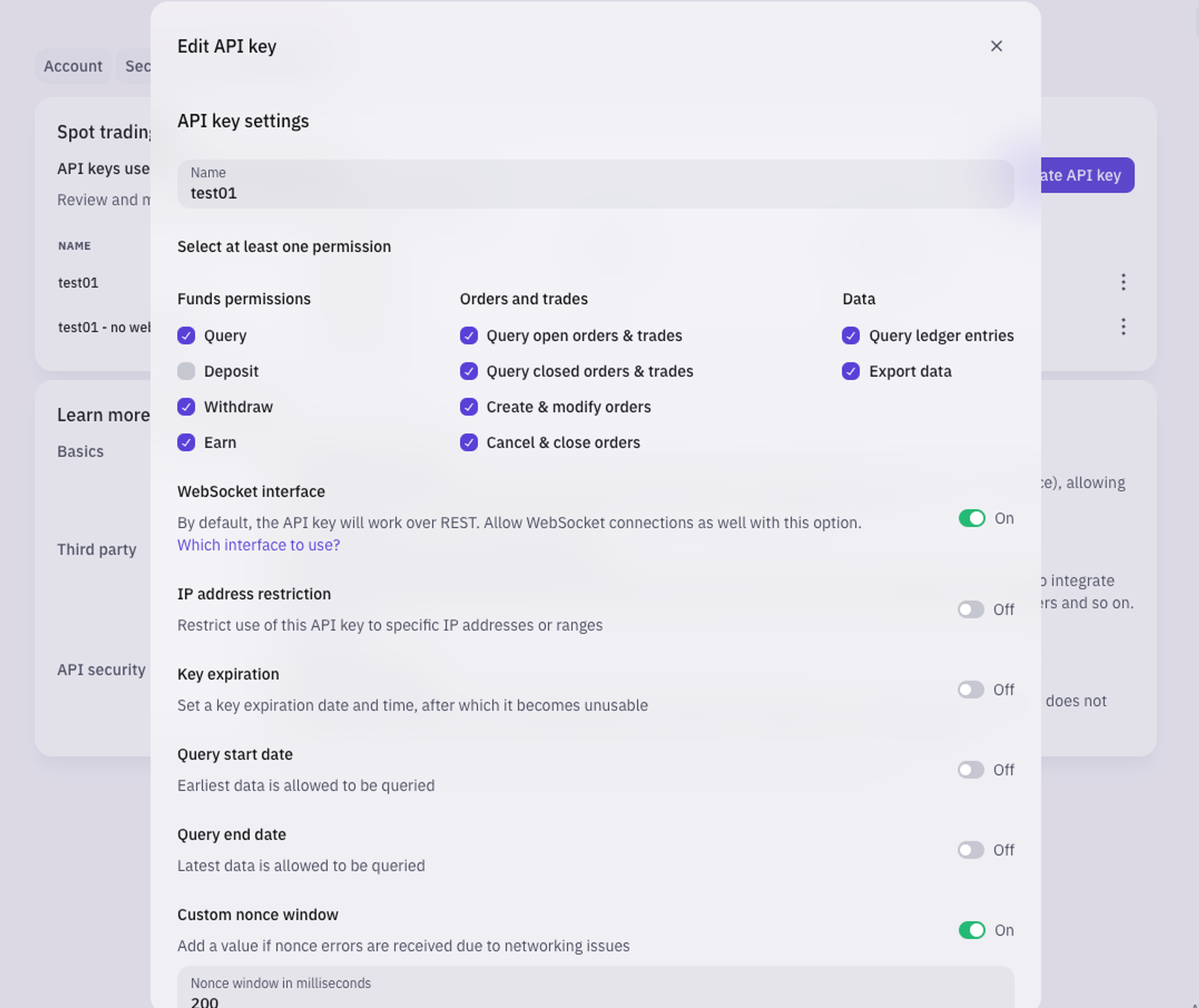
Uniswap - Hummingbot
URL: https://hummingbot.org/exchanges/gateway/uniswap
Contents:
- Uniswap
- 🛠 Connector Info
- ℹ️ Exchange Info
- 🔑 How to Connect
- Configuration
- Router Endpoints
- AMM Endpoints
- CLMM Endpoints
Uniswap operates on Ethereum and EVM-compatible networks.
See Gateway Connect for instructions on connecting your wallet to Gateway.
Configure Uniswap settings in /conf/connectors/uniswap.yml.
Below are the Uniswap configuration parameters and their default values: # Global settings for Uniswap # Default slippage percentage for swaps (2%) slippagePct: 2 # For each swap, the maximum number of hops to consider maximumHops: 4
Integration to Uniswap's Universal Router for optimal trade execution
Integration to Uniswap V2 classic AMM pools
Integration to Uniswap V3 concentrated liquidity pools
For more info, run Gateway in development mode and go to http://localhost:15888 in your browser to see detailed documentation for each endpoint.
Examples:
Example 1 (unknown):
# Global settings for Uniswap
# Default slippage percentage for swaps (2%)
slippagePct: 2

# For each swap, the maximum number of hops to consider
maximumHops: 4
MEXC - Hummingbot
URL: https://hummingbot.org/exchanges/mexc/
Contents:
- MEXC
- 🛠 Connector Info
- ℹ️ Exchange Info
- 🔑 How to Connect
- Generate API Keys
- Add Keys to Hummingbot
- 🔀 Spot Connector
- Order Types
- Paper Trading
Hummingbot Foundation has a fee share partnership with MEXC. When you use our software to trade on MEXC, a custom API header tells MEXC that the trade was executed using Hummingbot, so they share a portion of your fees with us, at no cost to you. To support us, just enter your API keys into Hummingbot and run bots! Thanks for your support! 🙏
Log into your MEXC account and click on "API" located under the user centre icon
Tick all boxes on the next page except for the Withdraw section (Hummingbot doesn't support withdraw at the moment) name your API KEY and click on create
Add your phone number and validate it
Complete the security verification with your email and your phone number
Your API is now created. Please keep your Secret Key secure. It will not be shown again. If you forget your Secret Key, you will need to delete the API and create a new one.
Please note that not all trading pairs are available for trading by the MEXC API. For a list of trading pairs that are available please check this link - https://www.mexc.com/user/openapi
From inside the Hummingbot client, run connect mexc:
If connection is successful:
Integration to spot markets API endpoints
This connector supports the following OrderType constants:
Access the Paper Trade version of this connector by running connect mexc_paper_trade instead of connect mexc.
If this is not available by default, you can configure Hummingbot to add this paper trade exchange. See Adding Exchanges for more information. ```
Examples:
Example 1 (unknown):
Enter your mexc API key >>>
Enter your mexc secret key >>>
Example 2 (unknown):
You are now connected to mexc
Dexalot - Hummingbot
URL: https://hummingbot.org/exchanges/dexalot/
Contents:
- Dexalot
- 🛠 Connector Info
- ℹ️ Exchange Info
- 🔑 How to Connect
- 🔀 Spot Connector
- Order Types
- Paper Trading
See the Dexalot Connector Guide for step-by-step instructions.
Create a wallet on one of the supported networks below:
From inside the Hummingbot client, run connect dexalot in order to connect your wallet:
If connection is successful:
Integration to spot markets API endpoints
This connector supports the following OrderType constants:
This perp exchange offers a paper trading mode:
Afer you create an account and create the API keys, you can enter them by using the connect dexalot_testnet command within the Hummingbot client. Once connected, you should be able to use the testnet with the available spot strategies / scripts.
Examples:
Example 1 (javascript):
Enter your Dexalot private key >>>
Enter your Dexalot wallet address >>>
Example 2 (unknown):
You are now connected to Dexalot!
CLOB Connectors - Hummingbot
URL: https://hummingbot.org/connectors/clob/
Contents:
- CLOB Connectors
- CLOB Connector Types
- Current CLOB Connectors
- Building CLOB Connectors
CLOB (Central Limit Order Book) connectors integrate into a CLOB exchange's WebSocket API, enabling standardized order placement/cancellation and order book data fetching from the perspective of Hummingbot strategies. These connectors work with both centralized exchanges (CEX) and decentralized exchanges (DEX) that utilize a central limit order book model.
Each connector is customized for a particular exchange's idiosyncrasies to enable this level of standardization, so they should ideally have a maintainer, whose role is to ensure consistent performance by fixing bugs, incorporating API updates, and other ongoing work.
Currently, Hummingbot supports two CLOB connector standards, each which define how the code encapsulated in a connector folder should offer standardized API endpoints and hook into the Hummingbot client.
CLOB Spot: WebSocket-based connectors to an exchange's spot order book-based markets. Each connector is a folder in the hummingbot/connector/exchange folder.
CLOB Perp: WebSocket-based connectors to an exchange's perpetual futures order book-based markets. Each connector is a folder in the hummingbot/connector/derivative folder. By convention, these connector names end in _perpetual.
These connector standards allow users to create Strategies and Scripts that can operate on different spot and perpetual markets without modification.
Here are the CLOB connectors in the codebase for the current Epoch. Note that the Foundation prioritizes fixes for connectors from exchanges that are sponsors or partners, so they tend to be more reliable and better maintained.
The Notion templates below summarize the file and functionalities needed to build the latest spot and perpetual connectors standards and support V2 Strategies:
See Building Connectors for more information.
If the exchange is not yet supported by Hummingbot, you can submit a governance proposal for it to be included. New connectors may be contributed by community members via New Connector Proposals, which require a pull request with the connector code to the Hummingbot Github repo, along with a minimum HBOT balance to create.
URL: https://hummingbot.org/assets/img/connector-order-lifecycle.svg

URL: https://hummingbot.org/academy-content/using-binance-with-hummingbot/binance-api7.png
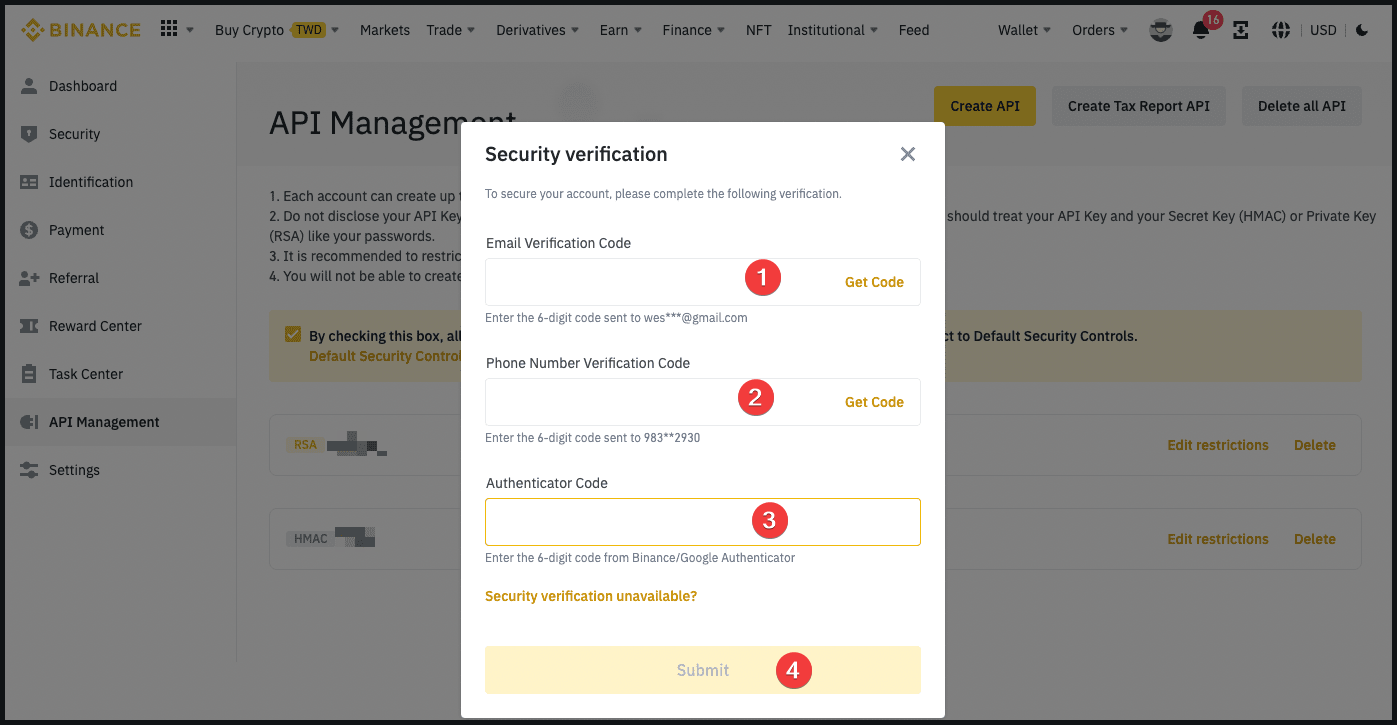
Pancakeswap - Hummingbot
URL: https://hummingbot.org/exchanges/gateway/pancakeswap
Contents:
- PancakeSwap
- 🛠 Connector Info
- ℹ️ Exchange Info
- 🔑 How to Connect
- Configuration
- Router Endpoints
- AMM Endpoints
- CLMM Endpoints
PancakeSwap operates on BNB Chain and other EVM-compatible networks.
See Gateway Connect for instructions on connecting your wallet to Gateway.
Configure PancakeSwap settings in /conf/connectors/pancakeswap.yml.
Below are the PancakeSwap configuration parameters and their default values: # Global settings for PancakeSwap # Default slippage percentage for swaps (2%) slippagePct: 2 # For each swap, the maximum number of hops to consider maximumHops: 4
Integration to PancakeSwap's Smart Router for optimal trade execution
Integration to PancakeSwap V2 classic AMM pools
Integration to PancakeSwap V3 concentrated liquidity pools
For more info, run Gateway in development mode and go to http://localhost:15888 in your browser to see detailed documentation for each endpoint.
Examples:
Example 1 (unknown):
# Global settings for PancakeSwap
# Default slippage percentage for swaps (2%)
slippagePct: 2

# For each swap, the maximum number of hops to consider
maximumHops: 4
Exchanges - Hummingbot
URL: https://hummingbot.org/exchanges
Contents:
- Exchanges
- What Are Exchange Connectors?
- Supported Exchange Types
- Real-Time Usage Data
- How to Add a Hummingbot Connector
- 🔧 DIY Governance
- 💎 Bounty Management
- 🏆 Sponsor the Foundation
- Current Foundation Partners
- 🏆 Exchange Sponsors
Hummingbot is open source software that helps you create and deploy crypto trading bots across 50+ exchanges. The project has 14k+ GitHub stars and 3.9k+ forks, representing one of the most active trading bot communities.
Connectors are standardized API integrations that enable Hummingbot to communicate with different exchanges. Each connector implements a common interface for order management, balance tracking, and market data streaming, allowing strategies to work seamlessly across multiple exchanges.
See live trading activity across all exchanges via our public dashboard:
The Reported Volumes dashboard shows real-time, aggregated trading data from Hummingbot instances worldwide, including both official releases and community forks. This transparent data helps exchanges understand actual usage patterns and trading volume.
View Live Dashboard →
You can choose from three integration options to get an official Hummingbot connector built and maintained:
Build your own connector following other connectors in the development branch of Hummingbot's open source framework. Then, create a New Connector Proposal along with a valid, comprehensive pull request containing the connector code.
You'll need some HBOT tokens to create a proposal, and you'll be responsible for ongoing maintenance updates and periodic voting to keep your connector included in ongoing releases of Hummingbot.
Have a professional community developer build and maintain your connector through our Bounty Management service for $10,000. This comprehensive package includes full connector development for all supported trading types (spot, perpetuals, AMM), plus one year of maintenance and governance support. The Foundation handles developer assignment, code review, testing, and community approval processes.
See Bounties for more information or review the Bounty Escrow Agreement.
Partner directly with Hummingbot Foundation for priority development, exchange-specific content like Funding Rate Arbitrage on Hyperliquid, and co-marketing campaigns starting at $50,000.
This premium option includes dedicated engineering resources, custom content development, and ongoing collaboration. Ideal for exchanges with new technical requirements and those seeking joint go-to-market and educational initiatives.
Leading exchanges partnering with Hummingbot Foundation for strategic integration:
Exchanges supporting open-source development through revenue sharing:
Hummingbot uses a transparent, community-driven governance process that lets [HBOT] holders decide which exchanges the codebase should support:
Learn About Governance →
CLOB (Central Limit Order Book) connectors provide WebSocket and REST-based integrations for order book exchanges. These connectors handle order placement, cancellation, balance tracking, and real-time market data streaming.
Build CLOB Connectors →
Gateway connectors enable interaction with decentralized protocols through a standardized REST API interface. Gateway supports Router, AMM, and CLMM connector types for blockchain-based trading.
Build Gateway Connectors →
Get your exchange integrated with Hummingbot through our comprehensive bounty management service. Email us at operations@hummingbot.org or contact Foundation team members on Hummingbot Discord to learn more. Sign the Bounty Escrow Agreement and escrow the funds to formalize the engagement.
2.0.1 - Hummingbot
URL: https://hummingbot.org/release-notes/2.0.1/
Contents:
- Hummingbot v2.0.1 Release Notes
- Introduction
- How to Update
- Docker
- Source
- Hummingbot 2.0.1 Highlights
- dYdX Updated Installation Instructions
- Dashboard Authentication
- New Bitstamp Connector
- New Hashkey Global Connector
Released on August 28, 2024
Hummingbot 2.0.1 continues to refine and expand the new graphical trading experience introduced in Hummingbot version 2.0.0, bringing several key updates and new features. This release includes an upgraded dYdX connector that supports the latest v4 chain, as a result of a grant from dYdX. Other new connectors in this release include Bitstamp, Hashkey and Telos. This release contains numerous other updates, including bug fixes and enhancements across the Hummingbot, Gateway, Dashboard, and Backend-API repositories, ensure a more robust and efficient trading experience.
Re-run the Deploy setup script: git clone https://github.com/hummingbot/deploy.git cd deploy bash setup.sh
For individual images, exit running containers, pull the latest images, and restart: docker compose down docker pull hummingbot/hummingbot:latest docker compose up -d
Update the branches of each repo to this release by running: git pull origin master
The new dYdX API connector has been upgraded to v4 in this release, enabling users to run bots on one of the leading decentralized perpetual DEXs! Due to dependency conflicts, we have created a custom Docker image and custom scripts to help users install Hummingbot with dYdX. The complete install instructions can be found in the dYdX connector docs, and see the blog post announcing the new dYdX sponsorship here!
We’ve reintroduced the authentication feature in this release, providing an additional layer of security for users who share their dashboard with others, such as team members or collaborators.
Authentication is disabled by default. However, if you want to enable it, please follow the instructions provided for your specific setup: Docker | Source.
Bitstamp is one of the oldest cryptocurrency exchanges, established in 2011. It offers a platform for buying, selling, and trading a variety of digital assets, including Bitcoin, Ethereum, and other major cryptocurrencies. Known for its robust security measures and regulatory compliance, Bitstamp is popular among both individual and institutional traders.
Pull Request: #7102 - Added Bitstamp connector
Thanks to Jbekker for this contribution! 🙏
Following Coinbase, HashKey Global also obtained a comprehensive exchange license for digital asset investor protection from the Bermuda Monetary Authority, making us a strong player in licensed crypto trading.
Pull Request: #7170 - Added Hashkey Global connector
Thanks to dengyh for this contribution! 🙏
TELOS is a blockchain platform known for its high-performance and versatile infrastructure, providing fast transaction speeds, low fees, and robust smart contract capabilities.
Pull Request: #7119 | #338 - Added Telos connector
Thanks to the Enflux Team for this contribution! 🙏
Bybit, a leading cryptocurrency exchange known for its high-performance trading platform, has recently updated its API to version v5. This release updates the Bybit spot connector to the latest v5 API version. While the spot connector now uses v5, the perpetual contract connector is still under development. You can track its progress through this Pull Request
Thanks to klpanagi for this contribution! 🙏
Examples:
Example 1 (unknown):
git clone https://github.com/hummingbot/deploy.git
cd deploy
bash setup.sh
Example 2 (unknown):
docker compose down
docker pull hummingbot/hummingbot:latest
docker compose up -d
Example 3 (unknown):
git pull origin master
Bybit - Hummingbot
URL: https://hummingbot.org/exchanges/bybit/
Contents:
- Bybit
- 🛠 Connector Info
- ℹ️ Exchange Info
- 🔑 How to Connect
- Generate API Keys
- Add Keys to Hummingbot
- 🔀 Spot Connector
- Order Types
- Paper Trading
- 🔀 Perp Connector
Hummingbot Foundation has a fee share partnership with Bybit. When you use our software to trade on Bybit, a custom API header tells Bybit that the trade was executed using Hummingbot, so they share a portion of your fees with us, at no cost to you. To support us, just enter your API keys into Hummingbot and run bots! Thanks for your support! 🙏
Log in to your Bybit account or Sign Up for a Bybit account.
Click on your account icon at the top right corner of the screen, and select API from the drop-down menu.
Navigate to the API Management tab and click on Create New Key.
Select System-generated API Keys.
Select API Transaction, and name the API key.
Set the permissions for the API key (e.g., account information, order placement, position information) and click on Submit
Copy the API key and secret, and save them somewhere safe.
Log in to the third-party application and link the saved API.
From inside the Hummingbot client, run connect bybit:
If connection is successful:
Integration to spot markets API endpoints
This connector supports the following OrderType constants:
Access the Paper Trade version of this connector by running connect bybit_paper_trade instead of connect bybit.
If this is not available by default, you can configure Hummingbot to add this paper trade exchange. See Adding Exchanges for more information.
Integration to perpetual futures markets API endpoints
This connector supports the following OrderType constants:
This connector supports the following position modes:
This perp exchange offers a paper trading mode: https://testnet.bybit.com/en-US/trade/spot/BTC/USDT
Afer you create an account and create the API keys, you can enter them by using the connect bybit_perpetual_testnet command within the Hummingbot client. Once connected, you should be able to use the testnet with the available perpetual strategies / scripts.
Examples:
Example 1 (unknown):
Enter your bybit API key >>>
Enter your bybit secret key >>>
Example 2 (unknown):
You are now connected to bybit
URL: https://hummingbot.org/academy-content/using-binance-with-hummingbot/binance-api2.png
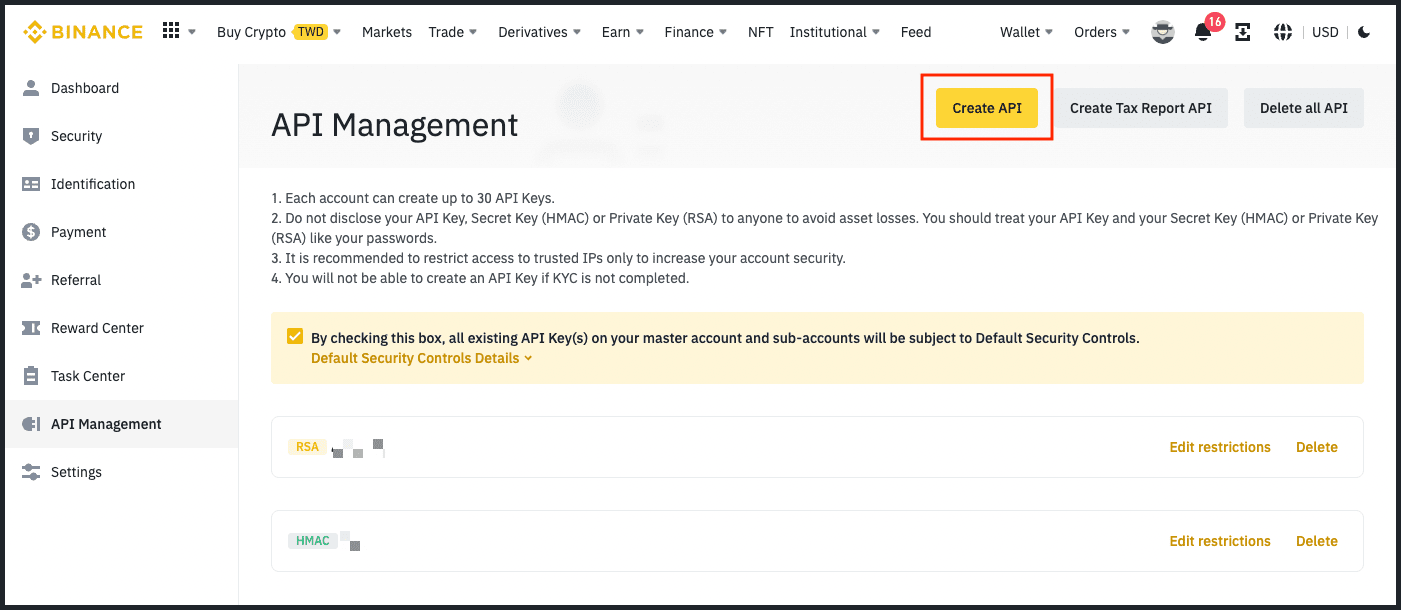
Connectors - Hummingbot
URL: https://hummingbot.org/connectors/
Contents:
- Connectors
- What are Connectors?
- CLOB Connectors
- Gateway DEX Connectors
- Connector Maintenance
- Connector Governance
Connectors are packages of code that link Hummingbot's internal trading engine with real-time and historical data from different cryptocurrency exchanges and blockchains, via WebSocket and/or REST API. They standardize interactions with the idiosyncratic APIs offered by these platforms, for purposes such as gathering order book and blockchain data, as well as sending and cancelling transactions and orders.
CLOB (Central Limit Order Book) connectors integrate into a CLOB exchange's WebSocket API, enabling standardized order placement/cancellation and order book data fetching from the perspective of Hummingbot strategies. These connectors work with both centralized exchanges (CEX) and decentralized exchanges (DEX) that utilize a central limit order book model.
See CLOB Connectors for a list of the current CLOB connectors in Hummingbot
Gateway connectors establish and maintain connections to automated market maker (AMM) DEXs and other protocols on various blockchain networks, interfaces with their Javascript SDKs, and exposes standard REST API endpoints for trading and liquidity provision-related actions on these DEXs.
See Gateway for comprehensive documentation about Gateway, including supported DEX connectors, API commands, and configuration.
CLOB connectors requires ongoing maintenance: fixing bugs, addressing user issues, and keeping up with updates to both the exchange/blockchain API as wel as improvements to the Hummingbot connector standard.
Hummingbot Foundation maintains certain reference connectors to maintain an updated standard and leverages community-based developers to maintain other connectors to the same standard. We assign Bounties to community developers to upgrade and fix bugs for each exchange's connectors in the codebase.
Hummingbot Foundation governance lets HBOT holders which exchanges are supported by the open source codebase.
New connectors may be contributed by community members via New Connector Proposals, which require a pull request with the connector code to the Hummingbot Github repo, along with a minimum HBOT balance to create.
For existing connectors, quarterly Exchange Connector Polls allocates HBOT bounties toward top exchanges and determines which exchanges should be included in the codebase going forward. See the Connector Pots tab in HBOT Tracker for the current allocations for each exchange.
CLOB Connectors - Hummingbot
URL: https://hummingbot.org/connectors/clob
Contents:
- CLOB Connectors
- CLOB Connector Types
- Current CLOB Connectors
- Building CLOB Connectors
CLOB (Central Limit Order Book) connectors integrate into a CLOB exchange's WebSocket API, enabling standardized order placement/cancellation and order book data fetching from the perspective of Hummingbot strategies. These connectors work with both centralized exchanges (CEX) and decentralized exchanges (DEX) that utilize a central limit order book model.
Each connector is customized for a particular exchange's idiosyncrasies to enable this level of standardization, so they should ideally have a maintainer, whose role is to ensure consistent performance by fixing bugs, incorporating API updates, and other ongoing work.
Currently, Hummingbot supports two CLOB connector standards, each which define how the code encapsulated in a connector folder should offer standardized API endpoints and hook into the Hummingbot client.
CLOB Spot: WebSocket-based connectors to an exchange's spot order book-based markets. Each connector is a folder in the hummingbot/connector/exchange folder.
CLOB Perp: WebSocket-based connectors to an exchange's perpetual futures order book-based markets. Each connector is a folder in the hummingbot/connector/derivative folder. By convention, these connector names end in _perpetual.
These connector standards allow users to create Strategies and Scripts that can operate on different spot and perpetual markets without modification.
Here are the CLOB connectors in the codebase for the current Epoch. Note that the Foundation prioritizes fixes for connectors from exchanges that are sponsors or partners, so they tend to be more reliable and better maintained.
The Notion templates below summarize the file and functionalities needed to build the latest spot and perpetual connectors standards and support V2 Strategies:
See Building Connectors for more information.
If the exchange is not yet supported by Hummingbot, you can submit a governance proposal for it to be included. New connectors may be contributed by community members via New Connector Proposals, which require a pull request with the connector code to the Hummingbot Github repo, along with a minimum HBOT balance to create.
Building CLOB Connectors - Hummingbot
URL: https://hummingbot.org/developers/connectors
Contents:
- Building CLOB Connectors
- Exchange API Requirements
- Building Connectors
- Spot Connectors
- Perp Connectors
- Contributing Connectors
- Additional Resources
The information below are for developers building spot and perp connectors that integrate directly into the Hummingbot client. For information on developing gateway connectors that use Gateway, see Building Gateway Connectors.
See Exchange API Requirements for what the exchange API requirements needed to support the latest Hummingbot spot and perp connector standards.
To gain a deeper understanding for how Hummingbot connectors work, we recommend reading the following engineering posts from Hummingbot's original technical founder:
The following pages offer more details on various components and classes of a connector:
Spot connectors provide WebSocket and REST-based integrations to spot order book-based markets offered by an exchange, which may be centralized (CEX) or decentralized (DEX). Each connector is a folder in the hummingbot/connector/exchange folder.
Perp connectors provide WebSocket and REST-based integrations to perpetual futures order book-based markets offered by an exchange, which may be centralized (CEX) or decentralized (DEX). Each connector is a folder in the hummingbot/connector/derivative folder. By convention, these connector names end in _perpetual.
Introducing an exchange connector into the Hummingbot code base requires a mutual commitment from both the Hummingbot Foundation team and the contributing developers to maintaining a high standard of code quality and software reliability.
We encourage and welcome new connector contributions from the community, subject to the guidelines and expectations outlined below.
Here is an overview of the process to get a new connector merged into the codebase:
For questions, please visit the #developer-chat channel on our Discord.
Connector Architecture - Hummingbot
URL: https://hummingbot.org/developers/connectors/architecture/
Contents:
- Connector Architecture
- Component Overview
- Exchange/Derivative.py
- ConnectorAuth.py
- OrderBookTracker
- UserStreamTracker
- OrderBookTrackerDataSource
- UserStreamTrackerDataSource
- InFlightOrder
- ClientOrderTracker
The information below are for developers building spot and perpetual connectors that integrate directly into the Hummingbot client. For information on developing gateway connectors that use Gateway, see Building Gateway Connectors.
Here is the high-level design of a connector:
Note that for Derivative (perp) connectors, we have a multiple inheritance to ExchangeBase and PerpetualTrading.
Each connector is comprised of the following components. Below are the detailed descriptions of tasks for each component and its corresponding files.
File: *_exchange/derivative.py — REQUIRED
Connector modules are centered around an Exchange/Derivative class, which are ultimately children of ConnectorBase. Each Exchange/Derivative class contains an OrderBookTracker and UserStreamTracker, and they are responsible for maintaining order books and user account information.
Exchange/Derivative instances also contain a ClientOrderTracker which tracks the connector's InFlightOrders, which are orders placed by Hummingbot currently on the order book. Typically, it is also helpful to have an exchange-specific Auth class, which generates the necessary authentication parameters/headers to access restricted REST endpoints and WebSocket channel, such as for placing orders and listening for order updates.
The Derivative class in particular inherits functions that are specifically used in perpetual markets. See the PerpetualTrading class for more info.
File: *_auth.py — OPTIONAL
This class generates the appropriate authentication headers for the restricted REST endpoints to be used by the Exchange/Derivative and UserStreamTrackerDataSource classes. Generally, this would mean constructing the appropriate HTTP headers and authentication payload(as specified by the exchange's API documentation)
Some arguments tend to include:
Depending on the specific exchange, different information may be needed for authentication. Typically, the Auth class will:
This module is typically required for centralized exchange only. Generally, auth for DEXs is handled by the respective wallet.
File: *_order_book_tracker.py — REQUIRED
Each Exchange/Derivative class contains an OrderBookTracker to maintain a real-time order book of one/multiple trading pairs and is responsible for applying the order book snapshots and diff messages to the corresponding OrderBook.
File: *_user_stream_tracker.py — OPTIONAL
Each Exchange/Derivative class contains a UserStreamTracker, to maintain the current state of the user's account, orders and positions.
File: *_order_book_data_source.py — REQUIRED
The OrderBookTrackerDataSource class is responsible for order book data retrieval. It simply collects, parses, and queues the data stream to be processed by OrderBookTracker. Generally, this would mean pulling data from the exchange's API/WebSocket servers. For Perpetual connectors, the OrderBookTrackerDataSource is also tasked with maintaining the funding information of the active market.
It is necessary to track the timestamp/nonce of each message received from the exchange API servers to maintain a consistent and up-to-date order book. Depending on the exchange responses, we can keep an order book in the following ways:
It is important that the order book being maintained reflects all changes and is consistent with the order book on the exchange. As a safeguard/fallback, in the event when Hummingbot is unable to adequately maintain the order book, executing periodic order book snapshot requests can help to ensure that any deltas missed would be corrected.
File: *_user_stream_data_source.py — OPTIONAL
The UserStreamTrackerDataSource class deals with user data retrieval. It simply collects, parses and queues the data stream to be processed by UserStreamTracker.
Unlike OrderBookTrackerDataSource, UserStreamTrackerDataSource only retrieves data about user account balances and orders.
File: /hummingbot/core/data_type/in_flight_order.py
Stores all details pertaining to the current state of an order.
It is important to keep a consistent and accurate state of all active orders placed by the user. This ensures that the strategies are given the correct information and are able to perform their tasks accordingly.
File: /hummingbot/connector/client_order_tracker.py
An instance of ClientOrderTracker holds and manages InFlightOrders by calling the connector's trigger_event method.
Provides utilities for connectors to update in-flight orders and to handle order errors.
The BudgetChecker uses the information from a TradeFeeSchema to generate a specific instance of TradeFeeBase that is then applied to an OrderCandidate in order to asses the order's effects on account balances.
The TradeFee object contains the necessary information to account for fees when estimating an order's impact on account balances.
Example: TradeFee from hummingbot.client.settings import AllConnectorSettings trade_fee_schema = AllConnectorSettings.get_connector_settings()[exchange].trade_fee_schema percent = trade_fee_schema.maker_percent_fee_decimal if is_maker else trade_fee_schema.taker_percent_fee_decimal fixed_fees = trade_fee_schema.maker_fixed_fees if is_maker else trade_fee_schema.taker_fixed_fees trade_fee = AddedToCostTradeFee(percent, trade_fee_schema.percent_fee_token, fixed_fees)
Contains the necessary information to build the TradeFee object.
For both makers and takers specifies percent and fixed fees, and tokens in which the fees are paid.
Exchanges must specify their respective default schemas inside their [exchange]_utils.py files: DEFAULT_FEES = TradeFeeSchema( maker_percent_fee_decimal=Decimal("0.001"), taker_percent_fee_decimal=Decimal("0.001") )
Example: TradeFeeSchema trade_fee_schema = TradeFeeSchema( maker_percent_fee_decimal=Decimal("1.0"), taker_percent_fee_decimal=Decimal("2.3") )
A specific instance of the TradeFeeBase class defines the fees to be applied to an order - their types, amounts and assets.
Extends TradeFeeBase, implements get_fee_impact_on_order_cost(), get_fee_impact_on_order_returns().
Fees of this class are applied on top of the cost of a buy order (e.g. a buy order of 10 COINX at 9 USDT with a fee of 1% means that the user's account will be deducted 90.9 USDT and added 10 COINX — this is most exchanges' approach to fees).
Extends TradeFeeBase, implements get_fee_impact_on_order_cost(), get_fee_impact_on_order_returns().
Fees of this class are deducted from the returns of a buy order (e.g. a buy order of 10 COINX at 9 USDT with a fee of 1% means that the user's account will be deducted 90 USDT and added 9.9 COINX — this is Binance's approach to fees).
Examples:
Example 1 (python):
from hummingbot.client.settings import AllConnectorSettings

trade_fee_schema = AllConnectorSettings.get_connector_settings()[exchange].trade_fee_schema

percent = trade_fee_schema.maker_percent_fee_decimal if is_maker else trade_fee_schema.taker_percent_fee_decimal
fixed_fees = trade_fee_schema.maker_fixed_fees if is_maker else trade_fee_schema.taker_fixed_fees

trade_fee = AddedToCostTradeFee(percent, trade_fee_schema.percent_fee_token, fixed_fees)
Example 2 (unknown):
DEFAULT_FEES = TradeFeeSchema(
    maker_percent_fee_decimal=Decimal("0.001"),
    taker_percent_fee_decimal=Decimal("0.001")
)
Example 3 (unknown):
trade_fee_schema = TradeFeeSchema(
    maker_percent_fee_decimal=Decimal("1.0"),
    taker_percent_fee_decimal=Decimal("2.3")
)
Bitget - Hummingbot
URL: https://hummingbot.org/exchanges/bitget-perpetual/
Contents:
- Bitget
- 🛠 Connector Info
- ℹ️ Exchange Info
- 🔑 How to Connect
- Generate API Keys
- Add Keys to Hummingbot
- 🔀 Perp Connector
- Order Types
- Position Modes
- Paper Trading
From inside the Hummingbot client, run connect bitget_perpetual:
If connection is successful:
Integration to spot markets API endpoints
This connector supports the following OrderType constants:
This connector supports the following position modes:
Examples:
Example 1 (unknown):
Enter your bitget_perpetual API key >>>
Enter your bitget_perpetual secret key >>>
Enter your bitget_perpetual user id >>>
Example 2 (unknown):
You are now connected to bitget_perpetual
Bounty Lifecycle - Hummingbot
URL: https://hummingbot.org/bounties/lifecycle/
Contents:
- Bounty Lifecycle
- Exchange Onboarding Process
- 1. Initial Contact
- 2. Technical Review
- 3. Bounty Management Agreement
- 4. Bounty Creation
- Developer Assignment Process
- 5. Developer Applications
- 6. Assignment Decision
- 7. Development Phase
This page outlines the complete lifecycle of connector bounties from initial contact through development, testing, and maintenance.
Exchange reaches out via Discord or email to discuss connector integration needs. Foundation schedules introduction call to understand requirements.
Foundation reviews exchange API documentation to confirm:
Exchange proceeds with $10,000 service:
Foundation posts bounties to Bounties Board:
Qualified developers apply by commenting on GitHub issues with:
Foundation assigns based on:
Developer submits PR with:
Foundation engineers review using:
QA team performs testing using:
For Bounty Management service, exchange may:
Foundation creates and manages:
Foundation manages ongoing bounties for:
Foundation ensures quality through:
Sponsors - Hummingbot
URL: https://hummingbot.org/about/sponsors
Contents:
- Sponsors
- Sponsors
- Exchange Partners
- How exchange partnerships Work
- Why should you support us?
The Hummingbot Foundation's mission is to foster a community-driven, open source ecosystem for algorithmic trading and market making. By partnering with pioneering protocols and exchanges in the crypto space, the Foundation ensures the continuous development, enhancement, and dissemination of Hummingbot as a leading open-source trading platform.
The Foundation works closely with leading crypto companies and protocols to develop and maintain high-quality exchange connectors, ensuring reliable integration with Hummingbot's extensive strategy library. Our dedicated team provides technical support, continuous quality assurance, and regular updates to maintain compatibility with exchange API changes. Sponsors benefit from exposure to Hummingbot's active trader community through our documentation, announcements, and communication channels. For more information about sponsorship opportunities, please contact Foundation team members via Discord.
XRPL: The XRP Ledger (XRPL) is a decentralized, public blockchain that enables fast, low-cost transactions between accounts with both central limit order book (CLOB) and automatic market maker (AMM) exchange functionality built into the ledger. The XRPL connector in Hummingbot enables sophisticated trading and liquidity provision strategies on one of the longest-running blockchain platforms. Connector Guide
Hyperliquid: Hyperliquid has partnered with Hummingbot Foundation to show the power of democratized, algorithmic access to markets. Hyperliquid is an order book spot and perpetual futures DEX that aims to do everything the best CEXs do, but on-chain. Their unique Vaults allow users to run stake-able liquidity provision strategies. Announcement.
Derive: Derive is a decentralized exchange aggregator that provides users with the best prices across multiple DEXs. By partnering with Hummingbot Foundation, Derive enables users to access deep liquidity across multiple DEXs and execute trades with minimal price impact. The Derive connector in Hummingbot allows users to implement sophisticated trading strategies while leveraging Derive's aggregation capabilities. Connector Guide.
dYdX: dYdX is a decentralized exchange (DEX) built on its own purpose-built blockchain that offers perpetual futures trading with deep liquidity and low latency. The dYdX v4 connector in Hummingbot enables users to implement sophisticated derivatives trading strategies while maintaining full custody of their assets. Announcement.
We're thrilled to partner with leading industry exchanges to champion decentralized, community-driven market making through strategic fee-share agreements. Our exchange partners share a portion of user-generated fees with the Foundation, at zero cost to users. We are grateful for their support of open source algorithmic trading, where innovation, community, and opportunity collide.
When you sign up for an account with our partner exchanges using the Hummingbot referral link, you will receive a rebate on your trading fees!
When you sign up for an account using our referral links, a portion of your trading fees are rebated back to Hummingbot Foundation. Every time you use Hummingbot to submit an order, it sends an HTTP request to the API of the exchange. The exchange then identifies that the HTTP request for the order is coming from a user who is using the Hummingbot codebase, it checks for the metadata in the HTTP request for a Hummingbot identifier. If the identifier is present, the exchange knows that the order is coming from a Hummingbot user and will rebate a portion of the trading fees to us.
These partnerships help sustain the Hummingbot Foundation's mission to keep our platform open source and free, while providing you with trading fee rebates at no additional cost. It's a win-win arrangement that supports both our users and the continued development of Hummingbot.
Debugging & Testing Connectors - Hummingbot
URL: https://hummingbot.org/developers/connectors/debug
Contents:
- Debugging & Testing Connectors
- Option 1. Unit Test Cases
- Option 2. aiopython console
- Issue a API Request
- Calling a Class Method
- Option 3. Custom Scripts
- API Request: POST Order
- Option 4: Using Debugger Tools
- VS Code
- PyCharm
The information below are for developers building spot and perp connectors that integrate directly into the Hummingbot client. For information on developing gateway connectors that use Gateway, see Building Gateway Connectors.
This section will break down some ways to debug and test the code. You are not required to use these options during your development process, but they will greatly help you in it.
As part of the QA process, you are required to include unit test cases for the code review process to begin. Refer to Option 1: Unit Test Cases to build your unit tests.
You are required to provide at least 80% of unit-test code coverage to have your contribution accepted in the hummingbot repository. Examples of unit-tests can be found in the test/integration folder.
Unit-tests submitted for merging in the code base must not access any external servers directly. All server API communications must be mocked — refer to existing examples provided by the exchange you are basing your implementation on for guidance.
When writing unit-tests for submission with your PR, take extra care not to include any API authentication credentials.
This option is mainly used to test for specific functions. Considering that many of the functions are asynchronous functions, it would be easier to test for these in the aiopython console. Click here for some documentation on how to use aiopython.
Writing short code snippets to examine API responses and/or how certain functions in the code base work would help you understand the expected side-effects of these functions and the overall logic of the Hummingbot client.
Below is just a short example on how to write a short asynchronous function to mimic a API request to place an order and displaying the response received.
Printing the output from get_active_exchange_markets() function in OrderBookTrackerDataSource.
In this example, we will be using BittrexAPIOrderBookDataSource:
This option, like in Option 2, is mainly used to test specific functions. This is mainly useful when debugging how various functions/classes interact with one another.
e.g. Initializing a simple websocket connection to listen and output all captured messages to examine the user stream message when placing/cancelling an order. This is helpful when determining the exact response fields to use.
e.g. A simple function to craft the Authentication signature of a request. This together with POSTMAN can be used to check if you are generating the appropriate authentication signature for the respective requests.
Below is a sample code for POST-ing a LIMIT-BUY order on Bittrex. This script not only tests the BittrexAuth class but also outputs the response from the API server.
This section will detail the necessary configurations/setup required to run the debugger tool from your IDE of choice.
Include the following debug configurations into the launch.json configuration file
By executing the Start Debugging command, the debugger will automatically attach itself to the Hummingbot process. The Hummingbot app will appear in the integratedTerminal. You may change this as desired.
Similarly, for PyCharm, you want to set up the debug configurations, as seen in the screenshot below.
For debugging it is neccessary that Gevent compatible in Python Debugger settings is enabled. See Stackoverflow Q&A.
As of this writing, there is no way to add breakpoints/log points to any of the Cython code in VSCode or PyCharm.
Examples:
Example 1 (unknown):
# Prints the response of a sample LIMIT-BUY Order
# Replace the URL and params accordingly.

>>> import aiohttp
>>> URL="api.test.com/buyOrder"
>>> params = {
...     "symbol": "ZRXETH",
...     "amount": "1000",
...     "price": "0.001",
...     "order_type": "LIMIT"
... }
>>> async with aiohttp.ClientSession() as client:
...    async with client.request("POST",
...                              url=URL,
...                              params=params) as response:
...        if response == 200:
...            print(await response.json())
Example 2 (python):
>>> from hummingbot.market.bittrex.BittrexAPIOrderBookDataSource import BittrexAPIOrderBookDataSource as b
>>> await b.get_active_exchange_markets()

                 askRate baseAsset        baseVolume  ...             volume     USDVolume old_symbol
symbol                                                ...
BTC-USD    9357.49900000       BTC  2347519.11072768  ...       251.26097386  2.351174e+06    USD-BTC
XRP-BTC       0.00003330       XRP       83.81218622  ...   2563786.10102864  7.976883e+05    BTC-XRP
BTC-USDT   9346.88236735       BTC   538306.04864142  ...        57.59973765  5.379616e+05   USDT-BTC
.
.
.
[339 rows x 18 columns]
Example 3 (python):
#!/usr/bin/env python3

import asyncio
import aiohttp
from typing import Dict
from hummingbot.connector.exchange.bittrex.bittrex_auth import BittrexAuth

BITTREX_API_ENDPOINT = "https://api.bittrex.com/v3"

async def _api_request(http_method: str,
                       path_url: str = None,
                       params: Dict[str, any] = None,
                       body: Dict[str, any] = None,
                       ):
    url = f"{BITTREX_API_ENDPOINT}{path_url}"

    auth = BittrexAuth(
        "****",
        "****"
    )

    auth_dict = auth.generate_auth_dict(http_method, url, params, body, '')

    headers = auth_dict["headers"]

    if body:
        body = auth_dict["body"]

    client = aiohttp.ClientSession()

    async with client.request(http_method,
                              url=url,
                              headers=headers,
                              params=params,
                              data=body) as response:
        data: Dict[str, any] = await response.json()
        if response.status not in [200,201]:
            print(f"Error occurred. HTTP Status {response.status}: {data}")
        print(data)

# POST order
path_url = "/orders"

body = {
    "marketSymbol": "FXC-BTC",
    "direction": "BUY",
    "type": "LIMIT",
    "quantity": "1800",
    "limit": "3.17E-7",  # Note: This will throw an error
    "timeInForce": "GOOD_TIL_CANCELLED"
}

loop = asyncio.get_event_loop()
loop.run_until_complete(_api_request("POST",path_url=path_url,body=body))
loop.close()
Example 4 (unknown):
{
  "version": "0.2.0",
  "configurations": [
    {
      "name": "Python: Hummingbot Application",
      "type": "python",
      "request": "launch",
      "program": "${workspaceRoot}/bin/hummingbot.py",
      "console": "integratedTerminal"
    }
  ]
}
Bounties FAQ - Hummingbot
URL: https://hummingbot.org/bounties/faq/
Contents:
- Frequently Asked Questions
- For Exchanges
- What is Bounty Management?
- What connector types are included?
- How long does development take?
- What if the connector isn't delivered?
- What's included in 1-year maintenance?
- How does payment work?
- For Developers
- What bounties are available?
Bounty Management is a $10,000 service where Hummingbot Foundation oversees the complete development and maintenance of your exchange connector through community bounties. This includes 1 year of governance and maintenance support.
The $10,000 fee covers ALL connector sub-types your exchange supports:
Total timeline is 4-8 weeks:
Full refund guarantee if:
All bounties focus on exchange connector development:
No, developers can only be assigned one active bounty at a time. Exception: if your PR is under review, you may be assigned a new bounty.
If you're unable to complete:
All connectors must implement standardized interfaces and functionality as outlined in our developer documentation:
Foundation reviews for:
🔥 Kucoin - Hummingbot
URL: https://hummingbot.org/exchanges/kucoin/
Contents:
- 🔥 Kucoin
- 🛠 Connector Info
- ℹ️ Exchange Info
- 🔑 How to Connect
- Generate API Keys
- Add Keys to Hummingbot
- 🔀 Spot Connector
- Order Types
- Paper Trading
- 🔀 Perp Connector
Kucoin is an exchange partner of Hummingbot Foundation, so when you use Hummingbot to run bots on Huobi, a portion of your fees goes to support the Foundation and our mission to democratize algo trading with open source software. To help support us, create an account using our Kucoin referral link and enter that account's API keys into Hummingbot and run bots! Thanks for your help! 🙏
Log in to Kucoin, click the avatar, in the drop-down menu, select API Management > Create API.
A window will pop up where you can choose either API Trading or Link Third-Party Applications.
For API trading, enter the API name and API passphrase.
For linking to a third-party application, first select the name of the third-party app you wish to link. Then, enter the API name and API passphrase, and select API permissions.
For account security purposes, withdrawals are not supported by linking a third-party application, and there is no need to link an IP address. During transactions, the platform will use the configured third-party IP addresses.
During the creation process, pay attention to the relevant prompts and rules on the API creation page. Here are some points for your special attention:
The API passphrase is crucial. It is highly recommended to write it down and store it in a secure location. You will need the API passphrase for verification when using the API. Additionally, do not disclose your API key to prevent any potential loss of assets.
To ensure the security of your funds, API keys that are enabled for spot, margin, or futures trading but not linked to an IP address will be automatically deleted or have their trade permissions disabled after 30 days of inactivity. However, there is no expiration limit for API keys that only have the General permissions.
To enable access to permissions, you must add your IP address to the whitelist.
A security verification will pop up. Enter your trading password, email verification code, and Google verification code.
Click the button to confirm and complete the creation.
From inside the Hummingbot client, run connect kucoin:
If connection is successful:
Integration to spot markets API endpoints
This connector supports the following OrderType constants:
Access the Paper Trade version of this connector by running connect kucoin_paper_trade instead of connect kucoin.
If this is not available by default, you can configure Hummingbot to add this paper trade exchange. See Adding Exchanges for more information.
Integration to perpetual futures markets API endpoints
This connector supports the following OrderType constants:
This connector supports the following position modes:
This perp exchange offers a paper trading mode: https://www.kucoin.com/support/7909075578521
Afer you create an account and create the API keys, you can enter them by using the connect kucoin_perpetual_testnet command within the Hummingbot client. Once connected, you should be able to use the testnet with the available perpetual strategies / scripts.
Collect historical OHCLV data from this exchange's spot markets
In a Hummingbot script, import CandlesFactory to create the candles that you want: from hummingbot.data_feed.candles_feed.candles_factory import CandlesFactory candles = CandlesFactory.get_candle(connector="kucoin", trading_pair="ETH-USDT", interval="1m", max_records=50)
See candles_example.py for more details.
Candles Feed not available for Perpetual
Examples:
Example 1 (unknown):
>>> connect kucoin

Enter your kucoin API key >>>
Enter your kucoin secret key >>>
Enter your kucoin passphrase >>>
Example 2 (unknown):
You are now connected to kucoin
Example 3 (python):
from hummingbot.data_feed.candles_feed.candles_factory import CandlesFactory
    candles = CandlesFactory.get_candle(connector="kucoin",
                                        trading_pair="ETH-USDT",
                                        interval="1m", max_records=50)
1.23.0 - Hummingbot
URL: https://hummingbot.org/release-notes/1.23.0/
Contents:
- Hummingbot v1.23.0 Release Notes
- Introduction
- How to Update
- Docker
- Source
- Monthly Community Call
- R&D: First steps toward a Hummingbot AI assistant
- New Script: Crypto Volatility Screener
- New DEX Connector: Hyperliquid
- New Chain and DEX Connector: XRP Ledger
Released on December 26, 2023
Happy Holidays everyone! We are excited to announce the release of Hummingbot version 1.23.0, marking a significant milestone as we wrap up the year. Highlights include the launch of two new DEX connectors: Hyperliquid and XRPL Ledger as well as notable updates across our core trading engine and gateway, along with improvements to existing connectors and the introduction of innovative tools such as the Crypto Volatility Screener and an (ongoing development) AI assistant for streamlined trading strategies.
As always, we thank our community for their contributions and continued support, and we are looking forward to an exciting new year as we remain committed to advancing Hummingbot and empowering our users with the best trading tools and experiences.
Clone the latest hummingbot/deploy-examples repository and use the hummingbot-update.sh script under the /bash_scripts folder.
Alternatively, run the following command to pull the latest Docker image:
Update your Hummingbot branch to this release by running:
Join the next community call on Discord to learn about the new features in this release and other Hummingbot news:
Afterwards, we will publish the recording on the Hummingbot YouTube and post it here.
For more community events, check out the Hummingbot Events Calendar.
The Hummingbot Helper repository is designed to explore, test, and refine the use of Large Language Models (LLMs) in enhancing the functionality and user experience of Hummingbot. We believe that these new technologies may synergize well with Hummingbot's trading engine, strategy frameworks, and connectors system.
Initially, we have set up a few research Jupyter notebooks to developing preprocessing techniques and effective LLM chains to assist users in running bots and efficiently answering questions related to Hummingbot's documentation.
Github Repo: https://github.com/hummingbot/helper
The new Volatility Screener sample script provides an new way to use Hummingbot: It conducts a detailed analysis of market volatility for multiple cryptocurrency pairs on a specified exchange, utilizing various metrics and indicators like percentage changes, Bollinger Bands, and standard deviation calculations.
The script is designed to provide periodic reports, making it a useful tool for traders looking to understand and capitalize on market volatility.
Hyperliquid, launched in 2023, is at the forefront of decentralized perpetual exchanges, recognized for its exceptional speed and liquidity. Operating on a unique Layer 1 blockchain, Hyperliquid is transforming the DeFi landscape with a user-centric design and advanced trading features. A key highlight is the introduction of Vaults, a novel concept designed to streamline asset management and bolster trading efficiency. These Vaults offer a secure and effective solution for asset storage while facilitating sophisticated trading strategies.
For more information, see Hyperliquid in our exchange connector documentation.
Snapshot Proposal: https://snapshot.org/#/hbot-ncp.eth/proposal/0x138d4160162f5e930e0bba0c8be408bd208d67b481e7924d39c9eba56def11e6
Thanks to yancong001 for their significant contribution to this integration! 🙏
Launched in 2012, Ripple is a prominent player in the digital payment protocol and cryptocurrency space, primarily known for its digital payment network and protocol. Unlike traditional cryptocurrencies, Ripple operates on a decentralized open-source protocol and supports token issuance of various kinds, including its native cryptocurrency, XRP. Ripple's technology allows for fast, low-cost international transactions, making it a favored choice for cross-border settlements. The platform's unique consensus mechanism distinguishes it from other blockchain-based systems, offering enhanced scalability and efficiency. Ripple's ecosystem includes a wide range of financial institutions and payment networks.
See DEX Connectors - XRP Ledger and Chain Connectors - XRP Ledger for the respective DEX and chain documentation pages.
Snapshot Proposal: https://snapshot.org/#/hbot-ip.eth/proposal/0x07b027fc420274d26add346ed65a2f7e3e5a662bd5317d2ddb2dd02562a7b2d2
Thanks to mlguys for this contribution! 🙏
Examples:
Example 1 (unknown):
docker pull hummingbot/hummingbot:latest
Example 2 (unknown):
git pull origin master
Meteora - Hummingbot
URL: https://hummingbot.org/exchanges/gateway/meteora
Contents:
- Meteora
- 🛠 Connector Info
- ℹ️ Exchange Info
- 🔑 How to Connect
- Configuration
- CLMM Endpoints
Meteora operates on Solana networks.
See Gateway Connect for instructions on connecting your wallet to Gateway.
Configure Meteora settings in /conf/connectors/meteora.yml.
Below are the Meteora configuration parameters and their default values: # Global settings for Meteora # Default slippage percentage for swaps (e.g., 1 = 1%) slippagePct: 1 # default DLMM strategy type for positions # SpotImBalanced = 0, # CurveImBalanced = 1, # BidAskImBalanced = 2, # SpotBalanced = 3, # CurveBalanced = 4, # BidAskBalanced = 5 strategyType: 0
Integration to Meteora's Dynamic Liquidity Market Maker (DLMM)
For more info, run Gateway in development mode and go to http://localhost:15888 in your browser to see detailed documentation for each endpoint.
Examples:
Example 1 (unknown):
# Global settings for Meteora
# Default slippage percentage for swaps (e.g., 1 = 1%)
slippagePct: 1

# default DLMM strategy type for positions
# SpotImBalanced = 0,
# CurveImBalanced = 1,
# BidAskImBalanced = 2,
# SpotBalanced = 3,
# CurveBalanced = 4,
# BidAskBalanced = 5
strategyType: 0
Gateway DEX Connectors - Hummingbot
URL: https://hummingbot.org/gateway/connectors/
Contents:
- Gateway DEX Connectors
- Supported Connectors
- Active Connectors
- Legacy Connectors
- Connector Schemas
- Router Schema
- AMM Schema
- CLMM Schema
- Building Custom Connectors
Gateway provides standardized connectors for interacting with decentralized exchanges (DEXs) across different blockchain networks. Each connector implements one or more trading types (Router, AMM, CLMM) to support various DeFi protocols.
The Gateway refactoring approved in NCP-22 has been completed with the v2.8.0 release. The new standard is now ready, and developers can help upgrade the legacy connectors to the new architecture. Community developers can claim bounties for these upgrades where available.
The following connectors are available in legacy versions but need to be upgraded to the v2.8.0 standard:
Gateway implements three standardized schemas that define the API structure for different trading types. Each connector must implement one or more of these schemas to ensure compatibility with Hummingbot.
For DEX aggregators and swap-only protocols. Focuses on quoting optimal trade routes across multiple liquidity sources and executing quotes.
For traditional Automated Market Maker pools with constant product (x*y=k) formulas, such as Uniswap V2 and Raydium Standard Pools.
For Concentrated Liquidity Market Maker pools where liquidity providers can specify custom price ranges such as Uniswap V3 and Raydium Concentrated Pools.
For detailed instructions on building custom Gateway DEX connectors, see Building Gateway Connectors.
Epochs - Hummingbot
URL: https://hummingbot.org/governance/epochs
Contents:
- Epochs
- Epoch 13 (Q3 2025)
- CLOB CEX Connectors
- CLOB DEX Connectors
- Gateway DEX Connectors
- Epoch 12 (Q2 2025)
- CEX Connectors
- CLOB DEX Connectors
- Gateway DEX Connectors
- Epoch 11 (Q1 2025)
The Hummingbot Foundation is an experiment in creating a self-sustainable open source ecosystem by distributing HBOT tokens to community developers who maintain the codebase.
We iterate to improve upon this distribution process via Epochs. Each Epoch is a quarterly period that are basically long agile sprints, after which the Foundation and the community may propose changes for the next Epoch.
Polls divide a fixed pool of HBOT between the connectors based on their pro-rata voting share. The Foundation assigns maintenance bounties to community developers for each connector using these amounts. See the Connector Pots tab in HBOT Tracker for the current allocations for each exchange.
Approved Governance Changes: HGP-70
The Foundation implemented three separate polls, one for each exchange type. To ensure room for new community-suggested exchanges while respecting the 20-choice limit, the following exchange removal conditions apply:
This system ensures at least 2 open slots in each exchange type for new additions every quarter. These removal conditions apply in addition to the current Minimum HBOT inclusion threshold (400K HBOT).
Approved Governance Changes: HGP-50
Approved Governance Changes: HGP-50
Approved Governance Changes: HGP-50
Approved Governance Changes: HGP-50
Approved Governance Changes: HGP-50
Recap: Epoch 6 Polls Recap
Approved Governance Changes: HGP-45
Recap: Epoch 5 Polls Recap
Approved Governance Changes: HGP-43
Recap: Epoch 4 Polls Recap
Recap: Epoch 3 Polls Recap
Approved Governance Changes: HGP-22, HGP-24
After Epoch 2, the Foundation conducted a retrospective and decided to enact the following changes to improve the governance process:
Approved Governance Changes: HGP-10, HGP-12, HGP-17
After Epoch 1, the Foundation conducted a retrospective and enacted a number of changes to the governance process. Specifically, the Foundation decided to start the following initiatives:
🔥 Bitmart - Hummingbot
URL: https://hummingbot.org/exchanges/bitmart/
Contents:
- 🔥 Bitmart
- 🛠 Connector Info
- ℹ️ Exchange Info
- 🔑 How to Connect
- Generate API Keys
- Add Keys to Hummingbot
- 🔀 Spot Connector
- Order Types
- Paper Trading
- 🔀 Perp Connector
Bitmart is an exchange partner of Hummingbot Foundation, so when you use Hummingbot to run bots on Bitmart, a portion of your fees goes to support the Foundation and our mission to democratize algo trading with open source software. To help support us, create an account using our Bitmart referral link and enter that account's API keys into Hummingbot and run bots! Thanks for your help! 🙏
Click Settings in the API tab
Create Successfully. The Secret Key will only be displayed once. Please copy and save.
Click Confirm button to exit. Now you can use your new API.
From inside the Hummingbot client, run connect bitmart:
If connection is successful:
Integration to spot markets API endpoints
This connector supports the following OrderType constants:
Access the Paper Trade version of this connector by running connect bitmart_paper_trade instead of connect bitmart.
If this is not available by default, you can configure Hummingbot to add this paper trade exchange. See Adding Exchanges for more information.
Integration to perpetual futures markets API endpoints
This connector supports the following OrderType constants:
This connector supports the following position modes:
Access the Paper Trade version of this connector by running connect bitmart_paper_trade instead of connect bitmart_perpetual.
If this is not available by default, you can configure Hummingbot to add this paper trade exchange. See Adding Exchanges for more information.
Examples:
Example 1 (unknown):
Enter your bitmart API key >>>
Enter your bitmart secret key >>>
Example 2 (unknown):
You are now connected to bitmart
🔥 XRP Ledger - Hummingbot
URL: https://hummingbot.org/exchanges/xrpl/
Contents:
- 🔥 XRP Ledger
- 🛠 Connector Info
- ℹ️ Exchange Info
- 🔑 How to Connect
- Create and fund a XRPL Wallet
- Add XRP Credentials to Hummingbot
- Modify the XRPL configuration file
- 🔀 Spot Connector
- Order Types
XRP Ledger (XRPL) is a sponsor of Hummingbot Foundation, so when you use Hummingbot to run bots on XRPL, you're supporting the Foundation and our mission to democratize algo trading with open source software.
From inside the Hummingbot client, run connect xrpl in order to connect your wallet:
Enter the seed from the account creation script, which starts with "s".
Afterwards, run balance If your keys are correct and the node is online, you should see your XRPL balances:
Open the newly created /conf/connectors/xrpl.yml file:
Integration to spot markets API endpoints
This connector supports the following OrderType constants:
Examples:
Example 1 (javascript):
Enter your XRPL wallet secret key >>>  *****************************
***********************************
Example 2 (unknown):
connector: xrpl

xrpl_secret_key: 7b2263727970746f223a207b226363125532223a20226165732d3132382d637472222876434586572706172616d73223a207b226976223a20226231613939313361626139353237393664623637373864653735346339653734234265547368657274657874223a20223766646530343233616361303036306430653437653461643539336563393337336434326534313334376239656534663637383733316261363130323332222c20226b6466223a202270626b646632222c20226b68534565478172616d73223a207b2263223a20313030303030302c2022646b6c656e223a2033322c2022707266223a2022686d61632d736861323536222c202273616c74223a20223866373731303365383935363765303937666663653330646134313063346436227d2c20226d6163223a2022666331373163653132363435646665353939616565306265646161343238626162625464564332326466303936623930626663663231613634646538346339316437227d2c202276657273696f6e223a20332c2112616c696173223a2022227d

custom_markets:
  SOLO-XRP:
    base: SOLO
    quote: XRP
    base_issuer: rsoLo2S1kiGeCcn6hCUXVrCpGMWLrRrLZz
    quote_issuer: ''

wss_node_url: wss://s1.ripple.com/

wss_second_node_url: wss://s1.ripple.com/
Example 3 (unknown):
custom_markets:
  SOLO-XRP:
    base: SOLO
    quote: XRP
    base_issuer: rsoLo2S1kiGeCcn6hCUXVrCpGMWLrRrLZz
    quote_issuer: ''
  CORE-XRP:
    base: CORE
    quote: XRP
    base_issuer: rcoreNywaoz2ZCQ8Lg2EbSLnGuRBmun6D
    quote_issuer: ''
Index - Hummingbot
URL: https://hummingbot.org/exchanges/tegro
Contents:
- Index
- 🛠 Connector Info
- ℹ️ Exchange Info
- 🔑 How to Connect
- 🔀 Spot Connector
- Order Types
- Paper Trading
From inside the Hummingbot client, run connect tegro:
If connection is successful:
Integration to spot markets API endpoints
This connector supports the following OrderType constants:
Access the Paper Trade version of this connector by running connect tegro_paper_trade instead of connect tegro.
If this is not available by default, you can configure Hummingbot to add this paper trade exchange. See Adding Exchanges for more information.
Examples:
Example 1 (unknown):
>>> connect tegro

Enter your public API key >>>
Enter your private secret key >>>
Enter your preferred chain >>>
Example 2 (unknown):
You are now connected to tegro
🔥 Gate.io - Hummingbot
URL: https://hummingbot.org/exchanges/gate-io/
Contents:
- 🔥 Gate.io
- 🛠 Connector Info
- ℹ️ Exchange Info
- 🔑 How to Connect
- Generate API Keys
- Add Keys to Hummingbot
- 🔀 Spot Connector
- Order Types
- Paper Trading
- 🔀 Perp Connector
Gate.io is an exchange partner of Hummingbot Foundation, so when you use Hummingbot to run bots on Gate.io, a portion of your fees goes to support the Foundation and our mission to democratize algo trading with open source software. To help support us, create an account using our Gate.io referral link and enter that account's API keys into Hummingbot and run bots! Thanks for your help! 🙏
Go to Gate.io Log in or create a new account at https://www.gate.io/.
Open the API Management page Hover over the profile icon on the top right corner and go to the API Management page:
Click on the Create API Key button
Add IP whitelist (optional) Enable Bind IP and input the IP addresses, separated by a comma. You'll need to find the public IP address of the machine you are running Hummingbot If you don't want to whitelist your IP then select Later instead but the API keys you create will only be valid for 90 days.
Choose API v4 Key and a Classic Account type
Select Permissions Please select the following permissions and then click on the Submit button.
Carefully read the Risk Reminder, tick both paragraphs, and click I Accept
Enter Fund Password, choose 2FA Authentication method and enter its code
Copy your API keys and store them somewhere safe.
Now, you have created API keys for your Gate.io exchange!
From inside the Hummingbot client, run connect gate_io:
If connection is successful:
Integration to spot markets API endpoints
This connector supports the following OrderType constants:
Access the Paper Trade version of this connector by running connect gate_io_paper_trade instead of connect gate_io.
If this is not available by default, you can configure Hummingbot to add this paper trade exchange. See Adding Exchanges for more information.
Integration to perpetual futures markets API endpoints
This connector supports the following OrderType constants:
This connector supports the following position modes:
This perp exchange offers a paper trading mode: https://www.gate.io/testnet/futures_trade/USDT/BTC_USDT
Users can use the perpetual testnet by clicking on the link above - however the testnet does not currently work with Hummingbot
Collect historical OHCLV data from this exchange's spot markets
In a Hummingbot script, import CandlesFactory to create the candles that you want: from hummingbot.data_feed.candles_feed.candles_factory import CandlesFactory candles = CandlesFactory.get_candle(connector="gate_io", trading_pair="ETH-USDT", interval="1m", max_records=50)
See candles_example.py for more details.
Collect historical OHCLV data from this exchange's perp markets
In a Hummingbot script, import CandlesFactory to create the candles that you want: from hummingbot.data_feed.candles_feed.candles_factory import CandlesFactory candles = CandlesFactory.get_candle(connector="gate_io_perpetual", trading_pair=trading_pair, interval="3m", max_records=50)
See candles_example.py for more details.
Examples:
Example 1 (unknown):
>>> connect gate_io

Enter your gate_io API key >>>
Enter your gate_io secret key >>>
Example 2 (unknown):
You are now connected to gate_io
Example 3 (python):
from hummingbot.data_feed.candles_feed.candles_factory import CandlesFactory
    candles = CandlesFactory.get_candle(connector="gate_io",
                                        trading_pair="ETH-USDT",
                                        interval="1m", max_records=50)
Example 4 (python):
from hummingbot.data_feed.candles_feed.candles_factory import CandlesFactory
    candles = CandlesFactory.get_candle(connector="gate_io_perpetual",
                                        trading_pair=trading_pair,
                                        interval="3m", max_records=50)
Raydium - Hummingbot
URL: https://hummingbot.org/exchanges/gateway/raydium
Contents:
- Raydium
- 🛠 Connector Info
- ℹ️ Exchange Info
- 🔑 How to Connect
- Configuration
- AMM Endpoints
- CLMM Endpoints
Raydium operates on Solana networks.
See Gateway Connect for instructions on connecting your wallet to Gateway.
Configure Raydium settings in /conf/connectors/raydium.yml.
Below are the Raydium configuration parameters and their default values: # Global settings for Raydium # Default slippage percentage for swaps (e.g., 1 = 1%) slippagePct: 1
Integration to Raydium's Standard AMM pools
Integration to Raydium's Concentrated Liquidity pools
For more info, run Gateway in development mode and go to http://localhost:15888 in your browser to see detailed documentation for each endpoint.
Examples:
Example 1 (unknown):
# Global settings for Raydium
# Default slippage percentage for swaps (e.g., 1 = 1%)
slippagePct: 1
🔥 Hyperliquid - Hummingbot
URL: https://hummingbot.org/exchanges/hyperliquid/
Contents:
- 🔥 Hyperliquid
- 🛠 Connector Info
- ℹ️ Exchange Info
- 🔑 How to Connect
- Add Keys to Hummingbot
- 🔀 Spot Connector
- Order Types
- 🔀 Perp Connector
- Usage
- Order Types
Hyperliquid is a sponsor of Hummingbot Foundation, so when you use Hummingbot to run bots on Hyperliquid, you're supporting the Foundation and our mission to democratize algo trading with open source software.
See the Hyperliquid Vault Guide for more details on how to use Hyperliquid VauLts.
From inside the Hummingbot client, run connect hyperliquid in Hummingbot in order to connect your wallet:
If connection is successful:
Integration to spot markets API endpoints
This connector supports the following OrderType constants:
Integration to perpetual futures markets API endpoints
From inside the Hummingbot client, run connect hyperliquid_perpetual:
If connection is successful:
This connector supports the following OrderType constants:
This connector supports the following position modes:
This perp exchange offers a paper trading mode: https://app.hyperliquid-testnet.xyz/trade
Afer you create an account and create the API keys, you can enter them by using the connect hyperliquid_perpetual_testnet command within the Hummingbot client. Once connected, you should be able to use the testnet with the available perpetual strategies / scripts.
OHLCV candles data collector from spot markets
In a Hummingbot script, import CandlesFactory to create the candles that you want: from hummingbot.data_feed.candles_feed.candles_factory import CandlesFactory candles = CandlesFactory.get_candle(connector="hyperliquid", trading_pair="ETH-USDC", interval="1m", max_records=50)
OHLCV candles data collector from perpetual futures markets
In a Hummingbot script, import CandlesFactory to create the candles that you want: from hummingbot.data_feed.candles_feed.candles_factory import CandlesFactory candles = CandlesFactory.get_candle(connector="hyperliquid_perpetual", trading_pair=trading_pair, interval="3m", max_records=50)
Examples:
Example 1 (javascript):
Enter your Arbitrum wallet address >>>
Enter your Arbitrum wallet private key >>>
Example 2 (unknown):
You are now connected to hyperliquid.
Example 3 (unknown):
>>> connect hyperliquid_perpetual
Example 4 (javascript):
Enter your Arbitrum wallet address >>>
Enter your Arbitrum wallet private key >>>
Using Binance with Hummingbot - Hummingbot
URL: https://hummingbot.org/academy-content/using-binance-with-hummingbot/
Contents:
- Using Binance with Hummingbot
- Introduction
- Generate API Keys
- Add Keys to Hummingbot
Binance is the world’s largest crypto exchange by trading volume, with $76 billion daily trading volume on Binance exchange as of August 2022, and 90 million customers worldwide.
This section provides a step-by-step guide that helps you use Hummingbot with Binance, starting with generating exchange API keys and adding them to Hummingbot. All information is sourced from the exchange website and other content.
Before you start, please make sure you complete your Binance account verification. Binance allows API key creation only for accounts that have completed their Basic and Intermediate Verification. If you haven't completed both of your account's Basic and Intermediate verification procedures, kindly go back to Binance and complete it. Once your account is verified, you will be able to complete the steps.
Log in to your Binance account. Click on your Profile icon, and then on the right-hand sidebar, click API Management
Click Create API. Please note that before creating an API Key, you need to:
Verify your request with 2FA devices.
Your API Key has now been created. Save your API Key and Secret Key securely. If you lose your Secret Key, you'll need to delete this API Key and create a new one.
Under API restrictions, ensure you select:
Enable Spot & Margin Trading if trading on Spot markets.
Enable Futures if trading Perpetuals.
Under IP access restrictions, you have two options:
Unrestricted - not recommended
Restrict access to trusted IPs only (Recommended) - enter the public IP address of the machine Hummingbot is running on
From inside the Hummingbot client, run connect binance:
If connection is successful:
Examples:
Example 1 (unknown):
>>> connect binance

Enter your binance API key >>>
Enter your binance secret key >>>
Example 2 (unknown):
You are now connected to binance
URL: https://hummingbot.org/academy-content/using-binance-with-hummingbot/binance-api4.png
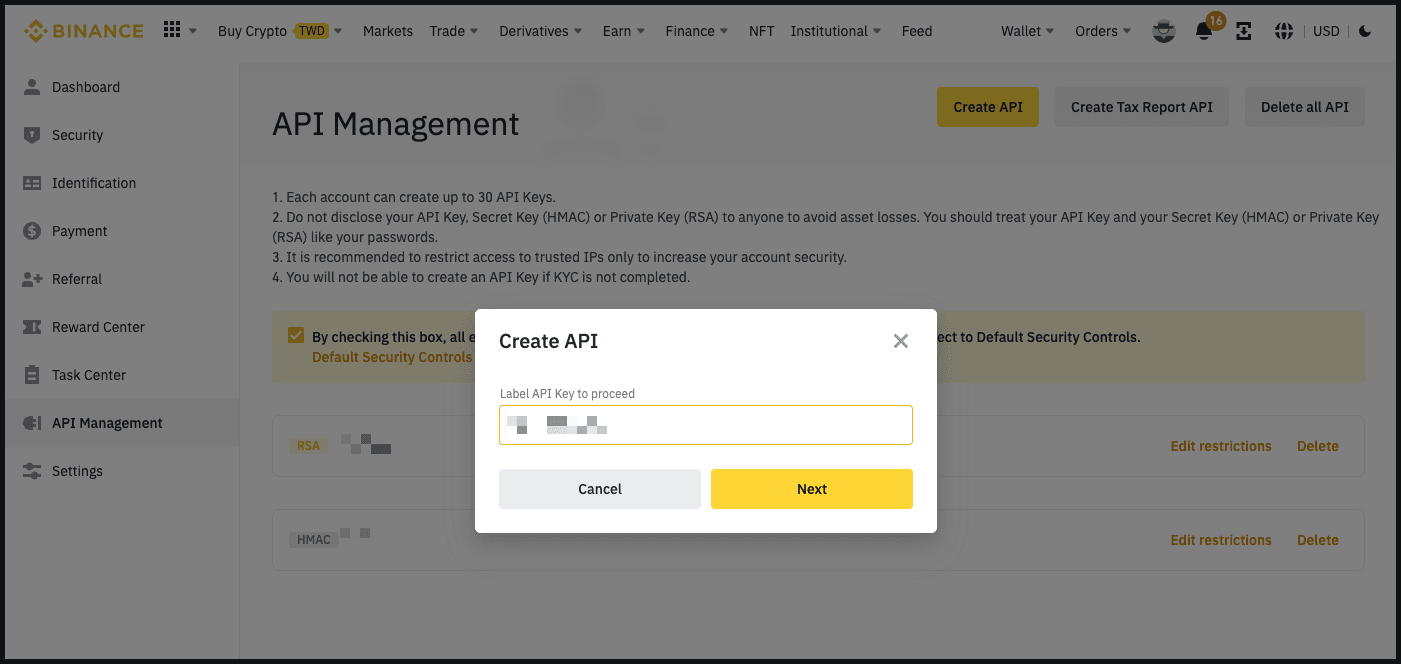
FAQ - Hummingbot
URL: https://hummingbot.org/faq/
Contents:
- FAQ
- Hummingbot client
- What type of software is Hummingbot?
- Is Hummingbot a protocol or an exchange?
- How do people use Hummingbot?
- Why is Hummingbot open source?
- Why did you make Hummingbot available to the general public?
- What is market making?
- How does Hummingbot store my private keys and API keys?
- What does it cost for me to run Hummingbot?
See below for answers to frequently asked questions about:
Hummingbot is software that helps you build and run crypto trading bots, freely available at https://github.com/hummingbot/hummingbot under the open source Apache 2.0 license.
No, Hummingbot is open source client software that you install on a local machine that interacts with exchanges and protocols.
With many connectors and strategies being added all the time, Hummingbot is a constantly evolving publicly available codebase with frequent external contributors seeking to merge their changes into the master branch, which is released once a month and widely used by tens of thousands of individual and professional bot-runners globally.
You can use Hummingbot to build any type of automated crypto trading bot, with the most common bot types being market making and arbitrage bots. Market making bots provide liquidity to a trading pair on an exchange, while arbitrage bots exploit price differences between trading pairs on different exchanges.
Typically, users install the Docker image version on AWS or another cloud provider. Afterwards, they can add their API key or private keys to it, which allows them to configure and run one of Hummingbot's pre-built strategies on many different exchanges.
Since Hummingbot is an open, modular codebase, many developers and professional firms fork the codebase and use it for their own purposes.
Trust and transparency: Market makers need to keep their API keys, private keys, and strategy configuration private and secure, so which is why Hummingbot is a local software client, not a web-based platform. In addition, Hummingbot's open source codebase enables anyone to inspect and audit the code.
Community maintenance: Hummingbot's value proposition is that it connects to many different centralized and decentralized exchanges, along with pre-built strategy templates that enable users to run many different types of trading strategies. In order to scale the number of connectors and strategies, Hummingbot relies upon its open source community.
Democratizing HFT: From the beginning, our mission has been to democratize high-frequency trading with open source software.
As we wrote in the original Hummingbot whitepaper, market making is an important function critical to organic, efficient markets that should be decentralized to prevent the concentration risk that exists in traditional finance.
Later, we pioneered the concept of decentralized market making by writing the Liquidity Mining whitepaper and built the first such platform: Hummingbot Miner. Miner has turned into a successful, standalone business that provides liquidity to hundreds of tokens across multiple exchanges, powered by thousands of individual market makers running Hummingbot.
This has allowed CoinAlpha to spin off Hummingbot into a not-for-profit foundation, which is dedicated to keeping Hummingbot open source.
Market making is the act of simultaneously creating buy and sell orders for an asset in a market. By doing so, a market maker acts as a liquidity provider, facilitating other market participants to trade by giving them the ability to fill the market maker's orders. Traditionally, market-making industry has been dominated by highly technical quantitative hedge funds and trading firms that have the infrastructure and intelligence to deploy sophisticated algorithms at scale.
Market makers play an important role in providing liquidity to financial markets, especially in the highly fragmented cryptocurrency industry. While large professional market makers fight over the most actively traded pairs on the highest volume exchanges, there exists a massive long tail of smaller markets who also need liquidity: tokens outside the top 10, smaller exchanges, decentralized exchanges, and new blockchains.
See What is market making? for more information.
Similar to wallet software, Hummingbot stores your private keys and API keys in encrypted form, using the password you enter when you first start Hummingbot. These keys are saved in your /conf folder.
Since Hummingbot is a local client, your private keys and API keys are as secure as the computer you are running them on. This is because the keys are used to create authorized instructions locally on the local machine, and only the instructions which have already been signed or authorized are sent out from the client.
Hummingbot is a free software, so you can download, install, and run it for free.
Transactions from Hummingbot are normal transactions conducted on exchanges; therefore when operating Hummingbot, you would be subject to each exchange’s fees (e.g. maker, taker, and withdrawal fees), as you would if you were trading on that exchange normally (i.e. without Hummingbot).
There is no minimum amount of assets to use Hummingbot, but users should pay heed to exchange-specific minimum order sizes. We include links to the exchange's minimum order size page. This can be found in each exchange's page in Exchange Connectors.
💡 DEX / Blockchain Experience Needed
Since Hummingbot Gateway is still nascent and DEX trading bots entails more specialized blockchain engineering than running CEX bots, we recommend Gateway for users with blockchain engineering or DEX trading experience.
Hummingbot Gateway is API middleware that helps Hummingbot clients interact with decentralized exchanges (DEXs) on various blockchain networks. It:
Similar to Hummingbot client, Gateway is open source under the Apache 2.0 license. Community developers can contribute DEX and blockchain connectors to the Gateway codebase via Pull Request Proposals.
If you want to understand how Gateway works, install the standalone Gateway repository: https://github.com/hummingbot/gateway
If you just want to get Gateway up and running alongside Hummingbot, following the Install with Docker process is the easiest method.
Afterwards, follow the instructions at Using Gateway with Hummingbot.
Currently, Hummingbot Gateway is ideal for bots that:
In the future, as Gateway should support additional use cases, but we are currently focused on enabling these only.
Bots that compete with others for transactions on the same blockchain (single-domain) need to compete to get transactions confirmed and thus need to play at the MEV level.
However, to improve latency, you may explore using Flashbots Protect as the RPC endpoint, i.e. use it as nodeUrl.
Here are some helpful articles and videos:
Speed and latency in DEX trading is heavily dependent on your connection to the blockchain network. Your options are to:
1 - Use a node provider
This is the most common route. Gateway ships with [Ankr] as the default node provider, since they don’t require API keys. See default settings for each chain.
2 - Use a mempool service
For advanced or professional users, mempool services allow you to “skip the line” and send your transaction bundle to a miner for inclusion in a block.
3 - Run your own node
While this is infeasible on Solana or BNB Chain, this is possible on Ethereum and EVM-based chains. See Run a Node for more details.
Check out the amm-arb or amm-v3-lp strategies.
The Hummingbot Foundation is a not-for-profit organization established in the Cayman Islands. The Foundation’s mission is to democratize high-frequency trading by enabling decentralized maintenance and community governance over the open-source Hummingbot code repository.
Below are its main roles and responsibilities:
Since Hummingbot is not a blockchain protocol, but rather open source client software run locally on individual client devices that interacts with protocols and exchanges, the Foundation governance system aims to fits into the existing Hummingbot open source software release process, which has been used to handle thousands of Github issues and pull requests created by the community over the past three years.
A large part of Hummingbot’s value comes from the number of connectors it supports and its overall usage, which can be measured by the aggregate trading activity that Hummingbot users supply to connected exchanges and protocols. The Foundation has fee share agreements and other partnerships with these exchanges and protocols that rebate fees based on usage, tracked at the API header level.
Meanwhile, community developers can maintain Hummingbot components of the codebase and extend the toolset to more markets and asset types, keeping maintenance costs low.
In addition, the Foundation plans to charge bounty administration fees to administer, review and merge the development work performed by bounty contributors.
Based on the source of income above, the Foundation is projected to be self-sustainable at inception. Over time, we expect this margin to increase as volume and fees generated grow as the Hummingbot user base expands.
A five-person Board of Directors provides oversight over the Foundation and oversees staff who manage day-to-day operations. This board is elected by HBOT token holders every 12 months.
In addition, the Foundation has a Chief Operating Officer and Chief Finance Officer, who collectively manage partnerships with exchanges, negotiate contracts with maintainers, and oversee the Foundation’s budget and finances.
The Foundation also employs staff who administer the governance system, respond to users on Discord, and handle other day-to-day operations of maintaining Hummingbot, including:
For the past 20 years, the Cayman Islands has been one of the preferred global jurisdictions for the incorporation of new securitizations, special purpose vehicles, and other new organizations. In 2017, the Cayman Islands introduced the Foundation Company structure, a flexible structure that allows a limited liability legal entity to operate similar to a civil law foundation, steered by a decentralized set of participants. The Hummingbot Foundation uses this structure.
See What is a Cayman Foundation Company? from Zedra, our corporate services provider in the Cayman Islands.
Post a message with your CV to one of the Foundation staff on Discord.
The Hummingbot Governance Token (HBOT) is the medium of governance for the Hummingbot open source ecosystem. It is a standard Ethereum ERC-20 token with a fixed total supply of 1,000,000,000 HBOT tokens.
HBOT is a governance token that give holders control over the Hummingbot codebase, the HBOT community treasury, and the Hummingbot Foundation. For instance, holders can:
HBOT token holders make these decisions by creating proposals and voting with their token balances. One HBOT equals one vote, and voting does not consume any tokens.
No. All Hummingbot Foundation proposals are on Snapshot, which lets HBOT holders vote by signing messages using their HBOT token balance to vote on issues without paying gas. Snapshots are recorded to IPFS to generate a permanent record.
To prevent HBOT token holders from being scammed by fraudulent versions of the token, unverified pools/DEXs, or incorrect coin listings, we maintain a compilation of verified HBOT-related pages from Reputable Sources. This does not constitute investment advice or a recommendation for any platform or market listed.
Please see Reputable Sources for information about venues where HBOT may be traded.
The Foundation plans to distribute the remaining 36 million tokens (36% of total supply) to Hummingbot users over the 4 years after inception across fixed Epochs. The goal is to distribute tokens to developers who contribute improvements to the codebase, and users of the Hummingbot software on connected exchanges and market making platforms.
See Hummingbot Governance Proposals for more information on the categories of HBOT grants.
The Hummingbot Foundation is grateful to everyone who has used Hummingbot, found bugs, and contributed to the codebase in the past. However, for the Retroactive Distribution, the Foundation decided to allocate tokens only to two types of historical activity: 1) Github code contributors and 2) users of the Hummingbot Miner platform. We chose these two types because past activity can be verified through public commit history and Miner API keys, respectively.
Other than those listed in the HBOT announcement, there are no other eligible HBOT recipients.
If you accidentally entered a Binance.com deposit address to claim your tokens, here is how you may be able to retrieve those tokens:
Vertex - Hummingbot
URL: https://hummingbot.org/exchanges/vertex
Contents:
- Vertex
- 🛠 Connector Info
- ℹ️ Exchange Info
- 🔑 How to Connect
- 🔀 Spot Connector
- Order Types
- Paper Trading
Create a wallet on one of the supported networks below:
From inside the Hummingbot client, run gateway connect vertex in order to connect your wallet:
If connection is successful: You are now connected to vertex.
Integration to spot markets API endpoints
This connector supports the following OrderType constants:
Access the Paper Trade version of this connector by running connect vertex_testnet instead of connect vertex.
Examples:
Example 1 (javascript):
Enter your Arbitrum private key >>>
Enter your Arbitrum wallet address >>>
Example 2 (unknown):
You are now connected to vertex.