
 tukuaiai
7db7617f48
fix: 添加被忽略的 jsonl 和图片文件
tukuaiai
7db7617f48
fix: 添加被忽略的 jsonl 和图片文件
|
1 сар өмнө | |
|---|---|---|
| .. | ||
| README.md | 1 сар өмнө | |
| claude-4-sonnet.yaml | 1 сар өмнө | |
| gpt-5.yaml | 1 сар өмнө | |
| view-thread-yaml.png | 1 сар өмнө | |

README.md
How to obtain the system prompt for Amp
- Login with Amp using VScode
- Issue a short query into Amp
- Hold down Alt (windows) or Option (macOS) and click on the workspace button
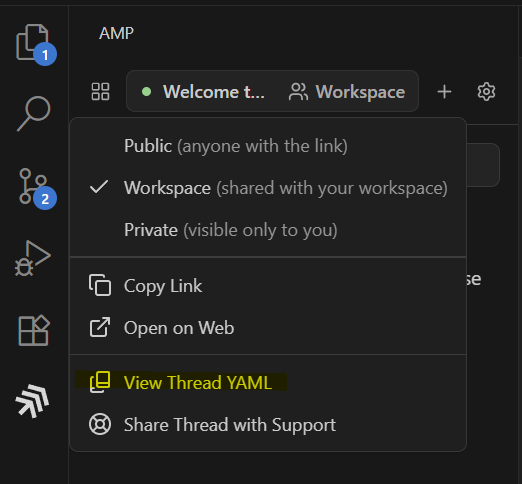
- Click view Thread YAML
Notes
The system prompt used by Amp is tuned to Sonnet 4.x and has other LLMs registered into it as tools ("the oracle"). To obtain the GPT-5 tuned system prompt then you need to configure VSCode user settings with the following and then follow the steps above again
{
    "amp.url": "https://ampcode.com/",
    "amp.gpt5": true
}